Is Usb C Better Than Usb Charging
USB-C is widely considered better than standard USB charging because it offers faster data transfer, higher power delivery, and a reversible design. Whether you are charging a phone, laptop, or external drive, USB-C provides a universal solution that works across many devices. In this guide, we break down the key differences, real-world benefits, and when traditional USB charging still makes sense.
This is a comprehensive guide about Is Usb C Better Than Usb Charging.
Key Takeaways
- Faster Charging: USB-C supports higher wattage and power delivery standards, meaning quicker charge times for phones, laptops, and tablets.
- Reversible Design: The USB-C connector flips both ways, so you never have to guess which side goes up.
- Universal Compatibility: USB-C works with phones, laptops, monitors, external drives, and many other devices in one standard connector.
- Faster Data Transfer: USB-C with USB 3.1 or Thunderbolt offers speeds far beyond what standard USB-A charging cables provide.
- Future-Proof Investment: Most new devices are moving to USB-C, making it a smarter long-term choice for accessories and cables.
- Traditional USB Still Has a Place: Older USB-A ports and cables remain useful for legacy devices and simple charging needs.
[FEATURED_IMAGE_PLACEHOLDER]
Is USB-C really better than USB charging? This is a question many people ask as they look at the cables and ports on their devices. The short answer is yes, USB-C offers major advantages over traditional USB charging in speed, power, and versatility. But there are still situations where standard USB-A charging makes perfect sense. Let us walk through everything you need to know.
USB-C has become the go-to connector for modern devices. From smartphones to laptops, this small oval-shaped port is replacing older USB-A ports at a fast pace. But if you still have older devices that use standard USB charging, you might wonder whether it is worth switching. This article will help you decide by comparing both connector types side by side.
What Is USB-C and How Does It Differ from Standard USB Charging?
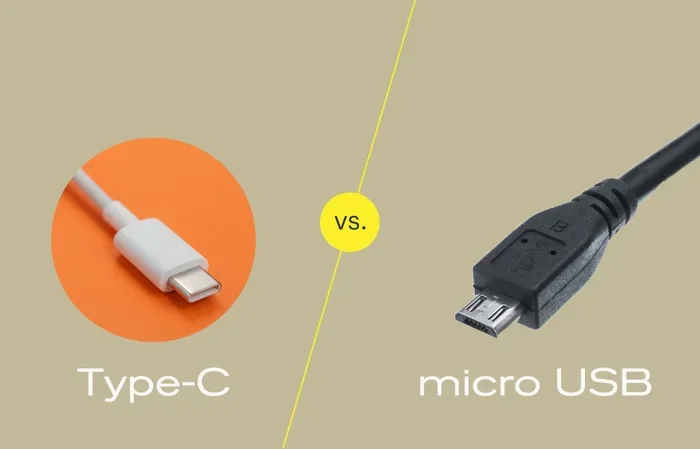
USB-C is a connector standard designed to be small, reversible, and powerful. Traditional USB charging typically uses a USB-A connector, the flat rectangular port you have likely seen on computers and wall chargers for years. The USB-C connector is about half the size of USB-A and can be plugged in either way, which is a huge convenience.
Standard USB charging, often referred to as USB-A charging, was designed primarily for data transfer and basic device power. USB-C, on the other hand, was built from the ground up to handle much higher power levels and faster data speeds. The USB Power Delivery standard, or PD, allows USB-C to deliver up to 240 watts of power, which is enough to charge a laptop or even a monitor.
Connector Shape and Design
The physical design difference is the most obvious one. USB-A has a flat, rectangular shape that only fits one way. USB-C is oval and symmetrical, so you can insert it either direction. This might seem like a small thing, but it saves a lot of frustration, especially in dark rooms or when you are rushing to plug something in.
Power Delivery Capabilities
Standard USB-A ports typically deliver 5 to 10 watts of power. USB-C with Power Delivery can deliver 60, 100, or even 240 watts. This means a USB-C charger can fully charge a laptop in about an hour, while a standard USB-A charger might take several hours or longer.
Speed and Data Transfer Comparison
One of the biggest advantages of USB-C over standard USB charging is data transfer speed. If you use your cable to move files between devices or connect external storage, this difference matters a lot.
USB-A Data Speeds
Standard USB-A ports come in different versions. USB 2.0, the most common, transfers data at 480 megabits per second. USB 3.0 and 3.1 improve this to 5 gigabits per second and 10 gigabits per second respectively. However, many USB-A cables and ports in everyday use are still USB 2.0, which is quite slow for large files.
USB-C Data Speeds
USB-C supports the latest USB standards, including USB 3.1 and USB 4. With USB 3.1, you get speeds of 10 gigabits per second. USB 4 pushes this even further to 40 gigabits per second. Thunderbolt 3 and Thunderbolt 4, which use the USB-C connector, offer the fastest speeds available today.
For example, if you connect a M.2 NVMe to USB-C SSD enclosure to your computer, you can experience transfer speeds that standard USB-A simply cannot match. The same applies to external drives, cameras, and other peripherals that benefit from fast data movement.
Power Delivery: Why USB-C Charges Faster
USB-C is not just about data. The power delivery capabilities make it far superior for charging. Here is a closer look at why USB-C charges faster than standard USB charging.
USB Power Delivery Standard
The USB Power Delivery, or PD, protocol is a key feature of USB-C. It allows devices to negotiate the exact amount of power they need. Your phone might draw 18 watts, while your laptop draws 65 watts, all through the same USB-C cable and charger. Standard USB-A charging does not support this dynamic negotiation, so it delivers a fixed amount of power.
Real-World Charging Speed Differences
Let us look at a practical comparison. A typical USB-A charger delivers about 10 to 15 watts. A USB-C charger with PD can deliver 65 to 100 watts or more. This means:
- Phone Charging: A phone that takes 2 hours on a USB-A charger might charge fully in 45 minutes with USB-C PD.
- Laptop Charging: USB-A chargers generally cannot charge laptops at all or do so very slowly. USB-C PD can fully charge most laptops in 1 to 2 hours.
- Tablet Charging: Tablets benefit greatly from USB-C PD, charging in roughly half the time compared to USB-A.
When you connect a device using a USB enclosure that also charges through the same port, the USB-C PD protocol ensures your device gets the right amount of power without any wasted energy or slow charging.
Compatibility and Versatility of USB-C
One reason USB-C has become so popular is its versatility. A single USB-C cable can charge your phone, connect your laptop to an external monitor, transfer large files to a drive, and even connect to networking equipment.
Devices That Use USB-C
Today, USB-C is found on a wide range of devices:
- Smartphones, including most Android models and newer iPhones
- Laptops from Apple, Dell, HP, Lenovo, and many others
- Tablets like the iPad Pro and Samsung Galaxy Tab
- External hard drives and SSDs
- Monitors and docking stations
- Gaming controllers and peripherals
When Standard USB-A Still Works
Standard USB-A charging is still perfectly fine for many situations. If you have an older keyboard, mouse, or flash drive, USB-A is the natural choice. Many wall chargers and car chargers still use USB-A ports. For simple tasks like charging a basic phone or powering a USB stick, USB-A does the job well enough.
However, if you are buying new accessories, it is worth considering USB-C. For instance, if you need an NVMe SSD to USB adapter, choosing one with a USB-C connection ensures you get the fastest possible speeds and the most future-proof setup.
Is USB-C Worth Switching To?
The answer depends on your devices and needs. If you own a laptop or phone with a USB-C port, switching to USB-C accessories will improve your charging speed and data transfer experience. The one-time cost of replacing cables and chargers is small compared to the daily convenience you gain.
Here are some situations where USB-C is absolutely worth it:
- You charge multiple devices daily and want one cable type to rule them all
- You transfer large files regularly, such as video or photo editing projects
- You use external drives or enclosures for storage, like a M.2 NVMe SSD to USB 3.1 adapter
- You want to future-proof your accessory collection
On the other hand, if your devices only have USB-A ports and you have no plans to upgrade soon, standard USB charging will continue to serve you fine. There is no urgent need to replace perfectly working USB-A cables.
Common Mistakes People Make With USB-C and USB Charging
Even though USB-C is great, people still make mistakes that reduce its benefits. Here are a few to avoid.
Using Cheap or Incompatible Cables
Not all USB-C cables are created equal. A cheap cable might only support USB 2.0 speeds or low power delivery. Always buy cables from reputable brands that clearly state their specs, such as supported USB version and wattage.
Assuming All USB-C Ports Are the Same
Some USB-C ports on a device only support charging, while others support data transfer and video output. Check your device manual to understand what each port can do. A port that only charges will not help you transfer files or connect to a monitor.
Ignoring Power Delivery Negotiation
USB-C PD relies on both the charger and the device supporting the protocol. If your charger does not support PD, you will not get the fastest charging speeds, even if your device does. Make sure both ends of your setup support PD for the best results.
Expert Tips for Getting the Most From USB-C
To really make the most of your USB-C setup, follow these practical tips from experienced users and tech professionals.
- Invest in a Good GaN Charger: Gallium Nitride, or GaN, chargers are compact and powerful. A single GaN charger with USB-C PD can charge your phone, laptop, and tablet simultaneously.
- Label Your Cables: Since USB-C cables look the same, label them if you use different ones for charging, data, and video to avoid confusion.
- Check Cable Length: Longer USB-C cables can sometimes deliver less power. For best results, use shorter cables for high-wattage devices like laptops.
- Keep Firmware Updated: Some devices need firmware updates to fully support USB-C PD and the latest USB standards. Check for updates regularly.
- Use Quality Adapters: If you need to connect older devices, use a quality M.2 NVMe SSD enclosure adapter with USB 3.1 to ensure reliable performance and speed.
Conclusion
USB-C is clearly better than standard USB charging in almost every meaningful way. It charges faster, transfers data at much higher speeds, and works with a wider range of devices. The reversible design adds everyday convenience that you will not want to give up once you try it. While standard USB-A charging still has its place for older devices and simple tasks, USB-C is the present and future of connectivity.
If you are ready to upgrade, start by replacing your most-used cables and chargers with USB-C versions. The small investment pays off quickly in speed, convenience, and compatibility. As more devices adopt USB-C as the standard, having a collection of quality USB-C cables and chargers will make your daily tech life much smoother.
Frequently Asked Questions
Can I use a USB-C cable to charge a device that only has a USB-A port?
No, you cannot directly plug a USB-C cable into a USB-A port. They have different shapes and pin configurations. You would need a USB-C to USB-A adapter or cable to bridge the two. However, this setup will still be limited by the USB-A port’s speed and power capabilities.
Is USB-C faster than USB-A for charging?
Yes, USB-C is significantly faster for charging. USB-C with Power Delivery can deliver up to 240 watts, while standard USB-A typically delivers only 5 to 10 watts. This means USB-C charges phones, laptops, and tablets much more quickly than USB-A.
Do all USB-C cables support fast charging?
No, not all USB-C cables support fast charging or high data speeds. Some cables are basic and only support USB 2.0 speeds and low power. Always check the cable specifications to ensure it supports the USB version and wattage you need.
Can I use USB-C for data transfer and charging at the same time?
Yes, USB-C supports simultaneous data transfer and charging. This is one of its biggest advantages. You can charge your device while moving files to an external drive, connecting to a monitor, or using peripherals through the same cable.
Will USB-C replace USB-A completely?
USB-C is replacing USB-A rapidly, especially in newer laptops, phones, and tablets. However, USB-A will likely remain in use for several more years, particularly in budget devices, peripherals, and legacy equipment. Many users will have both connector types for the foreseeable future.
What should I look for when buying a USB-C cable?
Look for cables that specify the USB standard they support, such as USB 3.1 or USB 4. Check the wattage rating to ensure it supports Power Delivery for your device. Choose cables from reputable brands and avoid very cheap options that may not meet their claimed specifications.