Is Usb C Phasing Out Usb A
USB C is gradually replacing USB A across modern devices, but the older port is far from dead yet. The shift is driven by faster speeds, reversible design, and universal compatibility. However, USB A still dominates in legacy systems, peripherals, and budget hardware. Understanding the transition helps you make smarter buying decisions today and tomorrow.
Key Takeaways
- USB C is the future: Most new laptops, phones, and tablets now use USB C as the default port.
- USB A is not disappearing overnight: Millions of USB A devices are still in use and actively manufactured.
- Backward compatibility matters: You can still use USB A devices with USB C adapters and hubs.
- Speed and power advantages: USB C supports faster data transfer and higher wattage charging than USB A.
- Adapters bridge the gap: A simple adapter lets you connect USB A devices to USB C ports easily.
- The transition timeline is long: Industry experts expect USB A to remain relevant for at least 5 more years.
📑 Table of Contents
- Is USB C Phasing Out USB A? The Truth Behind the Port Transition
- Understanding the Difference Between USB C and USB A
- Why Is USB C Replacing USB A?
- Is USB A Disappearing Completely?
- What This Means for Your Current Devices
- How to Prepare for the USB C Transition
- The Timeline: When Will USB A Fully Disappear?
- Common Mistakes People Make During the Transition
- Expert Insights on the USB C Transition
- Conclusion
Is USB C Phasing Out USB A? The Truth Behind the Port Transition
You have probably noticed something. The old rectangular USB port is slowly vanishing from new laptops, phones, and tablets. In its place sits a small, oval-shaped connector called USB C. This raises a big question. Is USB C really phasing out USB A? The short answer is yes, but slowly. The long answer is much more interesting.
The shift from USB A to USB C is one of the most significant changes in personal tech accessories over the last decade. USB C offers faster data speeds, reversible plug design, and the ability to carry more power. These advantages make it a clear upgrade. But that does not mean USB A is going away anytime soon. Millions of devices still rely on the older standard. Understanding this transition helps you make smarter buying decisions right now.
The transition is not a sudden switch. It is a gradual rollout driven by industry standards, consumer demand, and technological progress. Companies like Apple, Dell, HP, and Lenovo have all embraced USB C as their primary port. Meanwhile, USB A continues to thrive in budget devices, legacy systems, and specialized peripherals. Let us break down exactly what is happening and what it means for you.
Understanding the Difference Between USB C and USB A
Before diving into the transition, it helps to understand what makes these two ports different. They look different, work differently, and serve different purposes in the current tech landscape.
Physical Design
USB A has a flat, rectangular shape. It only fits one way. This has frustrated users for years. You flip the plug three times, and then it finally goes in. USB C is small, oval-shaped, and reversible. You can plug it in either direction. This alone is a huge improvement in everyday usability.
Speed and Performance
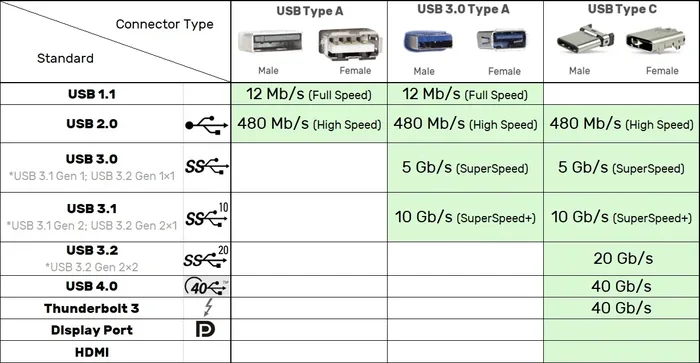
USB A maxes out at USB 3.0 speeds, which is about 5 Gbps. USB C can support USB 3.2 Gen 2 at 10 Gbps or even USB4 at 40 Gbps. That is a massive jump in data transfer capability. For people who move large files, this difference matters a lot.
Power Delivery
USB A typically delivers up to 15 watts of power. USB C supports USB Power Delivery, which can push up to 240 watts. This means your laptop can charge through a single USB C cable. No more carrying bulky power bricks everywhere you go.
Why Is USB C Replacing USB A?
The move toward USB C is not random. Several powerful forces are driving this change across the tech industry.
Industry Standardization
The European Union passed a law requiring USB C as the standard charging port for all electronic devices sold in the region. This includes phones, tablets, and laptops. Other countries are watching closely. Even without regulation, the industry trend is clear. USB C is becoming the universal standard for connectivity and charging.
Smaller Device Designs
Modern laptops and tablets are getting thinner. USB A requires more physical space than USB C. Manufacturers love the compact size of USB C because it frees up room inside devices. This allows for slimmer designs, better battery life, and more features packed into smaller chassis.
Consumer Demand
People want simplicity. One cable for charging, data transfer, and video output. USB C delivers on all three fronts. A single USB C cable can connect your phone to a USB C headset, charge your laptop, and link to a monitor. That kind of versatility is hard to beat.
Faster Technology Demands
As files get bigger and displays get higher resolution, older ports simply cannot keep up. USB A was designed in the 1990s. It was built for a different era. USB C was built for modern needs. Faster storage drives, 4K and 8K displays, and quick charging all demand the capabilities that only USB C provides.
Is USB A Disappearing Completely?
Here is the honest truth. USB A is not disappearing completely, at least not anytime soon. The transition is happening, but it is taking a long time. Here is why.
Legacy Devices Still Rule
Think about all the USB A devices you own. Your old external hard drive. Your wireless mouse. Your printer. Your keyboard. Many of these devices use USB A and work perfectly fine. There is no reason to replace them just because a new port standard exists. These devices will continue working for years to come.
Budget and Budget-Friendly Devices
Not every manufacturer has jumped on the USB C bandwagon. Budget laptops, entry-level desktops, and affordable peripherals still use USB A. This is especially true in the education market and developing regions where cost matters more than cutting-edge design.
Specialized Equipment
Some professional equipment still relies on USB A. Industrial machines, medical devices, and certain audio interfaces use USB A because the standard is stable and well-understood. Changing these systems is expensive and often unnecessary.
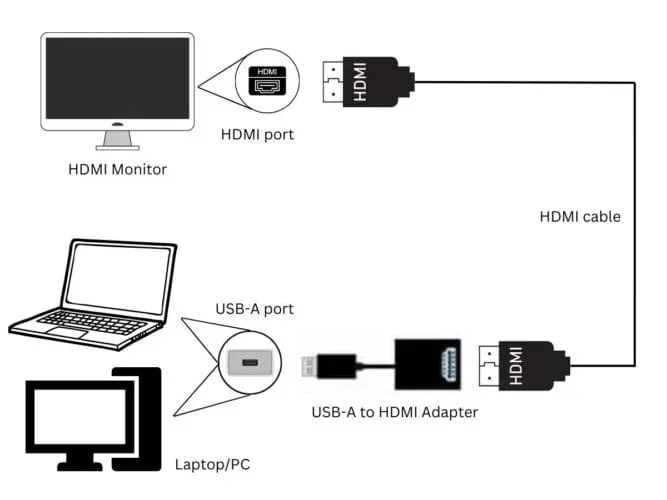
If you are worried about buying USB C gear while still owning USB A devices, do not stress. Adapters and hubs solve this problem completely. You can connect any USB A device to a USB C laptop with a simple dongle. The transition is smooth and painless.
What This Means for Your Current Devices
If you are reading this and wondering how the USB C shift affects your current setup, the answer is simpler than you think. Most changes are positive and backward compatible.
Laptops and Computers
Most modern laptops now come with at least one or two USB C ports. Some have replaced all USB A ports entirely. If your laptop has USB C only, you will need a USB C enclosure or adapter to connect older USB A storage devices. This is a small inconvenience for a big upgrade in versatility.
Storage and External Drives
External storage is where the USB C transition really shines. A portable SSD connected via USB C delivers incredible speeds. For example, the SanDisk Extreme Portable 2TB External USB C NVMe SSD offers blazing fast transfer rates that USB A simply cannot match. If you work with large video files or massive datasets, upgrading to USB C storage is a game changer.
Peripherals and Accessories
Keyboards, mice, webcams, and printers are slowly starting to offer USB C options. However, USB A versions of these devices are still widely available and will be for years. You do not need to rush out and replace every peripheral in your home or office.
Charging Ecosystem
The biggest practical change for most people is charging. USB C is becoming the universal charging standard. This means one cable can charge your phone, tablet, and laptop. It reduces cable clutter and simplifies travel. If you have not made the switch to USB C charging yet, now is a great time.
How to Prepare for the USB C Transition
Getting ready for the USB C era does not require throwing out all your old gear. A smart, gradual approach works best.
Step 1: Audit Your Current Devices
Make a list of all the USB devices you use regularly. Note which ones use USB A and which ones use USB C. This gives you a clear picture of where you stand and what you might need to upgrade.
Step 2: Buy a Good Hub or Adapter
A USB C hub with USB A ports is an essential accessory right now. It lets you connect all your old devices to a new USB C laptop. Look for hubs that also offer HDMI, SD card readers, and Ethernet ports for maximum versatility.
Step 3: Prioritize USB C for New Purchases
When buying new devices or accessories, choose USB C whenever possible. This future-proofs your setup and ensures you get the best speeds and features. Over time, USB C purchases will naturally replace your USB A gear.
Step 4: Keep Your USB A Devices
Do not throw away perfectly good USB A devices. They still work and will continue to work through adapters. The transition is about adding USB C, not eliminating USB A overnight.
The Timeline: When Will USB A Fully Disappear?
No one can predict the exact date when USB A will vanish. But industry trends give us a good picture of what to expect.
By 2025, most mid-range and premium laptops will use USB C exclusively. Budget laptops will likely still include USB A for another 2 to 3 years. Desktop computers will hold onto USB A the longest because they are not bound by the same portability constraints. Full phase-out of USB A from mainstream consumer electronics is probably 5 to 10 years away.
The key takeaway is this. USB C is the future, but USB A is still very much the present. You do not need to panic or rush. Just start making USB C choices when it makes sense, and keep your adapters handy for the devices you still love.
Common Mistakes People Make During the Transition
As the USB C shift continues, many people make avoidable mistakes. Here are a few to watch out for.
- Buying cheap USB C cables: Not all USB C cables are created equal. Cheap cables may not support the speeds or power delivery you need. Invest in quality cables from reputable brands.
- Assuming all USB C is the same: USB C is just a connector shape. It can carry different standards like USB 3.0, USB 3.1, USB 3.2, or USB4. Always check what protocol your cable and port support.
- Ignoring backward compatibility: You do not need to replace every USB A device right now. Adapters make the transition seamless.
- Throwing away old gear too early: Your USB A external drive or mouse still has plenty of life left. Use it with an adapter until it naturally reaches end of life.
Expert Insights on the USB C Transition
Industry experts agree that USB C is the clear winner for the future of connectivity. The universal connector design, combined with superior speed and power capabilities, makes it the natural successor to USB A. However, the transition timeline is longer than many people expect. Legacy support, manufacturing costs, and consumer habits all play a role in how quickly the older standard fades away.
One thing is certain. Whether you are a casual user or a professional, embracing USB C now puts you ahead of the curve. You will enjoy faster speeds, simpler setups, and a more versatile device ecosystem. The USB A era is fading, but it is fading on its own terms. There is no need to rush, and plenty of reasons to look forward to what USB C brings.
Conclusion
So, is USB C phasing out USB A? Yes, but it is a marathon, not a sprint. USB C is steadily becoming the dominant port on new devices thanks to its speed, power delivery, and reversible design. At the same time, USB A remains widely used in legacy devices, budget hardware, and specialized equipment. The best approach is to embrace USB C for new purchases while keeping your existing USB A devices working with simple adapters.
The transition is happening, and it is happening for good reasons. You will benefit from faster data transfer, universal compatibility, and a cleaner setup with fewer cables. Start making the shift today, and you will be fully ready when USB A finally steps aside.
Frequently Asked Questions
Will USB A ports disappear from laptops soon?
Many newer laptops have already dropped USB A in favor of USB C only. However, budget and business laptops still commonly include USB A ports. The complete disappearance from laptops is likely 3 to 5 years away, depending on the price range and manufacturer.
Can I use a USB A device with a USB C port?
Yes, you can. A simple USB C to USB A adapter or hub lets you connect any USB A device to a USB C port. This makes the transition seamless and lets you keep using your existing gear without any issues.
Is USB C faster than USB A?
Yes, USB C is significantly faster. While USB A tops out at 5 Gbps with USB 3.0, USB C can support speeds up to 40 Gbps with USB4. The actual speed depends on the cable and protocol you use, but USB C is always the faster option.
Do I need to buy all new cables for USB C?
Not necessarily. You only need new cables if your current ones do not support USB C. Many modern cables are already USB C compatible. When shopping for new cables, look for ones that support the speed and power delivery you need.
Is USB C the same as Thunderbolt?
No, but they are related. Thunderbolt uses the USB C connector shape but offers even faster speeds and more features. Not all USB C ports support Thunderbolt, so always check the specifications before buying Thunderbolt accessories.
How long will USB A devices continue to work?
USB A devices will continue to work for many years. Adapters and hubs ensure full compatibility with USB C devices. As long as the hardware is still functional, there is no reason to replace working USB A gear just because a new port standard exists.
=== END OF ARTICLE ===