Is Usb C Suitable for Iphone
USB C is absolutely suitable for iPhone and has been the standard connector since the iPhone 15 lineup. USB C offers faster charging, quicker data transfers, and a universal connector that works across devices. This guide covers everything you need to know about making the switch.
You have probably heard the buzz about USB C. Maybe you already have a laptop or tablet that uses it. But the real question is, is USB C suitable for iPhone? The short answer is yes. Apple made the switch to USB C starting with the iPhone 15, and it has changed how we charge and connect our phones. In this guide, we will walk through everything you need to know. We will cover compatibility, benefits, cables, accessories, and common mistakes to avoid.
The shift from Lightning to USB C was a big deal. For years, iPhone users were stuck with Apple’s proprietary connector. USB C changed that game completely. Now, one cable can charge your phone, your laptop, your tablet, and even your headphones. It is a game-changer for convenience and simplicity. Let us dive deep into why USB C is a great fit for iPhone users.
Key Takeaways
- Universal Compatibility: USB C works with Android, laptops, tablets, and more, making it a one-cable solution.
- Faster Charging: USB C supports faster wattage, meaning your iPhone charges quicker than with Lightning.
- iPhone 15 and Newer: All recent iPhone models now use USB C, so you are already using it.
- Better Data Transfer: USB C delivers significantly faster file transfer speeds compared to the old Lightning port.
- Accessory Ecosystem: A wide range of USB C accessories, from cables to hubs, is available and growing.
- Reversible Design: The USB C connector is reversible, so you never have to fumble plugging it in.
📑 Table of Contents
- What Is USB C and Why Does It Matter for iPhone?
- Which iPhone Models Use USB C?
- Benefits of USB C for iPhone Users
- USB C vs Lightning: What Changed?
- Choosing the Right USB C Cable and Accessories for iPhone
- Common Mistakes iPhone Users Make with USB C
- Final Thoughts: Is USB C the Right Choice for iPhone?
What Is USB C and Why Does It Matter for iPhone?
USB C is a universal connector standard used across many devices. It is small, oval-shaped, and reversible. That means you can plug it in either way, and it will work. No more flipping the cable three times trying to get it right.
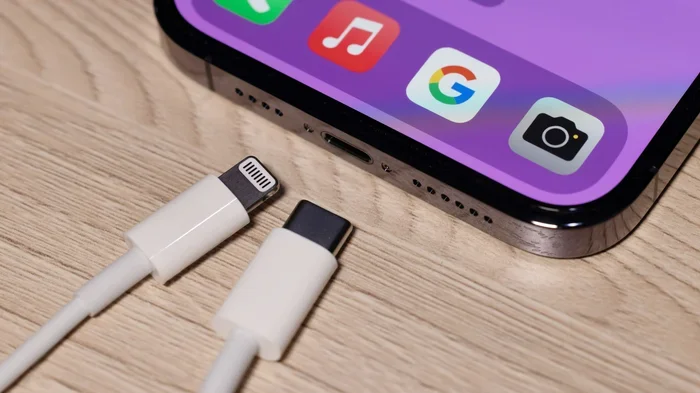
For iPhone users, USB C matters because it replaces the old Lightning port. Lightning served Apple well for many years, but it had limitations. USB C brings faster charging speeds, better data transfer rates, and a universal design. If you have an iPhone 15, iPhone 16, or any newer model, you are already using USB C.
Key Features of USB C
- Reversible connector: Plug it in either way with no guessing.
- High power delivery: Supports up to 240W with USB Power Delivery.
- Fast data transfer: USB 3.0 and USB 3.1 offer speeds up to 10 Gbps.
- Universal compatibility: Works with Android, Windows, Mac, and more.
- Compact design: Smaller than older USB connectors.
Which iPhone Models Use USB C?
Apple started the USB C transition with the iPhone 15 lineup. Here is a quick breakdown of which iPhones use USB C today.
iPhone 15 and iPhone 15 Plus: These were the first iPhones to ditch Lightning in favor of USB C. They support USB 2.0 speeds, which is a solid upgrade from Lightning.
iPhone 15 Pro and iPhone 15 Pro Max: These models take it further with USB 3.0 support, offering much faster data transfer speeds. If you regularly move large files like videos, this makes a big difference.
iPhone 16 and iPhone 16 Plus: Apple continued with USB C, and these models offer improved charging and data transfer capabilities.
iPhone 16 Pro and iPhone 16 Pro Max: The latest flagship models continue the USB C tradition with even better performance and faster charging speeds.
If you still own an older iPhone with Lightning, you can use a USB C to Lightning cable. This lets you enjoy USB C charging without buying a new phone. It is a great bridge option for those not ready to upgrade yet.
Benefits of USB C for iPhone Users
There are many reasons why USB C is a great choice for iPhone. Let us look at the biggest benefits that make a real difference in daily use.
Faster Charging Speeds
One of the most noticeable benefits of USB C is faster charging. USB C supports USB Power Delivery, which allows higher wattage charging. This means your iPhone can charge from zero to 50 percent in roughly 30 minutes with the right charger and cable. Compare that to Lightning, which is much slower by comparison.
If you are someone who frequently forgets to charge your phone overnight, fast charging is a lifesaver. A quick 20-minute plug-in during breakfast can give you hours of use.
Universal Cable Compatibility
With USB C, you do not need a different cable for every device. Your phone, tablet, laptop, and even some portable speakers can share the same cable type. This reduces clutter and makes traveling much simpler. You only need to pack one cable type instead of carrying multiple chargers.
Think about it. You probably already have USB C cables for your laptop or other gadgets. Now your iPhone uses the same connector. That is one less thing to buy and manage.
Improved Data Transfer Speeds
Transferring photos, videos, and files between your iPhone and a computer is much faster with USB C. iPhone 15 Pro and newer models support USB 3.0, which delivers transfer speeds up to 10 Gbps. This is a massive improvement over Lightning, which was limited to USB 2.0 speeds.
If you are a content creator or someone who regularly backs up large video files, this speed boost is significant. You can move a 10GB video file in minutes instead of waiting for hours.
Accessory Ecosystem Growth
The USB C ecosystem is booming. You can find USB C cables, chargers, hubs, and accessories from dozens of brands. This competition drives prices down and quality up. Whether you need a simple charging cable or a full USB C hub with multiple ports, there is an option for every budget.
For example, if you enjoy listening to music while working, you can find best USB Type C headphones that connect directly without needing a dongle. This is just one example of how the USB C ecosystem makes life easier for iPhone users.
USB C vs Lightning: What Changed?
The switch from Lightning to USB C was not just a cosmetic change. It brought real improvements to the iPhone experience. Here is a side-by-side comparison to help you understand what changed.
| Feature | Lightning | USB C |
|---|---|---|
| Connector Type | Proprietary (Apple only) | Universal standard |
| Charging Speed | Up to 20W | Up to 27W (USB PD) |
| Data Transfer Speed | USB 2.0 (480 Mbps) | USB 2.0 to USB 3.0 (up to 10 Gbps) |
| Reversible | Yes | Yes |
| Device Compatibility | Apple devices only | Works with almost all devices |
| Accessory Availability | Limited to Lightning products | Widespread and growing |
The table above makes it clear why the move to USB C was a smart decision. Universal compatibility alone is a huge win. You no longer need to carry a separate Lightning cable just for your iPhone.
Is the Transition Easy?
Most iPhone users find the switch to USB C seamless. If you already use USB C devices, you can share cables and chargers with your iPhone. The physical connector is slightly larger than Lightning, but it fits comfortably in most cases. Some users initially worry about case compatibility, but most manufacturers have updated their cases to accommodate the new port.
Choosing the Right USB C Cable and Accessories for iPhone
Not all USB C cables are created equal. Choosing the right one matters for charging speed, data transfer, and durability. Here is what to look for when picking USB C accessories for your iPhone.
Look for USB Power Delivery (USB PD)
USB PD is the fast-charging standard that USB C supports. To get the fastest charging speeds on your iPhone, make sure your charger and cable both support USB PD. Many cheap cables do not, and you will be left with slower charging speeds. Always check the specifications before buying.
Choose the Right Cable Length
USB C cables come in various lengths, from short 1-foot cables to long 6-foot options. For bedside charging, a shorter cable works well. For desk use or travel, a longer cable gives you more flexibility. Pick a length that fits your daily routine.
Consider a USB C Hub or Adapter
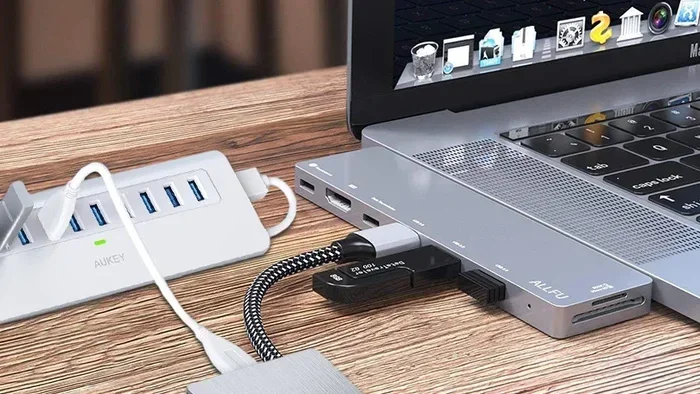
One of the best things about USB C is the ability to expand your connectivity. A USB C hub adds extra ports like HDMI, USB-A, and SD card slots. This turns your iPhone into a mini workstation. You can connect external displays, transfer files from cameras, and plug in USB drives, all from one small hub.
For those who need portable storage on the go, consider a Sandisk Extreme Portable 2TB External USB C NVMe SSD. This kind of drive connects directly to your iPhone via USB C and gives you massive storage for backups, videos, and files. It is a perfect companion for iPhone users who work on the move.
Avoid Cheap Knockoff Cables
This is a mistake many people make. Cheap, uncertified USB C cables can damage your device or charge slowly. Look for cables that are MFi certified (Made for iPhone) or USB-IF certified. These meet safety and performance standards. Spending a little extra on a quality cable saves you from headaches down the road.
Common Mistakes iPhone Users Make with USB C
Switching to USB C is straightforward, but there are a few common mistakes to watch out for.
Using Non-Certified Cables
As mentioned above, cheap cables are a risk. They may not deliver the correct voltage, which can harm your battery or even your phone. Stick with reputable brands and certified cables. The small extra cost is worth the peace of mind.
Ignoring Data Transfer Limitations
Not all USB C connections are equal. iPhone 15 and 16 base models use USB 2.0 speeds, while Pro models support USB 3.0. If you need fast file transfers, make sure you have the right model and the right cable. A USB 2.0 cable on a USB 3.0 port will still limit your speeds.
Forgetting About the Ecosystem
One of the biggest advantages of USB C is the shared ecosystem. Many people buy a USB C cable for their iPhone but do not realize they can use the same cable for their tablet, earbuds, or portable charger. Take advantage of this to simplify your life and reduce cable clutter.
In fact, the USB C ecosystem extends far beyond phones. If you work with external drives or need to connect your devices for professional use, you might explore options like an M 2 NVMe to USB C SSD enclosure. This lets you connect NVMe SSDs to your iPhone or any USB C device for high-speed storage solutions. It shows just how versatile the USB C standard really is.
Final Thoughts: Is USB C the Right Choice for iPhone?
The answer is a clear yes. USB C is suitable for iPhone in every way that matters. It charges faster, transfers data quicker, and works with a vast range of accessories and devices. Apple made the right call in adopting USB C, and iPhone users have already benefited from the change.
If you are still on the fence, consider this. You probably already own USB C cables or chargers. Switching to USB C means you can finally use one cable for multiple devices. That alone makes the transition worthwhile. Add in the faster speeds and better charging, and it is an easy choice.
Whether you are a casual user who just wants to charge faster or a power user who needs fast file transfers, USB C delivers. The ecosystem is growing, accessories are more affordable, and the technology is future-proof. USB C is here to stay, and your iPhone is better for it.
Embrace the change. Pick up a quality USB C cable, try a hub, or explore external storage options. You will wonder how you ever lived with Lightning. The USB C era on iPhone is bright, and it is only getting better from here.
Frequently Asked Questions
Is USB C compatible with older iPhone models?
No, USB C is only available on iPhone 15 and newer models. If you have an older iPhone with a Lightning port, you can use a USB C to Lightning cable to take advantage of USB C chargers and accessories.
Can I use any USB C cable to charge my iPhone?
Not all USB C cables are the same. To get the fastest charging speeds, look for cables that support USB Power Delivery and are MFi certified. Cheap, uncertified cables may charge slowly or could potentially damage your device.
Does USB C make iPhone charging faster?
Yes, USB C supports USB Power Delivery, which enables faster charging speeds compared to Lightning. With the right charger and cable, you can charge your iPhone significantly faster, especially on iPhone 15 Pro and newer models.
What is the difference between USB 2.0 and USB 3.0 on iPhone?
USB 2.0 has a maximum data transfer speed of 480 Mbps, while USB 3.0 can reach speeds up to 10 Gbps. iPhone 15 Pro and newer models support USB 3.0, making file transfers much quicker for large files like videos and photo libraries.
Do I need special accessories for USB C iPhone?
You do not need special accessories, but choosing certified USB C cables and chargers will give you the best experience. Many standard USB C accessories work perfectly with iPhone, including hubs, external drives, and headphones.
Will USB C replace Lightning on all Apple devices?
Apple has already transitioned most of its devices to USB C, including iPads, MacBooks, and AirPods Pro. The iPhone transition completed the shift, making USB C the universal connector across Apple’s product lineup.