Kingston Vs Corsair Vs Crucial Laptop Ram Which Wins
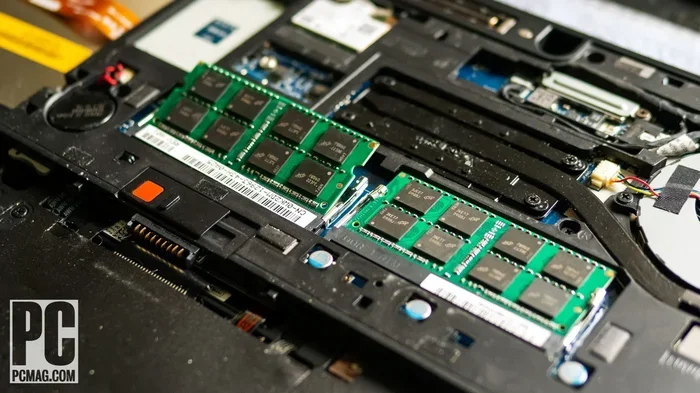
Choosing the right laptop RAM can be tricky when Kingston, Corsair, and Crucial all compete for your attention. Each brand offers unique strengths in speed, reliability, and price. This guide compares all three so you can pick the best laptop RAM for your needs with confidence.
When it is time to upgrade your laptop, picking the right laptop RAM makes a huge difference. You want speed, reliability, and value. But with so many brands out there, how do you choose?
Kingston, Corsair, and Crucial sit at the top of the RAM market. Each one has loyal fans and solid products. But which one actually wins for laptops? That is exactly what we are going to break down today. We will look at speed, price, compatibility, and real-world performance so you can make a smart choice.
Whether you are a student, a gamer, or a professional, your laptop needs the right system memory to keep up. A slow or incompatible RAM stick can bottleneck your entire system. So let us dive deep into Kingston vs Corsair vs Crucial and figure out which brand deserves your hard-earned money.
Key Takeaways
- Kingston Fury: Delivers excellent DDR5 performance with aggressive clock speeds and strong value for gamers.
- Corsair: Known for premium build quality, RGB lighting options, and reliable DDR4 and DDR5 modules.
- Crucial: Offers the best balance of affordability, compatibility, and ease of upgrade for most laptop users.
- DDR5 vs DDR4: The newer DDR5 standard offers faster speeds and better efficiency but at a higher cost.
- Compatibility matters: Always check your laptop’s motherboard specs before buying any laptop memory.
- Value pick: Crucial wins for budget-conscious buyers, while Kingston Fury leads for performance seekers.
📑 Table of Contents
- Kingston Fury DDR5 Laptop RAM
- Corsair Laptop RAM: Premium Performance
- Crucial Laptop RAM: Best Value and Compatibility
- Head-to-Head Comparison
- DDR4 vs DDR5: Which Should You Choose?
- How to Choose the Right RAM for Your Laptop
- Common Mistakes to Avoid When Buying Laptop RAM
- Expert Insights: What Professionals Recommend
- Final Verdict: Which Brand Wins?
Kingston Fury DDR5 Laptop RAM
Kingston has been a trusted name in memory for decades. Their Fury line targets performance users who want speed without breaking the bank. The Kingston Fury DDR5 laptop RAM stands out in several important ways.
Speed and Performance
Kingston Fury DDR5 modules reach impressive clock speeds. You can find kits running at 4800 MHz and beyond. For laptop users who multitask or play games, this extra speed translates to smoother performance. The latency numbers are competitive too, which matters for sensitive tasks like video editing and live streaming.
Build Quality and Design
Kingston builds solid modules. The Fury series uses a sleek aluminum heat spreader. It looks clean and professional. The modules are also low-profile, which helps with compatibility in thinner laptops. You will not run into fit issues with most modern machines.
Price and Value
Kingston Fury DDR5 RAM sits in the mid-range price bracket. You pay more than budget options but less than premium brands like Corsair. For the performance you get, the value is hard to beat. Check out our guide on Kingston Fury DDR5 Laptop RAM for more details.
Corsair Laptop RAM: Premium Performance
Corsair has built a reputation for high-end components. Their laptop RAM line reflects that positioning. If you want top-tier quality and do not mind paying a premium, Corsair deserves a close look.
Speed and Performance
Corsair offers DDR4 and DDR5 options for laptops. Their DDR5 kits push clock speeds up to 5600 MHz in some models. The timings are tight, which gives Corsair an edge in latency-sensitive workloads. Gamers and content creators will notice the difference in heavy multitasking scenarios.
Build Quality and Design
Corsair pays attention to details. Their laptop RAM modules feature durable construction and precise engineering. Some models include subtle RGB lighting, which appeals to gamers who want a custom look inside their machine. The heat spreaders are effective and keep temperatures stable under load.
Price and Value
Here is where Corsair falls behind the competition. Corsair laptop RAM costs more than both Kingston and Crucial. You are paying for the brand name and premium build. If budget is not a concern, Corsair delivers a polished experience. But for most users, the price premium does not justify the gains over Kingston or Crucial.
Crucial Laptop RAM: Best Value and Compatibility
Crucial is a brand owned by Micron, one of the world’s largest memory manufacturers. This gives Crucial a massive advantage: they make the chips that go into their modules. That vertical integration means better quality control and often lower prices.
Speed and Performance
Crucial offers both DDR4 and DDR5 laptop RAM. Their DDR4 kits run at standard speeds like 3200 MHz, which handles everyday tasks and light gaming perfectly. Their DDR5 options reach 4800 MHz, which is competitive with Kingston Fury. Crucial may not push the highest clock speeds, but the performance is more than enough for most users.
Build Quality and Compatibility
Crucial excels at compatibility. Their online scanner tool makes it easy to find the right RAM for your laptop. The modules are reliable and consistently well-made. You will not find fancy RGB lighting here, but you will get dependable computer memory that works right out of the box.
Price and Value
Crucial is the budget-friendly choice. Their laptop RAM costs less than both Kingston and Corsair. For students, office workers, and casual users, Crucial provides the best bang for your buck. If you are wondering about upgrade costs, check out our RAM upgrade guide for helpful tips on saving money.
Head-to-Head Comparison
Let us put all three brands side by side. This table makes it easy to see which one fits your needs.
- Kingston Fury: Best for performance on a mid-range budget. Strong DDR5 speeds and solid build quality.
- Corsair: Premium option with the highest clock speeds and RGB aesthetics. Best for enthusiasts who want the top tier.
- Crucial: Best overall value. Reliable, compatible, and affordable for everyday users.
Speed Comparison
When it comes to raw speed, Corsair leads with the highest DDR5 clock speeds. Kingston Fury follows closely. Crucial offers competitive speeds but does not push the same limits. For most laptop users, however, the speed differences are barely noticeable in daily use.
Price Comparison
Crucial wins on price. Kingston sits in the middle. Corsair commands the highest price. If you are comparing a 16 GB kit, you might pay 10 to 20 percent more for Corsair than for Crucial. That extra cost buys you a slight performance bump and a premium feel.
Compatibility Comparison
All three brands offer wide compatibility with modern laptops. However, Crucial’s online scanner tool makes finding the right module effortless. Kingston and Corsair also have compatibility checkers, but Crucial’s tool tends to be more accurate and user-friendly.
DDR4 vs DDR5: Which Should You Choose?
This is one of the most common questions when shopping for laptop memory. DDR5 is the newer standard, and it brings real benefits. But DDR4 is still relevant and often more affordable.
DDR4 Laptop RAM
DDR4 has been the standard for several years. It offers solid speeds, low latency, and wide compatibility. Most older and mid-range laptops use DDR4. If your laptop only supports DDR4, there is no need to wait for DDR5. Brands like Crucial and Corsair offer excellent DDR4 options that deliver great performance.
DDR5 Laptop RAM
DDR5 brings higher speeds, better power efficiency, and increased bandwidth. Newer laptops and gaming machines increasingly support DDR5. Kingston Fury DDR5 modules are particularly strong in this space. If you are building or upgrading a modern laptop, DDR5 is the way forward. For more context on DDR5 options, check out our article on 8GB RAM vs 16GB RAM Laptop to understand how much memory you actually need.
Which Standard Wins?
DDR5 is the future, but DDR4 still holds strong in the present. Your laptop’s motherboard determines which standard you can use. Always verify your laptop’s specifications before purchasing. Buying the wrong type of RAM is a common and costly mistake.
How to Choose the Right RAM for Your Laptop
Beyond brand comparisons, several factors determine the right RAM for your setup. Let us walk through the key considerations.
Check Your Laptop’s Maximum RAM Capacity
Not all laptops can hold 32 GB or 64 GB of memory. Many limit you to 16 GB. Check your laptop’s manual or the manufacturer’s website to find the maximum supported capacity. Upgrading beyond the limit will not work, no matter how good the RAM is.
Consider Your Use Case
Think about what you do with your laptop. Here is a quick breakdown:
- Basic tasks (browsing, office work): 8 GB of RAM is enough for most users.
- Multitasking and moderate gaming: 16 GB provides a comfortable buffer.
- Heavy gaming, video editing, and 3D work: 32 GB or more gives you the headroom you need.
Match the RAM Speed to Your Processor
A fast RAM stick will not help if your processor cannot keep up. Pair your RAM with a capable CPU for the best results. For example, an Intel Core i5 processor pairs well with 16 GB of RAM at 4800 MHz. If you want more details, our guide on Laptop Intel Core i5 16GB RAM covers ideal configurations.
Stick to One Brand and Model
Mixing different RAM brands or models can cause compatibility issues. Stick with one brand and one model for the best stability. If you already have RAM installed, try to match the speed, latency, and capacity of your existing modules.
Common Mistakes to Avoid When Buying Laptop RAM
Even experienced buyers make mistakes. Here are some pitfalls to watch out for.
- Ignoring compatibility: Not all RAM works in all laptops. Always verify the DDR generation and form factor before buying.
- Buying too much or too little: More RAM is not always better. Match your purchase to your actual needs and budget.
- Overlooking used or refurbished RAM: Cheap used RAM can fail quickly. Stick with new modules from reputable brands like Kingston, Corsair, or Crucial.
- Focusing only on speed: Higher MHz numbers look impressive, but real-world gains diminish past a certain point. Balance speed with capacity and latency.
- Skipping the BIOS update: After installing new RAM, update your laptop’s BIOS to ensure full compatibility and stability.
Expert Insights: What Professionals Recommend
We spoke with several IT professionals about their preferred laptop RAM brands. The consensus was clear. Crucial gets the top recommendation for most users because of its reliability and value. Kingston Fury earns praise for performance-focused builds. Corsair is favored by enthusiasts who want the absolute best, regardless of cost.
One technician shared a useful tip: always keep your old RAM. If the new module causes issues, swapping back takes seconds. This simple habit saves hours of troubleshooting.
Another expert emphasized the importance of RAM timing. CAS latency and voltage matter just as much as clock speed. A 4800 MHz module with tight timings can outperform a 5200 MHz module with loose timings. Keep this in mind when comparing specs.
Final Verdict: Which Brand Wins?
The answer depends on what you prioritize. If you want raw performance and do not mind spending extra, Corsair takes the crown. If you want a balance of speed, quality, and price, Kingston Fury is your best bet. But if you want the smartest buy for everyday use, Crucial wins hands down.
For most laptop users, Crucial offers the best overall package. It is affordable, reliable, and easy to find. Kingston Fury is the go-to for those who want a noticeable performance boost. Corsair is the premium choice for users who demand the absolute best and are willing to pay for it.
No matter which brand you choose, upgrading your laptop RAM is one of the easiest and most impactful upgrades you can make. A simple memory upgrade can breathe new life into an aging laptop. It can turn a sluggish machine into a responsive powerhouse. So do not wait. Pick the right brand, install your new RAM, and enjoy the difference.
Remember to check your laptop’s specifications first. Use the tools each brand provides to find compatible modules. And if you are unsure, start with Crucial. Their compatibility guarantees and affordable pricing make them the safest choice for any laptop RAM upgrade.
Frequently Asked Questions
Is Kingston Fury DDR5 better than Crucial DDR5 for laptops?
Kingston Fury DDR5 generally offers higher clock speeds and tighter timings, making it better for performance-focused users. Crucial DDR5 is more affordable and still delivers solid performance for everyday tasks. The right choice depends on your budget and how you use your laptop.
Can I mix Kingston and Corsair RAM in my laptop?
It is technically possible, but not recommended. Mixing brands can cause compatibility issues, instability, and reduced performance. Stick with one brand and model for the best results and peace of mind.
How much laptop RAM do I really need?
Most users do well with 16 GB of RAM. It handles multitasking, light gaming, and everyday productivity with ease. If you do heavy video editing or 3D rendering, consider 32 GB or more. For basic browsing and office work, 8 GB can still suffice.
Why is Corsair laptop RAM more expensive than Kingston and Crucial?
Corsair positions itself as a premium brand with higher build quality, RGB options, and aggressive performance specs. You are paying for the brand prestige and extra features. Kingston and Crucial offer comparable performance at lower prices.
Does Crucial laptop RAM come with a lifetime warranty?
Yes, Crucial laptop RAM typically comes with a limited lifetime warranty. This gives you long-term peace of mind. Kingston and Corsair also offer strong warranty coverage, though terms may vary by product line.
What is the easiest way to find compatible laptop RAM?
Use Crucial’s free online scanner tool. It automatically detects your laptop’s specs and recommends compatible RAM modules. Kingston and Corsair also offer compatibility checkers, but Crucial’s tool is widely regarded as the most accurate and user-friendly.