Can You Use Laptop Cpu in Desktop
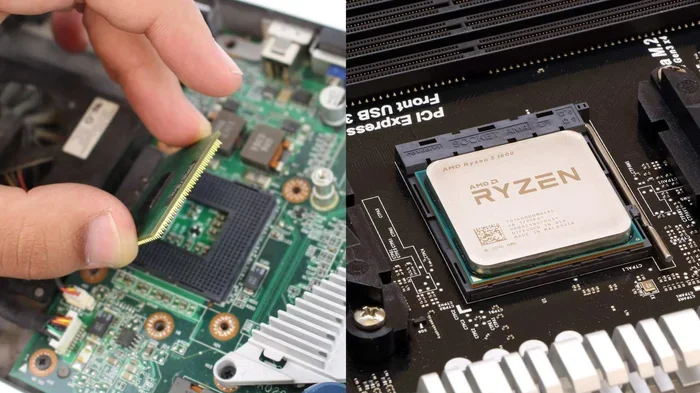
Using a laptop CPU in a desktop is not straightforward. Laptop processors differ from desktop chips in socket type, power draw, and physical design. Most laptop CPUs use a BGA socket that is soldered to the motherboard, making them impossible to swap. However, some older or specialized laptops use PGA sockets that could work with the right desktop motherboard.
Have you ever wondered if you can take a laptop CPU and drop it into a desktop computer? It sounds like a cool hack. Maybe you have an old laptop sitting around, and you want to reuse that processor. Or perhaps you are trying to save money on a new build.
The short answer is: it depends. In most cases, you cannot use a laptop CPU in a desktop. But there are a few exceptions. Let us break this down in simple terms so you know exactly what to expect.
The world of computer processors can be confusing. Laptop chips and desktop chips look similar on the outside, but they are built very differently on the inside. Understanding these differences is the first step to figuring out if a swap is even possible.
Key Takeaways
- Laptop CPUs are physically different: They use BGA packaging that is soldered, unlike desktop CPUs with removable PGA or LGA sockets.
- Compatibility is rare: Only a few older laptop processors can work in a desktop, and even then, the motherboard must match perfectly.
- Power and cooling differ: Laptop chips run on lower wattage and need different cooling solutions than desktop setups.
- RAM compatibility matters too: Check if laptop RAM works in a desktop before attempting any swap.
- Upgrading desktop CPU is easier: You have far more options when choosing a desktop processor for your build.
📑 Table of Contents
Why Laptop CPUs Are Different from Desktop CPUs
At first glance, a laptop processor and a desktop processor might look alike. They both have the same brand logo. They both run the same operating system. But underneath, they are built for completely different purposes.
Socket Types: BGA vs PGA vs LGA
This is the biggest reason you cannot swap a laptop CPU into a desktop. The CPU socket is the physical connector on the motherboard that holds the processor in place.
Most modern laptop processors use a BGA (Ball Grid Array) socket. This means the CPU is soldered directly onto the motherboard. You cannot remove it. You cannot replace it. It is permanent.
Desktop CPUs, on the other hand, use either PGA (Pin Grid Array) or LGA (Land Grid Array) sockets. These are removable. You can lift a lever, pull the CPU out, and swap in a new one. This is why desktop upgrades are so much easier.
Here is a quick comparison:
- BGA (Laptop): Soldered to the board. Not removable.
- PGA (Desktop, older Intel): Pins on the CPU. Removable.
- LGA (Desktop, newer Intel/AMD): Pins on the motherboard. Removable.
Power Consumption and TDP
Another major difference is power consumption. Laptop CPUs are designed to run on battery power. They use much less electricity than desktop processors. This is measured as TDP (Thermal Design Power).
A typical laptop CPU might have a TDP of 15 to 45 watts. A desktop CPU can range from 65 watts all the way up to 250 watts or more. Your desktop motherboard and power supply are built to handle this higher power draw.
If you somehow forced a low-power laptop chip into a desktop, it might work. But you would not be getting the full performance your desktop is capable of. The system would be held back by the weaker processor.
Thermal Design and Cooling
Laptop processors are designed to run cool in tight spaces. They use passive cooling or small fans. Desktop processors need much better cooling solutions. A desktop CPU cooler is bigger and more powerful.
Putting a laptop CPU in a desktop case would mean your cooling system is overkill. That sounds good, right? But the real issue is the other way around. If you put a desktop CPU in a laptop, the laptop cannot cool it properly. That causes overheating and thermal throttling.
Can You Physically Put a Laptop CPU in a Desktop?
The honest answer is almost always no. Here is why.
First, the socket must match. A laptop CPU with a BGA socket cannot fit into a desktop motherboard with an LGA or PGA socket. They are completely different shapes and designs.
Second, the pin layout is different. Even if two chips look the same size, the pins or contacts are arranged differently. Forcing a chip into the wrong socket can damage both the CPU and the motherboard.
Third, the BIOS may not support it. Even in the rare cases where the socket matches, the desktop motherboard’s firmware might not recognize the laptop processor. Without BIOS support, the computer will not boot.
Are There Any Exceptions?
There are a few rare cases where a laptop processor might work in a desktop. But these are exceptions, not the rule.
Older Laptop Processors with PGA Sockets
Some older laptops used removable PGA sockets. These were more common in the early 2000s. If you have a very old laptop, the CPU might be removable and could potentially fit a desktop motherboard with the same socket type.
However, even if the socket matches, the other components may not work together. The chipset, the BIOS, and the power delivery system all need to be compatible. This makes older setups very tricky.
MXM and Specialized Laptop GPUs
Some gaming laptops used a standard called MXM for their graphics cards. This allowed users to swap out the GPU. But this was for the GPU, not the CPU. The processor was still soldered in most cases.
MXM is a rare exception in the laptop world. It shows that some standardization exists, but it is not common enough to rely on for CPU swaps.
Embedded or Mini Desktop PCs
Some small form factor PCs use mobile processors. These are not traditional desktops. They use laptop chips because they need low power and small size. Brands like Intel NUC and some mini PCs use this approach.
In these cases, the laptop CPU is not being “used in a desktop.” The desktop was designed from the start to use a mobile processor. The motherboard supports it from the factory.
What Happens If You Try?
Some people wonder what would happen if they tried to force a laptop CPU into a desktop motherboard. Here are the likely outcomes.
- It will not fit: The physical socket is different. You simply cannot install it.
- It will not boot: Even if it fits loosely, the BIOS will not recognize the processor.
- You could damage components: Forcing a chip into the wrong socket can bend pins and ruin both the CPU and the motherboard.
- No performance gain: Even if it somehow worked, a laptop CPU would bottleneck your desktop build.
The bottom line is: do not try this. You will waste your time and risk damaging your hardware.
What Should You Do Instead?
If you want to build or upgrade a desktop computer, there are much better options than trying to use a laptop CPU.
Buy a Desktop CPU Instead
Desktop processors are widely available and come in many price ranges. You can find a powerful Intel Core or AMD Ryzen chip for any budget. The upgrade process is simple and well-documented.
Check Your Motherboard Compatibility
Before buying any CPU, check what socket your motherboard supports. A motherboard with an LGA 1700 socket will not work with an LGA 1200 CPU. Matching the socket is the first step.
Consider RAM Compatibility Too
When upgrading your desktop, make sure your RAM is compatible too. If you are wondering whether laptop RAM works in a desktop, the answer is usually no. Desktop uses DIMM modules while laptops use SO-DIMM modules. They are different sizes and have different pin counts.
If you are looking for more RAM options, check out our guide on how much RAM you need for a laptop. And if you are exploring upgrade paths, learn more about upgrading RAM in a laptop for mobile devices.
Look Into Pre-built Desktop Options
If you are not comfortable building a PC from scratch, consider a pre-built desktop. Many brands offer upgrade-friendly machines where you can swap out the CPU, RAM, and storage later. This gives you flexibility without the hassle of compatibility issues.
Common Myths About Using Laptop CPUs in Desktops
There are a lot of myths floating around online. Let us clear up a few of the most common ones.
- Myth 1: All laptop CPUs are the same as desktop CPUs. False. They share the same brand and architecture, but the packaging and socket are different.
- Myth 2: You can save money by using a laptop CPU. False. Laptop CPUs are often more expensive per performance level than desktop CPUs.
- Myth 3: A laptop CPU will fit if the size is the same. False. Size is only one factor. The socket, pins, and BIOS all matter.
- Myth 4: You can swap any CPU between laptop and desktop. False. Compatibility is very limited and almost never works in practice.
Final Thoughts
Using a laptop CPU in a desktop is not a practical option for most people. The differences in socket type, power design, and BIOS support make it nearly impossible. Even in the rare cases where it might work, the performance would be far below what a proper desktop processor can deliver.
If you are building or upgrading a desktop, stick with desktop CPUs. They are designed for the job. They offer better performance, easier upgrades, and wider compatibility. Your time and money are better spent on the right desktop hardware from the start.
If you are working with a laptop and want to improve its performance, focus on what you can upgrade. Adding more RAM or swapping in a faster SSD can breathe new life into an older machine. Check out our guide on adding RAM to a laptop to get started.
Frequently Asked Questions
Can I swap a laptop CPU into a desktop motherboard?
In almost all cases, no. Laptop CPUs use BGA sockets that are soldered onto the motherboard. Desktop motherboards use removable LGA or PGA sockets. The two are not compatible with each other.
What is the difference between BGA and LGA sockets?
BGA sockets have the processor soldered directly to the motherboard. LGA sockets have pins on the motherboard and the CPU sits on top. LGA sockets are removable and designed for upgrades.
Are there any laptop CPUs that work in desktops?
Very few older laptops used removable PGA sockets that might fit a desktop motherboard. But even then, the BIOS and chipset compatibility make it unreliable. It is not a practical upgrade path.
Will a laptop CPU fit physically into a desktop CPU socket?
No. The physical dimensions, pin layouts, and socket designs are completely different. Forcing a laptop CPU into a desktop socket can damage both components.
Can I use laptop RAM in a desktop instead?
Laptop RAM (SO-DIMM) and desktop RAM (DIMM) are different sizes and have different pin configurations. They are not interchangeable. You need to use the correct type for your system.
Is it worth trying to use a laptop CPU in a desktop to save money?
No. Laptop CPUs are not cheaper than desktop CPUs, and the compatibility issues make it a waste of time and money. A proper desktop CPU upgrade will give you far better results.