Used M 2 Nvme Ssd

A used M 2 NVMe SSD is one of the smartest upgrades you can make for your PC or laptop. These drives deliver blazing fast speeds, instant boot times, and generous storage at a fraction of the cost of brand-new models. Whether you need a second hand NVMe drive for a budget build or a storage boost, this guide covers everything you need to know.
If you are looking to boost your PC’s storage without breaking the bank, a used M 2 NVMe SSD is the way to go. These drives pack a punch. They offer read speeds that make your old hard drive feel like it is stuck in molasses. And the best part? You can get all that speed for a much lower price than buying new.
In this guide, I will walk you through everything you need to know about picking up a second hand NVMe drive. From understanding what makes these drives tick to spotting a good deal versus a risky buy, you will have all the information you need. Let us dive in.
Key Takeaways
- Used M 2 NVMe SSDs save you serious money while still offering fast read and write speeds that crush traditional hard drives.
- Check the drive’s health and wear level before buying to avoid ending up with a failing solid state drive.
- Popular used models include the Samsung 970 EVO Plus and Corsair MP600 Core XT, both known for reliability.
- A used NVMe drive works great as a boot drive or gaming storage and easily outperforms SATA SSDs.
- Always verify the M.2 form factor and PCIe generation of your motherboard before purchasing a second hand NVMe SSD.
- Refurbished options often come with warranties, giving you peace of mind at a lower price point.
📑 Table of Contents
- What Is a Used M 2 NVMe SSD?
- Benefits of a Used M 2 NVMe SSD
- Top Used M 2 NVMe SSD Models Worth Buying
- What to Check Before Buying a Used NVMe SSD
- Where to Buy a Used M 2 NVMe SSD
- Used vs New NVMe SSDs: Is It Worth It?
- Common Mistakes to Avoid When Buying a Used NVMe SSD
- How to Install a Used M 2 NVMe SSD
- Final Thoughts on Used M 2 NVMe SSDs
What Is a Used M 2 NVMe SSD?
A used M 2 NVMe SSD is simply a solid state drive that has been previously owned or refurbished. The M.2 form factor is a small, compact shape that plugs directly into your motherboard. NVMe stands for Non-Volatile Memory Express, which is the protocol that lets these drives communicate with your system at incredibly fast speeds.
Unlike traditional hard drives that use spinning disks, NVMe SSDs use flash memory. This means no moving parts, no noise, and much faster performance. When you buy one second hand, you are getting all of that same technology at a reduced cost. Many used NVMe drives have plenty of life left in them, especially if they were lightly used.
Why Buy a Used NVMe Drive?
There are several reasons why people choose a used M 2 NVMe SSD over a brand-new one. First, cost savings. New high-capacity NVMe drives can be expensive. A used drive can save you 30 to 50 percent or more. Second, availability. Some older models that are no longer in production can still be found in the used market, giving you access to drives with great features that you might not otherwise be able to get.
Third, sustainability. Buying used electronics reduces waste. It keeps perfectly good storage devices out of landfills. If you care about the environment, purchasing a refurbished NVMe SSD is a greener choice.
Benefits of a Used M 2 NVMe SSD
Switching to a used M 2 NVMe SSD brings real, noticeable improvements to your computing experience. Here is why so many people make the switch.
- Blazing fast speeds: NVMe drives can read data at speeds over 3,000 MB/s. That is way faster than any SATA SSD or traditional hard drive. Your system will feel snappier than ever.
- Quick boot times: With a used NVMe drive as your boot drive, your PC can start in seconds. No more waiting around for Windows to load.
- Better gaming performance: Games load faster and run smoother when installed on an NVMe drive. Open-world games benefit the most from the fast data transfer rates.
- Compact size: The M.2 form factor is tiny. It fits directly onto your motherboard without cables. This saves space inside your case and makes builds cleaner.
- Lower power consumption: NVMe SSDs use less power than mechanical drives. This can slightly improve laptop battery life and reduce heat inside your PC.
When you compare a used M 2 NVMe SSD to a brand-new one, the performance is identical. The flash memory does not degrade significantly over normal use. You get the same read and write speeds, the same reliability, and the same compact design. The only real difference is the price tag.
Top Used M 2 NVMe SSD Models Worth Buying
Not all used NVMe drives are created equal. Some models have a strong reputation for durability and performance. Here are some of the best options to look for when shopping for a second hand NVMe drive.
Samsung 970 EVO Plus
The Samsung 970 EVO Plus is one of the most popular NVMe drives on the market. It offers excellent read speeds up to 3,500 MB/s and solid write performance. Even in the used market, this drive holds up incredibly well. It is a great choice for both gaming and everyday use.
Corsair MP600 Core XT
The Corsair MP600 Core XT is another strong contender. It delivers PCIe Gen4 speeds and has a compact M.2 2280 form factor. Many users report consistent performance even after extended use. If you find one in good condition, it is a fantastic buy.
Crucial T705
The Crucial T705 is a newer model that supports PCIe Gen5. Even used models offer cutting-edge performance. This drive is ideal if you want top-tier speeds and plan to keep your system for years to come.
What to Check Before Buying a Used NVMe SSD
Buying a used M 2 NVMe SSD can be a great deal, but you need to be smart about it. Not every used drive is in good shape. Here is what you should check before making a purchase.
Check the Drive’s Health and Wear Level
Every SSD has a limited number of write cycles. This is called TBW, or Terabytes Written. You can check the health of a used drive using software like CrystalDiskInfo or the manufacturer’s own tool. Look for the drive’s SMART data, which includes information about total bytes written, remaining life percentage, and any errors.
If a drive shows high wear or a low remaining life percentage, steer clear. You do not want to buy a used NVMe drive that is about to fail. A healthy used drive should have at least 50 to 70 percent of its rated life remaining.
Verify the M.2 Key and Form Factor
M.2 SSDs come in different key types, usually B-key or M-key. Most NVMe drives use the M-key. Your motherboard slot must match the drive’s key. Also, check the form factor. The most common is M.2 2280, which is 22mm wide and 80mm long. Some drives are shorter, like the M.2 2242. Make sure your motherboard supports the size you are buying.
Confirm PCIe Generation Compatibility
NVMe SSDs come in different PCIe generations, including Gen3, Gen4, and Gen5. A Gen4 drive will work in a Gen3 slot, but it will run at Gen3 speeds. If you want the full speed of a newer drive, make sure your motherboard supports the right PCIe generation. This is an important step that many people overlook when buying a used M 2 NVMe SSD.
Ask About the Drive’s History
When buying from a seller, ask questions. How long was the drive used? Was it used in a mining rig or a server? Drives that ran 24/7 in heavy workloads may have more wear than a drive used in a casual gaming PC. The more you know about the drive’s history, the better your decision will be.
Where to Buy a Used M 2 NVMe SSD
Finding a reliable used NVMe drive is easier than you might think. Here are some of the best places to look.
- Online marketplaces: Sites like eBay and Amazon Marketplace often have used SSDs from verified sellers. Look for sellers with high ratings and good return policies.
- Manufacturer refurbished programs: Companies like Samsung and Crucial sometimes sell refurbished drives with warranties. These are the safest option for buying a second hand NVMe drive.
- Local computer shops: Many local repair shops carry used or refurbished SSDs. You can inspect the drive in person and get advice from knowledgeable staff.
- Community forums and classifieds: Reddit, Facebook groups, and local classifieds can have great deals. Just be cautious and verify the seller’s reputation.
Used vs New NVMe SSDs: Is It Worth It?
The big question is whether buying a used M 2 NVMe SSD is really worth it compared to a new one. The short answer is yes, in most cases.
Performance between a used and new NVMe drive is virtually the same. The flash memory does not slow down over normal use. What you save in cost can be significant. A used 1TB NVMe drive might cost half of what a new one does. That savings can go toward other upgrades like more RAM or a better graphics card.
The main risk is the unknown history of the drive. A new drive comes with a full warranty and guaranteed health. A used drive might have hidden issues. But if you do your homework, check the SMART data, and buy from a reputable source, the risk is minimal.
For budget builders, students, or anyone who needs extra storage fast, a used NVMe SSD is an excellent choice. It gives you the speed of NVMe technology without the premium price.
Common Mistakes to Avoid When Buying a Used NVMe SSD
To make sure you get a good deal and not a headache, here are some common mistakes to avoid.
- Skipping SMART data checks: Never buy a used drive without verifying its health. This is the single most important step.
- Ignoring compatibility: Make sure your motherboard supports the M.2 form factor, key type, and PCIe generation of the drive.
- Buying from unknown sellers: Stick to reputable platforms and sellers with good reviews. A too-good-to-be-true price is often a red flag.
- Not checking for the original packaging and accessories: While not critical, having the original packaging can be helpful for returns or warranty claims.
- Forgetting about the enclosure option: If you need to use the drive externally, consider getting an NVMe SSD M.2 enclosure to protect and connect it properly.
How to Install a Used M 2 NVMe SSD
Installing a used M 2 NVMe SSD is straightforward. Most modern motherboards have an M.2 slot built right in. Here is a quick overview of the process.
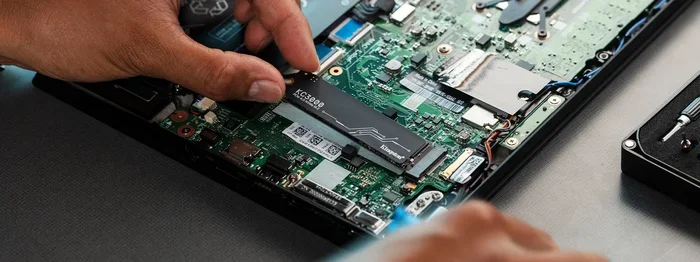
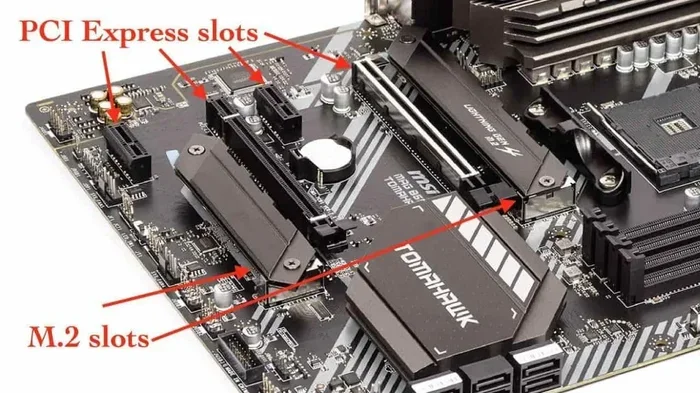
First, locate the M.2 slot on your motherboard. It is usually near the CPU or chipset area. Insert the drive at a 30-degree angle and press it down firmly. Secure it with the small screw that came with your motherboard. That is it. No cables needed.
Once installed, you can format the drive and set it up in your operating system. If you are using it as a boot drive, you will need to clone your existing drive or reinstall your operating system. For a simple storage upgrade, you can just format and start using it right away.
A used NVMe drive will instantly improve your system’s responsiveness. Files copy faster, applications open quicker, and games load in a snap. It is one of the easiest and most impactful upgrades you can do.
Final Thoughts on Used M 2 NVMe SSDs
A used M 2 NVMe SSD is a fantastic way to get fast, reliable storage without spending a fortune. The key is to do your research, check the drive’s health, and buy from a trustworthy source. With the right approach, you can get a drive that performs just as well as a new one at a much lower cost.
Whether you are building a budget PC, upgrading a laptop, or adding storage for gaming, a second hand NVMe drive delivers real value. The speed gains over traditional storage are dramatic. Once you make the switch, you will wonder how you ever lived without it.
Take your time, compare options, and find the best used NVMe drive for your needs. Your wallet and your PC will both thank you.
Frequently Asked Questions
Is it safe to buy a used M 2 NVMe SSD?
Yes, it is generally safe as long as you check the drive’s health using SMART data before purchasing. Buying from reputable sellers or manufacturer refurbishment programs adds an extra layer of protection. A used NVMe drive with moderate wear and good health will perform just as well as a new one.
How much can I save by buying a used M 2 NVMe SSD?
You can typically save 30 to 50 percent compared to buying new. Prices vary based on capacity and the specific model. For example, a used 512GB NVMe M.2 SSD might cost significantly less than a brand-new one, making it a great budget-friendly option.
What capacity should I look for in a used NVMe SSD?
It depends on your needs. A 512GB drive works well for an operating system and essential applications. A 1TB or 2TB drive is better for gaming or storing large files. Consider how much space you currently use and plan for future growth when choosing a used M 2 NVMe SSD.
Can I use a used NVMe SSD as a boot drive?
Absolutely. A used NVMe drive makes an excellent boot drive. The fast read speeds mean your operating system will load in seconds. Just make sure to clone your current drive or do a clean install of your operating system on the new SSD.
How do I check if a used NVMe SSD is healthy?
Use free software like CrystalDiskInfo to read the drive’s SMART data. Look for the percentage of remaining life, total bytes written, and any reallocated sectors. A healthy used M 2 NVMe SSD should show no critical errors and at least 50 percent of its rated life remaining.
Does a used NVMe SSD come with a warranty?
This depends on where you buy it. Manufacturer refurbished drives often include a limited warranty. Drives purchased from individual sellers on marketplaces usually do not. Always check the return policy and warranty terms before buying a second hand NVMe drive to protect your investment.