Usb4 M 2 Nvme Ssd Enclosure

A USB4 M 2 NVMe SSD enclosure turns your internal NVMe drive into a super-fast external SSD with speeds up to 40 Gbps. This guide covers everything you need to know about choosing, setting up, and getting the most from a USB4 enclosure. Whether you are a creative pro or a tech enthusiast, a USB4 M 2 NVMe SSD enclosure gives you portable high-speed storage that rivals internal drives.
If you have been looking for a way to get insane external storage speeds, a USB4 M 2 NVMe SSD enclosure is the answer. This little device takes an internal NVMe M.2 SSD and wraps it in a portable shell that connects to your computer through a USB4 cable. The result is external storage that is almost as fast as an internal drive.
USB4 is the latest standard in USB connectivity, and it brings serious bandwidth to the table. With up to 40 Gbps of throughput, a USB4 M 2 NVMe SSD enclosure can transfer a 1TB file in minutes, not hours. This is a game-changer for video editors, photographers, and anyone who works with large datasets.
In this guide, we will walk you through everything you need to know about USB4 NVMe enclosures. From understanding how they work to picking the right one for your setup, we have you covered. Let us dive in.
Key Takeaways
- USB4 M 2 NVMe SSD enclosures offer speeds up to 40 Gbps: This is four times faster than USB 3.2 Gen 2, making them ideal for large file transfers.
- Compatibility matters: Not all USB4 enclosures work with every M.2 NVMe SSD. Check your drive’s form factor and protocol before buying.
- Thermal design is critical: NVMe SSDs generate heat, and a good enclosure includes cooling to maintain top speeds.
- USB4 is backward compatible: You can use a USB4 enclosure with older USB cables and devices, though speeds will be lower.
- Price ranges vary widely: Budget options start around $30, while premium enclosures with full 40 Gbps support cost $80 to $150.
- Portability is a major benefit: A USB4 enclosure lets you carry terabytes of data in your pocket with plug-and-play simplicity.
📑 Table of Contents
What Is a USB4 M 2 NVMe SSD Enclosure?
A USB4 M 2 NVMe SSD enclosure is a small external device that houses an M.2 NVMe solid-state drive and connects to your computer via USB4. Think of it as a bridge between your internal NVMe drive and the outside world. The enclosure provides the physical housing, the connection interface, and often a cooling system to keep your SSD running cool.
The M.2 form factor is the small, rectangular shape you see inside most modern laptops and desktops. NVMe is the protocol that makes these drives so fast, using the PCIe bus instead of the older SATA interface. When you put an NVMe M.2 SSD inside a USB4 enclosure, you get the speed of an internal NVMe drive with the convenience of an external one.
How USB4 Differs from Previous USB Standards
USB4 is a big leap forward from older USB standards. Here is how it compares:
- USB 3.2 Gen 1: 5 Gbps max speed
- USB 3.2 Gen 2: 10 Gbps max speed
- USB3.2 Gen 2×2: 20 Gbps max speed
- USB4: 40 Gbps max speed
That 40 Gbps speed is what makes a USB4 M 2 NVMe SSD enclosure so exciting. It matches the bandwidth of Thunderbolt 3, which means you get near-internal-drive speeds in a portable package. Previous USB standards simply could not keep up with the raw speed of NVMe SSDs.
Why You Need a USB4 NVMe Enclosure
There are many reasons why people are switching to a USB4 M 2 NVMe SSD enclosure. Let us look at the biggest benefits that make these devices worth the investment.
Blazing-Fast Transfer Speeds
The most obvious reason is speed. With a USB4 connection, you can push an NVMe SSD to its full potential. Real-world speeds often reach 2000 MB/s to 3500 MB/s, depending on the drive inside and the enclosure’s design. To put that in perspective, a USB 3.0 external drive tops out around 450 MB/s. You are looking at up to an 8x speed improvement with USB4.
This speed matters when you are editing 4K video on the go or backing up hundreds of gigabytes of photos. What used to take hours now takes minutes. A USB4 M 2 NVMe SSD enclosure turns your workflow into something much more efficient.
Portability Without Compromise
Most USB4 enclosures are small and lightweight. You can slip one into your laptop bag along with your M.2 SSD and have a full external storage solution that weighs less than a few ounces. This is perfect for professionals who travel frequently or need to move large files between locations.
Unlike bulkier external hard drives, a USB4 NVMe enclosure feels more like carrying a small brick of high-speed storage. It is compact, quiet, and rugged in most cases. You get enterprise-grade performance in a package that fits in your hand.
One Cable, Multiple Uses
USB4 is versatile. It supports data transfer, video output, and charging through a single cable. This means your USB4 enclosure can double as a display link if your monitor supports USB-C with DisplayPort Alt Mode. You also get power delivery to charge your laptop while transferring files at full speed.
This all-in-one connectivity is a huge advantage over older enclosures that needed separate cables for power and data. With a USB4 M 2 NVMe SSD enclosure, one cable does it all.
How to Choose the Right USB4 M 2 NVMe SSD Enclosure
Not all enclosures are created equal. When shopping for a USB4 M 2 NVMe SSD enclosure, there are several factors you need to consider. Here is what matters most.
Form Factor Compatibility
M.2 SSDs come in different lengths and key types. The most common for NVMe drives is the M-key 2280 format, which is 22mm wide and 80mm long. Some enclosures also support the shorter 2242 or 2260 sizes. Before you buy, check what SSD sizes the enclosure accepts. Most enclosures support the standard 2280 size, but it is always worth confirming.
Thermal Management
NVMe SSDs get hot under heavy load. A good USB4 enclosure will have a heatsink or active cooling to prevent thermal throttling. When an SSD gets too hot, it slows down to protect itself. This defeats the whole purpose of buying a high-speed enclosure.
Look for enclosures with aluminum shells or built-in fans. Some models even have passive cooling fins that dissipate heat without any noise. The best USB4 M 2 NVMe SSD enclosure will keep your drive cool even during sustained read and write operations.
Build Quality and Durability
Since you are carrying this enclosure around, build quality matters. Look for metal constructions over plastic ones. Anodized aluminum enclosures not only look premium but also help with heat dissipation. Some enclosures come with shock-resistant designs that protect your valuable SSD from drops and bumps.
Cable and Connector Quality
USB4 enclosures typically use USB-C connectors. Make sure the enclosure comes with a high-quality USB4 cable that supports 40 Gbps. Some cheaper enclosures include cables that only support 20 Gbps or less, which will bottleneck your SSD’s performance. Always check the cable specifications before purchasing.
Setting Up Your USB4 M 2 NVMe SSD Enclosure
Getting started with a USB4 NVMe enclosure is straightforward. Here is a step-by-step guide to help you set everything up quickly.
Step 1: Choose Your NVMe SSD
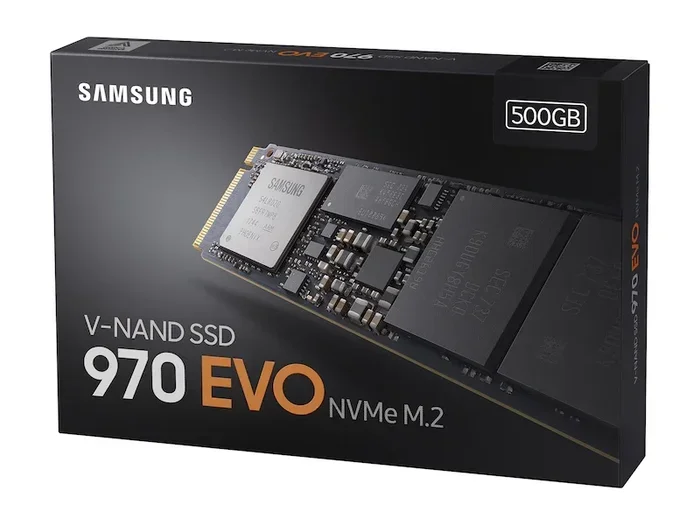
First, you need an M.2 NVMe SSD to put inside the enclosure. You can buy one separately or use an existing drive from your computer. Popular choices include the Corsair MP600 Core XT M.2 NVMe SSD and the Samsung 970 EVO Plus NVMe M.2 SSD. Both offer excellent performance and reliability.
Step 2: Install the SSD
Open the enclosure and carefully insert your M.2 SSD into the slot. Make sure the notch on the SSD aligns with the connector. Push it in gently and secure it with the screw that comes with the enclosure. Most enclosures make this process easy, even if you are not tech-savvy.
Step 3: Connect and Test
Close the enclosure and connect it to your computer using the USB4 cable. Your operating system should recognize the drive almost instantly. On macOS and Windows, you may need to initialize or format the drive the first time. Once formatted, you can start transferring files at full USB4 speeds.
To test your speeds, use a tool like Blackmagic Disk Speed Test or CrystalDiskMark. You should see read speeds close to the maximum advertised by your NVMe SSD. If speeds are lower than expected, check that your cable and port both support USB4 at 40 Gbps.
Top Use Cases for a USB4 NVMe Enclosure
A USB4 M 2 NVMe SSD enclosure is not just a gadget for tech enthusiasts. It serves real-world purposes across many industries and use cases.
Video Editing and Content Creation
Video editors working with 4K or even 8K footage need fast external storage they can take on location. A USB4 NVMe enclosure provides the speed required to play back high-bitrate footage directly from the drive without stuttering or buffering. This makes it an essential tool for freelance videographers and content creators.
Gaming and Game Libraries
Gamers who need to carry large game libraries between setups benefit hugely from USB4 speed. Modern games can be 50GB to 100GB each, and transferring them to an external drive used to take a long time. With a USB4 enclosure, you can move a 100GB game in under a minute.
Professional Data Backup
Photographers and data professionals deal with massive amounts of files every day. A USB4 M 2 NVMe SSD enclosure makes backing up entire photo shoots or data projects fast and reliable. The portable nature means you can keep a backup drive in your bag at all times.
Software Development and Testing
Developers who need to test software on different machines can use a USB4 enclosure to carry their development environment. The fast read and write speeds mean loading times and build processes remain quick even when working from an external drive.
Common Mistakes to Avoid
Even with a great USB4 M 2 NVMe SSD enclosure, there are some pitfalls you should watch out for.
- Using a non-USB4 cable: This is the most common mistake. A USB-C cable that only supports USB 3.2 will limit your speeds dramatically. Always use a certified USB4 cable.
- Ignoring thermal throttling: If your enclosure has no cooling, your SSD will slow down after sustained use. Look for enclosures with proper heat management.
- Buying the wrong M.2 size: Not all enclosures support all M.2 sizes. Double-check compatibility before you buy an SSD to go inside.
- Expecting 40 Gbps in real life: Real-world speeds are always lower than theoretical maximums. Expect around 70 to 90 percent of the advertised speed, which is still incredibly fast.
- Skipping the enclosure brand research: Cheap enclosures from unknown brands may have firmware issues or poor build quality. Stick with reputable brands and read reviews before buying.
Expert Insights: The Future of USB4 External Storage
The USB4 standard is still relatively new, but it is already shaping the future of external storage. As more devices adopt USB4 natively, the demand for high-speed enclosures will only grow. We expect to see even faster NVMe drives paired with USB4 enclosures in the coming years, pushing speeds beyond what we see today.
The convergence of USB4 with Thunderbolt technology means the line between the two standards is blurring. Many USB4 enclosures now offer Thunderbolt 3 compatibility, giving users more flexibility in how they connect their external drives. This is great news for anyone who wants the best of both worlds.
If you are thinking about investing in a USB4 M 2 NVMe SSD enclosure, now is a great time. Prices are coming down as the technology matures, and the performance gains over older USB standards are enormous. Whether you are a professional who needs reliable portable storage or a tech enthusiast who wants the fastest external drive possible, a USB4 enclosure delivers.
For those who want to explore specific SSD options that pair well with USB4 enclosures, check out our reviews of the Corsair MP600 Core XT M.2 NVMe SSD and the Samsung 970 EVO Plus NVMe M.2 SSD to find the perfect drive for your setup. You can also learn more about M.2 NVMe enclosures in general to understand the broader landscape of external NVMe storage options.
Conclusion
A USB4 M 2 NVMe SSD enclosure is one of the best upgrades you can make to your external storage setup. It combines the speed of NVMe technology with the convenience of USB4 connectivity, giving you portable storage that is nearly as fast as internal drives. From video editing to gaming to professional backups, the use cases are vast and compelling.
When choosing your enclosure, focus on form factor compatibility, thermal management, build quality, and cable quality. Avoid the common mistakes that can bottleneck your performance. With the right setup, you will enjoy transfer speeds that make waiting for files a thing of the past.
The future of external storage is here, and it runs on USB4. Invest in a quality USB4 NVMe enclosure today and experience the difference for yourself.
Frequently Asked Questions
What is the difference between USB4 and Thunderbolt 3 enclosures?
USB4 and Thunderbolt 3 share the same USB-C connector and offer up to 40 Gbps of bandwidth. Thunderbolt 3 has additional features like daisy-chaining multiple devices, but for most users, a USB4 M 2 NVMe SSD enclosure delivers the same real-world speeds. Many USB4 enclosures also work with Thunderbolt 3 ports on computers.
Can I use a USB4 enclosure with older USB cables?
Yes, USB4 is backward compatible with older USB cables and ports. However, your speeds will be limited by the slower cable or port. To get the full 40 Gbps benefit, you need a USB4 cable connected to a USB4 port on your computer.
Do I need a special NVMe SSD for a USB4 enclosure?
No, you can use any M.2 NVMe SSD that fits the enclosure’s form factor. The enclosure itself provides the USB4 interface. Just make sure your SSD is M-key and matches the supported length, typically 2280. The speed you get will depend on both the SSD and the enclosure’s capabilities.
Are USB4 M 2 NVMe SSD enclosures worth the price?
Absolutely. If you regularly transfer large files, work with high-resolution video, or need fast portable storage, a USB4 enclosure is worth every penny. The speed difference compared to USB 3.0 or USB 3.1 enclosures is dramatic, turning what used to be hour-long transfers into quick minutes.
How do I keep my NVMe SSD cool inside a USB4 enclosure?
Choose an enclosure with a metal body or built-in heatsink. Some models include small fans for active cooling. You can also avoid running sustained transfers that push the drive to its maximum for long periods. Placing the enclosure in a well-ventilated area helps too.
Can I use a USB4 NVMe enclosure with a PlayStation or Xbox?
Most gaming consoles do not support USB4 or recognize external NVMe drives as storage. However, some consoles like the PlayStation 5 can read specific external NVMe SSDs for game expansion. Always check your console’s compatibility before relying on a USB4 enclosure for gaming storage.