What Are the Uses of Scanners

Scanners are powerful tools that turn physical documents, photos, and objects into digital files. The uses of scanners range from simple home tasks to complex business workflows. Whether you need to digitize old photos, manage paperwork, or create digital designs, a scanner makes it easy and fast.
Key Takeaways
- Document Digitization: Scanners convert paper files into searchable digital formats, saving space and time.
- Business Efficiency: Offices use scanners for document management, digital archives, and quick sharing.
- Creative Work: Artists and designers rely on scanners for image scanning, photo restoration, and mockup creation.
- Specialized Scanning: 3D scanning, barcode scanning, and OCR technology open up advanced use cases.
- Home Use: From scanning school worksheets to preserving family photos, scanners serve everyday needs.
- Portable Options: Modern portable scanners let you scan anywhere without a bulky setup.
📑 Table of Contents
- What Is a Scanner and How Does It Work
- Common Uses of Scanners in Everyday Life
- Uses of Scanners in Business and Offices
- Specialized Scanner Types and Their Applications
- How to Choose the Right Scanner for Your Needs
- Tips for Getting the Best Scanning Results
- The Future of Scanning Technology
- Conclusion
What Is a Scanner and How Does It Work
A scanner is a device that captures images, text, or objects from a physical source and converts them into digital files. Think of it as a camera that reads paper instead of taking pictures of people. The uses of scanners have grown a lot over the years, and they now touch almost every part of our digital lives.
Most scanners work by shining light across a document and measuring how the light reflects back. A sensor reads the colors and shades, then turns that information into a digital image. The result is a file you can save, share, edit, or print again. Modern scanning software makes this process quick and simple.
Flatbed scanners are the most common type you will find in homes and offices. You place a document face-down on a glass surface, close the lid, and press scan. The machine does the rest. Some portable scanners are small enough to fit in a bag, making them great for people who travel often.
You might wonder how this connects to other tech. For instance, the way cameras on top of traffic lights capture images for monitoring is similar to how scanners capture document images. Both use sensors and light to record visual data in a digital format.
Types of Scanners You Should Know
Not all scanners are the same. Different types serve different purposes, and knowing them helps you pick the right one.
- Flatbed Scanners: Best for documents, photos, and books. These are the most popular for home use.
- Sheet-Fed Scanners: Pull paper through automatically. Great for scanning stacks of documents fast.
- Portable Scanners: Small and lightweight. Perfect for people on the go who still need to digitize papers.
- 3D Scanners: Capture the shape and texture of physical objects. Used in design, manufacturing, and healthcare.
- Barcode Scanners: Read barcodes on products. Essential for retail and inventory management.
- Network Scanners: Connect to Wi-Fi so multiple people can use one scanner without plugging in cables.
Common Uses of Scanners in Everyday Life
The uses of scanners go far beyond just making copies of documents. In everyday life, people rely on scanners for tasks they might not even think of as “scanning.” Let us explore the most common ways people use scanners at home and on the go.
Digitizing Old Photos and Documents
One of the most popular uses of scanners is preserving old memories. Family photo albums collect dust over the years. By scanning those photos, you create digital copies that last forever. You can also scan old letters, birth certificates, and important papers to keep them safe.
Modern image scanning technology captures every detail. You can restore faded colors and fix damage using editing software after scanning. This makes document digitization one of the most valuable things a scanner does for everyday users.
Scanning School and Work Materials
Students and teachers use scanners all the time. Think about scanning worksheets, study guides, or handouts so you can study them on a laptop or tablet. Instead of carrying heavy paper folders, you keep everything digital.
Many schools now accept digital assignments. A quick scan with a portable scanner turns handwritten notes into clean PDF files. This is especially helpful when you need to submit work remotely or share materials with classmates.
Home Organization and Paper Management
Do you have stacks of bills, receipts, or insurance papers sitting in a drawer? A scanner helps you organize them digitally. You can scan each document, name it clearly, and store it in a folder on your computer or cloud storage.
This approach to document management saves physical space and makes finding documents much faster. Instead of digging through papers, you search your computer for a keyword in seconds. That is the real power of paper-to-digital conversion.
Uses of Scanners in Business and Offices
Businesses depend on scanners more than almost any other tool. The uses of scanners in the workplace go well beyond simple copying. They drive efficiency, improve organization, and help companies stay compliant with record-keeping laws.
Document Management and Digital Archives
Offices handle huge volumes of paper every day. Invoices, contracts, employee records, and client files all need to be stored somewhere. Scanning these documents into a digital archive reduces the need for filing cabinets and physical storage space.
With a good document management system, employees can find any scanned file in seconds. Search for a client name, invoice number, or date, and the system pulls up the right document. This saves hours of manual searching every week.
Scan-to-Email and Quick Sharing
Many modern scanners offer a scan-to-email feature. You place a document on the glass, press one button, and the scanner sends the file directly to an email address. This is incredibly useful for sending contracts, receipts, or official documents to clients and colleagues.
Instead of printing, signing, and mailing a physical document, you can scan it and send it digitally. This speeds up workflows and reduces costs. It also helps companies move toward paperless operations, which is better for the environment.
OCR Technology and Searchable PDFs
One of the most powerful uses of scanners in business is OCR technology, which stands for Optical Character Recognition. OCR reads the text in a scanned image and converts it into editable, searchable text.
Imagine scanning a printed contract. With OCR, you can search for specific words inside that scanned PDF. You can also copy text from the scan and paste it into a word processor. This changes static images into living, searchable documents. It is a game-changer for offices that handle large volumes of paper.
OCR also works hand-in-hand with laptop hardware. The RAM of a laptop matters when processing large scanned files or running OCR software. More memory means faster processing and smoother performance.
Specialized Scanner Types and Their Applications
Beyond the basic flatbed and sheet-fed models, specialized scanners open up exciting possibilities. These advanced tools serve industries ranging from healthcare to creative design.
3D Scanning for Design and Manufacturing
3D scanning captures the shape, size, and texture of real-world objects and turns them into digital 3D models. Designers and engineers use 3D scanners to reverse-engineer parts, create prototypes, and inspect manufactured products for quality control.
In the world of design, the purpose of a mockup often starts with a scan. A designer might scan a physical object to create a digital mockup that can be viewed, modified, and shared with clients before anything is manufactured. This saves time and money in the design process.
Barcode and QR Code Scanning
Retail stores and warehouses rely on barcode scanners to track inventory. Every product on a shelf has a barcode that the scanner reads instantly. This helps businesses manage stock levels, process sales, and locate items quickly.
QR code scanning has also become hugely popular. Restaurants use QR codes for menus, event organizers use them for ticketing, and businesses use them for marketing. The scanner reads the code and directs you to a website, a payment page, or digital information in seconds.
Medical and Scientific Scanning
In healthcare, scanners play a critical role. Medical imaging devices like CT scanners and MRI machines capture detailed images of the inside of the human body. While these are very different from office scanners, the basic principle is the same: capture data from a physical source and turn it into a digital format that professionals can analyze.
Scientists also use specialized scanners to study artifacts, preserve historical documents, and analyze materials at a microscopic level. The uses of scanners in science continue to expand as technology improves.
How to Choose the Right Scanner for Your Needs
Picking the right scanner depends on what you plan to do most often. Not every scanner is the best fit for every user. Here is a simple guide to help you decide.
Consider What You Will Scan Most
Think about your primary use case. Do you mostly scan documents? Photos? Books? Small objects? Each task benefits from a different type of scanner.
- Documents and Text: A sheet-fed scanner with OCR software is ideal. Look for fast scanning speeds and automatic document feeders.
- Photos and Slides: A flatbed scanner with high optical resolution gives the best results for photos and film slides.
- Books and Thick Materials: Choose a flatbed scanner with a large lid that opens wide enough to accommodate books without damaging the spine.
- Small Objects and 3D Items: A 3D scanner or a specialized document camera works best for capturing three-dimensional items.
Check Your Laptop Compatibility
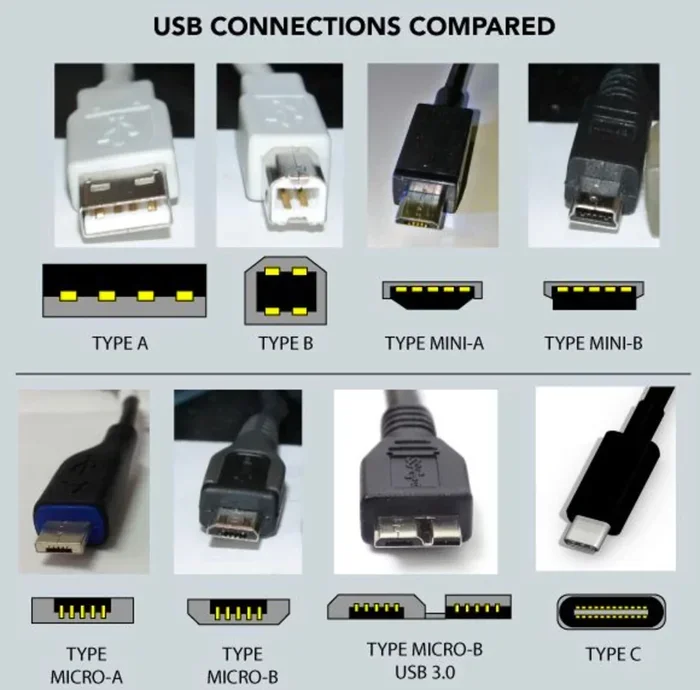
Before buying a scanner, make sure it works well with your computer. The best laptop brands generally support most major scanner models, but it is always smart to check compatibility. Look for USB or wireless connection options that match your setup.
Also consider how much RAM your laptop has and how it handles large image files. Scanning at high resolution creates large files that need sufficient memory to process smoothly.
Resolution and Speed Matter
Resolution, measured in DPI (dots per inch), determines how sharp your scanned images are. For documents, 300 DPI is usually enough. For photos, aim for 600 DPI or higher. For professional design work, even higher resolutions may be needed.
Scanning speed matters if you process lots of pages. Sheet-fed scanners can handle 20 to 50 pages per minute, while flatbed scanners are slower but produce higher-quality results for individual items. Balance speed with quality based on your needs.
Wireless vs. USB Connection
Modern scanners offer both wireless and USB connectivity. Wireless scanners let you scan directly to your phone, tablet, or cloud storage without cables. USB connections tend to be faster and more stable, which matters for large batches of documents.
If you work in a shared office space, a network scanner with wireless capability lets multiple users send scan jobs from their own devices. This is one of the most practical uses of scanners in a team environment.
Tips for Getting the Best Scanning Results
Getting great scans is easier than you think. A few simple habits make a big difference in the quality of your digital files.
- Clean the scanner glass regularly. Dust and fingerprints cause smudges and streaks in your scans. A soft microfiber cloth works great.
- Align documents carefully. Misaligned pages lead to crooked scans. Use the guides on the scanner bed to keep everything straight.
- Choose the right file format. Use PDF for documents, JPEG for photos, and TIFF for high-quality archival images.
- Preview before scanning. Always do a test scan first to check placement, resolution, and color settings.
- Name your files clearly. Use descriptive names like “2024-tax-invoice-001.pdf” so you can find files easily later.
- Save in multiple formats. Keep a high-quality master file and a smaller compressed version for sharing.
Quick Tips for Home Users
Home users can get even more out of their scanners with these simple tips. Scan important documents right away instead of letting paper pile up. Create a dedicated folder on your computer for scanned files. Back up your digital archive to cloud storage so nothing gets lost. And if you have a smartphone, many free apps let you scan documents using your phone camera as a basic scanner.
Common Mistakes to Avoid
One common mistake is scanning at too low a resolution. You might save time now, but you will regret it when you try to print or zoom in on the file later. Another mistake is forgetting to remove staples or paper clips before scanning. These can damage the scanner glass and create dark spots on your scans. Also, avoid scanning documents that are wrinkled or torn without flattening them first.
People also forget to update their scanning software. Updates often include improvements to OCR accuracy and new features that make scanning faster. Keeping your software current ensures you get the best results every time.
The Future of Scanning Technology
The uses of scanners continue to grow as technology advances. Artificial intelligence is making OCR smarter, so scanned documents are more accurate and searchable than ever. Cloud integration means you can scan a document on one device and access it from any other device instantly.
Mobile scanning apps are becoming more powerful. What used to require a dedicated scanner machine can now be done with your phone camera. AI-powered apps can automatically crop, enhance, and correct the perspective of a scan, producing professional-quality results in seconds.
3D scanning is also evolving rapidly. Soon, anyone with a smartphone may be able to scan objects in full 3D and share them digitally. The line between physical and digital continues to blur, and scanners are at the center of that shift.
As businesses move toward fully paperless operations, the demand for faster, smarter scanning solutions will only increase. The uses of scanners will expand into new areas we cannot even imagine yet. One thing is clear: scanners are no longer optional tools. They are essential devices for modern life.
Conclusion
The uses of scanners touch almost every part of modern life. From preserving family photos to managing business documents, from creating digital mockups to tracking inventory with barcode scans, scanners do far more than most people realize. They save time, reduce clutter, and bridge the gap between the physical and digital worlds.
Whether you are a student organizing study materials, a small business owner managing records, or a creative professional working on design projects, there is a scanner that fits your needs. The key is understanding what you want to achieve and choosing the right type of scanner and settings for the job.
Start by scanning a few documents today. See how quickly digital files replace paper clutter. Once you experience the convenience of a well-organized digital archive, you will wonder how you ever managed without one. The uses of scanners are vast, practical, and truly transformative.
Frequently Asked Questions
What are the main uses of scanners?
The main uses of scanners include digitizing documents, preserving photos, managing business records, creating digital archives, sharing files via scan-to-email, and supporting creative design workflows. Scanners turn physical paper and objects into searchable, shareable digital files.
Can I use a scanner to digitize old family photos?
Yes, scanning old photos is one of the most popular uses of scanners. A flatbed scanner at 600 DPI or higher captures fine details and colors. You can then edit, restore, and back up the digital copies to protect your memories forever.
What is OCR and why does it matter for scanning?
OCR stands for Optical Character Recognition. It reads the text in a scanned image and converts it into editable, searchable text. This is essential for making scanned documents useful, as it turns static images into files you can search, edit, and extract data from.
Do I need a powerful laptop to use a scanner effectively?
For basic scanning, most laptops work fine. However, if you scan large batches of high-resolution images or use OCR software regularly, having enough RAM helps. More memory means smoother processing and faster file handling.
What is the difference between a flatbed scanner and a sheet-fed scanner?
A flatbed scanner has a glass surface where you place documents or photos face-down. It is ideal for photos, books, and single pages. A sheet-fed scanner pulls paper through automatically, making it much faster for scanning large stacks of documents.
Are portable scanners worth buying?
Portable scanners are worth it if you travel often or need to scan documents on the go. They are compact, battery-powered, and connect to phones or laptops wirelessly. While they may not match the quality of a flatbed scanner, they are incredibly convenient for quick digitization tasks.