What Is a 35w Desktop Cpu Power Limit
A 35w desktop cpu power limit refers to the maximum amount of energy a processor draws under full load. This low wattage design makes it ideal for compact builds, quiet systems, and energy-efficient setups. Understanding this limit helps you choose the right processor and avoid overheating or throttling issues.
When you are building or upgrading a desktop computer, power consumption matters more than most people think. The 35w desktop cpu power limit is one of the most talked-about specs in modern processor selection. But what does it really mean for your daily computing experience?
A 35w power limit tells you the maximum amount of electricity your processor is designed to draw. This number shapes everything from how hot your chip runs to how loud your fans spin. Whether you are building a home office PC or a compact media center, understanding this limit is essential.
In this guide, we break down exactly what a 35w desktop cpu power limit means, why it matters, and how it impacts real-world performance. You will learn about the benefits, the trade-offs, and how to get the most out of a low-wattage processor.
Key Takeaways
- A 35w power limit means the CPU can draw up to 35 watts of electricity during operation.
- Low wattage CPUs run cooler, quieter, and use less energy than standard desktop processors.
- A 35w cpu is perfect for office work, web browsing, media consumption, and light gaming.
- Power limits affect how long your processor can sustain peak performance before throttling.
- Choosing the right cpu cooler is still important even with low power draw.
- A 35w desktop cpu can save you money on electricity over time.
- Understanding cpu power limits helps you build a more efficient and reliable system.
📑 Table of Contents
What Does 35w Mean for a Desktop CPU
The number 35w stands for 35 watts. This is the thermal design power, or TDP, of the processor. TDP measures how much heat the CPU generates under normal working conditions. It also tells you how much power the chip draws from your system.
For comparison, a standard desktop processor might run at 65w, 95w, or even 125w. A 35w cpu sits on the lower end of the spectrum. This makes it a popular choice for users who want efficiency without sacrificing basic performance.
How Power Limits Work
Every processor has a power envelope. This is the range of electricity it can pull from the motherboard. When a CPU hits its power limit, it either slows down or stabilizes its power draw. This mechanism protects the chip from overheating.
With a 35w desktop cpu power limit, the processor will not suddenly draw more energy than 35 watts. Even if you open heavy applications, the chip manages its own power budget. This self-regulation is built into modern processors and works automatically.
Some users adjust these limits in the BIOS. You can set a lower power ceiling to reduce heat. Or you can raise it slightly if your cooling setup allows it. But the factory default of 35w is designed to keep things safe and efficient.
Why Choose a 35w Desktop CPU
There are many reasons to pick a processor with a 35w power limit. Let us look at the biggest advantages that make these chips so appealing.
Energy Efficiency
A 35w cpu uses significantly less electricity than a standard desktop chip. Over weeks and months, this adds up to real savings on your power bill. If you run your computer for many hours a day, the difference is noticeable.
Lower power draw also means less strain on your power supply unit. You can often get away with a smaller, cheaper PSU in a low power CPU build. This keeps your overall system cost down.
Cooler and Quieter Operation
Less power means less heat. A 35w desktop cpu runs much cooler than a 95w or 125w chip. This directly leads to quieter operation because your fans do not need to spin as fast.
If you want a silent PC build, a low wattage processor is a great starting point. Even a basic cpu cooler can handle the thermal output of a 35w chip with ease. You will not need expensive cooling solutions to keep things quiet.
For comparison, a chip running at 95w will generate a lot more heat. That heat needs to be moved away quickly, which means louder fans and more aggressive cooling. The 35w option simply avoids this problem altogether.
Compact Build Friendly
Small form factor PCs benefit greatly from a 35w power limit. Compact cases have limited airflow. A low-wattage processor fits naturally into these tight spaces without causing thermal issues.
Mini ITX builds, home theater PCs, and office mini PCs all work well with a 35w cpu. You get solid performance in a tiny footprint that would struggle with a hotter, hungrier processor.
How Power Limits Affect Performance
The 35w desktop cpu power limit does have an impact on performance. But the effect is not always what people expect. Let us explore how this power cap shapes real-world usage.
Sustained Performance vs Burst Performance
A 35w cpu can still reach high clock speeds for short bursts. Modern processors are smart. They boost performance when they have thermal headroom and then settle back to a efficient level.
However, sustained heavy workloads will be limited by the power envelope. If you run a cpu intensive task for a long time, the chip will manage its power to stay within 35w. This means peak speeds may not last forever.
For everyday tasks like browsing, document editing, and video watching, this is not a problem at all. The 35w limit provides more than enough performance for these activities.
Gaming and Light Content Creation
Can you game on a 35w desktop cpu? Yes, but with some realistic expectations. A low wattage processor works well for casual gaming and lighter titles. Games like Fortnite or indie titles run fine on a 35w chip paired with a decent gpu.
For demanding AAA games or heavy video editing, a higher wattage processor may serve you better. The power limit caps how much processing power the chip can deliver over long periods.
The key is to match your cpu power limit to your actual workload. If you are not pushing the processor hard all day, a 35w chip will surprise you with its capability.
Thermal Throttling and Power Management
Thermal throttling happens when a CPU gets too hot and slows itself down. A 35w desktop cpu rarely hits this point because it generates less heat to begin with.
However, poor airflow or a weak cpu cooler can still cause issues. Even a low-wattage chip needs proper cooling to perform its best. Make sure your case has basic ventilation and your processor has at least a stock cooler installed.
If you notice high cpu temps at idle, check your thermal paste and fan placement. Sometimes a simple fix can make a big difference in how your 35w processor performs.
Best Use Cases for a 35w Desktop CPU
A 35w cpu shines in specific scenarios. Let us look at where these processors deliver the most value.
Home Office and Productivity
If you use your PC for email, spreadsheets, web browsing, and video calls, a 35w desktop cpu power limit is more than enough. These tasks do not push the processor hard enough to hit the power ceiling.
Office workers and remote professionals benefit from the quiet, cool operation of a low wattage chip. You can work for hours without hearing your fans ramp up.
Media Center and Entertainment
Streaming movies, listening to music, and light gaming all work great on a 35w cpu. These are background tasks that do not demand sustained processing power.
A home theater PC built around a 35w processor stays cool and quiet while delivering smooth entertainment. It is an ideal setup for living room use.
Budget and Student Builds
Students and budget builders love the 35w option. These processors cost less and pair well with affordable components. You get a reliable system without overspending on cooling or power supply hardware.
A low power CPU also teaches good habits about energy efficiency. Students learn that you do not need a power-hungry machine to get schoolwork done effectively.
Network and Server Applications
Light servers, NAS devices, and network appliances often use 35w processors. These systems run 24/7, so low power consumption translates to lower electricity costs over time.
The steady power draw of a 35w cpu makes it predictable and safe for always-on applications. You do not have to worry about sudden power spikes or thermal surges.
Tips for Managing Your CPU Power Limit
Getting the most from a 35w desktop cpu power limit requires some basic knowledge. Here are practical tips to help you manage and optimize your processor.
Choose the Right Cooler
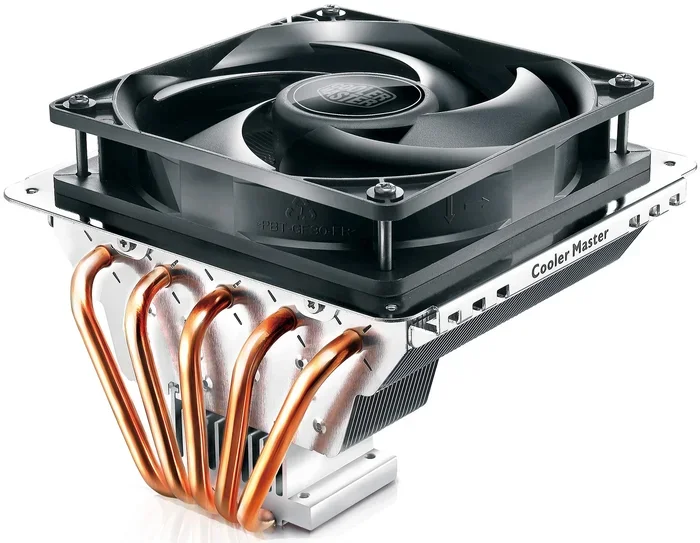
Even though a 35w chip runs cool, you still need a proper cpu cooler. A decent air cooler or a compact liquid cooler will keep temperatures in check. Do not skip this step just because the power limit is low.
Check reviews for the best cpu cooler options that fit your budget and socket type. A good cooler ensures your processor runs at its best without unnecessary noise.
Monitor Your Power Draw
Use software tools to watch how much power your CPU is actually using. Programs like HWiNFO or CPU-Z show real-time power consumption data. This helps you understand if your processor is staying within its 35w limit.
If you notice spikes above the limit, check for background processes. Sometimes software like Opera GX using too much CPU can cause unexpected power draw. Closing unnecessary apps helps keep your power envelope in check.
Keep Your System Clean
Dust buildup hurts airflow and raises temperatures. Regular cleaning keeps your 35w processor running efficiently. Use isopropyl alcohol to clean your cpu and remove dust from heatsinks and fans.
A clean system also lasts longer. Components run cooler when air can flow freely through the case. This simple maintenance step goes a long way for any low wattage build.
Optimize BIOS Settings
Your motherboard BIOS has settings that control cpu power limits. You can adjust the TDP multiplier, boost duration, and power floor. These tweaks let you fine-tune how your processor behaves.
If you want maximum efficiency, keep the 35w limit at default. If you want a slight performance boost and have good cooling, you can raise the limit by a few watts. Just be careful not to exceed what your cooler can handle.
Common Mistakes with CPU Power Limits
Avoid these common errors when working with a 35w desktop cpu power limit setup.
Mistake 1: Underestimating cooling needs. Even a low wattage CPU needs airflow. Do not assume 35w means zero heat. Always install at least a basic cooler.
Mistake 2: Ignoring power supply quality. A cheap PSU can cause instability even with a low power CPU. Invest in a reliable power supply from a reputable brand.
Mistake 3: Overclocking beyond limits. Pushing a 35w processor past its design spec can cause overheating and shorten component life. Stick to safe voltage and clock settings.
Mistake 4: Neglecting software updates. Keep your motherboard BIOS and cpu drivers updated. Manufacturers often improve power management with firmware updates that help your chip run more efficiently.
Final Thoughts
The 35w desktop cpu power limit is a smart choice for many users. It offers a balance of performance, efficiency, and quiet operation that fits a wide range of needs. From office work to home entertainment, a 35w cpu delivers reliable results without wasting energy.
Understanding your cpu power limit empowers you to make better build decisions. You can choose components that work together efficiently and avoid common pitfalls. A low wattage processor is not a compromise. It is a deliberate choice for a better computing experience.
Take the time to learn about your processor’s power specifications. Match your cpu power limit to your actual workload. And invest in basic cooling and maintenance. Your system will reward you with years of quiet, efficient, and dependable service.
Frequently Asked Questions
What is a 35w desktop cpu power limit?
A 35w desktop cpu power limit means the processor is designed to draw a maximum of 35 watts of electricity under normal operation. This limit controls heat output, power consumption, and sustained performance. It is a standard spec found in low wattage and efficient desktop processors.
Is a 35w CPU good for gaming?
A 35w cpu handles casual and lighter games very well. Titles like indie games, esports titles, and older games run smoothly. For demanding AAA games, you may need a higher wattage processor paired with a strong gpu. The power limit affects how long the chip can sustain peak performance during gaming sessions.
Does a 35w CPU need special cooling?
A 35w processor generates less heat than higher wattage chips, but it still needs proper cooling. A basic stock cooler or a budget air cooler is usually sufficient. Good case airflow helps too. Do not skip cooling just because the cpu power limit is low.
Can I change the 35w power limit in BIOS?
Yes, most motherboards allow you to adjust cpu power limits in the BIOS settings. You can raise or lower the TDP ceiling to match your cooling setup. Raising the limit may improve performance but also increases heat. Make sure your cpu cooler can handle any changes you make.
How does a 35w CPU compare to a 65w CPU?
A 35w cpu uses less power and runs cooler than a 65w chip. It is ideal for quiet and compact builds. A 65w processor offers more sustained performance for heavier workloads. Choose based on your needs, budget, and how you use your computer daily.
What are the best use cases for a 35w desktop CPU?
A 35w processor excels in home offices, media centers, student builds, and network appliances. These use cases involve light to moderate workloads where the power limit is not a bottleneck. If your tasks involve web browsing, document work, or streaming, a 35w chip will serve you well.