What Is a Bezel on a Monitor
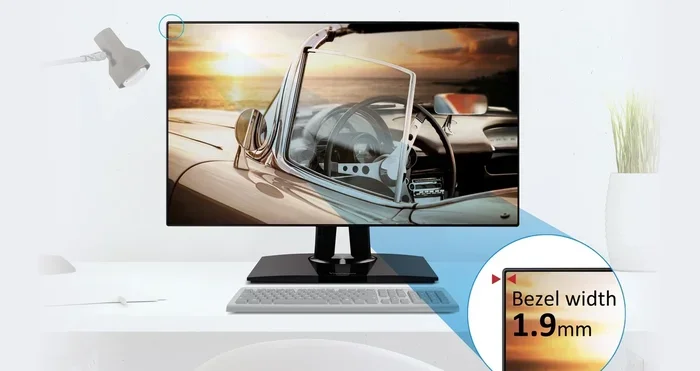
A bezel on a monitor is the frame or border that surrounds the display screen. Understanding what a monitor bezel is helps you make better choices when buying displays for work, gaming, or media. This guide covers everything from bezel types to practical tips for choosing the right one.
Have you ever looked closely at the border around your monitor screen? That frame is called a bezel. It is the plastic or metal surround that holds the display panel in place. You see bezels on every monitor, TV, and laptop screen you own.
Many people overlook bezels when shopping for a new display. But bezel size actually matters a lot. It affects how your screen looks, how much viewable space you get, and even how your workspace feels. Whether you are a gamer, a designer, or just someone who watches movies, understanding bezels on monitors can help you make a smarter purchase.
In this guide, we will break down everything you need to know. We will cover what a bezel does, the different types you will find, and how to choose the right one for your needs. Let us dive in.
Key Takeaways
- A monitor bezel is the frame around the screen that holds the panel in place.
- Thin bezels maximize screen space and improve multi-monitor setups.
- Bezel-less monitors offer a near-borderless viewing experience.
- Bezel size affects aesthetics, portability, and screen real estate.
- Thick bezels still have value in budget and protection-focused displays.
- Bezel design has evolved significantly over the past decade.
📑 Table of Contents
What Is a Bezel on a Monitor?
The bezel is the outer frame of a monitor. It is the strip of material that goes around the edges of the screen. On most monitors, the bezel is made of plastic, metal, or a combination of both. It sits between the visible display and the back of the monitor housing.
The bezel serves several important purposes. First, it protects the fragile display panel from damage. Second, it holds the screen securely in place inside the monitor frame. Third, it hides the internal components like wiring and mounting brackets. Without bezels, monitors would be fragile and hard to build.
Over the years, bezel design has changed a lot. Old monitors had very thick bezels. Today, many monitors feature thin bezels or even bezel-less displays. The trend toward narrow borders has made screens look sleeker and more immersive. But thick bezels are not always bad. They still serve a purpose in certain situations.
What Does a Bezel Do?
The bezel does more than just look good. Here are the key functions it serves:
- Protection: The bezel shields the screen from bumps and scratches.
- Structure: It keeps the monitor panel rigid and secure.
- Mounting: The bezel provides a surface for attaching the monitor to a stand or wall mount.
- Aesthetics: A clean bezel design gives the monitor a polished, professional look.
- Component Housing: It hides the internal electronics and wiring from view.
So the next time you look at your monitor, remember that the bezel is doing more work than you might think. It is not just a frame. It is a functional part of the display.
Types of Monitor Bezels
Not all bezels are the same. Manufacturers use different bezel designs depending on the monitor type and price range. Let us look at the most common types you will encounter.
Thick Bezels
Thick bezels are the traditional style. You will find them on budget monitors and older models. These bezels are usually over 10mm wide on each side. They provide solid protection and are easy to manufacture. The trade-off is that they make the monitor look bulky and outdated.
Thick bezels still have some advantages. They are durable. They hide internal components well. And they are often found on monitors that are more affordable. If you are on a tight budget, a monitor with thicker bezels can still deliver great picture quality.
Thin Bezels
Thin bezels are the modern standard. Most mid-range and premium monitors today feature narrow borders. These bezels are typically between 2mm and 5mm wide. They give the monitor a sleek, modern look and maximize the viewable screen area.
Thin bezels are especially popular for multi-monitor setups. When you place two or more monitors side by side, thin bezels reduce the gap between screens. This creates a more seamless viewing experience. If you work with spreadsheets, code, or creative tools across multiple screens, thin bezels make a big difference.
Bezel-Less Monitors
Bezel-less monitors take the concept even further. These displays have almost no visible border around the screen. The display panel extends to the very edge of the monitor housing. Some models have bezels so thin they are barely noticeable.
These monitors look stunning. They provide an immersive experience that makes you feel like you are inside the content. However, bezel-less displays can be more expensive. They also require careful handling since the edges of the panel are more exposed. If you want a premium look and do not mind the price, a bezel-less monitor is worth considering.
3-Sided and 4-Sided Narrow Bezels
Some monitors use a narrow bezel on three sides but keep a slightly thicker bezel on the bottom. This is called a 3-sided narrow bezel design. It is common on monitors meant for media consumption and gaming.
4-sided narrow bezels are the most balanced option. The border is evenly thin on all four sides. This design works well for both work and entertainment. It also looks the most symmetrical and polished.
Thin Bezels vs. Thick Bezels: What Is Better?
The debate between thin bezels and thick bezels is ongoing. Both have their strengths. The right choice depends on what you need from your monitor.
| Feature | Thin Bezel | Thick Bezel |
|---|---|---|
| Screen Visibility | More screen, less distraction | Less visible screen area |
| Multi-Monitor Use | Excellent for seamless setups | Gaps between screens are wider |
| Durability | Slightly less protection | More robust protection |
| Aesthetics | Modern and sleek | Classic and sturdy |
| Price | Usually more expensive | Often more affordable |
| Portability | Lighter and slimmer | Heavier and bulkier |
For most users today, thin bezels are the better choice. They look great, feel modern, and give you more screen space. But if you need a rugged monitor for a workshop or outdoor use, a thicker bezel might be a smarter pick.
Why Thin Bezels Matter for Multi-Monitor Setups
If you use more than one monitor, bezel size becomes even more important. Thick bezels create a wide gap between screens. This can be distracting when you are working across multiple windows. Thin bezels minimize that gap and let you focus on your work.
When choosing monitors for a multi-monitor setup, look for models with narrow bezels on all sides. Some manufacturers even sell bezel-less monitors specifically designed for side-by-side use. The result is a nearly continuous display that feels like one large screen.
How Bezels Affect Your Monitor Setup
The bezel on your monitor affects more than just looks. It influences how you set up your workspace and how you experience your content.
Workspace Aesthetics
A monitor with thin bezels looks clean and modern on any desk. It draws your eye to the screen instead of the frame. This is especially important if you have a minimalist workspace or a professional setup. A bezel-less monitor can make your entire desk feel more organized and spacious.
Gaming Experience
For gamers, bezel width matters a lot. Thick bezels can block your peripheral vision during gameplay. Thin bezels let you focus on the action without distractions. Some gaming monitors feature 3-sided narrow bezels to give you the widest possible field of view.
If you are into competitive gaming, consider how bezel design affects your response time and immersion. A monitor with minimal screen surround helps you stay focused on the game.
Content Creation and Productivity
Designers, video editors, and photographers need accurate colors and maximum screen space. A thin bezel monitor gives you more room to work with your tools and canvas. The narrow border also helps you focus on the content without visual clutter.
When you are working long hours, a clean display border reduces eye strain. You are less likely to be distracted by a bulky frame around your screen.
How to Choose the Right Bezel for Your Needs
Choosing the right bezel depends on your use case, budget, and personal preferences. Here are some practical tips to help you decide.
Consider Your Primary Use
Think about what you will use the monitor for most often. If you game, prioritize thin bezels for a wider field of view. If you do creative work, look for a bezel-less display that maximizes screen space. If you just need a budget monitor for basic tasks, a thicker bezel is perfectly fine.
Check the Bezel Width
Do not just rely on marketing terms like “slim bezel.” Check the actual bezel width in millimeters. A narrow bezel of 3mm or less on the sides is ideal for most users. The top and bottom bezels can be slightly thicker without affecting the experience much.
Think About Your Workspace
If you have limited desk space, a monitor with thin bezels will look better and feel less cluttered. If you are building a multi-monitor setup, choose monitors with matching bezel sizes on all sides for a uniform look.
Balance Bezel Size with Other Features
Remember that the bezel is just one factor. You should also consider panel type, refresh rate, color accuracy, and connectivity. A monitor with great specs but a bulky bezel might not be the best choice. Similarly, a monitor with a beautiful bezel design but poor image quality will disappoint you in the long run.
When shopping for a new display, try to visit a store and see the monitors in person. Notice how the bezel feels and looks. A monitor that looks great online might not feel the same in your hands.
The Future of Monitor Bezels
The monitor industry is constantly evolving. Bezel design is no exception. Manufacturers are pushing the boundaries of what is possible with display borders. We are seeing more bezel-less monitors every year, and the trend shows no signs of slowing down.
In the near future, we may see monitors with virtually no visible bezel at all. Some prototypes already feature screens that wrap around the edges. These innovations will change how we think about monitor panels and workspace design.
For now, thin bezels offer the best balance of aesthetics, functionality, and price. As technology advances, we can expect even slimmer and more innovative bezel designs to hit the market.
Common Mistakes People Make About Monitor Bezels
Here are some mistakes to avoid when thinking about monitor bezels:
- Ignoring bezel size: Even a small difference in bezel width can affect your multi-monitor experience.
- Focusing only on looks: A pretty bezel design does not mean the monitor has good image quality.
- Assuming thinner is always better: Very thin bezels can make monitors more fragile and harder to mount.
- Overlooking the bottom bezel: The bottom border often affects the monitor’s stand and viewing angle.
- Not checking bezel consistency: Uneven bezels on different monitors can look awkward in a multi-monitor setup.
Avoid these pitfalls and you will find a monitor that looks great and performs even better.
Final Thoughts
The bezel on a monitor might seem like a small detail, but it has a big impact on your experience. Whether you prefer thin bezels, a bezel-less display, or a classic thick frame, understanding your options helps you make a confident choice. The right bezel design can transform your workspace, improve your productivity, and make your screen time more enjoyable.
Take the time to compare bezel sizes and bezel styles before you buy. Your future self will thank you every time you sit down at your desk. And if you are upgrading your setup, remember that even small details like the screen surround can make a big difference in how your workspace feels and functions.
Frequently Asked Questions
What is the purpose of a bezel on a monitor?
The bezel protects the screen, holds the panel in place, and hides internal components. It also contributes to the monitor’s overall look and feel. A well-designed bezel adds to the aesthetics while keeping the display secure.
Are bezel-less monitors worth the extra cost?
Yes, if you value a sleek look and immersive viewing experience. Bezel-less monitors reduce distractions and look great in modern workspaces. However, they can be more fragile and typically cost more than monitors with standard bezels.
Does bezel size affect monitor performance?
Not directly. Bezel size does not change how the monitor displays images or colors. But it does affect your viewing experience, especially in multi-monitor setups where thin bezels create a more seamless look across screens.
What is a good bezel width for a monitor?
A bezel width of 3mm or less on the sides is considered thin and modern. For most users, anything under 5mm looks sleek and professional. The top and bottom bezels can be slightly thicker without affecting the overall appearance.
Can I remove the bezel from my monitor?
It is not recommended. Removing the bezel can damage the monitor panel and void your warranty. The bezel is an integral part of the monitor’s structure and protects the display from harm.
How do bezels affect a multi-monitor setup?
Thin bezels reduce the gap between monitors and create a more seamless view. This is especially helpful for professionals who work across multiple screens. Matching bezel sizes on all monitors also help maintain a clean, uniform look on your desk.