What Is a Network Drop
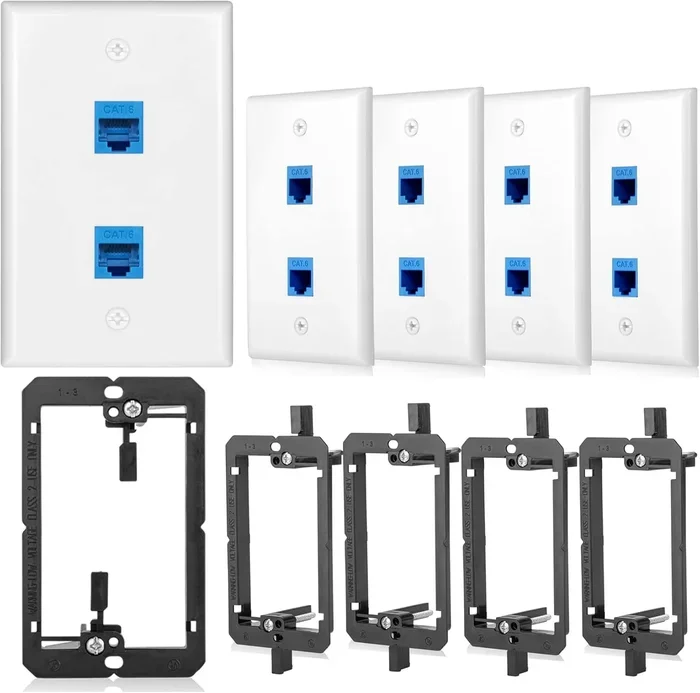
A network drop is the physical endpoint where a network cable connects to a wall outlet or patch panel. It serves as the data outlet that brings internet connectivity into your space for your laptop or other devices. This guide covers everything from how a network drop works to setting one up and troubleshooting common issues.
A network drop is one of the most important parts of any wired internet connection. If you have ever wondered why your laptop connects to the internet through a small wall plate, that is a network drop at work. It is the physical endpoint that brings data signals from your router or server into your room. Understanding how a network drop functions can help you set up a faster and more reliable wired network at home or in the office.
Many people rely on wireless connections today. But a wired network still offers better speed and stability. A network drop makes that possible by providing a direct Ethernet connection from your wall to your device. Whether you are setting up a home office networking station or upgrading your current setup, knowing about network drops is essential.
In this guide, we will cover everything you need to know. You will learn what a network drop is, how it works, the different types available, and how to set one up for your laptop. We will also share tips for troubleshooting common issues and optimizing your setup. By the end, you will feel confident about your network infrastructure and how to get the best internet connection for your device.
Key Takeaways
- A network drop is the physical connection point where a network cable meets a wall outlet or patch panel.
- Network drops use RJ45 connectors and structured cabling to deliver reliable wired network signals to your devices.
- Setting up a network drop for your laptop improves internet connection speed and stability compared to wireless options.
- Common network drop problems include loose cables, damaged jacks, and incorrect network setup configurations.
- A network drop is a key part of any home office networking network infrastructure and delivers better security than Wi-Fi.
- Understanding network drops helps you troubleshoot LAN port issues and choose the right network adapter for your needs.
📑 Table of Contents
What Is a Network Drop?
A network drop is a fixed data outlet on a wall or floor that connects to a network cable. This cable runs behind the walls to a central point, usually a patch panel or router. The network drop is where you plug in your device to access the wired network. Think of it as the bridge between your internet connection and your laptop.
How a Network Drop Differs from a Wall Outlet
A regular wall outlet delivers electricity. A network drop delivers data. It uses a special RJ45 connector on the end of the cable. This connector clicks into the LAN port on your laptop or desktop computer. The network drop itself is the female side of the connection, built into the wall plate.
Key Components of a Network Drop
A network drop has several parts that work together to deliver a steady signal:
- Wall plate – the cover you see on the wall surface.
- Jack – the female port where the cable plugs in.
- Cable – the network cable that runs behind the wall.
- Patch panel – the central hub where all cables meet and connect to your router.
Each part plays a role in delivering a steady internet connection. If any one part fails, your network setup can suffer. That is why understanding each component matters.
How Does a Network Drop Work?
A network drop works by transmitting data signals through a structured cabling system. When you plug a cable into the wall jack, the signal travels through the cable to the patch panel. From there, it goes to your router or switch. This entire process happens in milliseconds. You barely notice it is happening.
The Role of Ethernet Cables
The Ethernet cable is the lifeline of a network drop. It carries data between your laptop and the network source. Most network drops use Cat5e or Cat6 cables. These cables support fast internet connection speeds and low interference. A high-quality cable ensures your wired network performs at its best.
Understanding Network Termination
Network termination is the process of connecting the cable to the RJ45 connector at the wall end. Proper termination ensures a strong and clear signal. Poor termination can cause slow speeds or dropped connections. This is why hiring a professional for network setup can be a smart move, especially for large installations.
Types of Network Drops
Not all network drops are the same. Different setups need different types. Here are the most common ones you will encounter in both home and office environments.
Wall-Mounted Network Drops
A wall-mounted network drop is the most common type. It is a jack built into a wall plate. You see these in offices, classrooms, and homes every day. They provide a clean and permanent data outlet for laptop networking. Wall-mounted drops are easy to install and maintain.
Floor-Mounted Network Drops
A floor-mounted network drop is built into the floor. You often see these in large offices or conference rooms. They allow easy access without running cables across walkways. These are great for home office networking setups where the desk is near a wall or floor outlet.
Patch Panel Drops
A patch panel drop connects to a central patch panel instead of going directly to a device. This type is common in larger network infrastructure setups. It allows you to manage multiple network drops from one central location. Patch panel drops are ideal for offices with many devices that need internet connectivity.
Setting Up a Network Drop for Your Laptop
Setting up a network drop for your laptop is easier than you might think. Follow these steps to get a reliable wired internet connection in your home or office.
Step 1: Plan Your Network Setup
Before you start, plan where your network drop will go. Choose a spot near your desk or workspace. Make sure the wired network cable can reach your laptop without stretching too far. A good network setup starts with proper planning. Measure the distance and pick the right cable length.
Step 2: Choose the Right Cable
Pick a high-quality Ethernet cable for your network drop. Cat6 cables are a popular choice for fast speeds. They handle internet connection demands well for both work and play. Avoid cheap, unshielded cables if you live in an area with lots of electrical interference.
Step 3: Install the Wall Jack
Install the wall jack at your chosen spot. Connect the cable to the jack using proper network termination techniques. Make sure the RJ45 connector is fully seated. A loose connection can cause LAN port issues and frustration. Take your time with this step.
Step 4: Test the Connection
Plug your laptop into the network drop and test the internet connection. Check for steady speeds and no dropouts. If the connection is weak, check your cable and jack. You may also want to verify your network adapter is working properly. A quick test saves hours of troubleshooting later.
Does Your Laptop Have Enough Power for a Wired Network?
While a network drop handles the connection side, your laptop needs the right hardware to benefit. The RAM in your device affects how smoothly it handles network tasks and data processing. If you are wondering what the RAM on your laptop actually does, check out What Is The Ram On A Laptop for a detailed guide. Having enough memory ensures your laptop networking setup runs without lag or slowdowns.
Common Network Drop Problems and Solutions
Even with a good setup, network drops can have issues. Here are the most common problems you might face and how to fix them quickly.
Slow Internet Speeds
If your internet connection is slow through a network drop, the cable might be the culprit. Old or damaged cables limit your speed significantly. Try replacing the Ethernet cable with a newer Cat6 or Cat6a version. Also, check that your LAN port supports the speed you need. Sometimes a simple cable swap solves the problem entirely.
No Connection at All
A complete loss of connection often means a loose or broken RJ45 connector. Unplug the cable and plug it back in firmly. If that does not work, inspect the network cable for visible damage or bends. Sometimes the wall plate jack itself needs replacement. A new jack is inexpensive and easy to swap out.
Intermittent Connection Drops
If your connection drops randomly, the network termination might be faulty. Poor termination causes intermittent signal loss that comes and goes. Re-terminating the cable at the wall jack often fixes this issue. You can also test with a different data outlet to rule out other causes. A network tester tool can help you pinpoint the exact problem fast.
Is Your Laptop Holding You Back?
Sometimes the problem is not the network drop but your laptop itself. If your device has too little memory, it may struggle with network tasks and data processing. To learn more about whether your setup is sufficient, read Is 8Gb Ram Good For A Laptop. This guide helps you understand if your laptop has enough resources for smooth wired network performance and fast data transfer.
Network Drops vs. Wireless Connections
Many people ask whether a network drop is better than Wi-Fi. The answer depends on your needs and how you use your laptop.
Speed Comparison
A wired network through a network drop is almost always faster than Wi-Fi. Ethernet connections can deliver speeds of 1 Gbps or more. Wi-Fi speeds vary based on distance, walls, and interference from other devices. For tasks like large file transfers or video calls, a network drop wins every time. The difference is especially noticeable in busy home office networking environments.
Stability and Reliability
Wi-Fi signals can weaken through walls and around corners. A network drop provides a direct and stable internet connection. There are no random dropouts or lag spikes. This makes network drops ideal for home office networking where reliability matters most. You can count on a wired connection when the stakes are high.
Security Considerations
A wired network is harder to hack than a wireless one. Data travels through the cable, not through the air where it can be intercepted. This makes network drops a safer choice for sensitive work. If you handle confidential files on your laptop, a wired Ethernet connection adds an extra layer of protection. Security should always be a priority in your network setup.
Expert Tips for Optimizing Your Network Drop Setup
Getting the most from your network drop requires a few smart choices. Here are some expert tips to boost your network setup performance and keep things running smoothly.
Use Quality Cables
Cheap cables can limit your internet connection speed and cause frustration. Invest in certified Ethernet cables from reputable brands. Look for cables with proper shielding to reduce interference from nearby electronics. This simple upgrade can make a big difference in your laptop networking experience and overall speed.
Label Your Cables
In a busy home office networking setup, cables can get tangled and confusing. Label each network cable at both ends with tape or a label maker. This saves time when troubleshooting connection issues. You will know exactly which data outlet connects to which device without pulling cables out.
Keep Your Network Infrastructure Clean
Dust and debris can affect your patch panel and wall jacks over time. Clean your network drops regularly with compressed air. Check for loose connections and worn-out cables. A clean network infrastructure runs faster and lasts longer. Make it part of your routine maintenance schedule.
What Does RAM Mean for Your Laptop in a Networking Context?
Your laptop’s overall performance affects how it handles network data and multiple tasks at once. Understanding what RAM means for a laptop can help you optimize your setup for the best results. Memory allows your device to process incoming data quickly and efficiently. For a smooth wired network experience, make sure your laptop has adequate memory. Learn more by visiting What Does Ram Mean For A Laptop to understand how your device’s memory impacts your networking performance.
Conclusion
A network drop is a simple yet powerful part of any wired network setup. It brings fast and reliable internet connectivity directly to your laptop through a network cable and RJ45 connector. Whether you are building a new home office networking station or fixing an existing one, understanding your network drop makes all the difference.
By following the tips in this guide, you can set up a strong and stable network setup. Choose the right cable, install proper network termination, and keep your network infrastructure clean. Your laptop will thank you with faster speeds and fewer connection issues.
If you want to make sure your laptop is ready to take full advantage of a network drop, check your hardware specs. A well-equipped laptop paired with a quality network drop delivers the best internet connection experience. For more tips on choosing the right components, explore What Is A Good Ram For A Laptop to ensure your device is fully optimized for networking tasks.
Frequently Asked Questions
What exactly is a network drop?
A network drop is the physical endpoint where a network cable connects to a wall outlet or patch panel. It brings internet connectivity into your space and serves as the data outlet for your devices. Think of it as the doorway through which your wired network signal enters your room.
Do I need a network drop for my laptop?
You do not need one if you use Wi-Fi only. But if you want a faster and more stable internet connection, a network drop is very helpful. It provides a direct Ethernet connection to your laptop. This is especially useful for home office networking and tasks that require low latency.
Can I install a network drop myself?
Yes, you can install a basic network drop yourself with the right tools. You need a wall plate, a jack, a network cable, and a RJ45 connector tool. If you are not comfortable with network termination, hiring a professional is a safe option. Proper installation ensures the best internet connection quality.
What type of cable is best for a network drop?
Cat6 cables are the most popular choice for modern network drops. They support fast speeds and handle interference well. For older setups, Cat5e cables still work fine for most laptop networking needs. Always choose a quality cable from a reputable brand to get the best results from your network setup.
How is a network drop different from a Wi-Fi connection?
A network drop uses a physical cable to connect your laptop to the network. Wi-Fi uses wireless radio signals. A wired network drop is faster, more stable, and more secure than Wi-Fi. For home office networking, a network drop provides a more reliable internet connection with fewer interruptions.
What should I do if my network drop stops working?
Start by checking the cable connections at both ends. A loose RJ45 connector is the most common cause. If the cable looks damaged, replace it. You can also test a different data outlet to see if the problem moves. If none of these steps work, the wall plate jack may need replacement or professional repair.