What Is Arm64 Windows
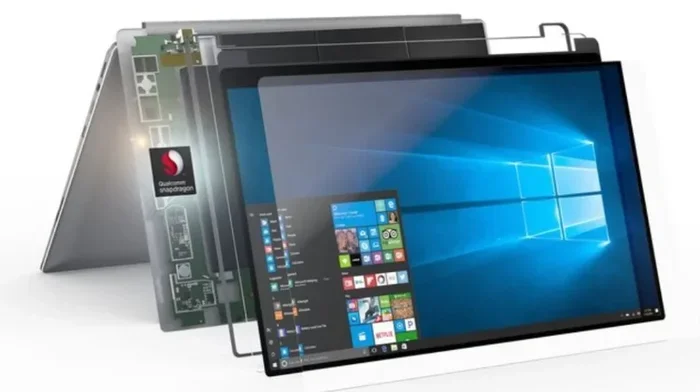
Arm64 Windows is a version of Windows built for ARM-based processors, mainly found in newer laptops. It offers better battery life and cooler operation but has some app compatibility limits. If you are shopping for a laptop or wondering why your system behaves differently, understanding Arm64 Windows helps you make smarter choices.
Arm64 Windows is changing the way laptops work. If you have been shopping for a new laptop lately, you may have noticed the term floating around. But what does it actually mean? Simply put, Arm64 Windows is a version of the Windows operating system designed to run on ARM-based processors. These processors are different from the Intel and AMD chips that have powered laptops for decades.
The shift to ARM matters because it brings real benefits. Better battery life, cooler running temperatures, and lighter designs are all part of the package. However, there are trade-offs too. Not every Windows app works perfectly on ARM, and some older software may not run at all. This guide breaks everything down so you understand exactly what you are getting into.
Key Takeaways
- Arm64 Windows runs on ARM processors: These chips are designed for efficiency and are common in modern laptops.
- Battery life improves significantly: ARM chips use less power than traditional x64 processors.
- App compatibility matters: Not all Windows apps run natively on Arm64, but emulation helps bridge the gap.
- RAM compatibility is key: Choosing the right good RAM for laptop ensures smooth performance on Arm64 systems.
- Windows 11 drives ARM adoption: Microsoft is pushing hard for ARM support across its ecosystem.
- Check your needs before buying: If you rely on specific software, verify ARM support first.
📑 Table of Contents
What Does Arm64 Mean?
The term Arm64 refers to a 64-bit processor architecture made by Arm Holdings. Unlike the x64 architecture used by Intel and AMD, ARM chips were originally designed for mobile devices like phones and tablets. Over time, chipmakers adapted them for laptops and desktops. The result is a processor that delivers strong performance while sipping power.
When you see Arm64 Windows, it means the operating system has been compiled to run natively on ARM processors. This is different from running Windows on an x64 chip. The underlying code is built differently, which affects how apps run and how the system uses resources.
ARM vs x64: What Is the Difference?
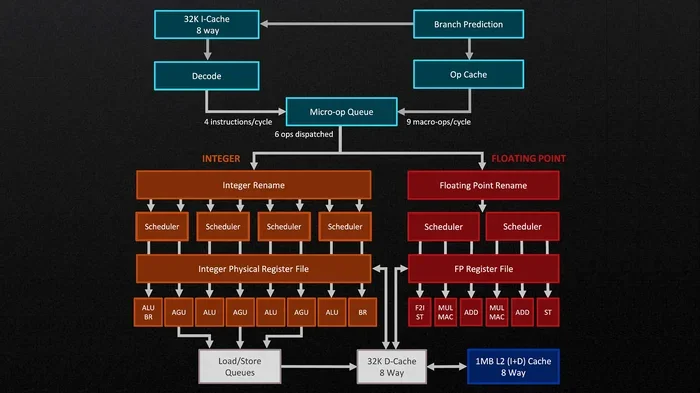
The main difference comes down to how the processor handles instructions. x64 processors use a complex instruction set. ARM uses a reduced instruction set, which means each task takes fewer steps. This makes ARM chips more efficient. Here is a quick comparison:
- Power consumption: ARM uses significantly less power than x64.
- Heat output: ARM chips run cooler, which means less fan noise.
- Performance: Modern ARM chips like the Snapdragon X Elite rival mid-range x64 processors.
- App support: x64 has broader software compatibility. ARM is catching up fast.
Why Is Arm64 Windows Important for Laptops?
Laptops built on ARM architecture are becoming more popular. Microsoft has been pushing Windows on ARM hard, especially with the Snapdragon X series chips. These laptops promise all-day battery life, instant wake from sleep, and always-connected LTE or 5G. For many users, that sounds like a dream come true.
If you are tired of carrying a charger everywhere, an Arm64 Windows laptop might be the answer. The efficiency gains are real. Some ARM laptops easily last 15 to 20 hours on a single charge. That is a huge upgrade over many traditional x64 laptops.
Who Benefits Most from Arm64 Windows?
Not everyone needs an ARM laptop, but certain groups benefit a lot. Frequent travelers love the battery life. Students appreciate the lightweight designs. Business users enjoy the always-connected features. If your daily tasks involve web browsing, email, office apps, and video calls, an ARM laptop handles all of that with ease.
However, if you rely on specialized software like certain video editing tools or development environments, you need to check compatibility first. Arm64 Windows is not a one-size-fits-all solution yet.
How Does Arm64 Windows Handle Apps?
This is where things get interesting. Arm64 Windows uses a technology called emulation to run apps built for x64 processors. Emulation translates x64 instructions into ARM instructions on the fly. This works surprisingly well for many apps, but it is not perfect.
Native vs Emulated Apps
Native apps are built specifically for ARM. They run faster and use less power. Emulated apps are x64 apps that get translated in real time. They work but may use more resources. Here is what you need to know:
- Native ARM apps: Fast, efficient, and fully supported. Examples include Microsoft Office and Microsoft Edge.
- Emulated x64 apps: Work well for most everyday tasks but may have minor performance hits.
- Incompatible apps: Some older or niche software simply does not run on ARM at all.
Microsoft maintains a compatibility list that shows which popular apps work on Arm64 Windows. Before you buy, check if your must-have apps are supported. This one step can save you a lot of frustration later.
System Requirements and Hardware Considerations
Not every laptop can run Arm64 Windows. You need specific hardware to make it work. The most important piece is the processor. Currently, Qualcomm Snapdragon chips dominate the ARM laptop market. The Snapdragon X Plus and Snapdragon X Elite are the most common options you will find.
When it comes to RAM compatibility, ARM laptops typically use LPDDR5X memory soldered directly to the motherboard. This means you usually cannot upgrade the RAM yourself. Make sure you choose the right amount from the start. For most users, 16 GB of RAM is the sweet spot.
Storage and Connectivity
ARM laptops often come with NVMe SSD storage, which keeps boot times and app loads blazing fast. Storage upgrades are sometimes possible but depend on the laptop model. Connectivity features like Wi-Fi 6E and Bluetooth 5.3 are standard on most Arm64 Windows machines.
If you are checking whether your current laptop supports ARM, the short answer is probably not. ARM Windows laptops are a newer category. You would need to purchase a new device with a compatible ARM processor. Think of it as buying a fresh start rather than upgrading an existing system.
Common Challenges with Arm64 Windows
No technology is perfect, and Arm64 Windows has its share of quirks. Being aware of these challenges helps you set realistic expectations. Here are the most common issues users face.
Software Compatibility Gaps
Some apps simply do not have ARM versions yet. This is especially true for niche or industry-specific software. If your work depends on a particular program, test it thoroughly before committing to an ARM laptop. Emulation helps, but it is not a magic fix for every situation.
Driver Support
Hardware drivers for ARM can lag behind x64 drivers. Certain peripherals, printers, or external devices might not work correctly right away. Before buying an ARM laptop, check if your essential peripherals have ARM-compatible drivers available.
Gaming Limitations
Gamers should approach Arm64 Windows with caution. Many PC games are built for x64 and rely on specific graphics APIs. While some games work through emulation, the experience is not always smooth. If gaming is a priority, an x64 laptop is still the safer choice for now.
Is Arm64 Windows the Future?
The trend clearly points toward ARM. Microsoft, Qualcomm, and other chipmakers are investing heavily in ARM laptops. The next few years will likely bring even better app compatibility and performance improvements. Arm64 Windows is not just a fad; it is a fundamental shift in how laptops are built.
If you are in the market for a new laptop, an ARM-based machine deserves serious consideration. The battery life alone is a game changer. Just make sure your essential apps work before you commit. As the ecosystem matures, more and more software will gain native ARM support.
For now, Arm64 Windows laptops are ideal for everyday users, students, professionals, and anyone who values portability and battery life. Power users and gamers may want to wait for the ecosystem to fully catch up. Either way, understanding what ARM Windows is and how it works puts you ahead of the curve.
Final Thoughts
Arm64 Windows represents a big step forward for laptop computing. It brings efficiency, portability, and modern features that traditional x64 laptops struggle to match. The key is knowing your needs and checking compatibility before you buy. With the right expectations and the right machine, an ARM laptop can be an excellent daily driver.
Keep learning about your hardware choices. If you are curious about what makes a laptop worth the investment, check out our guide on the best investments for your PC’s lifespan. And if you are upgrading RAM, understanding what RAM is in your laptop helps you make the right call. The more you know, the better your tech decisions will be.
Frequently Asked Questions
Can I install Arm64 Windows on any laptop?
No, you can only install Arm64 Windows on laptops with ARM-compatible processors, such as Qualcomm Snapdragon chips. Traditional Intel or AMD laptops use x64 Windows and cannot run the ARM version of the operating system.
Is Arm64 Windows slower than regular Windows?
Not necessarily. Native ARM apps run just as fast or faster than x64 apps. Emulated x64 apps may run slightly slower due to translation overhead, but for everyday tasks the difference is barely noticeable.
Can I run x64 apps on Arm64 Windows?
Yes, most x64 apps work through emulation. However, some older or specialized software may not be compatible. Always check the app’s compatibility before relying on it for important work.
Do Arm64 laptops have good battery life?
Yes, ARM laptops are known for exceptional battery life. Many models last 15 to 20 hours on a single charge, which is significantly longer than most x64 laptops. This is one of the biggest advantages of the ARM architecture.
Is gaming possible on Arm64 Windows?
Some games work, but many are not fully compatible yet. Emulation helps bridge the gap, but serious gamers may experience limitations. If gaming is a top priority, an x64 laptop remains the safer option for now.
What is the difference between Arm64 and x64 Windows?
The difference lies in the processor architecture. Arm64 Windows runs on ARM chips designed for efficiency, while x64 Windows runs on Intel and AMD chips. ARM offers better battery life and cooler operation, while x64 offers broader software compatibility.