What Is in Printer Head Cleaning Solution
A printer head cleaning solution is a specially formulated liquid that removes dried ink, debris, and buildup from your printer’s print head nozzles. It typically contains surfactants, solvents, and distilled water designed to dissolve clogged pigments without damaging delicate components. Understanding what goes into this solution helps you maintain optimal print quality and extend the life of your inkjet printer.
Key Takeaways
- Surfactants and solvents are the core ingredients that break down dried ink and clear clogged print head nozzles effectively.
- Never use DIY or homemade cleaning solutions as they can damage delicate print head components and void your warranty.
- Run cleaning cycles only when needed and never more than three times in a row to avoid wasting ink and fluid.
- Distilled water serves as the base in most cleaning solutions because it leaves no mineral deposits inside the print head.
- Regular printing prevents clogs by keeping ink flowing through the nozzles before it has a chance to dry out.
- Manufacturer-formulated solutions are always best because they are specifically designed to match your printer’s ink chemistry.
- Ignoring clogs leads to worse problems like ink leaks, damaged components, and expensive print head replacements.
📑 Table of Contents
- What Is in Printer Head Cleaning Solution?
- How Does Printer Head Cleaning Solution Work?
- Common Ingredients in Printer Cleaning Solutions
- When Should You Use Printer Head Cleaning Solution?
- DIY vs. Manufacturer Cleaning Solutions
- Tips to Keep Your Print Head Clean and Healthy
- What Happens If You Ignore a Clogged Print Head?
- Can You Reuse Printer Head Cleaning Solution?
- Final Thoughts
What Is in Printer Head Cleaning Solution?
If you own an inkjet printer, you have probably seen the “clean print head” option pop up on your screen at some point. But have you ever wondered what is actually inside that little bottle or cartridge? Printer head cleaning solution is not just plain water. It is a carefully balanced mixture of chemicals designed to break down dried ink and clear clogged nozzles. Let us dive into exactly what makes up this essential fluid and why it matters for your daily printing tasks.
Most cleaning solutions share a few core ingredients. These include surfactants, which lower the surface tension of ink so it flows more freely. There are also solvents that dissolve dried pigment particles. Some solutions use isopropyl alcohol or similar compounds to break down stubborn blockages. And of course, distilled water serves as the base. Together, these components work as a team to keep your print head clear and your pages looking sharp.
The exact formula varies by manufacturer. Epson, Canon, HP, and Brother all use their own proprietary blends. But the basic science behind them remains the same. A good cleaning fluid dissolves ink residue without corroding the tiny metal plates inside the print head. This balance is what makes the solution both effective and safe for your printer.
How Does Printer Head Cleaning Solution Work?
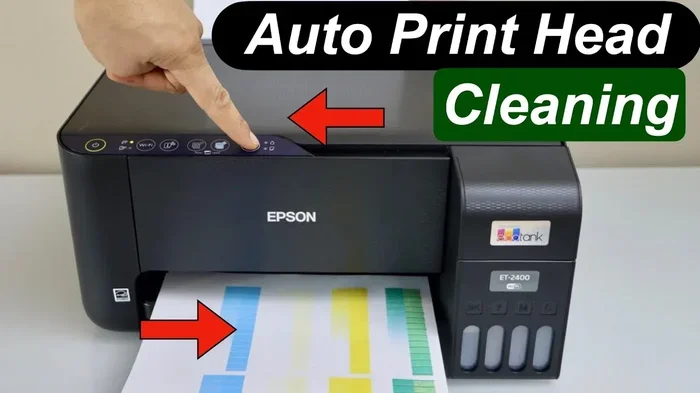
Understanding how the solution works helps you appreciate why the ingredients matter so much. When you run a cleaning cycle, the printer pushes a small amount of fluid through the nozzles. This flushes out any dried or semi-dried ink that has built up over time.
Here is a simple breakdown of the process:
- Step 1: The printer detects clogged nozzles or poor print quality.
- Step 2: It draws cleaning solution from a reservoir or cartridge.
- Step 3: The fluid is pushed through the tiny nozzles at high pressure.
- Step 4: Surfactants and solvents dissolve the dried ink particles.
- Step 5: The dissolved ink and debris are expelled onto a waste pad.
- Step 6: The print head is left clean and ready for the next print job.
The surfactants play a big role here. They reduce the “stickiness” of ink, which makes it easier to wash away. Without surfactants, the cleaning fluid would just sit on top of the dried ink and do very little. The solvents, on the other hand, actually break the chemical bonds in dried pigments. This two-pronged approach is what makes modern cleaning solutions so effective.
Think of it like washing greasy dishes. Water alone does not cut through the grease. But add dish soap (a surfactant), and suddenly the grease lifts right off. The same principle applies inside your printer.
Why Surfactants Matter
Surfactants are the unsung heroes of any cleaning fluid. They have a dual nature: one end loves water, and the other end loves oil-based ink. This allows them to surround ink particles and pull them away from the nozzle surfaces. Without surfactants, your printer would need much more force to clear a clog, which could damage the delicate components.
The Role of Solvents
Solvents do the heavy lifting when it comes to breaking down dried ink. Common solvents in printer cleaning solutions include isopropyl alcohol, glycol ethers, and water-based mixtures. These dissolve the pigment binders that hold dried ink together. Once the binder breaks down, the pigment particles become loose and easy to flush out.
Some printers also use ultrasonic cleaning technology, which vibrates the fluid at high frequencies. This creates tiny bubbles that scrub the nozzles from the inside. The cleaning solution supports this process by being thin enough to travel through the system efficiently.
Common Ingredients in Printer Cleaning Solutions
Not all cleaning solutions are created equal. But most share a similar set of ingredients. Here is a closer look at what you will typically find inside a printer head cleaning solution.
| Ingredient | Function | Common Type |
|---|---|---|
| Distilled Water | Base carrier fluid | Purified, mineral-free water |
| Surfactants | Reduces surface tension | Non-ionic or mild ionic |
| Isopropyl Alcohol | Dissolves dried ink | 70-99% concentration |
| Glycol Ethers | Softens hardened ink | Butyl or propyl glycol |
| pH Buffers | Prevents corrosion | Mild alkaline agents |
| Anti-Evaporation Agents | Keeps fluid stable | Glycol-based compounds |
Each ingredient serves a specific purpose. The distilled water acts as a safe base that will not leave mineral deposits inside the print head. The surfactants make the fluid “slippery” so it can penetrate dried ink. The solvents dissolve the ink itself. And the pH buffers protect the metal and plastic components from chemical damage.
One thing to note: never try to make your own cleaning solution at home. DIY mixtures using rubbing alcohol or vinegar can damage the print head and void your warranty. Always use the solution recommended by your printer manufacturer.
When Should You Use Printer Head Cleaning Solution?
Knowing when to run a cleaning cycle can save you time, money, and frustration. Most printers will alert you when the print quality drops. But there are also signs you can watch for before the printer sends a warning.
Here are the most common signs your print head needs cleaning:
- Streaks or lines running through your printed pages.
- Missing colors where they should appear.
- Faded text that is hard to read.
- White gaps in otherwise solid areas of print.
- Smudging or bleeding of ink on the paper.
- Error messages about print head blockage or poor nozzle health.
Running a cleaning cycle too often can waste ink and fluid. So it is best to wait until you actually notice a problem. Most experts recommend running one cleaning cycle and checking the results before repeating. If one cycle does not fix the issue, wait a few hours and try again. Running multiple cycles back-to-back can overheat the print head and cause more damage.
For printers that sit idle for long periods, a light cleaning cycle once every week or two can help prevent buildup. This is a great preventive maintenance habit. It keeps the ink flowing smoothly and reduces the chance of hard clogs that are harder to clear.
How Often Is Too Often?
Running the cleaning cycle more than three times in a row is generally not recommended. Each cycle uses a small amount of ink and fluid. Doing it too many times can deplete your cartridges faster than necessary. If three cleaning cycles do not resolve the issue, it may be time to try a deeper cleaning or consider a print head replacement.
DIY vs. Manufacturer Cleaning Solutions
Some users prefer to use third-party or DIY cleaning solutions to save money. While this can work in some cases, it comes with risks. Manufacturer solutions are specifically formulated for each printer model. They match the ink chemistry and print head design perfectly.
Third-party solutions may not have the same balance of ingredients. They could be too acidic, too harsh, or too thin. This can lead to damaged print heads, poor print quality, or even total printer failure. The cost of a replacement print head often far exceeds the savings from using a cheaper cleaning fluid.
If you do decide to use a third-party solution, make sure it is specifically designed for inkjet printers. Look for products that mention surfactants, pH balance, and non-corrosive formula on the label. And always test on a spare print head if you have one available.
Why Rms Power Matters in Printer Electronics
While this article focuses on cleaning solutions, it is worth noting that the electronics inside your printer rely on stable power delivery. Just like how Rms power in speakers ensures consistent audio output without distortion, your printer’s internal electronics need steady voltage to function correctly. Power fluctuations can affect the precision of the cleaning cycle and the overall print quality. Keeping your printer on a stable power source is a simple way to protect both the print head and the cleaning system.
Tips to Keep Your Print Head Clean and Healthy
Prevention is always better than cure. Here are some practical tips to keep your print head in great shape and reduce the need for frequent cleaning cycles.
- Print at least once a week. Regular use keeps ink flowing and prevents drying. Even a short test page does the trick.
- Use your printer regularly. A printer that sits unused for months is far more likely to develop clogs.
- Store ink cartridges properly. Keep them in a cool, dry place when not installed.
- Use genuine ink cartridges. Third-party inks can have different viscosity levels that increase clogging risk.
- Run a cleaning cycle at the first sign of trouble. Do not wait until the print quality becomes unbearable.
- Keep your printer in a dust-free environment. Dust and debris can enter the print head area and cause blockages.
- Update your printer firmware. Manufacturers often release updates that improve cleaning cycle efficiency.
These simple habits go a long way. They can extend the life of your print head by years and save you from costly repairs or replacements. Think of them as basic printer maintenance that anyone can do at home.
Quick Tips for Better Print Quality
- Always use original manufacturer cleaning fluid when possible.
- Run a single cleaning cycle and check results before repeating.
- Align your print head after every few cleaning cycles for best results.
- Keep spare cartridges on hand so you are never caught without ink.
- Check your printer’s nozzle check pattern regularly to catch issues early.
What Happens If You Ignore a Clogged Print Head?
Ignoring a clogged print head is not a good idea. Over time, dried ink hardens inside the nozzles and becomes much harder to remove. A light cleaning cycle may not be enough. You could end up needing a deep cleaning, which uses more fluid and ink, or even a full print head replacement.
In some cases, a severely clogged print head can cause ink to leak inside the printer. This can damage other internal components and lead to expensive repairs. The longer you wait, the worse the problem gets. So the best approach is always to address print quality issues early and run a cleaning cycle as soon as you notice any decline.
Some printers also have a deep cleaning mode that uses more solution and higher pressure. This mode is designed for stubborn clogs that a regular cleaning cycle cannot handle. However, it uses significantly more ink, so reserve it for serious blockages only.
Can You Reuse Printer Head Cleaning Solution?
Some people wonder if the cleaning fluid can be reused. The short answer is no. Once the fluid has been pushed through the print head, it picks up dissolved ink, debris, and contaminants. Reusing it could introduce these particles back into the system and cause more clogs. Always use fresh cleaning solution for each cycle.
Additionally, the fluid loses its effectiveness after it has been exposed to air for too long. The solvents evaporate, and the surfactants break down. So even if you have leftover fluid in the bottle, check the expiration date or the manufacturer’s guidelines before using it.
Final Thoughts
A printer head cleaning solution is a simple but powerful tool that keeps your inkjet printer running at its best. The combination of surfactants, solvents, distilled water, and pH buffers works together to dissolve dried ink and clear clogged nozzles. Understanding what is inside the solution helps you make better decisions about maintenance and troubleshooting.
Regular use, proper storage, and timely cleaning cycles can dramatically extend the life of your print head. And remember, when in doubt, always trust your printer manufacturer’s recommended products and procedures. A little care goes a long way in keeping your prints crisp, clear, and professional-looking every time you hit the print button.
Taking a few minutes to understand your printer’s cleaning system pays off in the long run. You will save money on replacements, enjoy better print quality, and avoid the frustration of mysterious streaks and faded text on your pages.
Frequently Asked Questions
Can I use rubbing alcohol instead of printer head cleaning solution?
No, rubbing alcohol is not a safe substitute. It can be too harsh on the delicate components inside the print head and may dissolve parts that the cleaning solution is designed to leave untouched. Always use the manufacturer-recommended fluid.
How much cleaning solution does one cycle use?
A single cleaning cycle typically uses a very small amount of fluid, usually just a few milliliters. However, deep cleaning cycles use more. Check your printer’s manual for exact specifications per cycle.
Can I clean my print head manually without a cleaning solution?
Some people use a damp cloth to gently wipe the outside of the print head, but this does not clear internal clogs. Internal blockages require the proper cleaning solution pushed through the nozzles by the printer’s cleaning mechanism.
Is printer head cleaning solution the same as ink?
No, they are completely different. Cleaning solution contains surfactants and solvents designed to dissolve dried ink. Ink is formulated for depositing color or text onto paper. Using ink as a cleaning fluid will not work and can damage the print head.
What is the difference between a regular cleaning cycle and a deep cleaning cycle?
A regular cleaning cycle uses a small amount of fluid and gentle pressure to clear minor buildup. A deep cleaning cycle uses more fluid and higher pressure to tackle stubborn, hardened clogs. Deep cleaning should only be used when regular cleaning does not resolve the issue.
How do I know if my print head needs to be replaced instead of cleaned?
If you have run multiple cleaning cycles and still see streaks, missing colors, or poor print quality, the print head may be physically damaged or worn out. At that point, a replacement is usually the best solution. Consult your printer’s manual or contact the manufacturer for guidance.