What Is Ips Glow How Can I Reduce It
IPS glow is a common display phenomenon where light leaks from the edges of IPS panels, especially in dark rooms. It is not a defect but a natural result of how IPS technology works. You can reduce IPS glow through brightness adjustments, ambient lighting changes, and proper monitor calibration.
Have you ever noticed a soft glowing light around the edges of your monitor? Maybe it is most visible when you are watching a dark movie or working in a dimly lit room. If so, you have likely encountered IPS glow. This is one of the most common questions among monitor buyers and users today. In this guide, we will explain exactly what causes it and how you can reduce it effectively.
IPS glow affects many users who own or plan to buy an IPS panel monitor. It can be distracting, but the good news is that it is manageable. Whether you are a gamer, a designer, or just someone who watches videos, understanding IPS glow helps you get the best experience from your display. Let us dive into the details.
Key Takeaways
- IPS glow is normal: It occurs in all IPS panels due to the way liquid crystals light up.
- It is not a defect: Do not confuse IPS glow with backlight bleed or a broken screen.
- Brightness control helps: Lowering brightness and adjusting gamma settings can significantly reduce glow.
- Ambient lighting matters: Using indirect light in your room makes IPS glow much less noticeable.
- Calibration tools work: Monitor calibration software can fine-tune display settings to minimize glow.
- Check your panel type: Some IPS variants and monitor brands show less glow than others.
- Know when to act: Excessive glow may warrant a warranty claim or panel replacement.
📑 Table of Contents
What Is IPS Glow?
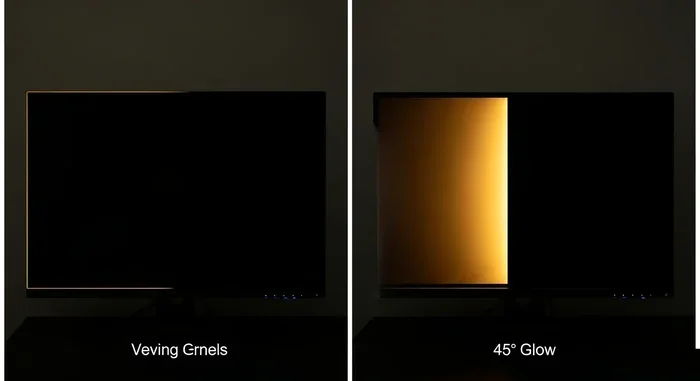
IPS glow refers to the visible light that leaks from the edges or corners of an IPS panel monitor. IPS stands for In-Plane Switching, a display technology known for excellent color accuracy and wide viewing angles. These strengths come with a trade-off: light can escape around the edges of the screen.
This glow usually appears as a soft white or bluish haze. You will notice it most on dark backgrounds. It is especially visible when you are in a dark room or when the screen displays mostly black content. The glow is not the same across every monitor. Some panels show very little, while others show more. This depends on the manufacturing quality, the LED backlight design, and the specific panel variant.
How IPS Panels Work
To understand IPS glow, it helps to know a little about how IPS panels work. In an IPS panel, liquid crystals rotate parallel to the screen surface to control light passage. This design allows for better color reproduction and wider viewing angles compared to other panel types. However, because the crystals are flat, some LED backlight energy escapes from the edges. That escape is what we see as IPS glow.
The pixel response time in IPS panels is also excellent, which is why they are popular for fast-moving content. But the very structure that makes IPS panels great also makes edge glow possible. It is simply part of the technology.
Why IPS Glow Happens
Several factors contribute to how much IPS glow you see:
- Panel quality: Higher-end panels often have better light sealing.
- Backlight type: Edge-lit LED backlights tend to show more glow than full-array backlights.
- Screen size: Larger screens may show more visible glow at the edges.
- Ambient conditions: Dark rooms make any glow stand out more.
- Brightness settings: Higher brightness levels increase the visibility of glow.
Keep in mind that IPS glow is not a defect. Every IPS panel has some degree of it. The key is managing how much you notice it.
IPS Glow vs Backlight Bleed
People often confuse IPS glow with backlight bleed. While they look similar, they are different issues. IPS glow is a natural and expected characteristic of IPS panels. Backlight bleed, on the other hand, is uneven lighting caused by manufacturing inconsistencies or poor panel fit.
Here is a simple way to tell the difference:
- IPS glow appears evenly along the edges and corners.
- Backlight bleed shows up as bright patches or uneven spots anywhere on the screen.
- IPS glow is consistent across all IPS monitors to some degree.
- Backlight bleed varies from unit to unit and may indicate a quality issue.
If you notice bright, uneven patches in the center of your screen, that is likely backlight bleed and not normal IPS glow. In that case, you may want to contact the manufacturer for a replacement. Check your warranty terms, as many brands cover backlight bleed within the first few weeks of purchase.
How to Reduce IPS Glow
Now that you understand what IPS glow is, let us look at practical ways to reduce it. You do not need expensive equipment. Many of these steps are free and easy to do right now.
Adjust Brightness and Contrast Settings
The simplest way to reduce IPS glow is to lower your monitor brightness. High brightness makes the edge light more visible. Try reducing your brightness to around 40 to 60 percent and see if that helps. You can also adjust your contrast ratio to find a balance that looks natural without emphasizing the glow.
Another useful setting is gamma adjustment. Gamma controls how mid-tones are displayed on your screen. Adjusting gamma can help darken the overall image slightly, which makes IPS glow less noticeable. Most monitors have built-in gamma presets you can cycle through.
Optimize Ambient Lighting in Your Room
One of the biggest factors in how much you notice IPS glow is the lighting in your room. When you sit in a completely dark room, your eyes adapt to the darkness, and any light from the screen edges becomes very noticeable. This is natural and happens with every display.
Here is what you can do:
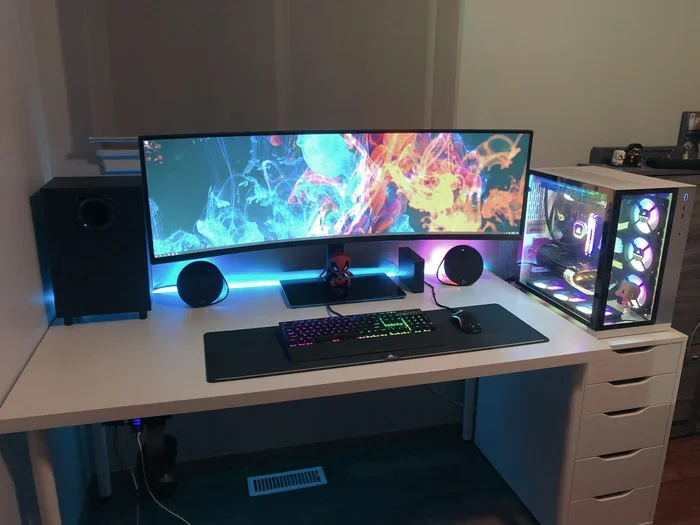
- Use a bias light behind your monitor. This is a soft LED light that reduces the contrast between the bright screen and the dark room.
- Keep some ambient light on in the room while you work or watch content.
- Avoid placing your monitor in a completely sealed dark space.
A simple bias light can make a huge difference. It does not eliminate IPS glow, but it makes it much less distracting. Many monitor light bars are available for under $30 and work wonderfully.
Use Monitor Calibration Tools
Calibrating your monitor can help reduce the visual impact of IPS glow. Calibration tools adjust color balance, brightness, and gamma to create a more uniform image. Many operating systems have built-in calibration wizards. You can also use third-party software for more advanced adjustments.
If you want professional-level results, consider a hardware calibration device. These tools measure your screen output and create a custom profile. This can improve overall image quality and reduce the perception of uneven lighting. However, for most users, software calibration is more than enough.
You might also explore whether your monitor has a local dimming feature. Some advanced IPS monitors offer this option, which adjusts the LED backlight zones to reduce glow in dark areas. Not all monitors have it, but if yours does, it can be very helpful.
Check for Overclocking or Refresh Rate Settings
Some users push their monitors beyond factory settings by overclocking the refresh rate. While this can boost performance, it may also affect screen uniformity and make IPS glow more visible. If you have overclocked your monitor, try resetting it to the default refresh rate and see if the glow reduces.
Overclocking your monitor is not always a bad idea, and you can learn more about whether it is worth it in our guide on overclocking your monitor. It is worth understanding the trade-offs before making any changes.
IPS Glow Across Different Panel Types
Not all panels show the same amount of IPS glow. Different display technology types have different characteristics. Here is a quick comparison:
- IPS panels: Best color accuracy and viewing angles, but noticeable edge glow in dark scenes.
- VA panels: Better contrast and less edge glow, but slower pixel response times.
- OLED panels: Perfect blacks and no glow, but risk of burn-in and higher cost.
If IPS glow bothers you a lot, you might consider a VA panel for darker content. VA panels use a different liquid crystal alignment that blocks light better in dark areas. However, they do not match IPS in terms of color accuracy and viewing angles. For most creative professionals, IPS remains the top choice despite the glow.
You can also look at premium IPS variants from brands like Dell, LG, and ASUS. These often use better light diffusion layers that reduce IPS glow significantly. Spending a bit more on a higher-quality panel can save you from frustration later.
When to Accept IPS Glow vs When to Take Action
Not all IPS glow requires action. A small amount of edge glow is normal and expected. It becomes a problem only when it distracts you during normal use. Here is a simple guide:
- Accept it if: The glow is only visible in very dark rooms on black backgrounds and disappears in normal lighting.
- Take action if: The glow is bright enough to distract you during everyday tasks, even in a well-lit room.
- Seek a replacement if: You see bright, uneven patches that look like backlight bleed rather than normal edge glow.
If your monitor is still under warranty, do not hesitate to contact the manufacturer. Many brands have specific standards for acceptable screen uniformity. If your panel exceeds those standards, they may replace it for free. It never hurts to ask.
Also worth noting is that your GPU temperature and overall system performance can indirectly affect your display experience. A well-cooled system ensures your monitor runs at optimal settings. You can learn more about healthy GPU temperature levels in our article on what is a good idle GPU temperature. Keeping your system running smoothly helps your monitor perform at its best.
Expert Tips for Minimizing IPS Glow
Here are some extra tips from display enthusiasts and professionals who deal with IPS glow every day:
- Use dark mode on your desktop. Dark backgrounds reduce the contrast between the screen glow and the rest of the display, making glow less obvious.
- Avoid full-black wallpapers. While they look great, they make IPS glow stand out more. Use dark gray or dark blue wallpapers instead.
- Keep your monitor clean. Dust on the screen can scatter light and make glow appear worse than it is.
- Position your monitor correctly. Angle the screen slightly downward so you are not looking directly at the edges where glow is strongest.
- Update your monitor firmware. Some manufacturers release updates that improve screen uniformity and reduce glow over time.
These small changes can make a big difference in how much you notice IPS glow. They are easy to implement and cost nothing.
For users who store large amounts of high-resolution content, fast storage like an NVMe SSD can improve your overall workflow. While storage speed does not directly affect IPS glow, a smoother system experience means less frustration when adjusting display settings on the fly.
Final Thoughts
IPS glow is a natural part of IPS display technology. It is not a defect, not a sign of a broken monitor, and not something you need to panic about. With the right settings and adjustments, you can significantly reduce its impact on your viewing experience. Lower your brightness, add ambient lighting, and calibrate your monitor for the best results.
Remember that every monitor is different. Some will show more glow than others, and that is okay. The key is to find a balance where the glow does not distract you from your work, your games, or your favorite shows. IPS glow should not stop you from enjoying the excellent color and viewing angles that IPS panels offer.
If you have tried everything and the glow still bothers you, consider reaching out to the manufacturer or exploring a different panel type. There are options for every preference and budget. The most important thing is that you enjoy your screen time without unnecessary distraction.
Frequently Asked Questions
Is IPS glow the same as a defective monitor?
No, IPS glow is not a defect. It is a natural characteristic of IPS panel technology where light leaks from the edges. Every IPS monitor has some degree of it. Only if the glow is excessively bright or uneven across the entire screen should you consider it a potential quality issue.
Can IPS glow be completely eliminated?
It cannot be completely eliminated because it is built into the display technology. However, you can significantly reduce its visibility through brightness adjustments, ambient lighting, and proper calibration. Most users find that these steps make the glow barely noticeable during normal use.
Does IPS glow affect color accuracy?
IPS glow does not directly affect color accuracy. The colors on an IPS panel remain excellent regardless of edge glow. However, in dark scenes, the glow can make blacks appear lighter or slightly tinted near the edges, which may affect your perception of contrast.
Which monitor brands have the least IPS glow?
Premium brands like Dell, LG, and ASUS often use higher-quality LED backlight diffusion layers that reduce IPS glow. However, glow levels can vary even within the same brand and model. Always check reviews and user reports before purchasing if screen uniformity is important to you.
Does lowering brightness reduce IPS glow?
Yes, lowering your monitor brightness is one of the most effective ways to reduce the visibility of IPS glow. Since the glow is caused by LED backlight energy escaping from the edges, less overall brightness means less light to escape. Try setting your brightness between 40 and 60 percent for the best balance.
Should I return my monitor if it has visible IPS glow?
Not necessarily. A small amount of IPS glow is normal and expected. Only return or exchange your monitor if the glow is excessively bright, uneven, or distracting enough to affect your daily use. Check your warranty terms first, as many manufacturers cover significant screen uniformity issues.
=== CONCLUSION ===
IPS glow is a common and manageable display characteristic that affects many IPS panel users. By understanding what causes it and applying the tips in this guide, you can enjoy your monitor without constant distraction. Adjust your brightness, improve your room lighting, and calibrate your display for the best experience. Remember, a little glow is normal, but too much should not be ignored. Take action when needed, and you will get the most out of your IPS monitor every single day.