What Is Isopropyl Alcohol for Cpu Cleaning
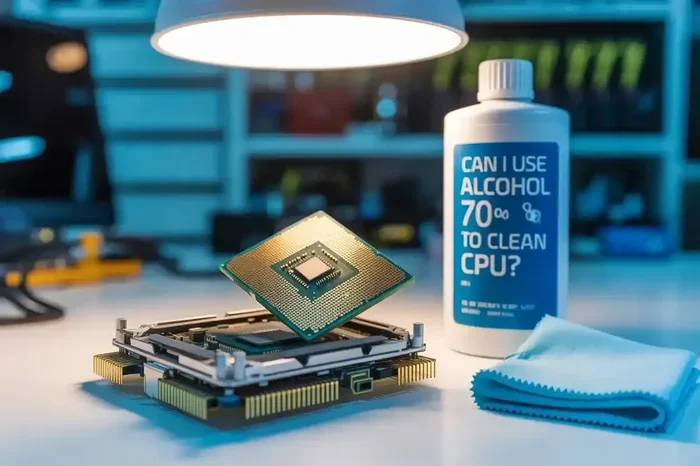
Isopropyl alcohol is a fast-evaporating cleaning solvent that safely removes thermal paste, dust, and grime from CPU surfaces without damaging sensitive electronic components. It comes in different concentrations, with 99% being the best choice for CPU cleaning because it leaves no residue. Using the right isopropyl alcohol concentration and proper technique keeps your processor running cool and extends your hardware lifespan.
Your computer works hard every single day. Dust builds up. Heat accumulates. And over time, the thermal paste between your CPU and cooler starts to dry out. This is where isopropyl alcohol comes in. It is one of the most important tools you can use for CPU cleaning. Whether you are a casual user or a PC enthusiast, understanding what isopropyl alcohol does and how to use it properly will save you money and keep your system running smoothly.
In this guide, we will cover everything you need to know about using isopropyl alcohol for CPU cleaning. You will learn what it is, which concentration to choose, how to apply it safely, and why regular cleaning matters. Let us get started.
Key Takeaways
- Isopropyl alcohol evaporates quickly: It leaves no moisture behind, making it ideal for cleaning electronic components.
- 99% concentration is the gold standard: Higher purity means faster drying and zero residue on your CPU.
- Never use tap water or household cleaners: These can leave conductive residue and damage your hardware.
- Always remove thermal paste first: Cleaning old thermal paste ensures proper heat transfer between the CPU and cooler.
- Use lint-free cloths and cotton swabs: These prevent fibers from getting stuck on sensitive surfaces.
- Regular cleaning improves performance: Removing dust and old paste helps your CPU maintain safe temperatures.
📑 Table of Contents
What Is Isopropyl Alcohol?
Isopropyl alcohol, also known as IPA or rubbing alcohol, is a chemical solvent that evaporates very quickly. Unlike water, it does not leave behind moisture or residue when it dries. This makes it perfect for cleaning electronic components like processors, motherboards, and graphics cards.
You will find isopropyl alcohol in different concentrations. The most common ones are 70% and 99%. For cleaning electronics, 99% is the best option. It dries almost instantly and leaves nothing behind. Lower concentrations contain more water, which takes longer to evaporate and can potentially cause damage to sensitive parts.
Why Is It Safe for Electronics?
Water is a conductor. That means it can create short circuits inside your computer. Isopropyl alcohol, on the other hand, is a non-conductive solvent. It breaks down grease, grime, and old thermal paste without harming circuits or traces on your motherboard. This is why professionals and hobbyists both rely on it for hardware cleaning.
Another great thing about IPA is that it is widely available and affordable. You can buy it at any pharmacy, hardware store, or online. A small bottle goes a long way, especially if you are cleaning a CPU or GPU regularly.
Why Do You Need to Clean Your CPU?
Over time, dust and old thermal paste build up on your processor. This creates a layer of insulation that traps heat. When heat cannot escape properly, your CPU runs hotter. Hotter components mean slower performance and a shorter lifespan for your hardware.
Cleaning your CPU involves two main steps. First, you remove the old thermal paste. Second, you wipe away dust and grime from the CPU surface and the cooler. Isopropyl alcohol is the best tool for both of these tasks. It dissolves dried thermal paste easily and evaporates without leaving anything behind.
Regular cleaning also gives you a chance to inspect your hardware. You can spot early signs of corrosion, damaged pins, or worn-out components. Catching these issues early can save you from costly repairs down the road. If you want to learn more about protecting your investment, check out our guide on what is the best investment for lifespan of PC for helpful tips on extending your hardware life.
Which Concentration of Isopropyl Alcohol Should You Use?
Not all isopropyl alcohol is created equal. The concentration matters a lot when you are cleaning CPU components. Here is a quick breakdown:
- 99% Isopropyl Alcohol: This is the best choice for CPU cleaning. It evaporates almost instantly and leaves zero residue. It is the purest form available.
- 91% Isopropyl Alcohol: A good alternative. It dries quickly and works well for most cleaning tasks. Slightly more water content than 99%, but still safe.
- 70% Isopropyl Alcohol: This is commonly used for disinfecting skin. It contains too much water for electronics cleaning. Avoid using it on your CPU.
If you want a deeper dive into the right percentages for cleaning, we have a detailed guide on what percentage of isopropyl alcohol to clean CPU that breaks down the best options for your specific needs.
Why 99% Is the Best Choice
The reason 99% isopropyl alcohol is the top pick is simple. It contains the least amount of water. Water is the enemy of electronics. Even a tiny amount of moisture left on a circuit board can cause corrosion over time. With 99% IPA, the alcohol evaporates before the small amount of water has a chance to cause any harm.
Additionally, 99% IPA is residue-free. Some lower concentrations may leave a thin film behind after drying. This film can act as an insulator and actually trap more heat. You definitely do not want that on your CPU surface.
How to Clean Your CPU with Isopropyl Alcohol
Cleaning your CPU is not hard. You just need the right supplies and a little patience. Follow these steps for a safe and effective cleaning session.
Step 1: Gather Your Supplies
Before you start, make sure you have everything ready:
- 99% isopropyl alcohol
- Lint-free microfiber cloth
- Cotton swabs (optional)
- Compressed air can or electric blower
- New thermal paste (if reapplying)
- A clean, flat workspace
Step 2: Power Down and Disconnect
Turn off your computer completely. Unplug the power cable. If you are working on a laptop, remove the battery if possible. This is a safety step you should never skip. Working on powered electronics can lead to electric shock or component damage.
Step 3: Remove the CPU Cooler
Carefully unscrew or unclip your CPU cooler. Gently wiggle it loose if needed. Set it aside on a clean surface. You will now see the CPU socket and the old thermal paste sitting on top of the processor.
Step 4: Clean the Old Thermal Paste
Drip a small amount of isopropyl alcohol onto your lint-free cloth. Gently wipe the CPU surface in circular motions. The old thermal paste will dissolve and come right off. Use a cotton swab dipped in IPA for tight corners around the CPU socket. Be gentle. You do not want to bend any pins.
Repeat this process with a fresh section of cloth until the CPU surface is completely clean and dry. Then do the same for the cooler’s contact surface. Both sides need to be spotless for the new thermal paste to work properly.
Step 5: Apply New Thermal Paste
Once both surfaces are clean and dry, apply a small pea-sized dot of fresh thermal paste in the center of the CPU. Reattach your cooler and secure it firmly. The pressure will spread the paste evenly across the surface.
After reassembly, plug everything back in and power on your computer. You should notice lower temperatures immediately. If you are interested in learning more about keeping your CPU cool, our article on what is the best CPU cooler can help you choose the right cooling solution for your setup.
Common Mistakes to Avoid
Even though isopropyl alcohol is safe for electronics, people still make mistakes. Here are some common errors you should avoid:
- Using 70% alcohol on electronics: The extra water content is risky. Stick with 91% or 99%.
- Using paper towels: Paper towels leave behind tiny fibers. These can short-circuit components. Always use lint-free cloths.
- Using too much alcohol: A little goes a long way. Excess liquid can drip into areas you do not want it to go.
- Not letting it dry completely: Even though IPA evaporates fast, give it a minute before reassembling. Never apply power to a wet surface.
- Skipping thermal paste replacement: Cleaning without reapplying paste is pointless. The old paste is what caused the heat problem.
Another mistake people make is using household cleaners or household alcohol. Products like hand sanitizer or window cleaner contain additives that leave residue. Only use pure isopropyl alcohol made for electronics. This ensures a clean, safe, and residue-free result every time.
How Often Should You Clean Your CPU?
The frequency of cleaning depends on your environment. If you live in a dusty area or have pets, you should clean your CPU every 6 months. For cleaner environments, once a year is usually enough.
Pay attention to your CPU temperatures. If you notice your processor running hotter than usual, it might be time for a cleaning session. A quick check every few months can prevent overheating issues before they become serious problems.
Regular PC maintenance is one of the simplest and most cost-effective ways to keep your computer performing at its best. It takes about 20 to 30 minutes and requires very little investment. A bottle of 99% isopropyl alcohol and a microfiber cloth are all you need to get started.
If you are curious about other aspects of PC care, understanding what tools and components contribute to your system’s longevity is essential. For more insights on maintaining your setup, explore our resources on what is the best investment for lifespan of PC to ensure you are making smart choices for your hardware.
Expert Tips for Better Cleaning Results
Here are some pro tips that will help you get the best results when cleaning your CPU:
- Work in a well-ventilated area: Isopropyl alcohol fumes can be irritating. Open a window or work near a fan.
- Use compressed air for dust: Before applying any liquid, blow out loose dust with compressed air. This prevents dust from turning into mud when the alcohol hits it.
- Do not reuse cloths: Switch to a clean section of cloth frequently. Reusing a dirty section just spreads grime around.
- Be patient: Let the alcohol do the work. Do not scrub aggressively. Gentle wiping is more effective and safer.
- Store IPA properly: Keep your bottle sealed and in a cool place. Exposure to air reduces the concentration over time.
These small habits make a big difference. They ensure your cleaning sessions are effective and your hardware stays in top shape for years to come.
Final Thoughts
Isopropyl alcohol for CPU cleaning is one of the simplest and most effective maintenance practices you can adopt. It is affordable, widely available, and incredibly effective at removing old thermal paste and dust from your processor. Using the right concentration, the right tools, and the right technique will keep your CPU running cool and efficient.
Remember to always use 99% isopropyl alcohol, a lint-free cloth, and never skip reapplying thermal paste after cleaning. These small steps make a huge difference in your computer’s performance and longevity. Your CPU works hard for you. Taking just a few minutes to clean it regularly is the least you can do to return the favor.
Start your next cleaning session with confidence. You now have all the knowledge you need to do it safely and effectively. Your computer will thank you with better temperatures, smoother performance, and a longer lifespan.
Frequently Asked Questions
Can I use rubbing alcohol to clean my CPU?
Yes, but only if it is pure isopropyl alcohol without additives. Most rubbing alcohol found in stores is 70% isopropyl alcohol, which contains too much water for electronics. You should use 91% or 99% isopropyl alcohol for safe and effective CPU cleaning.
How long does isopropyl alcohol take to dry on a CPU?
99% isopropyl alcohol evaporates almost instantly, usually within a few seconds. Even 91% concentration dries very quickly. However, it is still a good practice to wait about one minute after wiping before reassembling your PC to ensure all moisture has fully evaporated.
Is 70% isopropyl alcohol safe for electronics?
No, 70% isopropyl alcohol is not recommended for electronics cleaning. It contains 30% water, which can leave moisture residue and potentially cause corrosion or short circuits on sensitive components. Always opt for 91% or 99% concentration instead.
Do I need to clean thermal paste off my CPU?
Yes, absolutely. Old thermal paste dries out over time and loses its ability to transfer heat effectively. Cleaning it off with isopropyl alcohol and applying fresh paste ensures proper thermal contact between the CPU and cooler, which keeps temperatures low and performance optimal.
Can I use a regular cloth instead of a lint-free cloth?
No, regular cloths and paper towels leave behind tiny fibers that can cause short circuits on electronic components. Always use a lint-free microfiber cloth or coffee filter for cleaning your CPU and other sensitive parts.
What happens if I do not clean my CPU regularly?
Without regular cleaning, dust and old thermal paste build up, trapping heat inside your processor. This leads to higher temperatures, thermal throttling, reduced performance, and potentially a shorter lifespan for your CPU. Regular cleaning is a simple way to prevent these issues.