What Is Microsoft Silverlight Used For
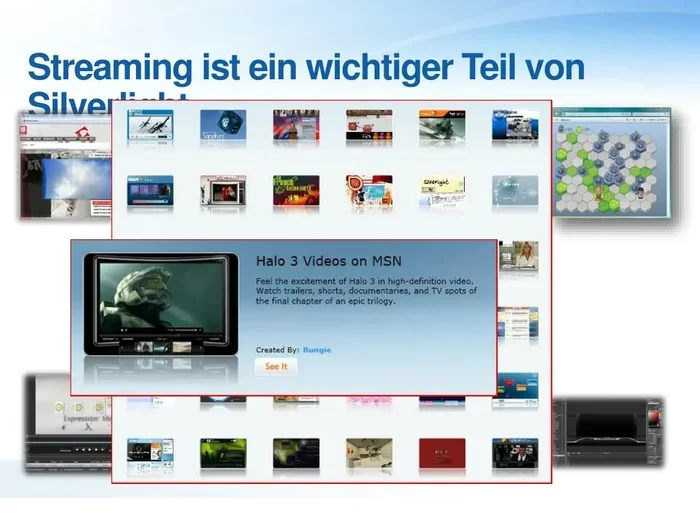
Microsoft Silverlight was a browser plugin used for streaming media, building rich internet applications, and delivering interactive web content. It powered video platforms like Netflix and enterprise tools before being discontinued in 2021. Today, Silverlight is considered legacy technology, and modern alternatives like HTML5 have replaced most of its functions entirely.
Key Takeaways
- Streaming Media Powerhouse: Silverlight was widely used for video streaming, including by Netflix and other major platforms during its prime.
- Rich Internet Applications: Businesses relied on Silverlight to build interactive web apps that behaved like desktop software.
- Cross-Platform Framework: Silverlight worked on both Windows and Mac, making it a versatile tool for developers.
- Deprecated and Unsupported: Microsoft ended all support for Silverlight in October 2021, and modern browsers no longer support it.
- HTML5 Replaced Silverlight: Modern web technologies like HTML5 now handle everything Silverlight once did, and better.
- Security Risks Remain: Using Silverlight today exposes your system to vulnerabilities and compatibility issues.
- Legacy Content Only: The only remaining use for Silverlight is accessing very old, unupdated websites or applications.
📑 Table of Contents
- What Is Microsoft Silverlight Used For
- What Is Microsoft Silverlight?
- What Is Microsoft Silverlight Used For?
- Key Features of Microsoft Silverlight
- Silverlight vs Modern Web Technologies
- Why Microsoft Silverlight Was Discontinued
- Should You Still Use Silverlight in 2025?
- Conclusion
- Frequently Asked Questions
What Is Microsoft Silverlight Used For
Microsoft Silverlight was a browser plugin that brought rich, interactive experiences to the web. It powered video streaming sites, business applications, and interactive media players across different operating systems. Before HTML5 became mainstream, Silverlight was one of the top choices for delivering rich internet applications and smooth multimedia content to users worldwide.
Many people encountered Silverlight when visiting websites that required the plugin to play videos or run interactive features. Netflix, for example, relied on Silverlight for streaming content on computers for several years. Microsoft Silverlight was built on the .NET framework, which made it a powerful tool for developers creating cross-platform web experiences. Understanding what Silverlight was used for helps you appreciate how far web technology has come.
Today, Silverlight is considered deprecated technology. Microsoft ended support for it in October 2021. The plugin is no longer available for download, and modern browsers have removed support for it entirely. In this article, we explore the many uses of Silverlight, its key features, and why it no longer plays a role in modern computing. You will also learn about Silverlight alternatives and whether you should still interact with this legacy software in any form.
What Is Microsoft Silverlight?
Microsoft Silverlight was a free browser plugin developed by Microsoft. It launched in 2007 and quickly gained popularity among developers and businesses. The plugin allowed web pages to display rich multimedia content, animations, and interactive user interfaces that standard HTML could not handle at the time. Think of it as a bridge between basic web pages and full-fledged desktop applications.
Silverlight worked on multiple platforms, including Windows and Mac computers. This cross-platform framework was a big selling point. Developers could write code once and have it run on different operating systems without major changes. The plugin was similar in concept to Adobe Flash, which was also widely used for rich web content during the same era. Both technologies aimed to fill the gaps that standard HTML left at the time.
The Silverlight version timeline included several major releases. Silverlight 1.0 launched in 2007, and subsequent versions added more features. Silverlight 5, the final version, came out in 2011. Each update brought improvements in performance, media support, and developer tools. However, the rise of HTML5 gradually made these updates less relevant over time.
How Silverlight Worked
Silverlight operated as a small plugin that users installed in their web browser. Once installed, it could render XAML-based user interfaces and play high-quality video streams. The plugin used a subset of the .NET framework, which made it familiar to many developers who already worked with Microsoft technologies. This familiarity drove adoption in the enterprise sector.
When you visited a website that used Silverlight, the plugin would load within your browser window. It handled everything from video decoding to user interaction. This meant smoother playback and more responsive interfaces compared to what standard HTML could offer at the time. The plugin technology was powerful but also came with drawbacks, which we will explore later.
What Is Microsoft Silverlight Used For?
The primary uses of Microsoft Silverlight centered around delivering rich media and interactive web experiences. Let us break down the main use cases in detail.
Streaming Media and Video
One of the biggest uses of Silverlight was streaming media. Netflix used Silverlight to deliver video content to viewers on their computers. Many other streaming platforms and video websites relied on the plugin to provide smooth, buffer-free playback for millions of users.
Silverlight supported adaptive streaming, which adjusted video quality based on the user’s internet connection. This was a significant feature at a time when broadband speeds varied widely. The plugin could handle both standard definition and high definition video content with relative ease. It also supported digital rights management, which helped content providers protect their copyrighted material.
Rich Internet Applications
Rich internet applications, or RIAs, were a major category for Silverlight. These were web applications that behaved like desktop software. They offered fast load times, smooth animations, and interactive interfaces that went beyond what traditional websites could provide. Users could interact with complex data, fill out detailed forms, and experience near-desktop performance inside their browser.
Businesses used Silverlight to build internal tools and customer-facing applications. The web application framework allowed developers to create complex interfaces with data grids, charts, and real-time updates. Many enterprise software solutions from the late 2000s and early 2010s were built on Silverlight. Some companies still maintain these older applications, though most have migrated to modern platforms.
For developers, Silverlight offered a familiar environment. Those who already knew C# or VB.NET could build Silverlight applications without learning an entirely new stack. This lowered the barrier to entry and accelerated development timelines for many projects. If you are curious about how web frameworks like WordPress evolved to fill similar roles in content delivery, the shift from plugin-based tools to native web standards tells an important story.
Interactive Web Content
Silverlight excelled at creating interactive web content. Websites used it for interactive maps, product configurators, and educational tools. The plugin supported vector graphics and animations that made web pages feel more dynamic and engaging. Users could explore data visualizations, manipulate 3D models, and interact with content in ways that were not possible with basic HTML and JavaScript at the time.
Media companies and news organizations used Silverlight to build interactive features on their sites. Users could explore detailed data visualizations, watch embedded videos with custom controls, and interact with rich media presentations. These experiences set a high bar for web interactivity during Silverlight’s active years.
Silverlight for Business and Enterprise
Many businesses adopted Silverlight for business applications. The plugin offered a secure sandbox environment for running web-based tools. Companies used it for dashboards, reporting tools, and customer relationship management systems that needed to run inside a browser. The integration with the .NET ecosystem made it attractive for organizations already invested in Microsoft technologies.
The Silverlight features that appealed to enterprises included strong security models, reliable performance, and easy deployment. IT departments could manage Silverlight installations across many machines using standard enterprise tools. This made it a practical choice for large organizations with thousands of desktop computers.
Key Features of Microsoft Silverlight
Understanding the Silverlight features helps explain why it was so popular during its peak years. Here are the standout capabilities that made Silverlight a go-to choice for developers and businesses.
- Cross-platform support: Silverlight ran on both Windows and Mac operating systems, giving developers a wider audience reach.
- High-quality video playback: The plugin supported smooth streaming of HD video with adaptive bitrate control and digital rights management.
- Rich UI capabilities: Developers could create stunning interfaces with animations, transitions, and vector graphics using XAML.
- .NET framework integration: Developers could use familiar C# and VB.NET languages to build Silverlight applications quickly.
- Browser compatibility: Silverlight worked with Internet Explorer, Firefox, Safari, and Chrome during its active years.
- Offline capabilities: Some Silverlight applications could function with limited offline access, storing data locally on the user’s device.
- Small plugin footprint: The Silverlight installer was relatively small compared to other plugins, making deployment quick and easy.
Silverlight vs Modern Web Technologies
The web has changed dramatically since Silverlight’s heyday. Today, HTML5 and modern JavaScript frameworks handle most of what Silverlight once did. Let us compare the two approaches and see why the industry moved on.
Why HTML5 Replaced Silverlight
HTML5 brought native support for video and audio playback directly into browsers. This eliminated the need for plugins like Silverlight and Flash entirely. Modern browsers could now handle multimedia content without requiring users to install additional software. This was a huge win for user experience and security alike.
HTML5 also offered better security overall. Plugins like Silverlight were frequent targets for vulnerabilities and exploits. By moving to native browser technologies, the web became safer for everyone. Browser compatibility also improved significantly since HTML5 worked consistently across all modern browsers without any additional setup.
Performance was another major factor. Native browser APIs are faster and more efficient than plugin-based solutions. HTML5 leverages the device’s hardware directly, resulting in smoother performance and lower resource usage. This is especially important for laptop users who rely on battery life and efficient processing. A modern laptop with fast components can handle today’s web content effortlessly, without the overhead that plugin technologies like Silverlight introduced.
Modern Alternatives to Silverlight
Today, developers have many powerful alternatives to Silverlight. React, Angular, and Vue.js are popular frameworks for building interactive web applications. These tools offer similar capabilities to what Silverlight provided but with better performance, broader support, and active development communities behind them.
For video streaming, HTML5 video tags and platforms like YouTube and Netflix now use modern streaming protocols that do not require any plugins at all. The shift away from plugin technology was a major step forward for web accessibility and user experience. Users no longer need to worry about installing, updating, or troubleshooting browser plugins.
Why Microsoft Silverlight Was Discontinued
Microsoft officially ended support for Silverlight in October 2021. Several factors led to this decision, and understanding them helps explain the broader trends in web technology.
The Rise of Open Web Standards
The web community moved toward open standards like HTML5, CSS3, and modern JavaScript. These standards are maintained by organizations like the W3C and are supported by all major browser vendors. Proprietary plugins like Silverlight did not fit into this open ecosystem. The web thrives on openness and interoperability, and closed plugin technologies ran counter to those principles.
Google Chrome was one of the first major browsers to phase out plugin support. This put significant pressure on other browsers to follow suit. As Chrome’s market share grew, the writing was on the wall for plugin-based technologies like Silverlight and Flash. Browser vendors recognized that native web standards were the future.
Security Concerns
Browser plugins were a significant security risk. Each plugin represented a potential attack surface for malicious actors. Silverlight had its share of vulnerabilities that required regular patches and updates. Microsoft found it increasingly difficult to maintain secure plugin support alongside the rapid pace of browser updates and evolving threat landscapes.
Moving away from plugins reduced the overall attack surface for web browsers. This made the internet safer for millions of users worldwide. Security should always be a top priority, and the industry made the right call by deprecating plugin technologies.
The Investment Shift
Rather than continuing to support legacy plugin technology, Microsoft chose to focus on modern web standards. Investing in open web technologies aligned with the company’s long-term strategy and the needs of its users. If you are maintaining an older system that still relies on Silverlight, investing in your PC’s longevity means transitioning away from deprecated software and toward modern, supported alternatives that will continue to receive updates and security patches.