What Is Netextender Sonicwall
Netextender Sonicwall is a secure SSL VPN client that lets you connect to your office network from any laptop or device remotely. It creates an encrypted tunnel between your computer and your company’s network, keeping data safe. Whether you work from home or travel, this tool gives you full access to files, apps, and resources as if you were in the office. This guide covers everything you need to know about setup, features, and troubleshooting.
Working from home has become the norm for millions of people. But how do you safely access your office network from your living room? That is where Netextender Sonicwall comes in. It is a powerful VPN tool that bridges the gap between your laptop and your company’s secure network. In this guide, we will break down everything you need to know about this essential remote access solution.
If you have ever wondered how remote employees securely reach company files, shared drives, and internal apps, the answer is often Netextender Sonicwall. It acts like a digital bridge. Your laptop connects to the company firewall through an encrypted tunnel. From there, you can do your work just like you would sitting at your desk in the office. It is simple, secure, and widely trusted by businesses around the world.
Key Takeaways
- What it is: Netextender Sonicwall is an SSL VPN client for secure remote access to corporate networks.
- How it works: It creates an encrypted connection between your laptop and your company’s firewall or gateway.
- Who uses it: Businesses of all sizes use it to let employees work remotely with full network access.
- Key benefits: Strong encryption, easy setup, cross-platform support, and seamless access to internal resources.
- Common uses: Remote work, accessing company files, using internal apps, and secure browsing on public Wi-Fi.
- Setup is simple: Download, install, enter server details, and connect in minutes.
- Laptop friendly: It works on Windows, macOS, and Linux laptops, making it versatile for any device.
📑 Table of Contents
- What Is Netextender Sonicwall?
- Key Features of Netextender Sonicwall
- Who Uses Netextender Sonicwall?
- How to Set Up Netextender Sonicwall on Your Laptop
- Benefits of Using Netextender Sonicwall for Remote Work
- Common Issues and How to Troubleshoot Them
- Netextender Sonicwall vs Other VPN Solutions
- Final Thoughts
What Is Netextender Sonicwall?
Netextender Sonicwall is a Secure Sockets Layer (SSL) VPN client developed by SonicWall. It allows users to establish a secure connection to their organization’s network from any remote location. Think of it as a private hallway between your laptop and your company’s servers. No one else can see what is traveling through that hallway.
This tool is part of the broader SonicWall ecosystem. SonicWall makes firewalls, security gateways, and network protection tools. NetExtender is their dedicated VPN client. It works alongside SonicWall firewalls and SonicOS to provide encrypted remote connectivity. Many businesses choose it because it is reliable, easy to deploy, and supports multiple operating systems.
How Does Netextender Sonicwall Work?
The technology behind Netextender Sonicwall is built on SSL VPN protocols. When you launch the client on your laptop, it reaches out to the SonicWall gateway at your company. The gateway authenticates your identity using usernames, passwords, or even multi-factor authentication. Once verified, an encrypted tunnel is established between your device and the network.
All your internet traffic that is meant for the company network travels through this tunnel. It is encrypted end to end. That means even if you are using a coffee shop Wi-Fi, your data stays private. Hackers on the same network cannot intercept your files, emails, or login credentials.
One of the best things about Netextender Sonicwall is that it does not require complex configuration. The client handles most of the setup automatically. You just enter the gateway address and your login details. The software takes care of the rest. This makes it a popular choice for IT departments that need to onboard remote workers quickly.
Key Features of Netextender Sonicwall
What makes Netextender Sonicwall stand out from other VPN clients? Let us look at the features that make it a go-to solution for businesses.
Secure Encrypted Connections
Security is the number one reason companies use Netextender Sonicwall. The client uses strong encryption standards to protect data in transit. AES-256 encryption is typically used, which is the same level of security trusted by governments and financial institutions. Your files, passwords, and communications are all wrapped in this protective layer.
Cross-Platform Compatibility
Whether your laptop runs Windows, macOS, or Linux, Netextender Sonicwall has you covered. The client is available for all major operating systems. This is a huge advantage for companies with diverse device ecosystems. Employees can use their preferred laptop without worrying about compatibility issues.
Easy Deployment and Management
IT administrators love how simple it is to roll out Netextender Sonicwall across an organization. The client can be pushed to devices remotely through the SonicWall management console. No need to visit each desk or send installation files manually. Updates are also handled centrally, keeping all clients up to date with the latest security patches.
Seamless Access to Internal Resources
Once connected, you have access to everything on the company network. Shared folders, printers, internal websites, and business applications all become available. It feels like you are physically present in the office. This seamless access is why so many businesses rely on Netextender Sonicwall for their remote work infrastructure.
Split Tunneling Support
Netextender Sonicwall supports split tunneling. This means you can choose which traffic goes through the VPN and which traffic goes directly to the internet. For example, you might route company network traffic through the VPN while letting your web browser access the open internet directly. This improves performance and reduces bandwidth usage on the corporate network.
Who Uses Netextender Sonicwall?
Netextender Sonicwall is designed for businesses of all sizes. Here are some common users and scenarios:
- Remote employees: People who work from home or co-working spaces need secure access to company resources. NetExtender makes this easy and safe.
- Frequent travelers: Sales teams, consultants, and executives who are always on the road use it to stay connected to the office network from hotels and airports.
- IT departments: Admins use it to manage and monitor remote access. They can push updates, enforce security policies, and troubleshoot connections from a central dashboard.
- Small and medium businesses: SMBs that cannot afford complex VPN infrastructure find NetExtender to be a cost-effective and reliable solution. It integrates directly with SonicWall firewalls, so there is no need for additional hardware.
If your company uses a SonicWall firewall or security gateway, there is a good chance Netextender Sonicwall is already part of your setup. It comes bundled with many SonicWall solutions, making it a natural choice for organizations already in the SonicWall ecosystem.
For those managing remote teams, tools like Netextender Sonicwall pair well with broader project management platforms. Keeping your remote workforce connected securely is just one piece of the puzzle. Coordinating tasks and workflows across time zones is another challenge that the right tools can solve.
How to Set Up Netextender Sonicwall on Your Laptop
Setting up Netextender Sonicwall is straightforward. Here is a step-by-step walkthrough for most users.
- Check system requirements. Make sure your laptop meets the minimum specs. The client supports most modern operating systems, but it is always good to verify.
- Download the client. Go to your company’s IT portal or the SonicWall support page. Download the correct version for your operating system.
- Install the software. Run the installer and follow the on-screen prompts. The process takes just a few minutes.
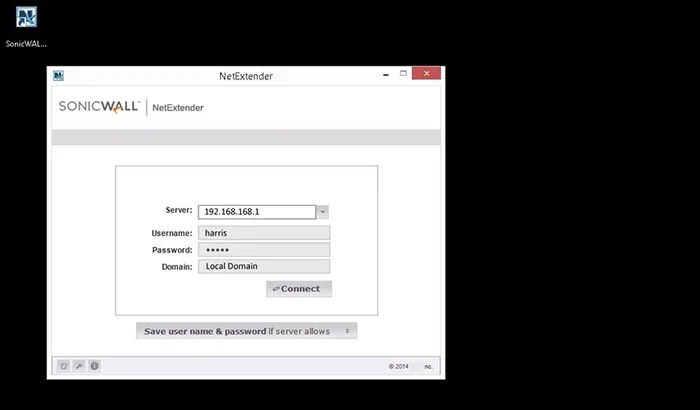
- Enter gateway details. Open NetExtender and type in the gateway address provided by your IT department. This is usually a web address or IP address.
- Log in. Enter your username and password. If your company uses multi-factor authentication, you will be prompted for a second verification step.
- Connect. Click the connect button. Once the tunnel is established, you will see a notification confirming the connection.
That is it. You are now connected to your company network. You can access files, applications, and shared resources as if you were in the office. If you run into issues, restarting the client or checking your internet connection usually resolves most problems.
Tips for a Smooth Setup
- Make sure your laptop has a stable internet connection before starting the setup process.
- Keep your operating system updated to avoid compatibility issues.
- Save your gateway address in a secure note so you do not have to look it up every time.
- If your company uses a SaaS environment for other tools, make sure your VPN connection does not conflict with those services.
Benefits of Using Netextender Sonicwall for Remote Work
Remote work is here to stay. And with it comes the need for secure, reliable connectivity. Netextender Sonicwall delivers several key benefits that make it a top choice for businesses.
Enhanced Security
The encrypted tunnel that Netextender Sonicwall creates protects your data from interception. This is especially important when you are working from public places like cafes, airports, or hotels. Without a VPN, your sensitive company data could be exposed to cyber threats. With NetExtender, you can work with confidence knowing your connection is secure.
Cost Efficiency
Because Netextender Sonicwall is bundled with many SonicWall security solutions, businesses do not need to invest in separate VPN software. This reduces overall IT costs. For small businesses especially, this bundled approach provides excellent value. You get enterprise-grade security without the enterprise-grade price tag.
Improved Productivity
When employees can access all company resources remotely, productivity goes up. There is no need to wait until you are back in the office to review a document or respond to a request. Netextender Sonicwall removes those barriers. Workers stay productive from anywhere in the world.
Centralized Control
IT teams benefit from the centralized management capabilities of Netextender Sonicwall. They can monitor connections, enforce security policies, and push updates from a single console. This makes managing a distributed workforce much easier and more efficient.
Common Issues and How to Troubleshoot Them
Like any software, Netextender Sonicwall can sometimes encounter issues. Here are the most common problems and their solutions.
Connection Failures
If the client fails to connect, first check your internet connection. Then verify that the gateway address is correct. Sometimes, firewall settings on your local network can block the VPN connection. In that case, try connecting from a different network or contact your IT support team.
Slow Performance
A slow VPN connection can be frustrating. This is often caused by high latency or bandwidth limitations. Try connecting to a server that is geographically closer to you. Also, check if split tunneling is enabled, as it can help improve speeds by routing only necessary traffic through the VPN.
Authentication Errors
If you get an authentication error, double-check your username and password. Make sure your account has not been locked or expired. If your company uses multi-factor authentication, ensure your second factor device (like a smartphone) is working properly.
Software Updates
Keeping Netextender Sonicwall up to date is important for both security and performance. Check for updates regularly or enable automatic updates if your IT department recommends it. Outdated clients can have vulnerabilities that expose your connection to risks.
Netextender Sonicwall vs Other VPN Solutions
There are many VPN clients on the market. How does Netextender Sonicwall compare to the competition?
Compared to standalone VPN services like NordVPN or ExpressVPN, Netextender Sonicwall is designed specifically for business use. It integrates directly with SonicWall security hardware, providing a unified security solution. Consumer VPNs focus on personal privacy, while NetExtender focuses on secure corporate access.
Compared to other enterprise VPN solutions, NetExtender stands out for its simplicity. The setup process is minimal, and the client interface is clean and intuitive. IT teams can deploy it across hundreds of devices without much effort. This ease of use is a major advantage for businesses that need to get remote workers online quickly.
If you are investing in laptop security and remote access tools, Netextender Sonicwall is one of the best investments you can make for your organization’s lifespan of PC security infrastructure. It protects your devices and data while keeping your workforce connected and productive.
Final Thoughts
Netextender Sonicwall is more than just a VPN client. It is a gateway to secure, productive remote work. Whether you are an employee connecting from home, a traveler staying productive on the go, or an IT admin managing a distributed team, this tool delivers what you need. It is secure, easy to use, and backed by one of the most trusted names in network security.
If your company uses SonicWall firewalls, there is no reason not to take advantage of NetExtender. It is already there, ready to go. Set it up, connect, and enjoy seamless access to your company network from any laptop, anywhere in the world. Secure remote access has never been this simple.
Frequently Asked Questions
Is Netextender Sonicwall free to use?
Netextender is typically included with SonicWall firewall and security gateway products. If your company already uses SonicWall hardware, you likely have access to NetExtender at no extra cost. However, standalone licenses may be required for some configurations.
Can I use Netextender Sonicwall on my personal laptop?
Yes, you can install NetExtender on a personal laptop as long as your company provides the gateway address and credentials. It works on Windows, macOS, and Linux, making it flexible for personal devices used for work.
Is Netextender Sonicwall safe for public Wi-Fi?
Absolutely. The encrypted tunnel created by NetExtender protects your data even on unsecured public Wi-Fi networks. This makes it one of the safest ways to access company resources from cafes, airports, and hotels.
What is the difference between Netextender and the SonicWall Global VPN Client?
NetExtender is an SSL VPN client designed for ease of use and quick setup. The Global VPN Client (GVC) uses IPsec and offers different features. NetExtender is generally preferred for its simplicity and broad compatibility, while GVC is used for specific IPsec-based connections.
Do I need admin rights to install Netextender Sonicwall?
Yes, you typically need administrator privileges on your laptop to install NetExtender. If you do not have admin rights, contact your IT department and they can assist with the installation.
Can Netextender Sonicwall be used for accessing cloud applications?
Yes, once connected through NetExtender, you can access cloud-hosted applications that are part of your company network. The VPN tunnel ensures that your connection to those apps remains secure and private.