What Is a Dc Power Jack
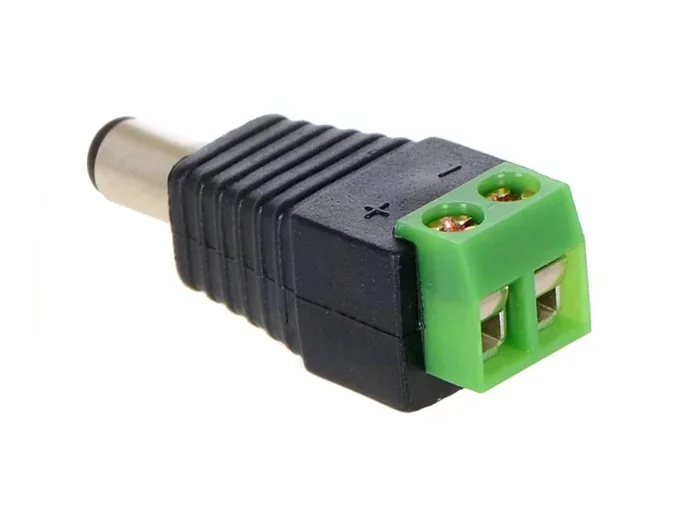
A DC power jack is the small port on your laptop where you plug in the charger to charge the battery and power the device. It converts alternating current from your wall outlet into the direct current your laptop needs to run. Understanding this component helps you troubleshoot charging issues and avoid costly repairs.
Have you ever plugged your laptop charger into the side of your computer and noticed it wiggles loose? Or maybe your laptop only charges when you hold the plug at a certain angle? If so, you have probably encountered a problem with the DC power jack. This tiny component plays a huge role in keeping your laptop powered and running smoothly.
In this guide, we will break down everything you need to know about the DC power jack. You will learn what it does, the different types you will find, how to spot when it is failing, and what you can do about it. Whether you are a student, a professional, or just someone who uses a laptop every day, this information will help you take better care of your device.
The DC power jack might be small, but it is one of the most important parts of your laptop. Without it, you cannot charge your battery or run your laptop directly from an electrical outlet. Let us dive into the details and make sure you understand this essential component inside and out.
Key Takeaways
- The DC power jack is the charging port on your laptop: It connects your AC adapter to the laptop’s internal power circuit.
- There are several types of DC jacks: Barrel jacks, USB-C power delivery, and proprietary connectors are the most common.
- Warning signs of a faulty jack include loose connections, sparks, and failure to charge: Catching these early saves money.
- Regular maintenance keeps your jack working: Clean it gently and avoid yanking the cable.
- Replacement is often straightforward: A technician can swap a damaged jack in under an hour.
- Power consumption varies by laptop model: Check how much power your device draws to choose the right adapter.
📑 Table of Contents
What Is A Dc Power Jack?
A DC power jack is the physical port on your laptop where you insert the charging cable or power adapter plug. It is also known as a DC connector, a power jack, or a charging port. Its main job is to deliver direct current from your wall adapter into the laptop’s power circuit. This current then charges the battery and powers the laptop while it is plugged in.
Most people never think about this port until something goes wrong. But the DC power jack handles a lot of daily wear and tear. Every time you plug in or unplug your charger, the jack absorbs the physical stress. Over time, this can lead to looseness, corrosion, or even complete failure.
The term DC stands for direct current. This means the electrical flow moves in one direction, unlike alternating current from your wall outlet. Your laptop charger converts AC to DC before sending it through the jack. This is why the jack is specifically designed for DC power delivery.
How Does It Work?
Inside the DC power jack, you will find metal contacts that connect with the plug of your charger. When you insert the plug, these contacts complete an electrical circuit. Power then flows from the adapter through the jack and into the laptop.
The jack also typically includes a detection pin. This pin tells the laptop that a charger is connected. When the laptop detects a valid charger, it starts charging the battery. If the detection pin is damaged or dirty, the laptop might not recognize the charger at all.
The voltage and current ratings of the jack must match your charger. Using the wrong adapter can damage the jack or the entire motherboard. Always check your laptop manual for the correct power specifications before swapping chargers.
Types Of Dc Power Jacks Found In Laptops
Not all DC power jacks look the same. Over the years, laptop manufacturers have used several different designs. Each type has its own shape, size, and purpose. Here is a closer look at the most common ones you will encounter.
Barrel Jack
The barrel jack is the most traditional type. It looks like a small cylindrical hole on the side of your laptop. You push a matching cylindrical plug into it. Barrel jacks come in different sizes, typically measured by the inner diameter and outer diameter of the plug.
Common barrel jack sizes include 5.5mm by 2.1mm and 5.5mm by 2.5mm. These measurements matter because using the wrong size plug can cause poor contact or damage. Always match the plug size to the jack exactly.
USB-C Power Delivery
Modern laptops are increasingly using USB-C ports for charging. This is a reversible connector, meaning you can plug it in either way. USB-C power delivery, or PD, can transmit both data and power through a single cable.
USB-C charging is convenient because you can use one charger for multiple devices. Many newer laptops charge through USB-C alone, eliminating the need for a bulky barrel adapter. However, not all USB-C ports support charging, so check your laptop specifications carefully.
Proprietary Connectors
Some laptop brands use their own unique connector designs. These proprietary jacks are not interchangeable with standard plugs. They are often found on older or specialized models. If you have a proprietary jack, you will need to find a replacement that matches your exact laptop model.
Common Signs Of A Faulty Dc Power Jack
A failing DC power jack shows clear warning signs. Catching these early can prevent further damage to your laptop. Here are the most common symptoms to watch for.
The Charger Feels Loose
If the plug wobbles inside the jack or falls out easily, the jack may be worn out. A healthy jack holds the plug snugly in place. Some looseness over time is normal, but if the plug slides around freely, something is wrong.
Intermittent Charging
Does your laptop only charge when you hold the plug at a specific angle? This is a classic sign of a damaged jack. The internal contacts are likely worn or broken, and they only make connection in certain positions.
No Charging At All
If your laptop refuses to charge even with a working charger, the DC jack could be the culprit. Before assuming the worst, try a different charger to rule out adapter failure. If the new charger also fails to charge, inspect the jack closely.
Burning Smell Or Sparks
This is a serious warning sign. If you smell something burning or see sparks when you plug in your charger, stop using it immediately. A damaged jack can cause short circuits, which may damage the motherboard or even pose a fire risk.
Scorch Marks Around The Port
Visual damage like discoloration or burn marks around the jack is never normal. This usually indicates overheating or an electrical short. Have the laptop inspected by a professional right away.
How To Protect And Maintain Your Dc Power Jack
Prevention is always better than repair. With a few simple habits, you can extend the life of your DC power jack and avoid frustrating charging problems. Here are practical tips that actually work.
Handle The Charger Plug Gently
Never yank the charger cable out by pulling on the wire. Always grip the plug itself and pull it straight out. Yanking the cable puts stress on the jack and can loosen the internal connections over time.
Keep The Port Clean
Dust and lint can build up inside the DC jack. This debris can block the electrical contacts and cause charging issues. Use a soft brush or compressed air to gently clean the port every few weeks.
Avoid Using The Laptop While Charging
This is not always possible, but reducing heavy use while charging generates less heat. Excess heat can weaken the jack and the battery over time. If you notice the laptop getting hot near the charging port, give it a break.
Use The Right Charger
Always use the charger that came with your laptop or one that matches the exact specifications. Using a cheap, incompatible charger can deliver the wrong voltage and damage the DC jack. Check the label on your original charger for the voltage and amperage ratings.
Store Your Laptop Properly
When traveling, protect the charging port from impact. Do not toss your laptop loosely into a bag. A hard bump against the port can bend or break the internal contacts of the jack.
Dc Power Jack Repair And Replacement
If your DC power jack is damaged, you have two main options: repair or replacement. The right choice depends on the extent of the damage and your budget. Let us explore both paths.
Can You Repair A Damaged Jack?
Minor issues like dirt or a bent pin can sometimes be fixed without replacing the entire jack. A technician can clean the port or solder a broken pin back into place. However, if the jack is physically broken or the motherboard solder points are damaged, a full replacement is usually necessary.
Some people try DIY repairs with online tutorials. While this is possible, it requires soldering skills and precision. One wrong move can destroy the motherboard. If you are not experienced with electronics repair, it is best to leave this to the professionals.
What Does Replacement Cost?
The cost of replacing a DC power jack varies. On average, you can expect to pay between $50 and $150 for parts and labor. The price depends on your laptop model, the type of jack, and the repair shop. Some high-end laptops may cost more due to complex disassembly requirements.
Keep in mind that the cost of repair is almost always less than the cost of replacing an entire laptop. A new DC jack is a small part, but it keeps your whole device functional.
How Long Does The Repair Take?
A professional DC jack replacement typically takes about one to two hours. The technician opens the laptop, desolders the old jack, installs the new one, and tests the charging function. Most repair shops can complete the job same day or within 24 hours.
When To Seek Professional Help
Some charging problems are simple to fix, but others need expert attention. If you notice any of the following situations, it is time to visit a qualified technician.
- You see physical damage: Cracks, bends, or scorch marks around the port mean the jack needs professional inspection.
- The laptop still does not charge after trying a new charger: This points to an internal issue that requires diagnostic tools.
- Your laptop shuts down immediately when unplugged: This could indicate a power circuit problem beyond just the jack.
- You are uncomfortable opening the laptop: Opening the chassis without proper tools and knowledge can cause accidental damage.
A trained technician can diagnose the exact problem and recommend the best solution. They have the tools and experience to handle delicate components safely. Do not risk making the problem worse by attempting repairs you are not confident about.
How Much Power Does Your Laptop Actually Use?
The amount of power your laptop draws through the DC jack depends on the model, screen size, and hardware inside. A basic office laptop might use around 45 to 65 watts when plugged in and running. A gaming laptop or a workstation can draw 100 watts or more.
Understanding your laptop’s power needs helps you choose the right charger and avoid overloading the DC jack. If you want to learn more about how much power your specific device uses, check out our detailed guide on how much power does a laptop use when plugged in. It covers wattage across many popular models.
Using a charger with too high or too low wattage can stress the DC power jack and shorten its lifespan. Always match the charger output to your laptop’s requirements for the best performance and safety.
Conclusion
The DC power jack is a small but essential part of every laptop. It is the gateway between your wall outlet and your device. Without a functioning jack, your laptop cannot charge or run on AC power.
Now that you understand what a DC power jack is, how it works, and how to care for it, you are better equipped to handle charging issues. Keep an eye out for warning signs, practice good charging habits, and seek professional help when needed. A little attention to this tiny port can save you time, money, and a lot of frustration down the road.
Take a moment today to inspect your laptop charging port. Clean it gently, check for looseness, and make sure you are using the right charger. These small actions go a long way in keeping your laptop powered and ready to go whenever you need it.
Frequently Asked Questions
Can I use a different charger if my DC power jack is damaged?
You can use a different charger temporarily, but only if it matches the exact voltage and amperage requirements of your laptop. Using an incompatible charger can worsen the damage to the DC jack or harm the motherboard. Always check the label on your original charger before switching.
Is it safe to keep using a laptop with a loose DC power jack?
It is not recommended. A loose jack can cause intermittent charging, which puts stress on the battery and the power circuit. Over time, the problem can worsen and lead to complete charging failure or even motherboard damage. Have it inspected as soon as possible.
How do I know if my DC power jack needs replacement or just cleaning?
If cleaning the port with compressed air does not fix the charging issue, the jack likely needs replacement. Signs like a wobbly plug, sparks, or scorch marks indicate physical damage that cleaning cannot fix. A professional technician can confirm the diagnosis quickly.
Can a damaged DC power jack affect laptop performance?
Yes, it can. If the jack fails to deliver stable power, the laptop may shut down unexpectedly, fail to charge, or run poorly on battery. Some laptops also throttle performance when they detect a power delivery problem. Fixing the jack restores normal operation.
What is the difference between a DC power jack and a USB-C charging port?
A traditional DC power jack is a round barrel-shaped port designed specifically for charging. A USB-C port is a smaller, reversible connector that can handle charging, data transfer, and video output. Many modern laptops use USB-C for charging, but the underlying DC power delivery function is the same.
How long does a DC power jack typically last?
A quality DC power jack can last 5 to 10 years with proper care. However, frequent plugging and unplugging, rough handling, and using the wrong charger can significantly shorten its lifespan. Gentle use and regular cleaning are the best ways to maximize its durability.