Why Are Usb Duplicators So Expensive
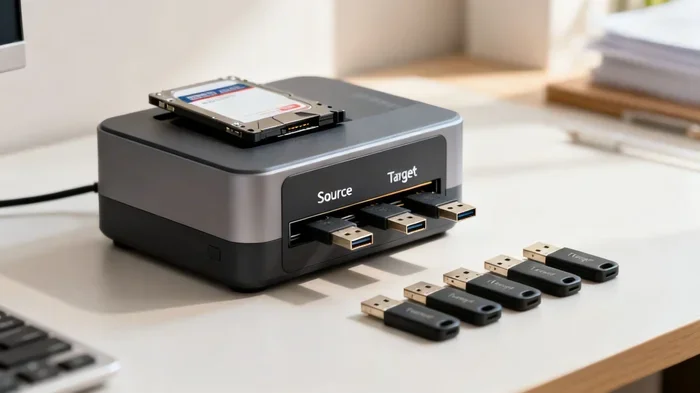
USB duplicators are expensive because they use specialized hardware, high-quality NAND flash components, and advanced cloning technology. Unlike simple cables or adapters, these machines handle bulk USB copying with precision, speed, and data integrity. Understanding what goes into their build explains the steep price.
Have you ever looked at a USB duplicator and thought, “Why does this thing cost so much?” It’s a fair question. A simple USB cable costs a few bucks. An M.2 NVMe SSD to USB 3.1 adapter won’t break the bank either. But a USB duplicator? That can set you back hundreds or even thousands of dollars.
The truth is, USB duplicators are not just fancy cables. They are specialized machines built for one purpose: copying data quickly and accurately across multiple USB drives at the same time. The technology inside them is far more complex than most people realize.
In this article, we will break down every reason why these devices carry such a hefty price tag. From the raw materials to the engineering behind them, you will understand exactly what you are paying for.
## What Exactly Is a USB Duplicator
A USB duplicator is a standalone device that copies data from one source drive to multiple target drives simultaneously. Think of it as a USB copy machine that works without needing a computer. You load the source drive, insert blank target drives, press a button, and the machine does the rest.
These devices are used by businesses, IT professionals, photographers, and anyone who needs to bulk USB copying on a regular basis. They come in different sizes, from small 1-to-5 port units to large 1-to-60 or even 1-to-120 port machines.
### How USB Duplicators Work
At a basic level, a duplicator reads data from a source drive and writes it to multiple destination drives at the same time. But the process is more complex than it sounds. Each port needs its own dedicated controller to manage the read and write operations independently.
The machine must also verify that the data was copied correctly. This sector-by-sector copy process ensures that every single bit matches the original. Without this verification, you could end up with corrupted files or incomplete transfers.
## The Hardware Behind the Price
The biggest reason USB duplicators are so expensive comes down to their internal hardware. These are not mass-produced consumer gadgets. They are purpose-built devices with specialized components.
### Dedicated Controller Chips
Every port on a duplicator needs its own controller chip. These chips manage the communication between the source drive and each target drive. They handle error correction, speed management, and data verification.
A standard USB hub uses cheap, generic chips. A duplicator uses industrial-grade controllers that cost significantly more. These chips are designed to handle continuous heavy workloads without failing.
### High-Quality NAND Flash and PCB Design
Inside a USB duplicator, you will find high-quality printed circuit boards and premium connectors. The board traces are thicker and better insulated to handle the heat generated during large-scale copying. The connectors are built to last thousands of insertion cycles.
The NAND flash memory used in the drives being duplicated also plays a role. When you are copying to high-performance drives like SanDisk Extreme portable NVMe SSDs, the duplicator must support fast transfer protocols. This requires additional hardware investment.
## Why Duplication Speed Drives Up Cost
Speed is one of the main selling points of USB duplicators. But faster speeds come with a price. A machine that can copy to 10 drives at 100MB per second needs serious processing power and heat management.
### USB 3.0 and USB 3.1 Transfer Rates
Modern duplicators support USB 3.0 and USB 3.1 transfer standards. These protocols offer much higher bandwidth than older USB 2.0 ports. But supporting these speeds requires better circuitry, stronger processors, and more advanced firmware.
When you multiply that by 10, 20, or 50 ports, the engineering challenge grows exponentially. Each port must maintain full speed without interfering with the others. This requires careful signal routing and electromagnetic shielding.
### Cooling Systems and Power Delivery
Fast copying generates heat. A large duplicator with 30 or more ports can produce a significant amount of thermal energy. To handle this, manufacturers add fans, heat sinks, and sometimes even liquid cooling systems.
Power delivery is another factor. Each USB port needs stable power to maintain consistent write speeds. Cheap power supplies would cause slowdowns or errors. Professional duplicators use high-quality voltage regulators and power circuits.
## How Duplicators Differ from Simple Adapters
Many people confuse USB duplicators with simple adapters. They are very different products. An M.2 NVMe to USB-C enclosure simply converts a drive’s connection type. It does not copy data on its own.
A USB duplicator, on the other hand, is a complete standalone system. It has its own processor, memory, firmware, and control interface. It can operate without any computer attached. This independence is what makes it so much more expensive.
### Built-In Verification and Error Checking
One feature that sets duplicators apart is built-in verification. After copying, the machine reads back every file and compares it to the original. If any errors are found, it flags them automatically.
This level of quality control is essential for businesses that distribute USB drives with important data. A corrupted copy could mean lost presentations, failed software installations, or broken marketing materials.
## Who Actually Needs a USB Duplicator
USB duplicators are not for everyone. But for certain industries and use cases, they are absolutely essential. Understanding who uses them helps explain why the price makes sense.
### Businesses and Corporations
Large companies use duplicators to distribute training materials, software, and presentations to employees. Instead of copying files one by one on a single computer, they can produce dozens of ready-to-go USB drives in a single session.
### Event Planners and Marketers
Conference organizers and marketers often load promotional content onto USB drives for attendees. A duplicator lets them prepare hundreds of drives overnight, ready for the next morning’s event.
### IT Departments and System Administrators
IT teams use duplicators to deploy operating systems, recovery tools, or software packages across multiple machines. The ability to create identical, verified copies saves hours of manual work.
### Photographers and Videographers
Professionals who shoot events or weddings sometimes need to deliver content on USB drives to clients. A duplicator lets them create backup copies and delivery copies at the same time.
## The Real Costs of Manufacturing a USB Duplicator
When you buy a USB duplicator, you are paying for more than just plastic and metal. Let us look at the real costs involved in manufacturing these devices.
### Research and Development
Building a reliable duplicator requires extensive R&D. Engineers must design firmware that works with dozens of different drive brands, capacities, and formats. They must also ensure compatibility with USB 2.0, USB 3.0, USB 3.1, and USB-C standards.
### Quality Control and Testing
Every unit must be tested before it leaves the factory. Manufacturers run stress tests to ensure each port performs at full speed. They also test the machine’s ability to handle error scenarios and recover gracefully.
### Small Production Runs
Unlike mass-market electronics, USB duplicators are produced in relatively small quantities. This means manufacturers cannot benefit from the same economies of scale that drive down prices for consumer gadgets.
## Are USB Duplicators Worth the Money
Whether a USB duplicator is worth the cost depends on your needs. If you only need to copy a few drives occasionally, renting a machine or using a computer with multiple ports might be a better option.
But if you regularly need to duplicate 10 or more drives, a dedicated duplicator will save you enormous amounts of time. The productivity gains often outweigh the upfront investment within just a few uses.
### Renting vs. Buying
For one-time projects, consider renting a duplicator. Many office supply stores and electronics rental companies offer them by the day or week. This lets you test the technology without committing to a purchase.
### Alternatives to Standalone Duplicators
Some people use software-based cloning tools on a multi-port USB hub. While this works, it is much slower and less reliable than a dedicated machine. The computer’s operating system has to manage each copy individually, which creates bottlenecks.
## Common Mistakes People Make When Buying USB Duplicators
Buying a USB duplicator is a significant investment. Avoid these common mistakes to get the best value for your money.
### Buying Based on Price Alone
The cheapest duplicator on the market is rarely the best choice. Low-cost machines often use inferior components that fail quickly or produce unreliable copies. Always check reviews and compare features before buying.
### Ignoring Compatibility
Not all duplicators work with every type of drive. Some struggle with high-capacity NVMe SSDs or USB-C drives. Before purchasing, confirm that the machine supports the drive types you plan to use.
### Overlooking Speed Ratings
A duplicator’s advertised speed is often the maximum speed under ideal conditions. Real-world speeds are usually lower, especially when copying to multiple drives simultaneously. Look for independent speed tests rather than relying on manufacturer claims.
## Quick Tips for Using a USB Duplicator
If you have decided to invest in a USB duplicator, here are some tips to get the best results.
– Always use high-quality USB drives from reputable brands. Cheap drives often have inconsistent performance and higher failure rates.
– Format your source drive before copying. This ensures a clean, error-free duplication process.
– Let the machine verify each copy. Do not skip the verification step, even if it adds time.
– Keep the duplicator in a well-ventilated area. Good airflow prevents overheating during long copying sessions.
– Update the firmware regularly. Manufacturers often release updates that improve compatibility and speed.
## Expert Insights on USB Duplicator Pricing
Industry experts agree that the high cost of USB duplicators is justified by the specialized components and engineering involved. According to technology analysts, the price of these machines has remained relatively stable over the past decade, even as consumer electronics have gotten cheaper.
“The core technology inside a USB duplicator is fundamentally different from what you find in a USB hub or adapter,” says one IT infrastructure specialist. “You are paying for industrial-grade reliability, parallel processing capability, and data integrity verification.”
As NAND flash memory prices have dropped, some duplicator manufacturers have been able to lower their prices slightly. But the specialized hardware and small production volumes keep these devices firmly in the premium category.
## Key Takeaways
Key Takeaways
- Specialized Hardware Costs: USB duplicators use dedicated controller chips that are far more advanced than standard USB cables or adapters.
- NAND Flash Quality Matters: High-grade NAND memory inside these machines drives up manufacturing costs significantly.
- Speed and Throughput Require Premium Components: Faster duplication speeds demand better circuitry and cooling systems.
- Not the Same as a USB Adapter: A USB adapter simply converts signals, while a duplicator actively clones data across multiple ports.
- Bulk Production Justifies the Investment: For businesses copying dozens of drives at once, the time saved offsets the upfront cost.
Key Takeaways
- Specialized Hardware Drives Cost: USB duplicators use industrial-grade controller chips and premium components that are far more expensive than standard consumer electronics.
- Speed Requires Better Engineering: Supporting fast USB 3.0 and USB 3.1 transfer rates across multiple ports demands advanced circuitry and cooling systems.
- Built-In Verification Adds Value: The ability to automatically verify every copied file ensures data integrity, which is critical for professional use.
- Small Production Runs Keep Prices High: Unlike mass-market gadgets, duplicators are produced in limited quantities, preventing cost savings from scale.
- Not the Same as a USB Adapter: A device like an M.2 NVMe SSD to USB 3.1 adapter simply converts connections, while a duplicator actively clones data across multiple drives simultaneously.
- Time Savings Justify the Investment: For businesses and professionals who regularly duplicate drives, the productivity gains quickly offset the upfront cost.
## Frequently Asked Questions
Can I use a regular USB hub instead of a duplicator?
A regular USB hub can connect multiple drives, but it cannot copy data on its own. You would still need a computer to manage each copy individually, which is much slower and less reliable than a dedicated duplicator.
How long does it take to duplicate a USB drive?
It depends on the drive capacity and the duplicator’s speed. A 64GB drive might take 10 to 15 minutes per copy on a basic USB 3.0 machine. Larger drives or slower machines can take longer, especially when copying to multiple targets simultaneously.
Do USB duplicators work with NVMe SSDs?
Many modern duplicators support NVMe SSDs, but not all of them do. Before purchasing, check the manufacturer’s specifications to confirm compatibility with the drive type you plan to use, such as when using an M.2 NVMe SSD to USB 3.1 adapter setup.
Is it cheaper to rent a USB duplicator than to buy one?
Yes, renting is almost always cheaper for occasional use. Rental prices typically range from $50 to $200 per day, making it a smart choice for one-time projects or infrequent needs.
What should I look for when buying a USB duplicator?
Look for the number of ports, supported USB standards, copy speed ratings, verification features, and brand reputation. Also confirm compatibility with the drive types and capacities you plan to use.
Are used USB duplicators a good option?
Used duplicators can save you money, but they may lack warranty coverage and the latest firmware updates. If you buy used, inspect the machine thoroughly and test it with your own drives before relying on it for important work.
## Final Thoughts
USB duplicators are expensive, but the price reflects real engineering, quality components, and specialized functionality. They are not simple cables or basic adapters. These are powerful machines designed to handle the demanding task of copying data accurately and quickly across multiple drives.
If you fall into the category of a business, IT professional, or content creator who regularly needs to duplicate USB drives, investing in a quality duplicator can save you significant time and headaches. The upfront cost pays for itself through efficiency and reliability.
Before you buy, do your research. Compare models, read reviews, and understand exactly what features you need. The right USB duplicator is a tool that will serve you well for years to come.
Frequently Asked Questions
What is Why Are Usb Duplicators So Expensive?
Why Are Usb Duplicators So Expensive is an important topic with many practical applications.