Why Does Hdmi Say Arc

HDMI ARC stands for Audio Return Channel, a feature that sends audio from your TV back to a soundbar or home theater system using a single HDMI cable. When your TV says HDMI ARC, it means the port is active and ready to handle audio signals in both directions. Understanding this feature helps you set up your home entertainment system without extra cables or confusion.
Have you ever looked at the back of your TV and noticed a port labeled HDMI ARC? Maybe you saw this label and wondered what it actually means. You are not alone. Many people buy a new soundbar or home theater system and run into this term without understanding what it does.
The good news is that HDMI ARC is simpler than it sounds. It is a smart feature built into HDMI cables that saves you from plugging in extra wires. This guide explains exactly why does HDMI say ARC, how it works, and what you need to do to use it.
Whether you are setting up a new TV or fixing a sound problem, understanding HDMI ARC makes a big difference. Let us break it all down in plain language so you can get your audio working the right way.
Key Takeaways
- HDMI ARC simplifies audio setup: It lets your TV send sound back to speakers or soundbars through one HDMI cable.
- Not all HDMI ports support ARC: Check your TV manual or look for the ARC label on the port.
- eARC is the newer, better version: It supports higher-quality audio formats like Dolby Atmos.
- Common issues include no sound or audio delays: Most can be fixed with simple settings changes.
- You need compatible devices on both ends: Your TV and audio device must both support ARC.
- HDMI ARC replaces optical audio in many setups: It reduces cable clutter and improves convenience.
📑 Table of Contents
What Does HDMI ARC Mean?
HDMI ARC stands for Audio Return Channel. It is a special feature found on HDMI ports that allows audio to travel in two directions. Normally, an HDMI cable sends video from a streaming box or game console to your TV. With ARC, the cable also sends audio back from the TV to a soundbar or speaker system.
This means you do not need a separate cable just for audio. One HDMI cable handles both video and sound. That is the main reason why does HDMI say ARC on your TV or device. It is telling you that this port supports two-way audio communication.
The ARC feature was introduced with HDMI version 1.4. Since then, it has become a standard on most modern TVs and audio devices. If your TV was made after 2009, there is a good chance it has at least one ARC port. Look for the word ARC printed next to the HDMI port on the back of your TV.
How Is ARC Different from a Regular HDMI Port?
A regular HDMI port only sends video and audio in one direction. It goes from your source device to your TV. ARC reverses part of that flow. It opens a channel for audio to go from the TV back to an external speaker system.
Think of it like a two-way street instead of a one-way road. The video still flows forward, but now audio can also travel backward. This simple change eliminates the need for optical audio cables or RCA connections.
Why Does HDMI Say ARC on My TV?
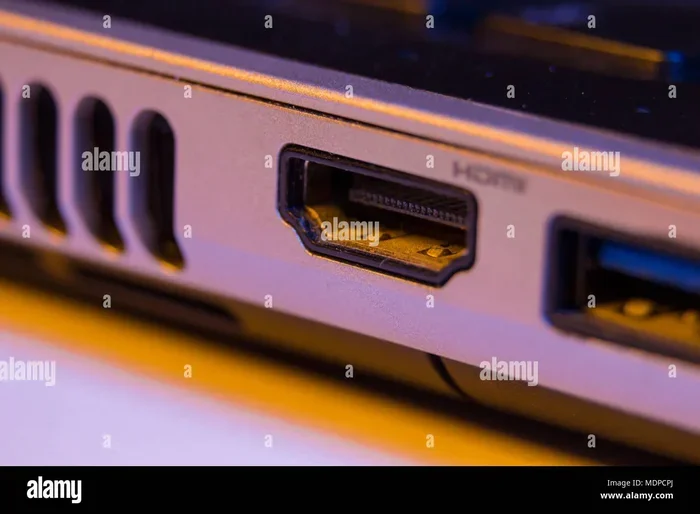
When you see the label HDMI ARC on your TV, it is identifying a specific port with special capabilities. Not every HDMI port on your TV supports ARC. Usually, only one or two ports have this feature. The label helps you know which one to use for your audio setup.
Manufacturers include this label so you do not plug your soundbar into the wrong port. If you connect to a non-ARC HDMI port, your TV will not send audio back to your speaker system. You will end up using your TV speakers instead, which is not ideal for most people.
Reasons Your TV Shows HDMI ARC
Here are the main reasons you will see HDMI ARC on your television:
- Your TV has an ARC-enabled port: This port is designed to send audio back to external devices.
- You are using a soundbar or home theater system: These devices rely on ARC for audio input from the TV.
- Your cable box or streaming device supports ARC: It can receive audio from the TV through the HDMI connection.
- You want to reduce cable clutter: ARC lets one cable handle both video and audio signals.
If your TV shows HDMI ARC but you do not see any sound, the problem is usually a setting issue. We will cover how to fix that later in this guide.
How HDMI ARC Works in Practice
Using HDMI ARC is straightforward once you understand the setup. You connect your TV to your soundbar or AV receiver using an HDMI cable. Plug one end into the HDMI ARC port on your TV and the other into the ARC port on your speaker system.
Once connected, you need to enable ARC in your TV settings. Go to Settings, then Sound, and look for HDMI Control or ARC. Turn it on. Your TV and soundbar should now communicate automatically.
When you turn on your TV, the soundbar powers on too. When you change the volume with your TV remote, the soundbar responds. This seamless integration is what makes HDMI ARC so useful. It removes the need for multiple remotes and extra cables.
Common Devices That Use HDMI ARC
Many audio devices work with HDMI ARC. Here are some common examples:
- Soundbars from brands like Samsung, Sony, and Vizio
- AV receivers for home theater systems
- Streaming devices with audio output support
- Gaming consoles that pass audio through HDMI
If you are having trouble with your speaker setup, issues like crackling or interference can sometimes point to connection problems. For example, if your speakers are crackling, it might be related to the HDMI signal or cable quality rather than the device itself.
HDMI ARC vs. eARC: What Is the Difference?
You may also see the term eARC on newer TVs. eARC stands for Enhanced Audio Return Channel. It is the upgraded version of standard ARC. Both serve the same basic purpose, but eARC offers much better performance.
Standard HDMI ARC supports common audio formats like Dolby Digital and PCM. It works well for most casual listening and TV watching. However, it cannot handle the latest high-resolution audio formats.
eARC, on the other hand, supports uncompressed audio and advanced formats like Dolby Atmos and DTS:X. These formats deliver immersive, theater-quality sound. If you have invested in a premium sound system, eARC ensures you get the full audio experience.
Which One Should You Use?
Check your devices to see which version they support. If both your TV and soundbar support eARC, use it. You will get better sound quality and fewer audio sync issues. If only standard ARC is available, it will still work fine for everyday use.
The connection quality also matters here. A high-speed HDMI cable is recommended for eARC to work properly. Standard HDMI cables may not carry the full bandwidth needed for enhanced audio formats.
Common HDMI ARC Problems and How to Fix Them
Even though HDMI ARC is designed to be simple, things can go wrong. Here are the most common issues and their solutions.
No Sound Through HDMI ARC
This is the number one complaint people have. You plug everything in, but you still hear sound from the TV speakers. The first thing to check is whether ARC is turned on in your TV settings. Go to Settings, then Sound, and enable HDMI Control or ARC mode.
Next, make sure you are plugged into the correct HDMI port. Not every port on your TV supports ARC. Look for the ARC label. If you are using an HDMI splitter or switch, it might not support ARC. Try connecting the cable directly to the TV.
Audio and Video Are Out of Sync
Sometimes the sound arrives a fraction of a second after the video. This lip-sync issue is frustrating but common. The fix is often in your TV audio settings. Look for an audio delay or sync option and adjust it until the sound matches the picture.
Restarting both devices can also help. Unplug your TV and soundbar for 30 seconds, then plug them back in. This resets the HDMI handshake and often resolves sync problems.
HDMI ARC Keeps Disconnecting
If your audio cuts out randomly, the HDMI cable might be faulty. Try a different high-quality cable. Also, check that the cable is firmly seated in both ports. A loose connection causes intermittent audio drops.
Another cause is firmware. Check if your TV and soundbar have pending updates. Outdated software can cause compatibility issues with ARC. Updating both devices often solves this problem.
For wireless audio solutions, Bluetooth speakers work differently than HDMI ARC devices, so keep that in mind when troubleshooting your setup.
Do You Need HDMI ARC?
Whether you need HDMI ARC depends on your setup. If you use your TV speakers and are happy with the sound, you probably do not need it. But if you have a soundbar, home theater system, or external speakers, HDMI ARC makes your life much easier.
Without ARC, you would need to run an optical audio cable from your TV to your soundbar. That means an extra cable, an extra remote, and more clutter on your entertainment center. HDMI ARC eliminates all of that with one simple cable.
Think about your setup. Do you want cleaner cables? Do you want to control your speaker volume with your TV remote? Do you want both video and audio to work through one connection? If yes to any of these, HDMI ARC is worth using.
For those looking at speaker options, the type of speaker you choose matters too. Even premium options like premium car and home speakers benefit from clean audio signal paths, and HDMI ARC provides exactly that for your home setup.
Quick Tips for Getting the Most Out of HDMI ARC
Follow these simple tips to ensure your HDMI ARC setup works flawlessly:
- Always use the ARC-labeled port: Plug your HDMI cable into the port marked ARC on both your TV and audio device.
- Enable CEC in your TV settings: Consumer Electronics Control is the technology behind ARC. Turn it on for full functionality.
- Use a high-speed HDMI cable: This ensures the best signal quality and supports eARC if available.
- Update your device firmware: Regular updates fix bugs and improve compatibility.
- Avoid using HDMI splitters: They often do not support ARC and can cause connection issues.
- Restart devices when troubleshooting: A simple power cycle fixes most ARC-related problems.
If you are still having trouble with audio quality after following these steps, consider whether your cable length or quality is the culprit. Sometimes a cheap or overly long HDMI cable degrades the signal enough to cause audio dropouts or low volume.
Final Thoughts
So, why does HDMI say ARC? It is simply telling you that the port supports Audio Return Channel. This feature lets your TV send audio back to a soundbar, speaker system, or AV receiver through a single HDMI cable. It is a convenient, clean, and effective way to manage your home audio setup.
Understanding HDMI ARC helps you avoid common setup mistakes. You will know which port to use, how to enable the feature, and how to troubleshoot when something goes wrong. Whether you are a casual viewer or a home theater enthusiast, HDMI ARC is a feature worth using.
Take a few minutes to check your TV settings and make sure ARC is enabled. You might be surprised at how much better your audio sounds and how much simpler your setup becomes. One cable, fewer clutter, and better sound. That is what HDMI ARC delivers.
If you are dealing with audio issues in your setup, remember that the problem might not always be the HDMI port itself. Sometimes speaker crackling or audio dropouts come from other parts of your system. A full check of your connections and settings goes a long way toward a perfect audio experience.
Frequently Asked Questions
What does HDMI ARC stand for?
HDMI ARC stands for Audio Return Channel. It is a feature that allows audio to travel from your TV back to an external speaker system through a single HDMI cable. This eliminates the need for extra audio cables like optical or RCA connections.
How do I know if my TV has HDMI ARC?
Look at the back or side of your TV for HDMI ports. Check if any port has the word ARC printed next to it. You can also check your TV manual or go to Settings, then Sound, and look for HDMI Control or ARC options. If the option exists, your TV supports ARC.
Why is there no sound when using HDMI ARC?
The most common reason is that ARC is not enabled in your TV settings. Go to Settings, then Sound, and turn on HDMI Control or ARC. Also make sure you are plugged into the correct ARC-labeled port. A faulty cable or incompatible device can also cause this issue.
Can I use HDMI ARC with any soundbar?
No, both your TV and soundbar must support HDMI ARC for it to work. Check the specifications of both devices. Most soundbars made after 2012 support ARC, but older or budget models might not. Look for the ARC label on the soundbar’s HDMI port.
Is eARC better than HDMI ARC?
Yes, eARC is the enhanced version of HDMI ARC. It supports higher-quality audio formats like Dolby Atmos and uncompressed audio. If your TV and soundbar both support eARC, you should use it for the best audio experience. Standard ARC works fine for basic setups.
Do I need a special HDMI cable for ARC?
Standard HDMI cables work for basic ARC. However, if you want to use eARC or experience the best performance, a high-speed HDMI cable is recommended. Avoid very long or low-quality cables, as they can degrade the audio signal and cause connection issues.
=== CONCLUSION ===
HDMI ARC is one of those features that makes your tech life easier once you understand it. Now you know why does HDMI say ARC and how it works to simplify your home audio setup. From enabling the right settings to choosing the correct port, you have everything you need to get started.
Take action today. Check your TV, find the ARC port, connect your soundbar, and enjoy cleaner audio with fewer cables. A great setup does not need to be complicated. HDMI ARC proves that simple solutions often work the best.