Is It Worth Getting a Usb Microphone
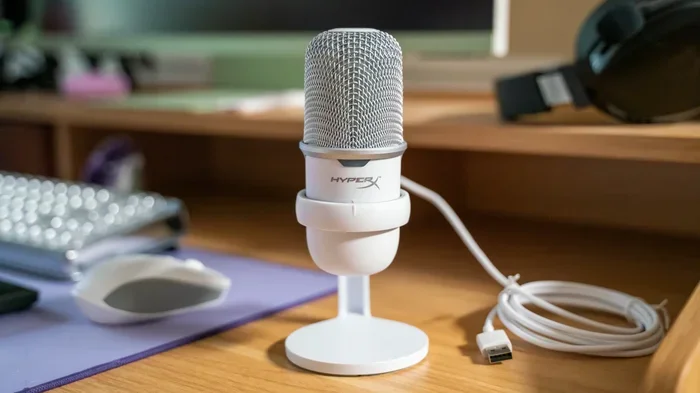
A USB microphone is one of the simplest ways to upgrade your audio quality without buying extra equipment. Whether you are podcasting, streaming, or just making video calls, a USB mic offers plug-and-play convenience that traditional microphones simply cannot match. In this guide, we break down the real benefits, drawbacks, and costs so you can decide if it is worth getting a USB microphone for your setup.
Have you been thinking about upgrading your audio setup? Maybe you want to start a podcast, stream your gaming sessions, or just sound better on video calls. A USB microphone seems like the easy answer. But is it really worth getting one? Let us walk through everything you need to know before spending your hard-earned money.
The short answer is yes, for most people. A USB mic removes the hassle of extra gear and gets you great sound fast. But like any purchase, it depends on what you need and what you are willing to compromise. We will cover all of that and more in this guide.
Key Takeaways
- Plug-and-play simplicity: No extra audio interface or sound card needed.
- Great for beginners: Easy setup means anyone can start recording or streaming quickly.
- Cost-effective: Many solid USB mics cost less than traditional setups with separate components.
- Limited upgrade path: You cannot swap out parts like you can with XLR microphones.
- Perfect for specific use cases: Ideal for podcasting, gaming streams, and video conferencing.
- Audio quality has improved: Modern USB mics rival entry-level traditional microphones.
📑 Table of Contents
- What Is a USB Microphone and How Does It Work?
- Benefits of Using a USB Microphone
- Drawbacks of USB Microphones
- USB Microphone vs. Traditional Microphone: Head-to-Head
- Who Should Get a USB Microphone?
- How to Choose the Right USB Microphone
- Common Mistakes to Avoid When Buying a USB Microphone
- Final Verdict: Is It Worth Getting a USB Microphone?
What Is a USB Microphone and How Does It Work?
A USB microphone is a microphone that connects directly to your computer through a USB cable. Unlike traditional microphones that need an external audio interface or sound card, a USB mic has the built-in audio interface right inside the unit. This means you plug it in, select it as your input device, and you are ready to go.
How Is It Different from a Regular Microphone?
A regular microphone, often called an XLR microphone, requires a separate piece of equipment to convert the audio signal into something your computer can understand. That equipment is called an audio interface. A USB mic skips that step entirely. The conversion happens inside the mic itself.
This difference might sound small, but it changes everything about how you set up your recording or streaming space. You do not need extra cables, extra power sources, or extra software. Just plug in and start talking.
Types of USB Microphones
Not all USB mics are the same. Here are the most common types you will come across:
- USB Condenser Microphones: These capture detailed, clear sound. They are popular for podcasting and voiceover work.
- USB Dynamic Microphones: These are more rugged and handle loud sounds well. They work great for streaming and gaming.
- USB Headset Microphones: These combine headphones and a mic in one. They are budget-friendly and portable.
- USB Desktop Microphones: These sit on your desk and offer a balance of quality and convenience.
Benefits of Using a USB Microphone
There are many reasons why a USB microphone has become the go-to choice for beginners and even professionals. Let us look at the biggest advantages.
Plug-and-Play Convenience
The number one benefit is how easy a USB mic is to use. You do not need to install drivers or configure complex settings. Most USB microphones work the moment you plug them in. This plug-and-play setup saves you hours of frustration and lets you focus on creating content instead of troubleshooting gear.
No Extra Equipment Needed
With a traditional microphone setup, you need an audio interface, cables, a microphone stand, and sometimes even a separate sound card. A USB mic bundles all of that into one device. This means less clutter on your desk and fewer things that can go wrong.
Plus, when you are building a PC setup, fewer cables means better cable management. If you are also looking into premium case fans to keep your system cool, a clean setup with a USB mic complements that nicely.
Great Audio Quality for the Price
Modern USB microphones have come a long way. Many models now offer studio-quality sound at prices that won’t break the bank. You can get clear voice reproduction, low background noise handling, and crisp voice clarity without spending hundreds of dollars on separate components.
Perfect for Multiple Uses
A USB mic works for almost anything. Use it for podcasting, YouTube videos, voice calls, video conferencing, or streaming on platforms like Twitch. If you are into gaming and want to look like a pro, you might also check out gaming glasses to complete your streamer setup.
Easy to Switch Between Devices
Most USB microphones work with Windows, Mac, and even some gaming consoles. You can unplug your mic from your desktop and plug it into your laptop without any hassle. This flexibility is a huge plus if you work from multiple setups.
Drawbacks of USB Microphones
USB microphones are not perfect. Before you buy one, it helps to know what you are giving up.
Limited Upgrade Options
With a traditional XLR microphone setup, you can swap out components as your needs grow. You can upgrade your audio interface, change your microphone capsule, or add accessories. With a USB mic, you are stuck with what you have. If the sound quality does not satisfy you later, you usually need to buy an entirely new microphone.
Shared Audio Processing
Because the built-in audio interface is part of the microphone, the processing quality depends entirely on that one component. A separate audio interface often provides better digital-to-analog conversion and more customization options. If you are serious about audio production, this limitation can matter.
Cable Length and Mobility
USB cables have a maximum recommended length of about 15 feet. If your desk setup is far from your computer, you might run into signal quality issues. You can buy active USB extenders, but that adds cost and complexity.
Less Customization
Many USB mics come with fixed settings. You cannot adjust gain staging, phantom power, or sample rate independently the way you can with a full recording setup. Some higher-end USB mics offer software controls, but they still do not match the flexibility of a modular setup.
USB Microphone vs. Traditional Microphone: Head-to-Head
Still not sure which type of microphone to get? Let us compare them side by side.
| Feature | USB Microphone | Traditional XLR Microphone |
|---|---|---|
| Setup Difficulty | Very Easy | Moderate to Complex |
| Extra Equipment Needed | None | Audio Interface, Cables |
| Cost (Entry Level) | $30 – $100 | $50 – $150 (plus interface) |
| Audio Quality | Good to Excellent | Excellent to Professional |
| Upgrade Path | Limited | Highly Expandable |
| Portability | Very Portable | Less Portable |
| Best For | Beginners, Streamers, Podcasters | Professionals, Studios |
As you can see, each type has its strengths. If you want simplicity and affordability, a USB microphone wins hands down. If you want maximum control and professional-grade sound, a traditional setup is the way to go.
Who Should Get a USB Microphone?
Not sure if a USB mic fits your situation? Here are some profiles of people who will really benefit from one.
You Are a Beginner Podcaster
If you are just starting a podcast, a USB mic lets you focus on content instead of gear. You can always upgrade later once you know what you need. Starting with a USB microphone keeps your initial investment low while still delivering solid audio quality.
You Stream or Create Content
Streamers and YouTubers benefit from the quick setup and clean sound of USB mics. You can go live in minutes without worrying about driver conflicts or latency issues. Just plug in, select the mic in your streaming software, and you are broadcasting.
You Work From Home
If you take frequent video calls for work, a USB mic will make a noticeable difference in how you sound to colleagues and clients. Clear voice clarity during meetings helps you sound more professional without any complicated setup.
You Have a Small or Shared Space
USB mics take up very little room. If you work in a small home office or share a workspace, the compact design of a desktop microphone keeps things tidy. You can also store it easily when you are not using it.
How to Choose the Right USB Microphone
Not all USB mics are created equal. Here are some tips to help you pick the right one for your needs.
Consider Your Primary Use
Are you recording vocals, streaming gameplay, or doing video calls? Different mics excel in different areas. Condenser USB mics shine for voice recording, while dynamic USB mics handle louder sources better. Think about what you will use it for most.
Check the Frequency Response
The frequency response of a microphone tells you which sounds it captures best. For voice work, look for a range around 20 Hz to 20 kHz. If you want your audio to sound as good as a quality speaker system, pay attention to this spec.
Read Reviews and Watch Demos
Before buying any USB mic, read user reviews and watch comparison videos. Pay attention to comments about background noise rejection, build quality, and ease of use. Real-world feedback is more valuable than manufacturer claims.
Set a Budget
You can find decent USB microphones for as low as $30. Mid-range options between $50 and $150 offer excellent sound quality for most users. You do not need to spend a fortune to get a mic that sounds great.
Think About Your Setup
If you already have a good PC setup with quality speakers or ceiling speakers, make sure your USB mic complements them. A mic with good noise cancellation will help your recordings sound clean even in a noisy room.
Common Mistakes to Avoid When Buying a USB Microphone
Steer clear of these common pitfalls when shopping for a USB microphone:
- Buying based on looks alone: A pretty design does not mean good sound. Always prioritize audio specs over aesthetics.
- Ignoring compatibility: Make sure the mic works with your operating system and any software you plan to use.
- Skipping the tripod or stand: A good microphone stand makes a big difference in sound quality and convenience.
- Overlooking return policies: Buy from retailers that allow returns so you can test the mic and send it back if it does not work for you.
- Expecting studio-quality results on a budget: Even the best budget USB mic has limits. Know what to expect at your price point.
Final Verdict: Is It Worth Getting a USB Microphone?
So, is it worth getting a USB microphone? For the vast majority of users, the answer is a strong yes. If you are a beginner, a casual streamer, a remote worker, or someone who wants better audio without the complexity, a USB mic is one of the best investments you can make.
The convenience factor alone makes it worthwhile. You get solid audio quality, a simple setup, and no extra equipment to buy or manage. Whether you are recording a podcast, joining a video call, or streaming your gameplay, a USB microphone delivers results that will genuinely improve your experience.
The only reason to skip a USB mic is if you are a professional audio engineer or someone who needs the highest level of customization and sound quality. In that case, a traditional XLR setup with a dedicated audio interface is the better choice.
For everyone else, go ahead and grab a USB microphone. Your listeners, viewers, and colleagues will notice the difference.
Frequently Asked Questions
Can I use a USB microphone for music recording?
Yes, you can use a USB microphone for music recording, especially for vocals and acoustic instruments. However, if you are recording a full band or multiple instruments at once, a traditional setup with an audio interface may give you better results. USB mics work great for solo recording and home studios.
Do USB microphones need special drivers?
Most USB microphones work without special drivers thanks to plug-and-play technology. Some brands may include optional software for adjusting settings like gain, EQ, or mute functions. Check the product specifications before buying to confirm driver requirements.
Can I connect a USB microphone to a smartphone or tablet?
Some USB microphones can connect to smartphones and tablets using an OTG adapter. However, compatibility varies by device and microphone model. Always check if the mic supports mobile devices before purchasing if that is important to you.
How long do USB microphones last?
A quality USB microphone can last anywhere from three to ten years depending on usage and care. Keep it in a safe place when not in use, avoid dropping it, and clean the grille regularly. The USB connector itself is usually the most durable part of the setup.
Is a USB microphone better than a built-in laptop microphone?
Absolutely. A USB microphone delivers far better sound quality than a built-in laptop mic. You will notice improved voice clarity, reduced background noise, and a more professional overall sound. The difference is immediate and noticeable in any recording or call.
What is the average price of a good USB microphone?
A good USB microphone typically costs between $30 and $150. Budget options under $50 still offer decent sound quality for casual use. Mid-range mics in the $50 to $150 range provide excellent audio quality for podcasting, streaming, and professional video calls.