Why Is Usb C So Special
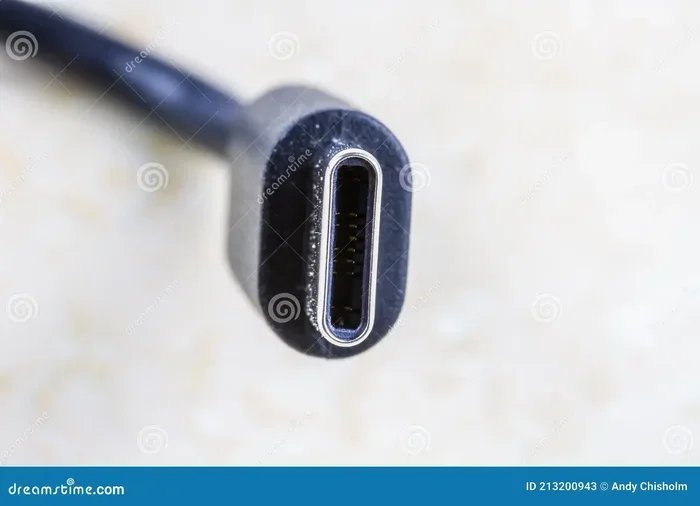
USB-C is special because it delivers blazing fast data transfer, powerful charging, and works with nearly every device today. It replaces older ports with one tiny reversible connector. Whether you are charging a laptop or transferring huge files, USB-C makes it faster and easier than ever.
You have probably noticed that almost every new gadget uses the same small, oval-shaped port. It is called USB-C, and it has taken the tech world by storm. From laptops to phones to gaming controllers, USB-C is everywhere now. But what makes it so special? Why did it replace the old rectangular USB-A ports we used for years?
The answer comes down to speed, power, and convenience. USB-C was designed to be a one-size-fits-all connector. It charges your devices faster, moves files in seconds, and works with a huge range of accessories. In this guide, we will break down exactly why USB-C stands out and why it matters for your daily tech life.
Key Takeaways
- Universal Connector: USB-C works across laptops, phones, tablets, and accessories, replacing multiple old port types.
- Blazing Fast Speeds: USB 3.2 and Thunderbolt USB-C connections can move data at up to 40 Gbps.
- Power Delivery: USB-C can charge devices up to 100W, meaning one cable handles most of your gear.
- Reversible Design: The plug flips either way, so you never struggle to insert it correctly.
- Versatile Accessories: USB-C hubs, adapters, and cables open up a world of connectivity options.
- Future-Proof Technology: More devices are adopting USB-C every year, making it the standard going forward.
📑 Table of Contents
What Makes USB-C Different From Older Ports
Older USB ports like USB-A look like flat rectangles. You have probably flipped them three times before getting them into the right spot. USB-C solves that problem with a small, reversible connector. It is about the same size as a micro-USB plug but much more capable.
Here is what sets USB-C apart from older USB types:
- Reversible design: The plug fits either way, so there is no wrong side up.
- Smaller form factor: It is compact enough for thin laptops and small phones.
- Higher power output: USB-C can deliver up to 100 watts of power, enough to charge a full laptop.
- Faster data speeds: The latest USB-C standards move data much faster than USB-A ever could.
- Alternate modes: USB-C can carry video signals, meaning you can plug your laptop straight into a monitor.
USB-A served us well for over a decade, but it simply could not keep up with what modern devices need. USB-C was built from the ground up for today’s demands. It handles power, data, and video all through one tiny cable.
How Fast Is USB-C Really
Speed is one of the biggest reasons USB-C has become so popular. Let us look at the numbers and what they mean for real-world use.
USB-C Speed Tiers
Not all USB-C cables are the same. The speed depends on the USB standard the cable and port support. Here is a quick breakdown:
- USB 3.1 Gen 1: Up to 5 Gbps. Great for everyday file transfers.
- USB 3.1 Gen 2: Up to 10 Gbps. Handles large files with ease.
- USB 3.2 Gen 2×2: Up to 20 Gbps. Perfect for heavy data work.
- Thunderbolt 3: Up to 40 Gbps. The fastest USB-C option available.
- Thunderbolt 4: Also up to 40 Gbps with extra security and display features.
To put this in perspective, a 50GB video file that would take minutes to transfer over USB-A takes just seconds over a Thunderbolt USB-C connection. That is a massive difference if you work with large files every day.
When shopping for USB-C cables, always check the speed rating. A cheap cable may only support USB 2.0 speeds, which is just 480 Mbps. That is barely faster than the old USB-A standard. Look for cables that explicitly state their USB standard to get the best performance.
The Power Delivery Revolution
USB-C changed the game when it comes to charging. Before USB-C, you usually needed a separate charger for your laptop and a different cable for your phone. USB-C changed all of that with something called USB Power Delivery, or USB PD.
How USB Power Delivery Works
USB PD is a smart charging protocol built into USB-C. It lets devices negotiate the right amount of power they need. Your phone might pull 18 watts while your laptop pulls 65 watts, all through the same type of cable and port.
Here are some key benefits of USB-C power delivery:
- Up to 100W of power: Enough to charge even powerful gaming laptops.
- Bidirectional charging: Your device can both send and receive power through the same port.
- Fast charging: Many phones charge from 0 to 50% in under 30 minutes with USB-C PD.
- One charger for everything: A single USB-C charger can power your phone, tablet, and laptop.
This means less clutter and fewer chargers to carry around. You can use one USB-C charger and one cable for nearly all your devices. It is simpler, cleaner, and more efficient than the old charging setup.
Universal Compatibility Across Devices
One of the biggest reasons USB-C is so special is that it works with almost everything. Apple switched its entire MacBook lineup to USB-C. Most Android phones now use it. Even gaming consoles like the Nintendo Switch use USB-C for charging.
This universal adoption means you no longer need to carry a bag full of different cables. Whether you are at home, in the office, or traveling, one USB-C cable can handle most of your charging and data needs.
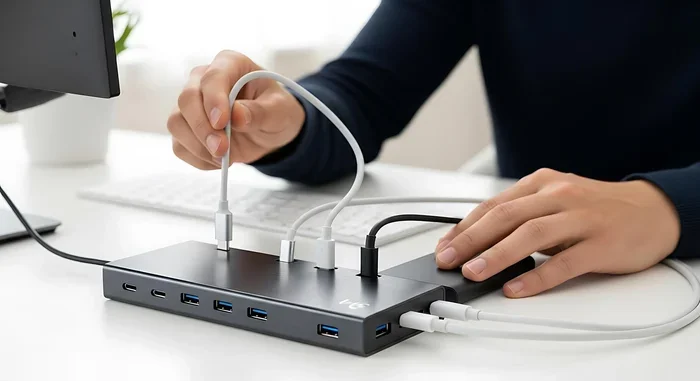
The accessories ecosystem has also grown around USB-C. You can find USB-C hubs, adapters, docks, and cables at almost any electronics store. Need to connect an older USB-A device? There is a USB-C adapter for that. Need to hook up an external display? USB-C with DisplayPort alternate mode handles that too. Want to expand your storage? An M 2 NVMe to USB-C SSD enclosure lets you connect super-fast NVMe drives to your laptop using just a USB-C cable.
The point is that USB-C has become the universal language of modern tech. As more devices adopt it, the ecosystem only gets stronger and more useful.
USB-C for Audio and Peripherals
USB-C is not just for charging and data. It has also become a standard for audio and peripheral devices. Many modern headphones now use USB-C instead of the old 3.5mm headphone jack. This shift means better digital audio quality and fewer dongles.
If you are into audio, you will find a wide range of USB Type C headphones that deliver studio-quality sound directly through the USB-C port. These headphones often include built-in digital-to-analog converters, which means better sound than what you get from a phone’s headphone jack.
Beyond audio, USB-C works with keyboards, mice, webcams, and external drives. The versatility of this single port is what makes it so powerful. Instead of plugging in five different cables for five different devices, you can often do it all through one USB-C hub or dock.
Common Myths About USB-C
With so much buzz around USB-C, there are quite a few misconceptions floating around. Let us clear up some of the most common ones.
Myth 1: All USB-C Cables Are the Same
This is simply not true. USB-C refers to the shape of the connector, not the speed or power capability. A basic USB-C cable might only support USB 2.0 speeds and 60 watts of power. A premium Thunderbolt 4 cable can handle 40 Gbps of data and 100 watts of power. Always check the specs before buying.
Myth 2: USB-C Means Thunderbolt
Thunderbolt uses the USB-C connector shape, but not every USB-C port supports Thunderbolt. Thunderbolt is a separate technology developed by Intel. You can tell if your port supports Thunderbolt by looking for the lightning bolt icon next to it.
Myth 3: USB-C Will Break Your Old Devices
USB-C does not make your old devices obsolete. You can easily use adapters and cables to connect your older USB-A devices to new USB-C ports. The transition is gradual, and manufacturers know this, which is why USB-C docks and adapters are so widely available now.
How to Choose the Right USB-C Accessories
With so many USB-C products on the market, it can be overwhelming to pick the right ones. Here are some quick tips to help you make smart choices.
- Check the USB standard: Look for USB 3.1 or higher for fast data transfer.
- Verify power ratings: Make sure your cable supports the wattage your device needs.
- Go for certified cables: Look for USB-IF certification to ensure quality and safety.
- Consider your needs: If you need video output, choose a USB-C cable that supports DisplayPort or HDMI alternate mode.
- Buy from reputable brands: Cheap knockoff cables can damage your devices or underperform.
Investing in good USB-C accessories pays off in the long run. A reliable cable and a quality hub will save you from frustration and keep your devices safe.
The Future of USB-C
USB-C is only going to become more important. The European Union has even mandated USB-C as the standard charging port for most electronic devices sold in the region. This means even more devices will adopt USB-C in the coming years.
The next generation of USB standards, like USB4, are built on the USB-C connector. This means USB-C will continue to get faster and more capable over time. What is special about USB-C today will only become more impressive tomorrow.
Whether you are a student, a professional, or a casual user, USB-C is the connector that will serve you well for years to come. Embracing it now means you are ready for whatever comes next in the world of tech.
Final Thoughts
USB-C is special because it solves problems that older ports never could. It is fast, powerful, reversible, and universal. One small connector handles charging, data transfer, video output, and audio all at once. No other port comes close to offering that level of versatility.
If you have not fully made the switch to USB-C yet, now is the perfect time. Pick up a few quality USB-C cables, maybe a hub or two, and start enjoying the benefits. Once you go USB-C, you will wonder how you ever lived without it.
The world of tech moves fast, and USB-C is leading the way. It is not just a connector, it is the foundation of a simpler, faster, and more connected tech experience.
Frequently Asked Questions
Is USB-C the same as Thunderbolt?
No, USB-C is a connector shape, while Thunderbolt is a technology that uses the USB-C connector. Not every USB-C port supports Thunderbolt, but every Thunderbolt port uses USB-C. Look for the lightning bolt icon to confirm Thunderbolt support.
Can I use any USB-C cable for fast charging?
Not all USB-C cables support fast charging. You need a cable that is rated for the power level your device requires. Check the cable specifications for wattage and USB standard before using it for fast charging.
Why does my USB-C cable only transfer data slowly?
This usually happens when the cable only supports USB 2.0 speeds. To get faster data transfer, make sure your cable supports USB 3.1 or higher and that both your device and cable match the same standard.
Can I connect a USB-A device to a USB-C port?
Yes, you can use a simple USB-C to USB-A adapter or cable. This lets you connect older devices to new USB-C ports without any issues. These adapters are inexpensive and widely available.
Are all USB-C ports on laptops the same?
No, USB-C ports can support different standards. Some may only support data and charging, while others support Thunderbolt, DisplayPort video output, or even eGPU connections. Always check your laptop specs to know what each port can do.
What is USB Power Delivery?
USB Power Delivery, or USB PD, is a charging protocol built into USB-C that allows devices to negotiate the right amount of power they need. It supports up to 100 watts and enables fast, safe charging for phones, laptops, and tablets.
=== CONCLUSION ===
USB-C has earned its place as the most important connector in modern technology. Its speed, power delivery, reversible design, and universal compatibility make it truly special. From charging your phone to connecting external storage like an M 2 NVMe to USB-C SSD enclosure, USB-C handles it all with ease. The shift to USB-C is not just a trend, it is the future of how we connect our devices. Embrace it today and enjoy a simpler, faster tech experience tomorrow.