2tb Nvme M 2 Ssd Gen 4
A 2TB NVMe M.2 SSD Gen 4 delivers blazing fast data transfer speeds up to 7000 MB/s using the PCIe Gen 4 interface. This guide covers everything you need to know, including how Gen 4 compares to older generations, top drive picks, and what to look for when buying one.
If you have been shopping for a new 2TB NVMe M.2 SSD Gen 4, you have probably noticed how fast prices have come down. These drives are incredibly fast, packing up to 7000 MB/s of sequential read speed in a tiny M.2 stick that fits right into your motherboard. Whether you are a gamer, a video editor, or someone who just wants a snappy system, a Gen 4 NVMe drive changes everything.
The 2TB NVMe M.2 SSD Gen 4 sits in a sweet spot right now. You get plenty of storage space, cutting-edge speed, and solid reliability all in one package. In this guide, we will break down exactly what makes these drives special, how they compare to older options, and what you should look for before buying one.
By the end of this article, you will know everything you need to make a confident purchase. We will cover the tech behind Gen 4, share real-world performance insights, and give you practical tips to get the most out of your new drive.
Key Takeaways
- Blazing Speeds: Gen 4 NVMe M.2 SSDs offer sequential read speeds up to 7000 MB/s, far outpacing SATA and Gen 3 drives.
- Massive Storage: A 2TB capacity gives you plenty of room for games, video files, and creative projects.
- Future-Proof: PCIe Gen 4 is widely supported on modern motherboards and offers excellent value right now.
- Thermal Management Matters: Gen 4 drives run hot, so a heatsink or thermal pad is essential for sustained performance.
- Price Has Dropped: 2TB Gen 4 NVMe SSDs are now affordable and offer the best price-per-gigabyte ratio.
- Compatibility Check: Always confirm your motherboard supports M.2 PCIe Gen 4 before purchasing.
📑 Table of Contents
What Is a 2TB NVMe M.2 SSD Gen 4?
Let us start with the basics. An NVMe M.2 SSD is a type of solid state drive that uses the NVMe protocol over PCIe lanes. Unlike older SATA SSDs, NVMe drives communicate directly with your CPU through the PCIe bus. This means much faster data transfer and lower latency.
The “Gen 4” part refers to the fourth generation of PCIe technology. Each new generation doubles the bandwidth available. Gen 4 offers roughly twice the speed of Gen 3, which means your 2TB NVMe M.2 SSD Gen 4 can read and write data at astonishing rates.
Understanding the M.2 Form Factor
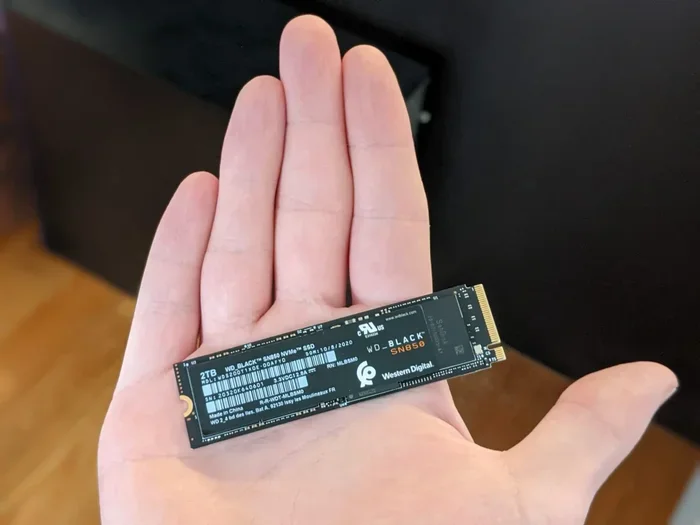
The M.2 form factor is a small, rectangular stick that plugs directly into your motherboard. The most common size is the 2280, which means 22 millimeters wide and 80 millimeters long. This compact design saves space inside your case and makes installation a breeze.
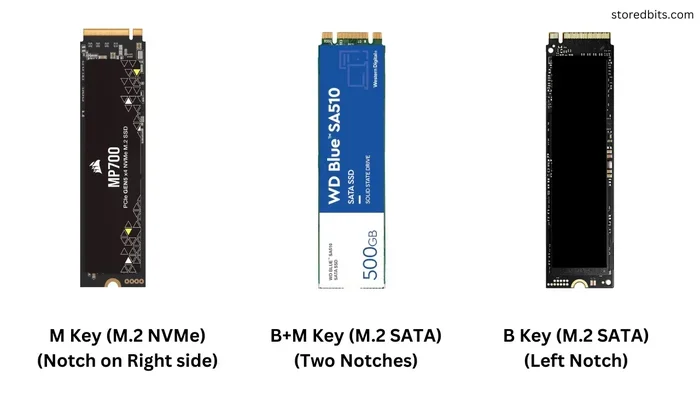
M.2 SSDs come in different key types, but the B-key and M-key are the most common for NVMe drives. Most modern motherboards have M.2 slots that support NVMe PCIe Gen 4 SSDs. Always double-check your motherboard manual to confirm compatibility before you buy.
How NVMe Differs from SATA SSDs
A traditional SATA SSD maxes out at about 550 MB/s. That was great years ago, but today it feels slow. An NVMe M.2 SSD can hit speeds over 7000 MB/s on Gen 4. That is more than ten times faster than SATA.
Here is a simple comparison:
- SATA SSD: Up to 550 MB/s read, 500 MB/s write.
- NVMe Gen 3 SSD: Up to 3500 MB/s read, 3000 MB/s write.
- NVMe Gen 4 SSD: Up to 7000 MB/s read, 5000 MB/s write.
The difference is night and day. If you have ever waited minutes for a large file to copy or watched your game stutter during loading screens, a Gen 4 drive will feel like a revelation.
How Gen 4 Compares to Gen 3 and Gen 5
Understanding where Gen 4 fits in the PCIe timeline helps you make a smart buying decision. Each generation brings improvements, but not all of them matter equally for everyday users.
Gen 3 vs. Gen 4
Gen 3 NVMe drives topped out at around 3500 MB/s read speeds. Gen 4 doubles that to 7000 MB/s. For most people, the jump from Gen 3 to Gen 4 is very noticeable, especially when transferring large files or booting up heavy applications.
Gen 4 also benefits from better NAND flash technology and larger DRAM caches on many models. This means sustained write speeds stay high even when the drive is full, which was a common problem with earlier Gen 3 drives.
Gen 4 vs. Gen 5
Gen 5 NVMe SSDs, like the Crucial T705 2TB Gen 5 SSD, push speeds even further to around 14,000 MB/s read. However, Gen 5 drives are still relatively new and expensive. For most users, a Gen 4 drive offers the best balance of speed, price, and availability.
Gen 5 also requires newer motherboards with explicit Gen 5 M.2 slots. Gen 4, on the other hand, works on a wide range of modern boards from Intel 500-series and AMD 500-series chipsets and beyond. That broad compatibility is a big advantage.
Which Generation Should You Choose?
If you are building a new PC or upgrading a current one, Gen 4 is the sweet spot right now. The prices have dropped significantly, and the speed difference over Gen 3 is massive. Gen 5 is exciting but not yet essential for most workloads.
Top Benefits of a 2TB NVMe M.2 SSD Gen 4
There are many reasons to choose a 2TB NVMe M.2 SSD Gen 4 for your system. Let us walk through the biggest advantages.
Blazing Fast Load Times
Games load faster, applications open instantly, and file transfers happen in seconds instead of minutes. If you are a gamer with a library of large titles, a Gen 4 NVMe drive cuts load screens dramatically. You will notice the difference the moment you boot up your system.
Perfect for Content Creators
Video editors, photographers, and 3D artists work with massive files. A 2TB Gen 4 drive handles 4K video editing, large Photoshop files, and complex 3D renders with ease. The fast sequential read and write speeds mean your editing software stays responsive even with heavy projects.
Plenty of Storage Space
Two terabytes is a generous amount of space. You can store dozens of AAA games, hours of raw video footage, and thousands of photos without worrying about running out of room. A 2TB drive also gives you the flexibility to keep your operating system and applications on the same drive as your files.
Energy Efficient and Quiet
Unlike traditional hard drives, NVMe SSDs have no moving parts. They use less power, produce no noise, and generate less heat than older storage options. This makes them ideal for laptops and quiet desktop setups alike.
What to Look for When Buying a 2TB NVMe M.2 SSD Gen 4
Not all Gen 4 SSDs are created equal. Here are the key factors you should consider before making a purchase.
Sequential Read and Write Speeds
The advertised speeds on a box are the maximum sequential rates. Look for drives that offer at least 7000 MB/s read and 5000 MB/s write. These numbers represent the top-tier Gen 4 performance you should expect.
Keep in mind that real-world speeds can vary based on your system configuration, the type of files you are working with, and how full the drive is. Always check independent reviews for real-world performance data.
DRAM Cache
A DRAM cache is a small memory chip on the SSD that stores the mapping table for data locations. Drives with DRAM tend to be faster and more consistent, especially during mixed workloads. Most quality 2TB NVMe M.2 SSD Gen 4 models include a DRAM cache, but always verify this before buying.
Thermal Management
Gen 4 NVMe drives generate more heat than their Gen 3 predecessors. Many models come with a heatsink or thermal guard built in. If your motherboard M.2 slot has a heatsink, you may not need an additional one. But if you are running demanding workloads for long periods, a good thermal solution is essential.
Endurance and Warranty
Look at the TBW (terabytes written) rating, which tells you how much data you can write to the drive over its lifetime. A 2TB drive typically has a TBW rating of 1200 TBW or higher. Most manufacturers also offer a 5-year warranty, which gives you peace of mind.
Price and Value
Prices for 2TB Gen 4 NVMe SSDs have dropped to around $130 to $170 depending on the brand and features. Compare prices across retailers and watch for sales. The price per gigabyte for a 2TB Gen 4 drive is excellent right now, making it a smart investment.
Installation and Setup Tips for Your 2TB NVMe M.2 SSD Gen 4
Installing an M.2 NVMe SSD is one of the easiest upgrades you can do. Here is a quick walkthrough to help you get started.
Step-by-Step Installation
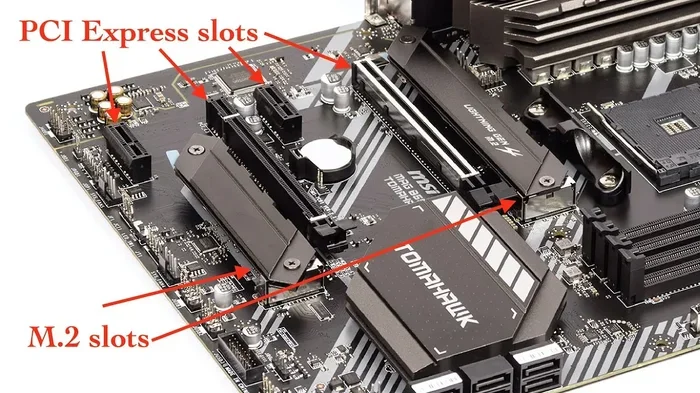
First, locate the M.2 slot on your motherboard. It usually sits near the CPU socket or along the bottom edge of the board. Remove the mounting screw, align the notch on the SSD with the key in the slot, and gently press the drive down at a 30-degree angle. Secure it with the screw and you are done.
Most modern motherboards support NVMe drives out of the box. If your system does not recognize the new drive, you may need to enable it in the BIOS settings. Look for the M.2 or NVMe configuration option and make sure it is set to “Enabled.”
Optimizing Performance After Installation
Once your drive is installed, make sure you have the latest NVMe drivers. For WD drives, you can check the WD Blue NVMe driver download page for the latest version. Keeping your drivers updated ensures you get the best performance and stability.
You should also enable TRIM support, which helps maintain long-term performance. Most modern operating systems handle this automatically, but it is worth checking in your OS settings.
Common Mistakes to Avoid
- Forgetting the thermal pad: If your drive does not come with a heatsink, add a thermal pad to prevent thermal throttling.
- Mixing up M.2 key types: Make sure your drive matches the M.2 slot key on your motherboard.
- Ignoring BIOS updates: A motherboard BIOS update can improve M.2 compatibility and performance.
Conclusion
A 2TB NVMe M.2 SSD Gen 4 is one of the best upgrades you can make for your PC or laptop. The combination of massive storage, lightning-fast speeds, and affordable pricing makes it a no-brainer for almost any user. Whether you are gaming, editing video, or just want a snappy everyday system, a Gen 4 NVMe drive delivers.
The technology is mature, prices are at an all-time low, and compatibility is widespread. There has never been a better time to make the switch from a SATA SSD or old hard drive to a 2TB NVMe M.2 SSD Gen 4. Your system will thank you every time you boot up or open a heavy application.
Take your time, compare a few models, and pick the one that fits your needs and budget best. With the right Gen 4 NVMe drive, you will wonder how you ever lived without it.
Frequently Asked Questions
Is a 2TB NVMe M.2 SSD Gen 4 worth it?
Absolutely. The speed difference over SATA and Gen 3 SSDs is dramatic, and 2TB gives you plenty of space for games, files, and applications. At current prices, the value is excellent.
Can I use a Gen 4 NVMe SSD in a Gen 3 M.2 slot?
Yes, Gen 4 SSDs are backward compatible with Gen 3 slots. However, the drive will operate at Gen 3 speeds, which maxes out around 3500 MB/s read. You will still get a big speed boost over SATA.
Do I need a heatsink for a 2TB NVMe M.2 Gen 4 SSD?
It depends on your workload. For light everyday use, the built-in thermal protection on most drives is enough. For heavy sustained transfers or gaming workloads, a heatsink helps maintain peak performance and prevents thermal throttling.
How long does a 2TB NVMe SSD last?
Most quality 2TB Gen 4 NVMe SSDs have a TBW rating of 1200 TBW or higher and come with a 5-year warranty. For typical home and office use, the drive should last many years of heavy use.
What is the difference between NVMe and M.2?
M.2 refers to the physical form factor of the drive, while NVMe is the communication protocol. An M.2 SSD can use either SATA or NVMe, but NVMe M.2 SSDs are much faster than SATA M.2 drives.
Will a Gen 4 NVMe SSD make my games load faster?
Yes, significantly. Gen 4 NVMe drives offer read speeds up to 7000 MB/s, which dramatically reduces game load times and texture streaming stutters compared to SATA SSDs or hard drives.