Samsung 970 Evo Plus 500gb Nvme M.2 Ssd

The Samsung 970 Evo Plus 500GB NVMe M.2 SSD delivers blazing fast PCIe Gen3 speeds, reliable TLC NAND flash memory, and excellent gaming and multitasking performance. This solid state drive is a top choice for anyone upgrading a laptop or desktop with a fast boot drive. Read on for our full in-depth review and honest take.
The Samsung 970 Evo Plus 500GB NVMe M.2 SSD has been one of the most popular solid state drives on the market for several years now. If you are looking to speed up your computer or build a new system, this drive keeps popping up in recommendations. But is it still worth buying in 2024 and beyond? Let us dive deep into everything you need to know.
This NVMe M.2 SSD uses the PCIe Gen3 interface and Samsung’s trusted V-NAND technology. It is designed for everyday users, gamers, and professionals who need fast storage without breaking the bank. Whether you want a boot drive for your operating system or a fast secondary drive for games and apps, the 970 Evo Plus delivers.
In this review, we will cover the design, speed benchmarks, real-world performance, pros and cons, and who should buy this drive. We will also compare it to some alternatives so you can make the best decision for your needs.
Key Takeaways
- Blazing Speeds: Sequential read speeds up to 3,500 MB/s and write speeds up to 3,200 MB/s make this one of the fastest PCIe Gen3 NVMe M.2 SSDs available.
- Reliable TLC NAND: Samsung 3-bit V-NAND TLC flash provides durability and consistent performance over time.
- Great for Gaming: Load times drop significantly, making this Samsung SSD a favorite among gamers and content creators.
- Easy Installation: The standard M.2 2280 form factor fits most modern laptops and desktops without any extra adapters.
- DRAM Cache Included: A dedicated DRAM buffer helps maintain fast random read/write performance for everyday tasks.
- Good Value: At around $60-$75, the 500GB model offers a solid balance of speed and price for most users.
📑 Table of Contents
What Makes the Samsung 970 Evo Plus 500GB Stand Out
The Samsung 970 Evo Plus 500GB NVMe M.2 SSD stands out because it combines speed, reliability, and value in one package. Samsung has a long history of making quality storage devices, and this drive is no exception. It uses a Phoenix controller paired with 3-bit V-NAND TLC flash memory.
Here is what makes this Samsung SSD special:
- PCIe Gen3 x4 Interface: This gives you much faster speeds than a traditional SATA SSD. You get up to 3,500 MB/s read and 3,200 MB/s write speeds.
- V-NAND TLC Flash: Samsung’s 3-bit Vertical NAND technology stores more data per cell. This improves endurance and overall reliability.
- DRAM Cache: A dedicated memory buffer helps the drive handle small file operations quickly. This matters for multitasking and boot times.
- M.2 2280 Form Factor: The standard size fits most modern motherboards and laptops. No extra cables or adapters needed.
- 5-Year Warranty: Samsung backs this drive with a solid warranty for peace of mind.
Understanding NVMe vs SATA SSDs
Before we go further, it helps to understand why NVMe M.2 SSDs are faster than traditional SATA drives. NVMe stands for Non-Volatile Memory Express. It is a protocol designed specifically for flash storage. Unlike SATA SSDs that max out around 550 MB/s, NVMe drives can reach speeds over 3,000 MB/s.
This means your operating system boots in seconds, games load much faster, and large files transfer in a blink. The Samsung 970 Evo Plus 500GB NVMe M.2 SSD takes full advantage of this technology. If you are still using a SATA drive, upgrading to this NVMe M.2 SSD will feel like a completely new computer.
Design and Build Quality
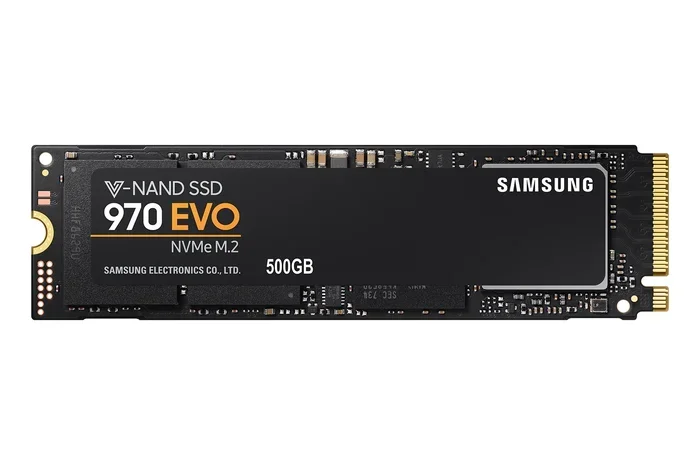
Samsung keeps the design simple and effective. The 970 Evo Plus comes in a standard M.2 2280 stick format. It is about the size of a gum stick and slides right into the M.2 slot on your motherboard. No cables, no fuss.
The aluminum heat spreader on top helps manage thermal management during heavy workloads. Under normal use, the drive stays cool. But during sustained writes or large file transfers, temperatures can climb. Samsung includes a nickel coating on the controller to help with heat dissipation.
For most users, the thermal performance is more than adequate. If you are running in a tight enclosure or doing heavy video editing, you might want to add a small M.2 NVMe heatsink. But for everyday use and gaming, the built-in cooler handles the job well.
Performance Benchmarks and Real-World Speed
Let us talk about numbers. The Samsung 970 Evo Plus 500GB NVMe M.2 SSD delivers impressive sequential performance. Here is a quick look at the specs:
- Sequential Read: Up to 3,500 MB/s
- Sequential Write: Up to 3,200 MB/s
- Random Read (4K): Up to 620,000 IOPS
- Random Write (4K): Up to 540,000 IOPS
- Interface: PCIe Gen3 x4 NVMe
- Capacity: 500GB
In real-world testing, these numbers hold up well. Booting Windows 11 takes about 8 to 12 seconds on this drive. Opening heavy applications like Photoshop or Premiere Pro feels instant. Game load times drop dramatically compared to a traditional hard drive or even a SATA SSD.
For gaming performance, this drive shines. Modern games like Cyberpunk 2077, Call of Duty, and Hogwarts Legacy load noticeably faster on the 970 Evo Plus. The DRAM cache helps with maintaining consistent speeds even when the drive is nearly full.
How Does It Compare to Other Samsung Drives
If you are considering other options, the Samsung 970 Evo Plus 1TB NVMe SSD offers double the storage for a small price increase. Both drives share the same controller and NAND technology. The main difference is capacity. For most users, 500GB is enough for an OS drive plus a few games. But if you store lots of media or work with large files, the 1TB version might be a better fit.
You can also check out the Crucial P310 1TB PCIe Gen4 NVMe 2280 M.2 SSD if you want a Gen4 option. It is faster in sequential speeds but uses a different controller and does not include DRAM cache. Each drive has its strengths depending on your needs.
Who Should Buy the Samsung 970 Evo Plus 500GB
This Samsung 970 Evo Plus 500GB NVMe M.2 SSD is a great fit for several types of users. Here are the best use cases:
- Budget Builders: If you are building a PC on a budget but still want fast storage, this drive hits the sweet spot between price and performance.
- Gamers: The fast load times and responsive performance make it ideal for gaming setups. Pair it with a decent GPU and CPU and you have a great gaming machine.
- Office and Students: Booting into Windows, opening Word, browsing the web, and multitasking all feel snappy on this drive.
- Content Creators: Video editors and photographers benefit from the fast write speeds when working with large media files.
- Upgrade Seekers: If your laptop or desktop still uses a slow HDD or SATA SSD, this NVMe M.2 SSD will breathe new life into your system.
Who Should Look Elsewhere
While the 970 Evo Plus is excellent, it is not perfect for everyone. If you need more than 500GB of storage, you should look at higher capacity options. The Samsung 970 Evo Plus 1TB NVMe SSD or a 2TB NVMe M.2 SSD would be better choices. Also, if you need the absolute fastest speeds, a PCIe Gen4 or Gen5 drive like the Crucial T705 PCIe Gen5 NVMe M.2 SSD might be more suitable.
Pros and Cons
Pros
- Excellent sequential speeds for a PCIe Gen3 drive
- Reliable V-NAND TLC flash with good endurance
- DRAM cache for consistent random performance
- Easy M.2 2280 installation in most systems
- Affordable price point around $60-$75 for 500GB
- 5-year warranty from Samsung
- Great for gaming and everyday use
Cons
- 500GB may feel limiting for heavy game libraries or large media collections
- PCIe Gen3 is slower than newer Gen4 and Gen5 drives
- Temperatures can rise during sustained heavy workloads without additional cooling
- Not the absolute fastest option available in the current Gen4 and Gen5 lineup
Installation and Setup Tips
Installing the Samsung 970 Evo Plus 500GB NVMe M.2 SSD is straightforward. Most modern motherboards have an M.2 slot right on the board. Here are some quick tips:
- Check your motherboard manual for the M.2 slot location. Some boards have multiple slots, and some share bandwidth with SATA ports.
- Use the included M.2 screw to secure the drive. Do not overtighten it.
- Install Samsung Magician Software after setup. This free tool lets you update firmware, run benchmarks, and optimize performance.
- Enable NVMe mode in BIOS if the drive is not showing up. Some older BIOS versions need this setting toggled on.
- Consider a heatsink if your case has limited airflow. Even a basic M.2 NVMe enclosure with a fan can help keep temperatures in check.
For users who want to protect their drive outside the system, an NVMe M.2 SSD enclosure is a handy accessory. These allow you to use the drive as portable storage or for backups on the go.
Final Verdict and Conclusion
The Samsung 970 Evo Plus 500GB NVMe M.2 SSD remains a fantastic choice for users who want fast, reliable storage at a reasonable price. It delivers excellent sequential and random performance, easy installation, and Samsung’s trusted build quality. The DRAM cache and V-NAND TLC flash make it a well-rounded drive for gaming, productivity, and everyday use.
While newer Gen4 and Gen5 drives offer higher top speeds, the 970 Evo Plus still holds its own for most real-world tasks. The price-to-performance ratio is hard to beat. If you need a fast boot drive or a reliable gaming storage solution, this drive continues to be a strong pick.
For those who want more capacity, consider the Samsung 970 Evo Plus 1TB NVMe SSD or explore options like the 512GB NVMe M.2 SSD lineup for a middle ground. Whatever you choose, the Samsung 970 Evo Plus series proves that quality solid state drives do not have to be expensive.
Bottom line: if you want a proven, fast, and dependable NVMe M.2 SSD that gets the job done without any headaches, the Samsung 970 Evo Plus 500GB is a purchase you will not regret.
Frequently Asked Questions
Is the Samsung 970 Evo Plus 500GB NVMe M.2 SSD good for gaming?
Yes, absolutely. The fast sequential read speeds and responsive random performance make this NVMe M.2 SSD excellent for gaming. Game load times are significantly shorter compared to traditional hard drives or SATA SSDs. Most gamers will notice a big improvement in how quickly levels and assets load.
How does this drive compare to the Samsung 970 Evo Plus 1TB version?
Both drives use the same controller and V-NAND TLC flash technology. The only real difference is storage capacity. The 1TB version gives you double the space for the same performance. If you plan to install many games or store large files, the 1TB model is the better choice.
Can I use this SSD in a laptop?
Yes, the M.2 2280 form factor is compatible with most modern laptops that have an M.2 slot. Just make sure your laptop supports NVMe PCIe drives. Check your laptop’s manual or specifications before purchasing. This Samsung SSD is a popular upgrade for older laptops that still use mechanical drives.
Does the Samsung 970 Evo Plus need a heatsink?
For most everyday use and gaming, the built-in aluminum heat spreader is sufficient. However, if you do sustained heavy workloads like video rendering or prolonged large file transfers, adding a heatsink can help maintain performance. Many motherboards now come with M.2 heatsinks built in, so check your board first.
What is the warranty on the Samsung 970 Evo Plus 500GB?
Samsung provides a 5-year limited warranty for the 970 Evo Plus series. This covers defects in materials and workmanship under normal use. The drive also has a generous TBW (terabytes written) rating, which means it is built to last for many years of regular use.
Should I buy this SSD or a PCIe Gen4 drive instead?
If you have a PCIe Gen4 or Gen5 compatible motherboard and want the absolute fastest speeds, a newer drive like the Crucial T705 PCIe Gen5 NVMe M.2 SSD might be a better option. However, for most users, the Gen3 speeds of the 970 Evo Plus are more than enough. The price difference is also a big factor, as Gen4 and Gen5 drives tend to cost more.