40gbps M.2 Nvme Ssd Enclosure
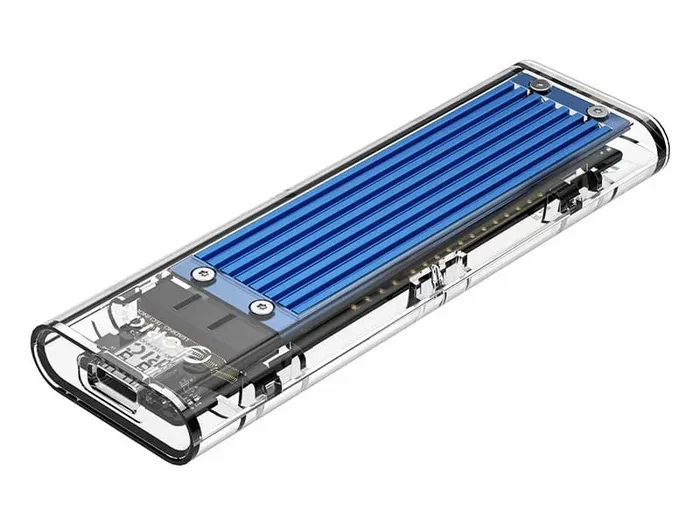
A 40gbps M.2 NVMe SSD enclosure turns your internal NVMe drive into an ultra-fast external storage solution. These enclosures deliver transfer speeds up to 40 gigabits per second, making them ideal for professionals who need rapid file access. Whether you are editing video or backing up large datasets, this setup offers serious performance gains.
A 40gbps M.2 NVMe SSD enclosure is one of the most exciting tools in the storage world right now. It lets you take a tiny M.2 NVMe solid-state drive and turn it into a high-speed external drive. The result is portable storage that moves files at incredible rates. If you have ever waited minutes for a large file to copy, you know why this matters.
These enclosures connect to your computer through a Thunderbolt 3 or Thunderbolt 4 cable. That connection is what makes the 40 gigabit per second speed possible. Without Thunderbolt, you would be limited to much slower transfer rates. So if you are building a fast external storage setup, understanding how these enclosures work is essential.
Many people ask whether a 40Gbps enclosure is worth the investment. The short answer is yes, especially if you work with large files daily. A standard USB 3.0 enclosure tops out around 10Gbps. A 40Gbps enclosure is four times faster. That difference becomes huge when you are moving hundreds of gigabytes of data.
The NVMe SSD M.2 enclosure market has grown rapidly in recent years. Brands like Acasis, Ugreen, and Orico now offer enclosures designed specifically for M.2 NVMe drives. The Acasis 40Gbps M.2 NVMe SSD enclosure, for example, has become a popular choice among users who want reliable speed without breaking the bank. You can read more about it on our detailed Acasis review page.
## What Is a 40Gbps M.2 NVMe SSD Enclosure?
A 40gbps M.2 NVMe SSD enclosure is a protective shell that houses an M.2 NVMe solid-state drive and connects it to your computer externally. The enclosure itself contains a controller chip that manages data transfer between the drive and your system. This chip determines the maximum speed you can achieve.
M.2 is a form factor for SSDs. These drives are small, flat, and rectangular. They plug directly into a motherboard slot inside a desktop or laptop. But with an enclosure, you can use them outside the computer too. The NVMe protocol is what makes these drives so fast. It communicates directly over the PCIe bus, bypassing older bottlenecks found in SATA drives.
The 40Gbps speed refers to the maximum bandwidth the connection can handle. Thunderbolt 3 and Thunderbolt 4 both support this rate. USB4 also reaches 40Gbps. So when you buy a 40Gbps enclosure, you are investing in the fastest portable storage available today.
### How Does It Compare to SATA Enclosures?
A Ugreen M.2 NVMe SATA SSD enclosure supports both NVMe and SATA M.2 drives. This is useful because it gives you flexibility. However, SATA drives max out at around 6Gbps. Even an NVMe drive inside a SATA enclosure will not reach its full potential. You need a true 40Gbps enclosure to unlock NVMe speeds.
Here is a simple comparison of enclosure types:
– USB 3.0 Enclosure: Max speed around 5Gbps. Good for casual use but not for heavy workloads.
– USB 3.1 Gen 2 Enclosure: Max speed around 10Gbps. A solid step up for most users.
– Thunderbolt 3 Enclosure (40Gbps): Max speed around 40Gbps. Best for professionals and enthusiasts.
– Thunderbolt 4 Enclosure (40Gbps): Same 40Gbps bandwidth but with added security and display support features.
The jump from 10Gbps to 40Gbps is massive. A 100GB file that takes about 20 seconds to transfer on a 40Gbps connection might take over a minute on a 10Gbps setup. Over time, those savings add up significantly.
## Why Choose a 40Gbps Enclosure?
There are several compelling reasons to choose a 40gbps M.2 NVMe SSD enclosure over slower alternatives. Let us break them down.
### Speed That Matches Internal Drives
One of the biggest advantages is that a 40Gbps enclosure can nearly match the speed of an internal NVMe SSD. When your drive lives inside a computer, it benefits from a direct PCIe connection. A good 40Gbps external enclosure comes close to that performance. You get read speeds above 2000MB/s and write speeds that rival internal setups.
This matters if you are a video editor working with 4K footage. Copying large video files from an internal drive to an external one takes a fraction of the time. You spend less time waiting and more time creating.
### Portability Without Sacrificing Performance
External storage does not have to be slow. With a 40gbps M.2 NVMe SSD enclosure, you get a pocket-sized drive that delivers desktop-class speeds. You can carry terabytes of data in your bag and access it instantly. This is perfect for photographers who shoot on location or designers who work between multiple workstations.
The physical size of M.2 drives is tiny. They are smaller than a postage stamp. Combined with a compact enclosure, you get a highly portable solution that does not compromise on performance.
### Future-Proofing Your Storage
Technology moves fast. A 40Gbps enclosure ensures your external storage setup stays relevant. Even as new SSDs with faster NAND flash hit the market, a 40Gbps connection will keep up. You are investing in a solution that will serve you well for years.
## Key Features to Look For
Not all 40gbps M.2 NVMe SSD enclosure products are created equal. Here are the features you should prioritize when shopping.
### Thunderbolt 3 vs. Thunderbolt 4
Both Thunderbolt 3 and Thunderbolt 4 support 40Gbps speeds. However, Thunderbolt 4 adds some important extras. It enforces stricter certification standards, which means better reliability. Thunderbolt 4 also supports daisy-chaining multiple devices and connecting to external displays. If your budget allows, Thunderbolt 4 is the better choice.
### Drive Compatibility
Make sure the enclosure supports the M.2 form factor you own. Most NVMe SSD M.2 enclosure options support 2230, 2242, 2260, and 2280 drives. Some also support SATA M.2 drives, which adds versatility. Check the product specifications before purchasing to avoid compatibility headaches.
### Thermal Management
NVMe drives generate heat, especially during sustained transfers. A good enclosure includes a heatsink or fan to keep temperatures in check. Overheating can throttle your drive’s speed, which defeats the purpose of buying a 40Gbps setup. Look for enclosures with aluminum housings or active cooling.
### Build Quality and Portability
You want an enclosure that feels solid and well-built. Cheap plastic enclosures may crack or flex over time. Metal enclosures offer better durability and also help with heat dissipation. The M.2 NVMe SSD enclosure from Acasis, for instance, has a sleek metal design that feels premium and protects your drive.
### Software and Compatibility
Most 40Gbps enclosures are plug and play. You do not need to install special drivers. They work with Windows, macOS, and even some Linux distributions. However, if you want to use features like hardware encryption, check that the enclosure supports it.
## Top Uses for a 40Gbps NVMe Enclosure
A 40gbps M.2 NVMe SSD enclosure is not just a gadget for tech enthusiasts. It serves real, practical purposes across many fields.
### Video Editing and Content Creation
Video editors handle massive files daily. A 40Gbps enclosure lets you edit footage directly from an external drive without lag. You can also use it as a scratch disk for rendering projects. The speed difference compared to a traditional external HDD is night and day.
### Gaming Storage Expansion
Gamers with large libraries benefit from fast external storage. A 40Gbps NVMe enclosure lets you store and run games externally. Load times remain low because the drive is so fast. This is especially useful for laptop gamers who need extra storage without opening their device.
### Backup and Archiving
Need to back up your entire computer quickly? A 40Gbps enclosure makes this possible. You can back up terabytes of data in a fraction of the time it would take on a slower drive. For businesses and creatives, this means less downtime and more productivity.
### Professional Photography Workflows
Photographers who shoot in RAW format know how large their files can be. Transferring hundreds of RAW images from a memory card to an external drive happens in seconds with a 40Gbps setup. You can review and edit photos faster in the field.
## How to Set Up Your 40Gbps M.2 NVMe SSD Enclosure
Setting up a 40gbps M.2 NVMe SSD enclosure is straightforward. Follow these steps for a smooth experience.
First, make sure your computer has a Thunderbolt 3 or Thunderbolt 4 port. A regular USB-C port will not deliver 40Gbps speeds. Check your laptop or desktop specifications to confirm.
Next, insert your M.2 NVMe SSD into the enclosure. The drive slides into a slot and is secured with a screw or a click mechanism. Make sure it is seated properly for a stable connection.
Then, connect the enclosure to your computer using the Thunderbolt cable that comes in the box. Most systems will recognize the drive instantly. You may need to format the drive the first time you use it.
Finally, test the speed using a tool like Blackmagic Disk Speed Test or CrystalDiskMark. You should see read speeds near or above 2000MB/s. If your speeds are much lower, check that you are using a Thunderbolt port and not a standard USB-C port.
### Quick Tips for Best Performance
– Always use the Thunderbolt cable included with the enclosure.
– Keep the enclosure in a well-ventilated area during long transfers.
– Avoid moving the enclosure while data is being written.
– Update your enclosure firmware if the manufacturer releases updates.
– Use the enclosure on a supported operating system for best compatibility.
## Common Mistakes to Avoid
Even with a great 40gbps M.2 NVMe SSD enclosure, mistakes can hurt your performance. Here is what to watch out for.
### Using a Non-Thunderbolt USB-C Cable
This is the most common mistake. Many USB-C cables only support 10Gbps or even 5Gbps. You need a Thunderbolt-certified cable to reach 40Gbps speeds. Always check the cable specifications before assuming it will work.
### Ignoring Thermal Throttling
If your enclosure gets too hot, your NVMe drive will slow down to protect itself. This is called thermal throttling. Look for enclosures with built-in cooling solutions. Placing the enclosure on a flat, hard surface also helps airflow.
### Buying the Wrong Form Factor
M.2 drives come in different lengths. A 2280 drive will not fit in an enclosure designed for 2242 drives. Always match the enclosure to your specific SSD size before purchasing.
### Skipping Firmware Updates
Manufacturers release firmware updates that improve speed, stability, and compatibility. Skipping these updates means you might miss out on performance improvements. Check the manufacturer’s website periodically.
## Expert Insights
Storage experts agree that 40Gbps external enclosures represent a major leap forward. According to industry reviews, the M.2 NVMe SSD enclosure category has matured significantly. Build quality, thermal design, and compatibility have all improved in recent generations.
The Corsair MP600 Core XT M.2 NVMe SSD pairs beautifully with a 40Gbps enclosure for users who want both a fast drive and a reliable housing. This combination delivers consistent performance under heavy workloads. When building your setup, consider pairing a quality drive with a quality enclosure for the best results.
Experts also recommend considering your workflow needs. If you rarely transfer large files, a 10Gbps enclosure might be sufficient. But if speed is your top priority, there is no substitute for a 40Gbps connection.
## Conclusion
A 40gbps M.2 NVMe SSD enclosure is a powerful tool for anyone who needs fast, portable storage. Whether you are a video editor, photographer, gamer, or IT professional, the speed gains are undeniable. These enclosures bring internal NVMe performance to the outside world, giving you flexibility without compromise.
The key is choosing the right enclosure for your needs. Look for Thunderbolt connectivity, good thermal management, and solid build quality. Avoid common pitfalls like using the wrong cable or ignoring thermal throttling. With the right setup, you will wonder how you ever worked without one.
If you are ready to upgrade your external storage, explore the options available today. The technology is mature, prices are reasonable, and the performance difference is truly transformative.
Key Takeaways
- Blazing Speeds: A 40gbps M.2 NVMe SSD enclosure offers transfer rates far faster than USB 3.0 or SATA enclosures.
- Easy Setup: Most enclosures plug and play with minimal software installation required.
- Wide Compatibility: These enclosures support M.2 2230, 2242, 2260, and 2280 NVMe SSDs.
- Best for Professionals: Video editors, photographers, and data analysts benefit the most from 40Gbps speeds.
- Thunderbolt Matters: You need a Thunderbolt 3 or 4 port to reach full 40Gbps performance.
- Price Range Varies: Quality enclosures range from affordable to premium, depending on build and features.
Frequently Asked Questions
What is a 40Gbps M.2 NVMe SSD enclosure?
A 40gbps M.2 NVMe SSD enclosure is an external housing that holds an M.2 NVMe solid-state drive and connects to your computer at speeds up to 40 gigabits per second. It uses a Thunderbolt 3 or Thunderbolt 4 connection to deliver these blazing-fast transfer rates.
Do I need a Thunderbolt port to use a 40Gbps enclosure?
Yes, you need a Thunderbolt 3 or Thunderbolt 4 port to reach full 40Gbps speeds. A standard USB-C port will limit you to lower speeds. Always check your computer’s ports before purchasing a 40Gbps enclosure.
What M.2 SSD sizes are compatible with these enclosures?
Most NVMe SSD M.2 enclosures support 2230, 2242, 2260, and 2280 form factors. Some models also accept SATA M.2 drives. Always check the product specifications to confirm compatibility with your specific SSD.
How fast are 40Gbps enclosures in real-world use?
In real-world tests, a quality 40gbps M.2 NVMe SSD enclosure delivers read speeds above 2000MB/s and write speeds close to that range. Actual speeds depend on your NVMe drive, the cable quality, and your computer’s Thunderbolt implementation.
Can I use a 40Gbps enclosure for gaming?
Absolutely. A 40Gbps M.2 NVMe SSD enclosure works great for gaming. You can store and run games directly from the external drive with minimal load time differences compared to internal storage. This is especially useful for expanding laptop storage.
Are 40Gbps enclosures worth the price?
For professionals who work with large files daily, a 40Gbps enclosure is absolutely worth it. The speed gains save significant time during file transfers, backups, and editing workflows. Casual users who rarely move large files may find a 10Gbps enclosure sufficient.