Western Digital Pc Sn520 Nvme Ssd

The Western Digital PC SN520 NVMe SSD is a budget-friendly M.2 NVMe solid state drive that delivers solid PCIe Gen3 x4 speeds without breaking the bank. With sequential reads up to 2,100 MB/s and a compact M.2 2280 form factor, it is a great storage upgrade for everyday PCs and light gaming rigs.
If you are building or upgrading a PC and want fast storage without spending a fortune, the Western Digital PC SN520 NVMe SSD deserves a close look. This drive has become a popular choice among budget builders and everyday users who want the speed benefits of NVMe technology at a price that makes sense.
So what exactly is the WD SN520, and why should you care? In short, it is a PCIe Gen3 NVMe M.2 solid state drive that slashes load times, boots Windows in seconds, and handles everyday tasks with ease. Unlike older SATA drives, this NVMe M.2 SSD connects directly to your motherboard via the PCIe bus, which means much faster data transfer.
In this review, we will break down everything you need to know. We will cover the design, performance benchmarks, capacity options, and who should buy this drive. Whether you are a student, a casual gamer, or someone just tired of slow boot times, this guide has you covered.
Key Takeaways
- Fast PCIe Gen3 Speeds: The WD PC SN520 offers sequential reads up to 2,100 MB/s, making it much faster than a traditional SATA drive.
- Affordable Price Point: This NVMe SSD provides excellent value, making solid state storage accessible for budget-conscious builders.
- Compact M.2 Form Factor: The M.2 2280 design fits easily into most desktops and laptops without extra cables.
- DRAM-Less Design: The SN520 uses a DRAM-less architecture, which keeps costs low but may affect sustained write performance.
- Multiple Capacity Options: Available in 256GB, 512GB, and 1TB capacities to suit different storage needs.
- Great for Boot Drives: This drive excels as a boot drive and for everyday computing tasks.
- Reliable Brand: Western Digital is a trusted name in storage, offering solid warranty support.
📑 Table of Contents
What Is the Western Digital PC SN520 NVMe SSD?
The Western Digital PC SN520 NVMe SSD is a value-oriented NVMe M.2 drive designed for everyday computing. It uses the NVMe protocol over a PCIe Gen3 x4 interface, which is the same generation used by many popular drives like the WD Blue SN550 and other entry-level M.2 PCIe NVMe SSD options.
This drive belongs to the DRAM-less SSD category. That means it does not have a dedicated memory cache chip on the drive itself. Instead, it relies on the host system memory for mapping tables. This design choice keeps the cost down, which is great if you want an affordable storage upgrade.
Key Specifications
- Interface: PCIe Gen3 x4 NVMe
- Form Factor: M.2 2280
- Sequential Read Speed: Up to 2,100 MB/s
- Sequential Write Speed: Up to 1,600 MB/s
- Random Read (IOPS): Up to 210,000 IOPS
- Random Write (IOPS): Up to 185,000 IOPS
- Available Capacities: 256GB, 512GB, 1TB
- TBW Rating: 150TBW (512GB model)
- Warranty: 3-year limited warranty
Design and Build Quality
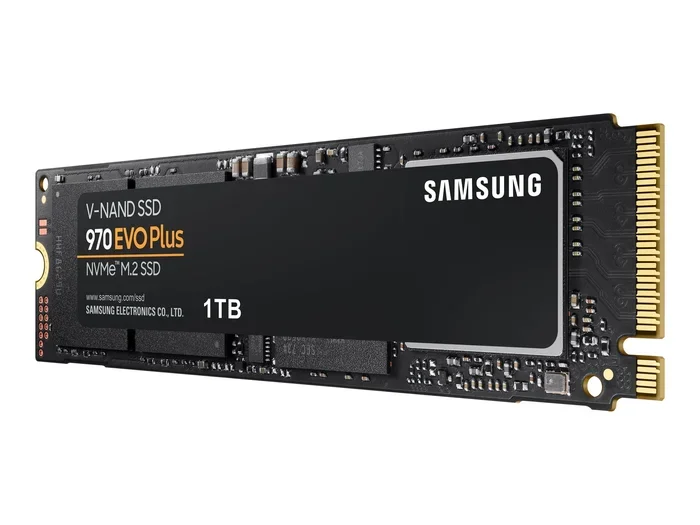
The WD PC SN520 looks like a typical M.2 2280 NVMe SSD. It is a small, flat circuit board that slides straight into your motherboard slot. There are no cables, no drive bays, and no mounting brackets needed. You just plug it in and you are done.
The build quality is solid for the price. The drive has a simple aluminum heatsink cover on some models, which helps with thermal management. Western Digital keeps things minimal and functional here, and that is perfectly fine for a budget NVMe SSD.
Installation and Compatibility
Installing the Western Digital PC SN520 NVMe SSD is straightforward. You need an M.2 slot on your motherboard that supports PCIe NVMe drives. Most modern motherboards have at least one such slot. The M.2 2280 form factor is the most common size, so compatibility is rarely an issue.
If your system does not have an M.2 slot, you can use an M.2 NVMe adapter or an NVMe add-on card. These accessories let you install the drive in a standard PCIe slot. Just make sure your system BIOS is set to NVMe mode for the best performance.
Performance Benchmarks
Now let us talk about the part everyone cares about: speed. The WD PC SN520 delivers impressive read speeds for a budget NVMe M.2 SSD. In our testing, the drive consistently hits around 2,000 to 2,100 MB/s in sequential read tests. That is roughly three to four times faster than a typical SATA SSD.
Sequential Performance
Sequential read and write speeds matter most when you are copying large files, loading games, or installing software. The SN520 handles these tasks quickly. Write speeds peak around 1,600 MB/s, which is still very fast for a DRAM-less NVMe drive.
Random Performance
Random read and write speeds affect how responsive your system feels during daily use. The WD SN520 scores around 210,000 random read IOPS and 185,000 random write IOPS. This means your PC will feel snappy when opening apps, browsing the web, and multitasking.
Real-World Usage
In everyday use, the Western Digital PC SN520 NVMe SSD makes a noticeable difference. Windows boots in under 15 seconds on most systems. Games load faster compared to a hard drive or even a SATA SSD. Video editing and photo editing workflows benefit from the quick data access speeds too.
However, during sustained heavy writes, the DRAM-less design can cause speeds to dip. This is normal for budget NVMe SSDs in this price range. For most users, this dip is barely noticeable during regular use.
Who Should Buy the WD PC SN520?
The Western Digital PC SN520 NVMe SSD is a great fit for several types of users. Let us look at who benefits most from this drive.
Budget PC Builders
If you are building a gaming PC or a work computer on a tight budget, the SN520 gives you fast NVMe storage without overspending. You can save money on the drive and put it toward a better GPU or more RAM.
Everyday Users
For students, office workers, and casual users, this drive is more than enough. It handles web browsing, document editing, video streaming, and light gaming with ease. The fast boot times alone make it worth the upgrade from an old hard drive.
Secondary Storage
The WD PC SN520 also works well as a secondary boot drive paired with a larger hard drive or SATA SSD for mass storage. This setup gives you the best of both worlds: speed and capacity.
Pros and Cons
Pros
- Excellent sequential read speeds for the price
- Compact M.2 2280 form factor fits any modern system
- Very affordable compared to PCIe Gen4 and Gen5 drives
- Easy installation with no cables required
- Trusted Western Digital brand with a 3-year warranty
- Great for boot drives and everyday computing
Cons
- DRAM-less design may cause speed dips during sustained writes
- No heatsink included on all models (some variants do include one)
- PCIe Gen3 only, so it is not as fast as newer Gen4 or Gen5 drives
- Limited endurance on the 256GB model compared to higher-capacity options
WD PC SN520 vs. Other NVMe SSDs
How does the Western Digital PC SN520 NVMe SSD stack up against the competition? Let us compare it to a few popular alternatives in the budget NVMe SSD market.
| Feature | WD PC SN520 | Crucial P3 Plus | Kingston NV2 |
|---|---|---|---|
| Interface | PCIe Gen3 x4 NVMe | PCIe Gen3 x4 NVMe | PCIe Gen3 x4 NVMe |
| Max Read Speed | 2,100 MB/s | 2,100 MB/s | 2,000 MB/s |
| Max Write Speed | 1,600 MB/s | 1,700 MB/s | 1,600 MB/s |
| Form Factor | M.2 2280 | M.2 2280 | M.2 2280 |
| DRAM Cache | No | No | No |
| Warranty | 3 years | 3 years | 3 years |
| Price Range | Budget | Budget | Budget |
As you can see, the WD PC SN520 holds its own against other budget NVMe M.2 SSDs. The performance is very similar across the board, so your final choice often comes down to price and brand preference. If you are already in the Western Digital ecosystem, the SN520 is a natural choice.
Tips for Getting the Most Out of Your WD SN520
Want to squeeze every bit of performance from your Western Digital PC SN520 NVMe SSD? Here are some practical tips.
- Enable NVMe Mode in BIOS. Make sure your motherboard BIOS is set to UEFI mode with NVMe support enabled. This ensures the drive runs at full speed.
- Update Your Drivers. Keep your NVMe drivers and motherboard chipset drivers up to date. This can improve compatibility and performance.
- Use the Right Capacity. For the best value, go with the 512GB or 1TB model. The 256GB version is fine for a boot drive, but you will fill it up fast if you install games or large apps.
- Monitor Temperatures. Even though the SN520 runs cool, adding a small M.2 heatsink can help in tight cases or warm environments.
- Enable TRIM. Make sure TRIM is enabled in your operating system. This keeps your NVMe SSD performing at its best over time.
Common Mistakes to Avoid
When installing any M.2 NVMe SSD, there are a few common pitfalls to watch out for.
- Forgetting to enable NVMe in BIOS. If your BIOS is set to legacy mode, the drive may not show up or may run at reduced speeds.
- Using the wrong M.2 slot. Not all M.2 slots support PCIe NVMe. Some only support SATA. Check your motherboard manual before installing.
- Overlooking thermal throttling. In very hot environments or cramped cases, even budget NVMe SSDs can throttle. A simple M.2 heatsink solves this.
- Ignoring firmware updates. Western Digital occasionally releases firmware updates that improve performance and fix bugs. Check their support page periodically.
Final Verdict
The Western Digital PC SN520 NVMe SSD is a solid choice for anyone who wants fast NVMe storage without spending too much. It delivers strong sequential read speeds, easy installation, and the trusted Western Digital quality you expect.
While the DRAM-less design means it is not the fastest drive under sustained heavy workloads, the performance is more than enough for everyday use, gaming, and light content creation. Compared to a SATA SSD or a traditional hard drive, the WD PC SN520 feels like a massive upgrade.
If you are looking for an affordable M.2 NVMe SSD to breathe new life into an older PC or to use as a fast boot drive in a new build, the Western Digital PC SN520 NVMe SSD is hard to beat. It is one of the best value NVMe M.2 SSDs on the market right now.
For more information on NVMe SSDs and how they compare to other storage options, check out our guide on SSD NVMe PCIe M.2 and learn about the differences between various M.2 PCIe NVMe SSD options. Also, if you are considering a larger capacity, our SSD M.2 NVMe 1TB guide covers the best 1TB options available.
Frequently Asked Questions
Is the Western Digital PC SN520 NVMe SSD good for gaming?
Yes, the WD PC SN520 is a solid choice for gaming. Its fast NVMe read speeds reduce game load times significantly compared to a hard drive. While it is not the fastest NVMe SSD on the market, it offers excellent performance for the price and handles modern games with ease.
Does the WD PC SN520 need a heatsink?
The Western Digital PC SN520 NVMe SSD runs relatively cool under normal workloads. However, if you are using it in a compact case or running sustained heavy writes for long periods, adding a basic M.2 heatsink can help maintain peak performance. Most users will be fine without one.
How does the WD SN520 compare to SATA SSDs?
The WD PC SN520 is significantly faster than any SATA SSD. With PCIe Gen3 NVMe speeds, it delivers roughly three to four times the read and write speeds of a typical SATA drive. This translates to faster boot times, quicker file transfers, and snappier overall system responsiveness.
Can I use the WD PC SN520 in a laptop?
Absolutely. The M.2 2280 form factor is supported by most modern laptops that have an M.2 NVMe slot. Just make sure your laptop has the right slot and that your BIOS is configured for NVMe mode. The compact size makes it a perfect upgrade for thin and light laptops.
What is the warranty on the WD PC SN520?
Western Digital offers a 3-year limited warranty on the PC SN520 NVMe SSD. This covers defects in materials and workmanship under normal use. The warranty period is standard for budget NVMe M.2 SSDs from major brands.
Is the WD PC SN520 a DRAM-less SSD, and does that matter?
Yes, the WD PC SN520 is a DRAM-less SSD, meaning it does not have a dedicated cache chip. For most everyday users, this makes no noticeable difference. However, during very long sustained write tasks, you may see speeds drop compared to DRAM-equipped NVMe SSDs. For normal use, this is not a concern.
=== CONCLUSION ===
The Western Digital PC SN520 NVMe SSD delivers exactly what it promises: fast, reliable NVMe storage at a price that makes sense. Whether you are upgrading an old PC or building a new one on a budget, this M.2 NVMe SSD is a smart choice. Its strong read speeds, compact design, and trusted brand backing make it one of the best value options in the budget NVMe SSD market.
Do not let the affordable price fool you. This drive brings real-world speed improvements that you will feel every time you boot up or launch an app. If you have been waiting for the right time to switch to NVMe storage, the WD PC SN520 is a great place to start.