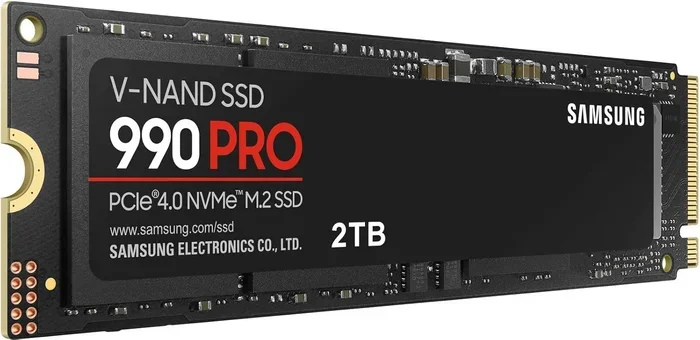
990 Pro Nvme M 2 Ssd
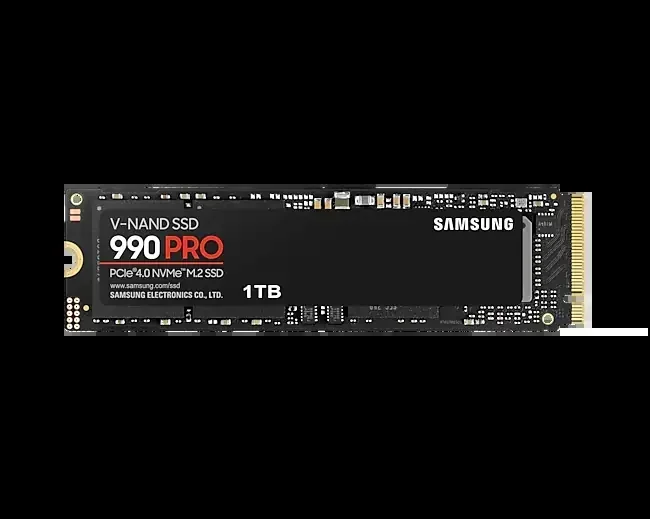
The 990 Pro NVMe M 2 SSD is one of the best solid state drives on the market right now. It delivers incredible read speeds up to 7,450 MB/s and writes at up to 6,900 MB/s. Whether you are building a gaming PC or upgrading a workstation, this drive offers top-tier NVMe M.2 performance that beats most competitors.
Key Takeaways
- Blazing Speeds: The 990 Pro NVMe M 2 SSD offers read speeds of 7,450 MB/s and write speeds of 6,900 MB/s.
- Multiple Capacities: Available in 500GB, 1TB, 2TB, and 4TB options to fit any budget.
- Top-Tier Endurance: The drive comes with a generous warranty and high TBW ratings for long-lasting reliability.
- PCIe Gen4 Performance: Built on the PCIe Gen4 NVMe protocol for fast data transfer.
- Great for Gaming: Perfect for game loading and fast system boot times.
- Easy Installation: Standard M.2 2280 form factor fits most modern motherboards.
📑 Table of Contents
What Is the Samsung 990 Pro NVMe M 2 SSD?
The 990 Pro NVMe M 2 SSD is Samsung’s flagship solid state drive for enthusiasts and professionals. It belongs to the NVMe family, which stands for Non-Volatile Memory Express. This protocol was built specifically for flash storage, making it far faster than older SATA drives.
Samsung has long been a leader in the NVMe M.2 SSD space. The 990 Pro continues that tradition with impressive performance numbers and reliable build quality. It uses a PCIe Gen4 interface, which doubles the bandwidth of the previous generation. This means your files, games, and applications load significantly faster.
If you have been looking for a solid state drive that handles heavy workloads with ease, the 990 Pro is worth your attention. It works beautifully for gaming, video editing, content creation, and everyday computing. The drive comes in a standard M.2 2280 form factor, so it fits most modern desktops and laptops.
Key Features and Performance Specs
Read and Write Speeds
Speed is where the 990 Pro NVMe M 2 SSD truly shines. The sequential read speed reaches up to 7,450 MB/s. Sequential write speeds hit 6,900 MB/s. These numbers are outstanding for a consumer drive and put it ahead of many rivals in the market.
Random read and write performance is equally impressive. The drive delivers up to 1.5 million IOPS for random reads and 1.0 million IOPS for random writes. This translates to snappy multitasking and near-instant application launches. Your operating system will feel incredibly responsive with this drive installed.
Capacity Options
Samsung offers the 990 Pro in several capacity tiers. You can choose from 500GB, 1TB, 2TB, and 4TB variants. The 1TB model is the sweet spot for most users. It gives you enough space for your operating system, games, and media files without breaking the bank.
If you need more storage, the 2TB and 4TB options are excellent for content creators and professionals who work with large files. The 500GB version is a budget-friendly choice for those who want a speed boost without a big investment.
Endurance and Warranty
Endurance matters when you pick a solid state drive. The 990 Pro comes with a high TBW (Terabytes Written) rating. This means the drive can handle a lot of data writing over its lifetime. Samsung backs the drive with a 5-year limited warranty, giving you peace of mind.
The endurance ratings vary by capacity. The 1TB model typically offers around 600 TBW. Higher capacity models come with even higher TBW numbers. This makes the 990 Pro a reliable choice for demanding workloads like video rendering and constant data transfers.
How Does the 990 Pro Compare to Other NVMe SSDs?
The NVMe M.2 SSD market is crowded with excellent options. Let us look at how the 990 Pro stacks up against some popular competitors. Understanding the differences helps you make a smarter buying decision.
990 Pro vs. Samsung 970 EVO Plus
The Samsung 970 EVO Plus is a previous-generation NVMe M.2 SSD that still performs well. However, the 990 Pro is noticeably faster. The 970 EVO Plus maxes out at around 3,500 MB/s for reads. The 990 Pro nearly doubles that number. If you are upgrading from the 970 EVO Plus, the performance jump is significant.
The 990 Pro also benefits from improved power efficiency. This means lower heat output and better battery life on laptops. The newer controller and V-NAND technology make a real difference in everyday use.
990 Pro vs. Crucial T705
The Crucial T705 is another strong contender in the PCIe Gen4 space. Both drives offer similar read speeds. The 990 Pro edges ahead in write performance and sustained workloads. Samsung’s reputation for reliability and software support also gives it an advantage.
For a deeper look at the Crucial T705, you can check our Crucial T705 PCIe Gen5 NVMe M.2 SSD review to compare features side by side.
990 Pro vs. WD Blue SN770
The WD Blue SN770 is a popular budget-friendly NVMe M.2 SSD. It offers good speeds but falls short of the 990 Pro in both read and write performance. The 990 Pro also includes a DRAM cache, which the SN770 lacks. This cache helps with consistent performance during heavy workloads.
Performance Comparison Table
| Feature | Samsung 990 Pro | Samsung 970 EVO Plus | Crucial T705 |
|---|---|---|---|
| Seq. Read Speed | 7,450 MB/s | 3,500 MB/s | 7,400 MB/s |
| Seq. Write Speed | 6,900 MB/s | 3,200 MB/s | 6,600 MB/s |
| Interface | PCIe Gen4 NVMe | PCIe Gen3 NVMe | PCIe Gen4 NVMe |
| Warranty | 5 Years | 5 Years | 5 Years |
| Form Factor | M.2 2280 | M.2 2280 | M.2 2280 |
As you can see, the 990 Pro NVMe M 2 SSD competes very well against other top drives. Its combination of speed, endurance, and reliability makes it a standout choice.
Who Should Buy the Samsung 990 Pro?
The 990 Pro NVMe M 2 SSD is ideal for several types of users. Let us break down who will benefit the most from this drive.
- Gamers: Fast load times and smooth performance make gaming more enjoyable. Modern games are huge files, and this drive handles them with ease.
- Content Creators: Video editors and photographers benefit from fast read and write speeds. Rendering and exporting files happens much quicker.
- Professionals: Anyone who works with large datasets or runs virtual machines will appreciate the speed and reliability.
- PC Enthusiasts: If you love building or upgrading PCs, the 990 Pro is a premium component that delivers results.
- Everyday Users: Even for basic tasks, the drive makes your system feel faster and more responsive.
For those looking at higher capacity options, you might also want to explore the 4TB NVMe M.2 SSD market. Samsung’s 4TB variant of the 990 Pro is perfect for users who need massive storage without sacrificing speed.
Installation and Setup Tips
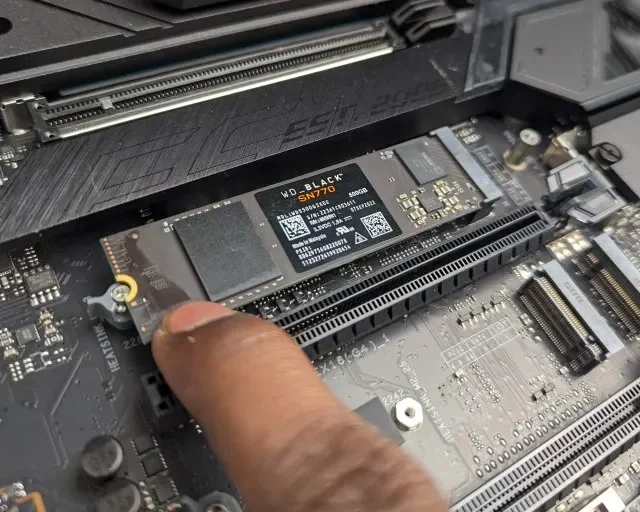
Installing the 990 Pro NVMe M 2 SSD is straightforward. Most modern motherboards have an M.2 slot ready to go. Here is a quick guide to get you started.
- Locate the M.2 slot on your motherboard. Refer to your motherboard manual if needed.
- Remove the M.2 heatsink or retention bracket if necessary.
- Insert the drive at a 30-degree angle into the slot.
- Press the drive down gently and secure it with the retention screw.
- Reinstall the heatsink if your motherboard has one.
- Boot into your BIOS and confirm the drive is detected.
- Initialize and format the drive through your operating system.
One important tip: always use the latest NVMe M.2 SSD drivers for the best performance. Samsung provides its own Samsung Magician software, which helps you manage and optimize the drive. Keeping your firmware updated ensures you get the latest performance improvements and bug fixes.
Quick Tips for Best Performance
- Enable PCIe Gen4 in your BIOS settings if it is not already on.
- Use Samsung Magician to keep your firmware and drivers up to date.
- Leave at least 10% of the drive free for optimal performance.
- Avoid filling the drive to maximum capacity for sustained workloads.
- Use the Samsung Magician SSD optimizer tool for periodic maintenance.
Common Mistakes to Avoid
Even with a great drive like the 990 Pro NVMe M 2 SSD, some common mistakes can hurt your experience. Here are a few things to watch out for.
- Skipping BIOS updates: An outdated BIOS can prevent your motherboard from running the drive at full PCIe Gen4 speeds. Always check for BIOS updates before installing a new NVMe M.2 SSD.
- Ignoring thermal management: High-speed drives generate heat. Without proper cooling, the drive may throttle and slow down. A heatsink or thermal pad can make a big difference.
- Using the wrong slot: Not all M.2 slots on a motherboard support NVMe. Some only support SATA. Check your motherboard manual to ensure you are using the right slot.
- Forgetting to enable XMP/EXPO: While this is more about RAM, it affects overall system responsiveness when paired with a fast drive like the 990 Pro.
For more tips on choosing the right NVMe M.2 SSD enclosure or external solutions, check out our guide on NVMe M.2 SSD enclosures for external storage options.
Expert Insights on NVMe M.2 SSDs
The NVMe M.2 SSD market has evolved rapidly in recent years. PCIe Gen4 drives like the 990 Pro represent the current sweet spot for most users. They offer a massive speed upgrade over SATA and Gen3 drives without the premium price tag of Gen5 models.
Samsung’s approach to the 990 Pro focuses on balanced performance. The drive does not just chase peak numbers. It delivers consistent speeds even during sustained workloads. This is where cheaper NVMe M.2 SSD options often fall short. Their speeds drop significantly after the SLC cache is exhausted.
For users considering a 1TB NVMe M.2 SSD, the 990 Pro is one of the best options available. It combines speed, endurance, and reliability in a single package. The drive also supports hardware-based encryption, adding a layer of security for sensitive data.
Looking ahead, PCIe Gen5 drives are starting to arrive. But for most users, the 990 Pro NVMe M 2 SSD provides more than enough performance. It is a future-proof choice that will serve you well for years to come.
Final Thoughts
The Samsung 990 Pro NVMe M.2 SSD is an outstanding drive that delivers on every front. Its read and write speeds are class-leading. The endurance ratings are excellent. And the build quality reflects Samsung’s decades of experience in flash storage.
Whether you are a gamer, creator, or professional, this drive will elevate your computing experience. It turns slow load times into instant access. It makes file transfers a breeze. And it runs cool and quiet thanks to efficient design.
If you are in the market for a new NVMe M.2 SSD, the 990 Pro should be at the top of your list. It is not the cheapest option, but the performance and reliability justify the price. Pair it with a quality M.2 heatsink, keep the firmware updated, and you will enjoy a fast and dependable storage solution for a long time.
For those exploring other options, also consider the Samsung 970 EVO Plus NVMe M.2 SSD as a solid alternative if budget is a concern. And for the latest in NVMe technology, keep an eye on our Crucial T705 PCIe Gen5 NVMe M.2 SSD review for a look at the next generation of storage.
Frequently Asked Questions
What makes the 990 Pro NVMe M 2 SSD different from other SSDs?
The 990 Pro NVMe M 2 SSD uses the PCIe Gen4 NVMe protocol, which is significantly faster than SATA-based SSDs. It also features Samsung’s latest V-NAND technology and a sophisticated controller that delivers consistent speeds even under heavy workloads.
Is the Samsung 990 Pro worth the price?
Yes, the 990 Pro NVMe M 2 SSD is worth the investment for users who need top-tier performance. Its blazing read and write speeds, high endurance, and 5-year warranty make it a premium choice for gaming, content creation, and professional use.
Can I use the 990 Pro in a laptop?
Absolutely. The 990 Pro NVMe M 2 SSD comes in the standard M.2 2280 form factor, which fits most modern laptops. Just make sure your laptop has an M.2 slot that supports NVMe PCIe Gen4 drives.
How does the 990 Pro handle heat?
The 990 Pro NVMe M 2 SSD runs warm under heavy workloads. Samsung includes a basic heatsink in some retail versions. For best results, especially in compact builds, we recommend adding a dedicated M.2 heatsink to maintain optimal performance.
What capacity should I choose for the 990 Pro?
The 1TB model is the best all-around choice for most users. If you work with large files or have a growing game library, consider the 2TB or 4TB variants. The 500GB version works well for budget builds or as a secondary drive.
Does the 990 Pro support hardware encryption?
Yes, the 990 Pro NVMe M 2 SSD supports AES 256-bit hardware-based encryption. This feature helps protect your data without impacting drive performance. You can manage encryption settings through Samsung Magician software.
=== CONCLUSION ===
The 990 Pro NVMe M 2 SSD stands out as one of the best choices in the NVMe M.2 SSD market today. It combines blazing speeds, excellent endurance, and reliable performance in a user-friendly package. Whether you are upgrading an existing system or building a new one, this drive delivers a noticeable improvement in everyday tasks and demanding workloads alike.
Make the smart choice for your storage needs. Consider the 990 Pro NVMe M 2 SSD for your next PC build or upgrade. You will not be disappointed.