How to Pair Two Bose Soundlink Flex Speakers

Pairing two Bose Soundlink Flex speakers is simple and unlocks amazing stereo sound for your music. You can sync them using the Bose Music app or Bluetooth settings on your phone. This guide walks you through every step so you can enjoy rich audio anywhere. Follow our easy instructions to get your speakers working together in minutes.
Key Takeaways
- Simple Setup: You only need the Bose Music app or Bluetooth settings to connect two speakers.
- Stereo Mode: Pairing creates a left and right channel for wider soundstage.
- App Required: The Bose Music app makes pairing faster and more reliable.
- Range Matters: Keep speakers within 30 feet for stable connection.
- Battery Check: Ensure both units have enough charge before starting.
- Reset Option: Factory reset helps if pairing fails repeatedly.
- Portable Design: Both speakers are waterproof and great for outdoor use.
📑 Table of Contents
- Introduction
- Why Pair Two Bose Soundlink Flex Speakers
- What You Need Before You Start
- How to Pair Two Bose Soundlink Flex Speakers Using the App
- How to Pair Two Bose Soundlink Flex Speakers via Bluetooth
- Tips for the Best Sound Experience
- Troubleshooting Common Pairing Issues
- Expert Insights and Best Practices
- Key Takeaways for Quick Setup
Introduction
Want bigger sound without carrying heavy equipment? You are in the right place. Many people own more than one portable speaker. When you connect them, the audio feels wider and fuller. It transforms a simple playlist into a live experience. That is exactly what happens when you learn how to pair two Bose Soundlink Flex speakers.
The Bose Soundlink Flex is a tough, compact speaker. It handles water, dust, and rough trips. But one unit alone cannot fill a large room. Adding a second speaker changes everything. You get clearer vocals, deeper bass, and better separation. The best part is that you do not need technical skills. The process takes just a few minutes.
This guide covers every step in plain language. You will see how to use the app, how to use Bluetooth, and what to do when things go wrong. We also share tips for better sound and common mistakes to avoid. By the end, you will feel confident setting up your speakers anywhere.
Why Pair Two Bose Soundlink Flex Speakers
Bigger Sound in a Small Package
One speaker sounds great. Two speakers sound amazing. When you link them, the audio spreads across the space. Your ears pick up distinct left and right details. This creates a stereo effect that a single unit cannot match. You hear instruments more clearly. Vocals sit front and center. The overall experience feels more immersive.
Perfect for Gatherings and Outdoor Use
Think about a backyard hangout or a camping trip. A single speaker often gets lost in open air. Two speakers cover more ground. They push sound further and reduce dead spots. You can place them on opposite sides of a patio or inside a tent. The setup stays portable. Both units are lightweight and built for travel. You can carry them in a backpack or clip them to gear.
Easy to Use Every Day
You do not need a complicated receiver or extra wires. The pairing process is built into the design. Once connected, the speakers remember each other. You can disconnect and reconnect quickly. This makes daily use simple. You can switch from solo listening to shared audio in seconds. The flexibility fits busy lifestyles.
What You Need Before You Start
Two Fully Charged Speakers
Start with power. Low batteries cause dropouts and weak signals. Charge both units fully before pairing. This prevents interruptions during setup. It also helps the speakers maintain a strong link. A full charge gives you room to test the connection without worry.
The Bose Music App
The app is your best friend for this task. It guides you through pairing with clear prompts. You can see both speakers on the screen. The app also lets you adjust EQ settings and manage connections. Download it from your app store. Create a Bose account if you do not have one. The setup takes only a minute.
A Smartphone or Tablet
You need a device to run the app or manage Bluetooth. Keep your phone close during pairing. Strong phone signal helps the process run smoothly. Turn on Bluetooth before you begin. Make sure your device is not connected to other audio gear that could interfere.
Quiet Space for Initial Setup
Noise does not stop Bluetooth, but it helps to focus. A calm room makes it easier to hear prompts and confirm success. You can move the speakers later. Start close together. Then spread them out once the link is stable.
How to Pair Two Bose Soundlink Flex Speakers Using the App
Step One: Turn On Both Speakers
Press the power button on each unit. You should hear a clear tone. The Bluetooth light will blink. This means the speaker is ready to connect. Keep them near each other for the first attempt. Close range reduces pairing errors.
Step Two: Open the Bose Music App
Launch the app on your phone. Sign in if needed. The home screen shows your available devices. If your speakers do not appear, tap the add device option. Follow the on-screen prompts. The app will search for nearby Bose gear.
Step Three: Select the First Speaker
Tap the name of your first speaker. The app connects to it. You may hear a confirmation sound. The speaker light may change color or pattern. This tells you the link is active. Keep the app open while you add the second unit.
Step Four: Add the Second Speaker
Tap the option to add another device. Choose the second speaker from the list. The app may ask you to confirm stereo pairing. Accept the prompt. The two units will sync and assign left and right roles. You will see both names on the screen.
Step Five: Test the Audio
Play a song you know well. Walk between the speakers. Listen for smooth transitions and balanced volume. Adjust the position if one side sounds louder. The app may offer simple EQ tweaks. Use them to match your taste.
How to Pair Two Bose Soundlink Flex Speakers via Bluetooth
Use This Method When the App Is Not Available
Sometimes you prefer a quick Bluetooth link. This method works on many phones and tablets. It does not require the app. The steps are straightforward. You connect one speaker, then the second, and let the system handle the rest.
Connect the First Speaker
Open Bluetooth settings on your device. Turn Bluetooth on. Select the first Bose speaker from the list. Wait for the connection to complete. You should hear a tone or see a connected status. Play a short track to confirm audio flows properly.
Connect the Second Speaker
With the first speaker active, turn on the second unit. Some devices allow you to join a second audio source to the same stream. On other devices, you may need to use a party mode or stereo link feature. Check your phone’s audio settings. Look for options that support multiple outputs. If your device does not support this, the app method is more reliable.
Confirm Stereo Performance
Once both speakers play, listen carefully. The sound should feel wider. If both units play the same mono signal, check your settings. You may need to enable stereo pairing in the Bose menu. A quick reset often clears the confusion. Move the speakers apart slightly. This helps you hear the separation more clearly.
Tips for the Best Sound Experience
Place Speakers for Clear Separation
Distance matters. Place the speakers at least a few feet apart. This creates a better stereo image. Avoid hiding them behind thick walls or metal objects. These materials can block or reflect sound. Open spaces work best. Try corners for fuller bass response.
Keep the Link Stable
Stay within a reasonable range. Bluetooth works well up to about 30 feet in open air. Walls and furniture reduce that range. Keep your phone near the speakers during playback. Avoid crowded wireless areas if possible. Too many signals can cause dropouts.
Match Volume and EQ Settings
Start with both volumes at the same level. This keeps the stereo balance even. Use the app to tweak bass or treble if needed. Small changes make a big difference. Test with different genres. Music with clear vocals and steady drums shows stereo separation well.
Manage Battery Life Wisely
Playing two speakers uses more power. Plan your listening sessions accordingly. Charge both units before long trips. If you camp or beach hop, bring a power bank. Lower volume slightly to extend play time. Turn off Bluetooth on unused devices to reduce interference.
Troubleshooting Common Pairing Issues
Speakers Will Not Connect
Start with a restart. Turn both speakers off and on again. Close the app and reopen it. Clear your phone’s Bluetooth cache if needed. Make sure the speakers are not linked to another device. A previous connection can block a new one. Forget the speaker in your Bluetooth list and try again.
Sound Is Uneven or Mono
Check the pairing mode. The speakers may be in a single-channel mode. Use the app to switch to stereo. Verify that both units show the correct left and right status. Move them closer during testing. Uneven volume can also come from one speaker set lower. Match the levels and test again.
Dropouts and Skipping
Interference often causes this. Move away from Wi-Fi routers, microwaves, and crowded Bluetooth zones. Keep the phone within range. Reduce distance between the two speakers during setup. If skipping continues, reset both units and pair from scratch. A clean start often fixes stubborn glitches.
App Cannot Find the Second Speaker
Make sure the second speaker is in pairing mode. Hold the Bluetooth button if needed. Keep the app updated. Older versions may miss newer device features. Restart your phone. A fresh device scan usually reveals the missing speaker. If the problem persists, check for firmware updates in the app.
Expert Insights and Best Practices
Use the App for Long-Term Control
The app gives you more than pairing. You can save presets and update firmware. Updates often improve stability and sound quality. Keep your speakers current. This prevents many common issues. The app also makes it easy to switch between stereo and single-speaker use.
Reset Only When Needed
A factory reset solves tough problems. It also clears saved connections. Use it as a last step. Before resetting, try simple fixes first. Restart the app, toggle Bluetooth, and move the speakers. Reserve the reset for repeated failures. This saves time and keeps your settings intact.
Match Your Setup to Your Space
Small rooms need less distance between speakers. Large areas benefit from wider placement. Test different spots. Listen from the main seating area. Adjust until the sound feels natural. The goal is balanced audio, not just loud volume. Comfort matters as much as power.
Keep Your Gear Protected
Both speakers are built for tough conditions. Still, avoid direct heat and long sun exposure. Wipe them down after beach or pool use. Store them in a dry place when not in use. Clean grilles gently with a soft cloth. Good care keeps the sound clear and the battery healthy.
Key Takeaways for Quick Setup
Pairing two Bose Soundlink Flex speakers is fast when you follow a clear plan. Charge both units, use the app, and keep them close at first. Test the sound, adjust placement, and enjoy the wider stereo field. If issues appear, restart, re-pair, or reset with confidence. With a little practice, you will set up your speakers in minutes every time.
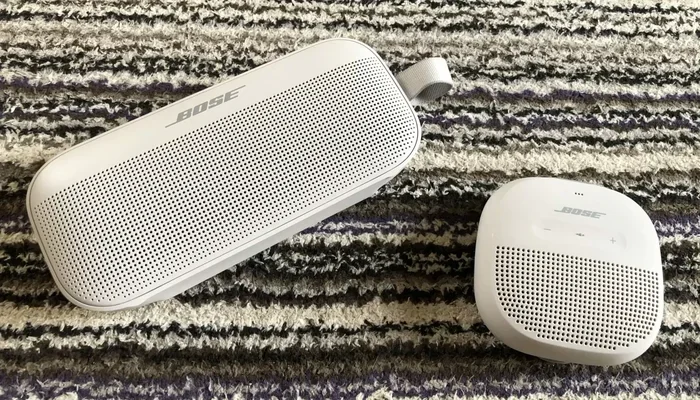
Visual guide about Bose SoundLink Flex speakers side by side
Image source: senntineru.com
Frequently Asked Questions
How do I put my Bose Soundlink Flex speakers into pairing mode?
Press the power button to turn the speaker on. Hold the Bluetooth button until the light blinks. This signals that the speaker is ready to connect. Use the Bose Music app or your phone’s Bluetooth menu to complete the link.
Can I pair two Bose Soundlink Flex speakers without the app?
Yes, you can use Bluetooth settings on some devices. Connect the first speaker, then try to add the second through your phone’s audio options. The app method is usually more reliable for stereo pairing and keeps the connection stable.
Why is only one speaker playing sound after pairing?
This often happens when stereo mode is not active. Open the Bose Music app and check the speaker status. Make sure both units show left and right roles. Restart the pairing process if the second speaker stays silent.
How far apart can I place the two speakers?
You can place them several feet apart for better stereo separation. Keep them within about 30 feet of your phone for a strong Bluetooth signal. Walls and large objects can reduce range, so test the sound in your space.
What should I do if the speakers keep disconnecting?
Move closer to the speakers and reduce wireless interference. Turn off Bluetooth on other devices that may compete for signal. If the problem continues, forget the speakers in your Bluetooth list and pair them again from scratch.
Do both speakers need to be the same model to pair?
For the best results, use two Bose Soundlink Flex speakers. Matching models ensure compatible stereo pairing and balanced sound. Mixing different models can work in some cases, but the app may not recognize the second unit properly.