8gb Ram for Laptop Lenovo
8GB RAM is the sweet spot for most Lenovo laptop users. It handles everyday tasks, light gaming, and multitasking with ease. Whether you own a ThinkPad or an IdeaPad, 8GB memory keeps your system running smoothly. This guide covers everything you need to know about 8GB RAM for laptop Lenovo models, from compatibility to performance tips.
If you own a Lenovo laptop or are thinking about buying one, you have probably wondered about memory. 8GB RAM for laptop Lenovo machines is one of the most common configurations on the market today. But is it really enough? And can you upgrade to 8GB if your laptop comes with less?
This guide answers all of those questions and more. We will walk you through what 8GB RAM means for your Lenovo laptop, which models support it, and how to get the best performance out of your setup. Whether you use your laptop for work, school, or entertainment, this article has you covered.
Memory is one of the most important parts of any laptop. It affects how fast your computer opens apps, how many tabs you can keep in your browser, and whether your system slows down when you switch between tasks. Understanding your RAM options helps you make smarter buying and upgrading decisions.
Key Takeaways
- 8GB RAM is ideal for everyday use: It handles browsing, office work, and light multitasking on Lenovo laptops with ease.
- Most Lenovo models support RAM upgrades: Many ThinkPads and IdeaPads allow you to add or swap memory modules.
- Check compatibility before buying: Not all Lenovo laptops use the same RAM type or have upgradeable slots.
- 8GB meets Windows 11 requirements: Microsoft recommends 4GB minimum, so 8GB gives you comfortable headroom.
- Dual-channel RAM boosts performance: Using two 4GB sticks instead of one 8GB stick can improve speed on supported models.
📑 Table of Contents
- What Is 8GB RAM and Why Does It Matter for Lenovo Laptops?
- Lenovo Laptops That Come with 8GB RAM
- Can You Upgrade to 8GB RAM on Your Lenovo Laptop?
- 8GB RAM Performance: What Can You Do with It?
- Common Mistakes When Choosing RAM for Lenovo Laptops
- Tips to Get the Most Out of 8GB RAM on Your Lenovo Laptop
- Is 8GB RAM Enough for a Lenovo Laptop in 2024?
What Is 8GB RAM and Why Does It Matter for Lenovo Laptops?
RAM stands for Random Access Memory. Think of it as your laptop’s short-term workspace. When you open a program, browse the web, or edit a document, your laptop uses RAM to hold that data temporarily. The more RAM you have, the more tasks your laptop can handle at once without slowing down.
8GB RAM for laptop Lenovo systems strikes a great balance between price and performance. It is not the cheapest option, but it is far from the most expensive. For most users, 8GB provides a smooth and responsive experience for daily use.
How Much RAM Do You Really Need?
The answer depends on what you do with your laptop. Here is a quick breakdown of RAM needs by use case:
- Basic tasks (browsing, email, documents): 4GB to 8GB is sufficient.
- Multitasking (multiple apps and browser tabs): 8GB works well for most people.
- Creative work (photo editing, light video editing): 8GB is a solid starting point.
- Gaming and heavy workloads: 16GB or more is recommended.
For the average Lenovo laptop user, 8GB hits the sweet spot. It gives you room to breathe without overspending. If you are a casual user, 8GB will feel more than enough. If you are a power user, you may eventually want to move up to 16GB.
8GB RAM vs. 4GB RAM: What Is the Difference?
The difference between 4GB and 8GB is noticeable in everyday use. With 4GB, you might experience slowdowns when you have several browser tabs open. With 8GB, you can comfortably run multiple apps at the same time. If you are currently using a laptop with 4GB memory, upgrading to 8GB can feel like a brand new machine.
For more details on whether 8GB is enough for your needs, check out our article on Is 8GB RAM Enough for Laptop.
Lenovo Laptops That Come with 8GB RAM
Many Lenovo laptops ship with 8GB RAM right out of the box. This is especially true for mid-range models designed for students, professionals, and everyday users. Lenovo offers a wide range of laptops, and memory options vary by model and price point.
Popular Lenovo Models with 8GB RAM
- Lenovo IdeaPad series: Budget-friendly laptops that often come with 8GB memory. Great for students and home users.
- Lenovo ThinkPad series: Business laptops known for durability. Many models offer 8GB as a standard configuration.
- Lenovo Legion series: Gaming laptops that sometimes start with 8GB but are designed to be upgraded to 16GB or more.
- Lenovo Flex series: 2-in-1 convertibles that balance portability with performance, often featuring 8GB RAM.
When shopping for a new Lenovo laptop, always check the specifications. Some base models come with 4GB memory, while others include 8GB or even 16GB. If you want a laptop that is ready to go out of the box, look for one with 8GB RAM already installed.
For a deeper look at what makes a good RAM size for your next laptop, visit our guide on What Is a Good RAM Size for a Laptop.
Can You Upgrade to 8GB RAM on Your Lenovo Laptop?
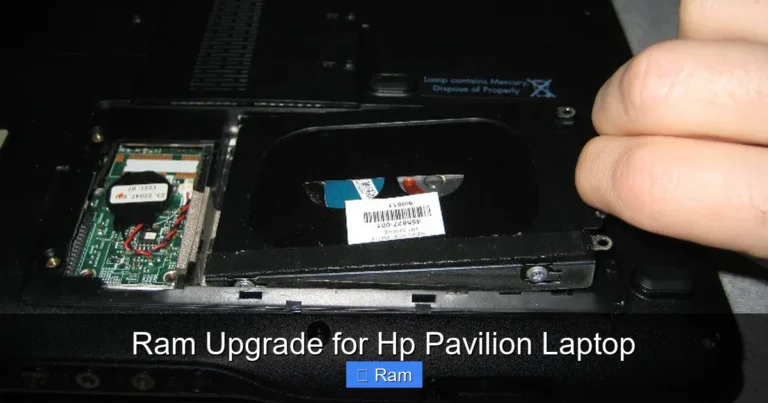
One of the best things about many Lenovo laptops is that they allow RAM upgrades. If your laptop currently has 4GB or less, you can often add an 8GB module to boost performance. However, not all Lenovo laptops are upgradeable, so you need to check your specific model first.
How to Check if Your Lenovo Laptop Has Upgradeable RAM
Follow these steps to find out if your laptop supports RAM upgrades:
- Check your laptop model number. You can usually find it on the bottom of the device or in your system settings.
- Search online for your model’s specifications. Lenovo’s website has detailed specs for every laptop they sell.
- Look for information about RAM slots. Does your laptop have a free slot? Can you replace the existing module?
- Check what type of RAM your laptop uses. Most modern Lenovo laptops use DDR4 memory, but older models may use DDR3.
Upgrading your RAM is one of the easiest and most affordable ways to breathe new life into an older laptop. Instead of buying a whole new machine, you can add an 8GB stick for a fraction of the cost. For step-by-step guidance on laptop RAM upgrades, see our article on Buy RAM Memory for Laptop.
Understanding RAM Types and Speeds
When shopping for RAM, you will see terms like DDR4, DDR5, and different speed ratings. Here is what you need to know:
- DDR4: The most common RAM type in modern laptops. It offers a good balance of speed and power efficiency.
- DDR5: The newest standard. It is faster but not yet widely available in laptops.
- Speed (MHz): Higher speed numbers mean faster data transfer. However, the difference in real-world use is often small.
For most Lenovo laptop users, DDR4 8GB RAM is the best choice. It is widely available, affordable, and compatible with a large range of models.
8GB RAM Performance: What Can You Do with It?
So what can you actually do with 8GB RAM on a Lenovo laptop? The answer is quite a lot. Most everyday tasks run perfectly fine with 8GB of memory. Let us break down what you can expect.
Everyday Use
For web browsing, email, word processing, and streaming videos, 8GB RAM is more than enough. You can keep multiple browser tabs open, run a few background apps, and still have plenty of memory left over. Your Lenovo laptop will feel fast and responsive during normal daily use.
Work and Productivity
If you use Microsoft Office, Google Workspace, or similar tools, 8GB RAM handles these with ease. You can switch between documents, spreadsheets, and presentations without any lag. For video conferencing, 8GB is also sufficient, even when you are sharing your screen or running other apps at the same time.
Light Creative Work
Photographers and graphic designers who work with lighter files will find 8GB RAM adequate. You can edit photos in programs like Adobe Photoshop or Lightroom without major issues. However, if you work with very large files or complex projects, you may notice some slowdowns.
Gaming
8GB RAM is enough for many casual and indie games. Popular titles like Minecraft, Fortnite, and Rocket League run well with 8GB memory. However, demanding AAA games may require 16GB or more for the best experience. If gaming is your main priority, consider saving up for a laptop with 16GB RAM or plan to upgrade later.
For more information on how RAM affects gaming and general performance, read our piece on 8GB RAM for Laptop.
Common Mistakes When Choosing RAM for Lenovo Laptops
Buying RAM for your laptop seems simple, but mistakes happen. Here are some common pitfalls to avoid when upgrading or purchasing a Lenovo laptop with 8GB RAM.
Buying the Wrong RAM Type
Not all RAM is the same. Your laptop needs a specific type of memory, such as DDR4 or DDR3, and it needs to fit the right physical slot (called a SO-DIMM for laptops). Buying the wrong type means the RAM will not work. Always double-check your laptop’s specifications before making a purchase.
Ignoring Dual-Channel Configuration
Many laptops perform better with dual-channel memory. This means using two smaller RAM sticks (like two 4GB modules) instead of one larger stick (like one 8GB module). Dual-channel RAM can improve memory bandwidth and boost performance. If your Lenovo laptop has two slots, consider using two 4GB sticks for better speed.
Overlooking Compatibility
Some Lenovo laptops have soldered RAM, which means you cannot upgrade them at all. Before you buy RAM separately, confirm that your model has an accessible and upgradeable memory slot. Check Lenovo’s support page for your specific model to verify this.
Skimping on Quality
It can be tempting to buy the cheapest RAM you find, but quality matters. Cheap or uncertified RAM can cause crashes, blue screens, and instability. Stick with reputable brands like Kingston, Crucial, Samsung, or Corsair for reliable performance.
Tips to Get the Most Out of 8GB RAM on Your Lenovo Laptop
Once you have 8GB RAM in your Lenovo laptop, there are several things you can do to maximize its performance. These simple tips will help your laptop run faster and smoother every day.
Keep Your Operating System Updated
Windows updates often include memory management improvements. Keeping your system up to date ensures your laptop uses RAM as efficiently as possible. For users running Windows 11, 8GB RAM meets the recommended requirements for a smooth experience.
Close Unnecessary Background Apps
Even with 8GB RAM, having too many apps running in the background can slow things down. Get in the habit of closing programs you are not using. Use the Task Manager to see which apps are consuming the most memory and close the ones you do not need.
Use Lightweight Apps When Possible
Some applications use more memory than others. For example, using a lightweight browser like Microsoft Edge or Brave can help conserve RAM compared to heavier alternatives. The same goes for office suites and media players. Choosing lighter apps frees up memory for the tasks that matter most.
Disable Unnecessary Startup Programs
Many programs launch automatically when you start your laptop. These startup apps eat up RAM before you even begin using your computer. Go to your Task Manager, navigate to the Startup tab, and disable any programs you do not need running in the background.
Consider a RAM Upgrade When Needed
Technology changes fast. What feels like plenty of RAM today may not be enough in a few years. If you find your 8GB Lenovo laptop struggling with newer apps or heavier workloads, it may be time to upgrade to 16GB. Upgrading is usually simple and affordable, making it a smart investment.
For more on how much RAM is truly enough for a laptop, check out our article on How Much RAM for Laptop.
Is 8GB RAM Enough for a Lenovo Laptop in 2024?
The short answer is yes. For the vast majority of users, 8GB RAM is more than enough in 2024. Web browsing, office work, streaming, and light creative tasks all run smoothly with 8GB memory on a Lenovo laptop. Microsoft Windows 11 recommends 4GB as a minimum, so 8GB gives you double that, which is a comfortable margin.
However, if you plan to do heavy video editing, 3D rendering, or play the latest AAA games, 8GB may feel limiting. In those cases, consider upgrading to 16GB. For most people though, 8GB strikes the perfect balance between cost and capability.
If you are still deciding between different RAM sizes, our article on 8GB RAM Laptop Windows 11 can help you understand how 8GB memory performs with the latest operating system.
Remember, 8GB RAM for laptop Lenovo machines is a proven, reliable configuration that serves millions of users worldwide. Whether you are a student, a professional, or a casual user, 8GB RAM will keep your Lenovo laptop running well for years to come.
Before making any purchase or upgrade, always verify your laptop model’s specifications. Check Lenovo’s official website or your user manual to confirm RAM compatibility. With the right 8GB memory module, your Lenovo laptop will feel fast, responsive, and ready for whatever tasks you throw at it.
Frequently Asked Questions
Is 8GB RAM enough for a Lenovo laptop?
Yes, 8GB RAM is enough for most Lenovo laptop users. It handles everyday tasks like browsing, office work, streaming, and light multitasking with ease. If you do heavy creative work or gaming, you may want to consider 16GB instead.
Can I upgrade my Lenovo laptop to 8GB RAM?
Many Lenovo laptops allow RAM upgrades, but it depends on the model. Check your laptop’s specifications to see if it has an accessible RAM slot. Some models have soldered memory that cannot be upgraded. Look up your specific model on Lenovo’s support page to confirm.
What type of RAM does a Lenovo laptop use?
Most modern Lenovo laptops use DDR4 SO-DIMM RAM. Older models may use DDR3. Always check your laptop’s specifications before purchasing RAM to ensure compatibility. Using the wrong type of RAM will not work and could damage your system.
Does 8GB RAM slow down a Lenovo laptop?
No, 8GB RAM does not slow down a Lenovo laptop. In fact, it provides a smooth and responsive experience for most users. If your laptop feels slow, the issue may be related to other factors like a full hard drive, too many background apps, or an outdated processor.
Should I get one 8GB stick or two 4GB sticks?
Two 4GB sticks are often better than one 8GB stick because they enable dual-channel memory mode. Dual-channel RAM can improve performance by allowing your laptop to access memory more efficiently. Check your laptop’s manual to confirm it supports dual-channel configuration.
How much does 8GB RAM cost for a Lenovo laptop?
8GB DDR4 RAM sticks typically cost between $20 and $50, depending on the brand and speed. Upgrading your RAM yourself is much cheaper than paying for professional installation. It is one of the most affordable ways to boost your laptop’s performance.
=== CONCLUSION ===
8GB RAM for laptop Lenovo machines is a reliable and practical choice for the vast majority of users. It offers the perfect balance of performance, affordability, and compatibility. Whether you are buying a new Lenovo laptop or upgrading an existing one, 8GB memory will serve you well for everyday tasks and beyond.
Remember to check your laptop model’s specifications before purchasing RAM, and consider dual-channel configurations for the best performance. With the right setup, your Lenovo laptop will run smoothly and efficiently for years to come. Upgrade wisely, and enjoy a faster, more responsive computing experience.