Is 8gb Ram Enough for Laptop

Is 8GB RAM enough for a laptop in 2024? The answer is a firm “it depends.” For basic web browsing, office work, and media consumption, 8GB remains a functional baseline. However, for modern multitasking with numerous browser tabs, professional creative work, gaming, or future-proofing, 8GB is already showing its limits. Most users will benefit significantly from upgrading to 16GB for a smoother, more capable experience.
Key Takeaways
- For Basic Tasks, 8GB is Adequate: Simple web browsing (few tabs), email, word processing, and streaming video work fine on 8GB.
- Modern Browsers are RAM Hungry: Each Chrome, Edge, or Firefox tab can consume 500MB-2GB+, quickly eating into 8GB with just 10-15 tabs open.
- Professionals & Creators Need More: Video editing, graphic design, software development, and data analysis software demand 16GB+ to run efficiently and avoid slowdowns.
- Gaming is Borderline to Insufficient: While some older or less demanding games run on 8GB, modern AAA titles and any streaming while gaming will struggle.
- Multitasking is the True Test: Running a browser, a Zoom call, Spotify, and a document simultaneously on 8GB will often cause noticeable lag and stuttering.
- Upgradability is Key: If your laptop has a free RAM slot, starting with 8GB and upgrading to 16GB later is a cost-effective strategy. Soldered RAM is a permanent decision.
- Future-Proofing Means 16GB: Software and operating systems become more demanding over time. 16GB is the new practical standard for a laptop bought today to remain usable for 3-5 years.
📑 Table of Contents
- Introduction: The Eternal RAM Question
- 1. The Baseline: What 8GB RAM Can Handle Comfortably
- 2. The Multitasking Reality: Where 8GB Starts to Strain
- 3. Professional & Creative Work: 8GB is Not Enough
- 4. Gaming: A Complicated Picture
- 5. The macOS & Chromebook Consideration
- 6. The Upgrade Path & Future-Proofing Strategy
- Conclusion: Making Your Decision
Introduction: The Eternal RAM Question
You’re staring at two laptop configurations. One has 8GB of RAM. The other, with a slightly higher price tag, has 16GB. The salesperson says, “You probably don’t need more than 8GB.” But a little voice in your head whispers, “Is 8GB RAM enough for a laptop… really?” This question haunts every laptop buyer in 2024. Random Access Memory (RAM) is your system’s short-term workspace. The more you have, the more applications and files it can keep immediately ready for your processor, leading to a smoother, faster experience. Determining if 8GB is “enough” isn’t about a universal yes or no—it’s about your specific workflow. Let’s break down the real-world performance of 8GB RAM across every common laptop use case, so you can make a confident, informed decision.
1. The Baseline: What 8GB RAM Can Handle Comfortably
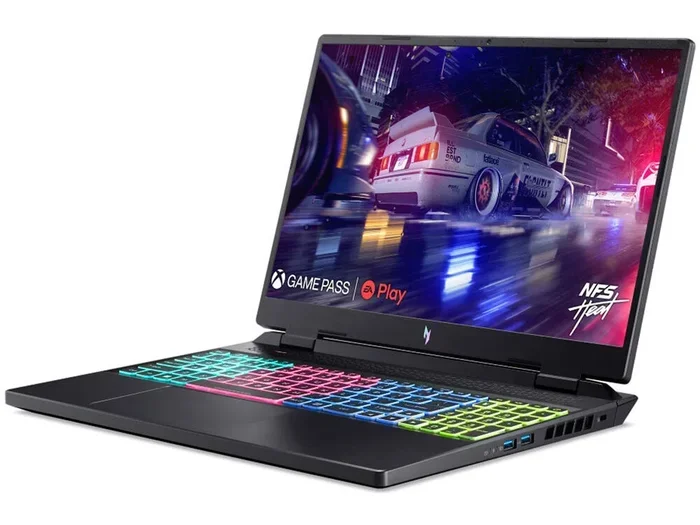
Let’s start with the positives. 8GB of RAM is not obsolete. For a very specific, light set of tasks, it performs perfectly acceptably. If your laptop usage mirrors this list, 8GB will likely suffice without major frustration.
Visual guide about Is 8gb Ram Enough for Laptop
Image source: laptops251.com
The “Light User” Profile
- Web Browsing (2-5 tabs): Visiting a few news sites, checking social media, or looking at a couple of product pages. Modern web pages are heavy, but a few won’t tank an 8GB system.
- Office Productivity: Working in Microsoft Word, Excel (with moderate datasets), PowerPoint, or Google Docs. These are not RAM monsters when used in isolation.
- Email & Communication: Running Outlook, Thunderbird, or a webmail client alongside Slack or Discord.
- Media Playback: Streaming movies and music from Netflix, YouTube, or Spotify. This is handled by your dedicated hardware (GPU/audio chip), not the main RAM.
- Very Light Photo Viewing/Editing: Viewing photos from your phone or camera. Basic edits in a simple tool like Windows Photos or a lightweight app.
In this scenario, your RAM usage might hover between 4GB and 6GB. The system feels responsive because there’s ample free space for the OS to manage things smoothly. If this is 100% of your computing life, 8GB is enough. But for anyone who does even a little more, the cracks begin to show.
2. The Multitasking Reality: Where 8GB Starts to Strain
Here’s the critical, often overlooked factor: we all multitask. You likely have a browser open with multiple tabs, a document you’re working on, a music or podcast app running, and perhaps a chat window. This is the normal workflow for students, remote workers, and casual users. This is precisely where 8GB of RAM starts to creak.

Visual guide about Is 8gb Ram Enough for Laptop
Image source: laptopmates.co.uk
The RAM Hunger of Modern Web Browsers
This is the single biggest reason 8GB feels tight today. A single Chrome or Edge tab can use anywhere from 500MB to 2GB of RAM, depending on the sites loaded (looking at you, Gmail with thousands of emails, and complex web apps like Twitter or Figma). Open 10-15 tabs as part of your research or work, and you’ve already consumed 5GB-10GB of RAM just for your browser. Add your operating system (Windows 11/macOS ~2-4GB baseline), and you’re flirting with your 8GB limit.
The Symptoms of RAM Pressure
When your RAM is full, your system uses a portion of your much slower SSD or hard drive as “virtual memory” or a swap file. This process, called paging, causes severe slowdowns. You’ll experience:
- Noticeable Lag: Clicking an app or switching windows and waiting a second or two for it to respond.
- Stuttering During Scrolling: Web pages or documents not scrolling smoothly.
- Slow Tab/App Switching: Your computer feels like it’s “thinking” hard when you Alt+Tab.
- Increased SSD Wear: Constant swapping to the SSD, while efficient, uses up your drive’s write cycles faster.
Practical Example: A student writing a paper with 15 research tabs open in Chrome, a PDF viewer, Microsoft Word, and Spotify running. This setup will consistently use 7.5GB-8GB of RAM. The system will be functional, but it won’t feel snappy. Any additional task—a Zoom call, a quick Photoshop edit—will push it over the edge into sluggish territory.
3. Professional & Creative Work: 8GB is Not Enough
If you use your laptop for any form of professional or serious creative work, you should immediately cross 8GB off your list. These applications are engineered to use as much RAM as you can give them to improve performance and handle large projects.

Visual guide about Is 8gb Ram Enough for Laptop
Image source: goodhomeservices.in
Content Creation & Design
- Photo Editing (Lightroom, Photoshop): Loading high-resolution images (20MP+ from modern cameras) and using layers, filters, and brushes consumes RAM rapidly. Working on multiple images or with complex Photoshop files will cripple 8GB, leading to long save times and laggy brush strokes.
- Video Editing (Premiere Pro, DaVinci Resolve): Even 1080p video editing benefits greatly from 16GB+. 4K editing is a non-starter on 8GB. The software caches footage and effects in RAM for smooth playback. Without enough, you’ll get constant stuttering in the preview window.
- 3D Modeling & Animation (Blender, CAD): These are among the most RAM-intensive applications. Complex scenes with many polygons, textures, and effects can easily demand 16GB-32GB+. 8GB will result in extremely slow viewport manipulation and frequent crashes.
Development & Data Work
- Software Development: Running a local development environment (IDE like VS Code, a local server, database, Docker containers, and a browser for testing) is a RAM-intensive cocktail. 8GB is the absolute bare minimum and will lead to a poor developer experience.
- Data Analysis & Science: Tools like Python (with pandas/numpy), R, or MATLAB that handle large datasets in memory will quickly max out 8GB. You’ll be forced to constantly sample your data or wait for operations to complete.
Verdict: For any professional workflow, 16GB is the new entry point. 32GB is increasingly common for serious work. Investing in 8GB for a professional machine is a false economy that will cost you significant time and frustration.
4. Gaming: A Complicated Picture
Gaming on a laptop with 8GB RAM is a tale of two eras and a major “it depends.”
What Can Run on 8GB?
- Esports Titles: Games like CS:GO, Valorant, League of Legends, and Dota 2 are optimized to run on a wide range of hardware. They often use less than 6GB of system RAM, leaving room for background tasks.
- Older AAA Titles (Pre-2020): Many games from 2018 and earlier were built in an 8GB era and will run, though sometimes with longer load times.
- Indie & 2D Games: Stardew Valley, Terraria, and similar titles have minimal RAM requirements.
Where 8GB Fails Gamers
- Modern AAA Releases (2021+): Games like Cyberpunk 2077, Elden Ring, Hogwarts Legacy, and Call of Duty: Modern Warfare II officially recommend 16GB RAM. On 8GB, you’ll face severe stuttering, texture pop-in, and crashes as the game and OS fight for memory.
- Game Streaming & Recording: If you plan to stream via OBS or record your gameplay, you are adding another major RAM consumer. 8GB is completely insufficient for this combo.
- Open-World Games with Fast Travel: These games constantly stream assets from storage. With insufficient RAM, the system can’t cache enough, leading to frequent, distracting pop-in of textures and objects.
Practical Tip: Check the “Minimum” vs. “Recommended” specs for the games you want to play. If the recommended is 16GB, treat 8GB as a serious risk. For a dedicated gaming laptop, 16GB should be considered mandatory.
5. The macOS & Chromebook Consideration
Operating system efficiency plays a huge role. Apple’s macOS and Google’s Chrome OS manage RAM differently than Windows.
macOS: The Memory Compression Champion
macOS is exceptionally good at compressing inactive data in RAM, making 8GB feel more usable than on a comparable Windows machine. An M1 or M2 MacBook Air with 8GB can handle a surprising amount of multitasking—multiple browser tabs, several apps, and even some light photo editing—without the same level of slowdown seen on Windows. However, the same professional rules apply: for video editing, development, or heavy design work on a Mac, 16GB+ is still strongly recommended. The 8GB Mac is best for the “light user” or very efficient multitasker.
Chrome OS: Built for the Cloud
Chromebooks are designed around web-based apps and cloud storage. The OS itself is incredibly lightweight. For web browsing, Android app usage, and Linux development environments (Crostini), 8GB is often more than sufficient. High-end Chromebooks aimed at developers or power users may still benefit from 16GB, but for 90% of Chromebook use cases, 8GB is perfectly adequate and a great value.
6. The Upgrade Path & Future-Proofing Strategy
This is the most crucial practical section. Your decision shouldn’t just be about today, but about 3-5 years from now.
Check Your Laptop’s Upgradability
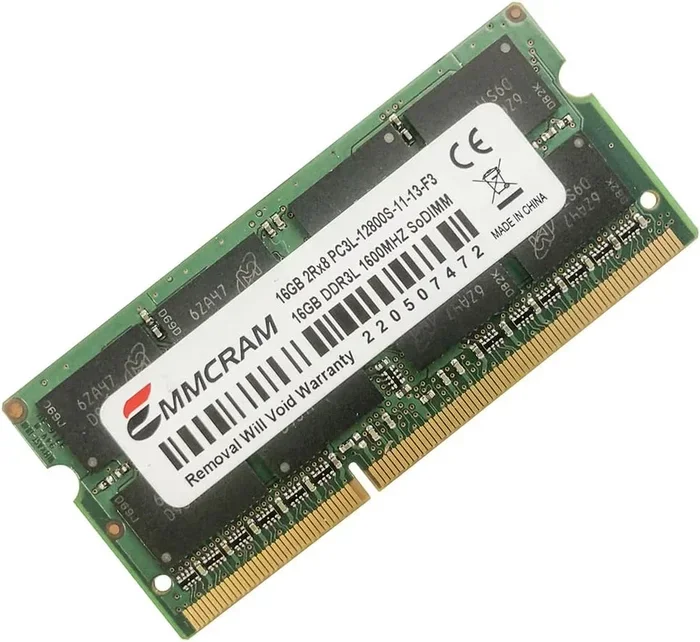
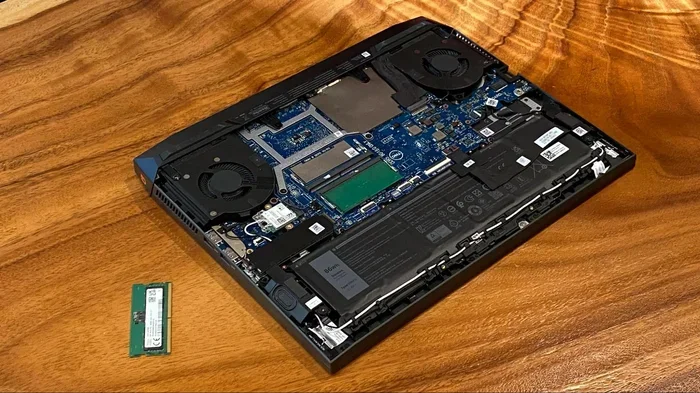
Before you buy, find out if the RAM is soldered (permanently attached to the motherboard) or available in slots (SO-DIMM slots you can access by removing a back panel). Use the manufacturer’s specs sheet or search for a teardown video of your specific model. This is your single most important research step.
- If it has slots: You can often buy the base 8GB model and buy a compatible 8GB stick (or 16GB stick) separately for $30-$60 and install it yourself in 10 minutes. This is the best way to save money and upgrade later.
- If it’s soldered: What you buy is what you get forever. In this case, you must choose correctly at purchase. Given the trends, if your budget allows, 16GB is the smarter long-term investment for a soldered system.
The Inevitable March of Progress
Software is a greedy thing. Operating system updates, new versions of browsers, and applications constantly add features and security layers that consume more resources. What runs comfortably on 8GB today will feel slow in 2-3 years. Web pages are only getting more complex. Video codecs are getting more demanding. Buying 8GB in 2024 is essentially committing to feeling the pinch of your laptop’s limits sooner rather than later. 16GB provides a comfortable buffer for this inevitable software bloat.
Conclusion: Making Your Decision
So, is 8GB RAM enough for a laptop? Let’s summarize clearly. 8GB is the absolute minimum viable RAM for a Windows or Linux laptop in 2024. It is enough for a very light user who runs a handful of apps at once and does not engage in professional work or modern gaming. For the vast majority of people who multitask—having a browser with 10+ tabs open while working in an office suite and listening to music—8GB will lead to a compromised, sometimes frustrating experience marked by slowdowns. For anyone in creative fields, development, data work, or modern gaming, 8GB is insufficient and will actively hinder your productivity and enjoyment. If your laptop has upgradable RAM, starting with 8GB and adding a matching stick later is a valid cost-saving strategy. If the RAM is soldered, strongly consider stretching your budget for 16GB. Your future self, juggling tasks in three years, will thank you for the foresight. Think of RAM not as a luxury, but as the foundation for a smooth, responsive, and capable computing experience that lasts.
Frequently Asked Questions
Can I upgrade from 8GB to 16GB RAM in my laptop?
It depends entirely on your laptop model. Many business and gaming laptops have accessible RAM slots. However, most modern ultrabooks and Apple Silicon Macs have RAM soldered to the motherboard, making upgrades impossible. Always check your specific model’s specifications or a teardown video before buying based on upgrade potential.
What are the first signs my 8GB RAM is not enough?
The primary sign is consistent slowdown during normal use. If your laptop feels laggy when you have a web browser with several tabs open alongside a program like Word or Spotify, or if it stutters while scrolling, your RAM is likely maxed out and using the slower SSD as virtual memory. Check Task Manager (Ctrl+Shift+Esc) or Activity Monitor to see if RAM usage is consistently at 90-100%.
Is 8GB RAM enough for a Windows 11 laptop?
Technically, Windows 11’s minimum requirement is 4GB, but this is misleading for real-world use. Windows 11 itself uses about 4GB at idle. With 8GB total, you have roughly 4GB left for all your applications. This is a very tight squeeze for modern multitasking, making 8GB feel insufficient for most users who do more than one thing at a time.
Should I get 8GB or 16GB RAM for college?
For most college students, 16GB is the recommended choice. Research often involves keeping 10-20 browser tabs open for papers, alongside a word processor, PDF reader, and possibly a video call. This workflow will strain 8GB. A student in engineering, design, or film will absolutely need 16GB+ for their specialized software. 16GB provides the headroom needed for intense study sessions and multitasking.
Is there a performance difference between 1x8GB and 2x4GB RAM?
Yes, but it’s nuanced. Two 4GB sticks running in dual-channel mode (which nearly all modern laptops do) offer slightly better performance—typically 5-15% faster in integrated graphics tasks and memory-sensitive applications—compared to a single 8GB stick running in single-channel mode. The difference is most noticeable in gaming with integrated graphics (like AMD Ryzen APUs or Intel Iris Xe) and some creative workloads. For general use, the difference is minimal.
What’s a better investment: more RAM or a faster SSD?
For overall system responsiveness, more RAM is almost always the better investment if you are currently RAM-starved. An SSD makes loading files and booting faster, but it doesn’t solve the fundamental problem of having enough workspace for your open apps. If your RAM is constantly full, adding a faster SSD won’t fix the lag from swapping. First, ensure you have enough RAM (16GB minimum), then invest in a fast NVMe SSD for the best overall experience.