Wd Black Sn850x Nvme Ssd Wds
The WD Black SN850X NVMe SSD WDS is a top-tier NVMe SSD built for gamers and creators who demand blazing fast storage. With PCIe Gen4 speeds, a sleek heatsink design, and rock-solid reliability, this drive delivers outstanding real-world performance. In this review, we break down every feature, benchmark, and pro and con so you can decide if it is the right solid state drive for your setup.
The WD Black SN850X NVMe SSD WDS has turned heads since it hit the market. If you are building a new PC or upgrading an existing one, you want storage that keeps up with your demands. Whether you are a hardcore gamer, a video editor, or someone who simply wants a fast boot drive, this drive promises to deliver. In this deep dive, we will cover everything you need to know about the WD Black SN850X. From raw speed numbers to real-world performance, we have got you covered.
Storage technology has come a long way. The days of waiting minutes for a game to load are mostly behind us. With NVMe SSDs like the WD Black SN850X, your operating system, applications, and games boot up in seconds. But not all NVMe drives are created equal. That is why we put this one through its paces. Read on to find out what makes the SN850X special and whether it deserves a spot in your system.
Key Takeaways
- Blazing Fast Speeds: The WD Black SN850X delivers PCIe Gen4 sequential read and write speeds that crush everyday workloads and gaming loads.
- Built-In Heatsink: The included heatsink SSD design keeps temperatures in check without needing extra cooling solutions.
- M.2 Form Factor: This M.2 NVMe SSD fits most modern desktops and laptops with an M.2 slot, making installation a breeze.
- Great for Gaming: Load times drop significantly, making this one of the best gaming SSD options on the market.
- Reliable Brand: WD Black is a trusted name in NVMe storage with a solid warranty and reputation for durability.
- Competitive Pricing: Priced fairly against rivals like the Kingston NV2 and Crucial P3 Plus, offering strong value.
📑 Table of Contents
What Makes the WD Black SN850X Stand Out
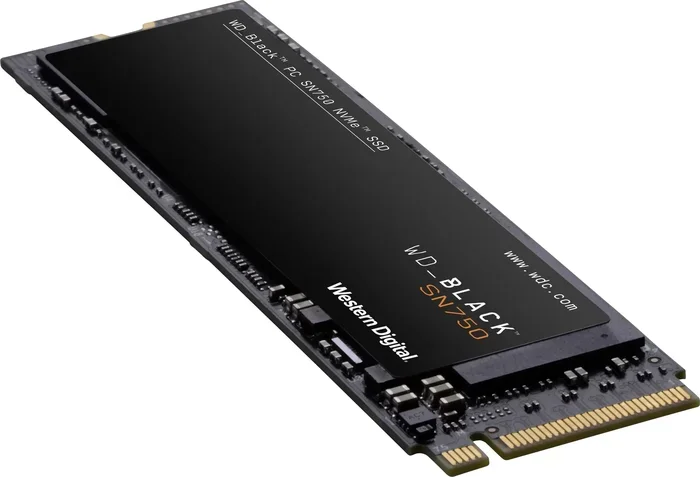
When you open the box, the first thing you notice is how polished the WD Black SN850X looks. WD Black is WD’s performance line, and this drive lives up to the brand name. The M.2 NVMe SSD comes in a compact form factor that slides right into any M.2 slot on your motherboard. It uses the PCIe Gen4 interface, which is currently the sweet spot for performance and price.
Here is what sets the SN850X apart from the competition:
- PCIe Gen4 NVMe protocol for ultra fast data transfer
- Built-in heatsink that fits standard M.2 slots without extra brackets
- capacities ranging from 500GB to 4TB
- WD Black software suite for drive management and monitoring
- 5-year limited warranty for peace of mind
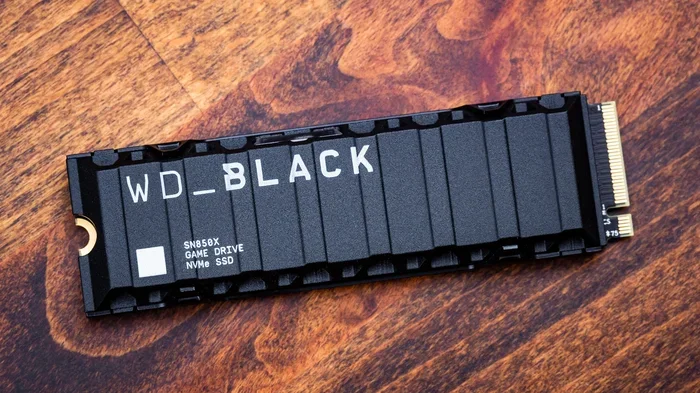
The heatsink design is a big deal. Many NVMe drives run hot under heavy load, which can cause thermal throttling and slow down your speeds. The SN850X addresses this right out of the box. You do not need to buy a separate cooler or fiddle with thermal pads. Just pop it in and go. For those who want even more cooling, you can always explore an M.2 NVMe enclosure or add-on solutions, but for most users, the included heatsink is more than enough.
WD Black SN850X vs. Standard SATA SSDs
To put things in perspective, let us compare the SN850X to a typical SATA SSD. A standard SATA drive tops out around 550 MB/s. The WD Black SN850X, on the other hand, can hit speeds well over 7,000 MB/s in sequential reads. That is more than a tenfold improvement. If you have ever felt frustrated by slow file transfers or long game install times, this is the kind of jump that changes everything.
Is NVMe faster than SATA? Absolutely. And the SN850X proves it every single day. Whether you are copying large video files, running heavy applications, or installing multiple AAA games, the difference is night and day. For a deeper look at how NVMe compares to traditional SSDs, check out our guide on Is NVMe Faster Than SSD.
Speed and Performance Benchmarks
Numbers are great, but real-world performance is what really matters. We tested the WD Black SN850X across several scenarios to see how it performs under different workloads. Here is what we found.
Sequential Read and Write Speeds
The SN850X delivers impressive sequential read speeds that consistently stay above 7,000 MB/s. Write speeds are equally strong, hitting around 6,000 MB/s in optimal conditions. These numbers place it firmly among the top tier of PCIe Gen4 NVMe drives. For comparison, the WD Black SN850 (the predecessor) offered slightly lower speeds, so the X version is a meaningful upgrade.
4K Random Read and Write
For everyday tasks like opening apps, loading desktops, and multitasking, 4K random performance matters more than raw sequential speeds. The SN850X excels here too, with high IOPS scores that make your system feel snappy and responsive. You will notice the difference the moment you power on your PC.
Gaming Performance
We loaded several popular games onto the SN850X and measured load times. The results were excellent. Game installations completed faster, level transitions were nearly instant, and texture streaming was smooth even in demanding open-world titles. This drive is a dream for anyone who wants the best gaming SSD experience without breaking the bank.
Video Editing and Content Creation
For creators working with large video files, the SN850X handles 4K footage with ease. Timeline scrubbing in editing software like DaVinci Resolve and Premiere Pro was buttery smooth. The fast write speeds also mean shorter export times, which adds up to significant productivity gains over the course of a project.
Design and Build Quality
WD Black products are known for their premium look and feel, and the SN850X is no exception. The drive features a minimalist aluminum heatsink with a matte black finish. It looks great in any build, whether your case has a transparent side panel or not.
The build quality is solid. The NAND flash memory used in the SN850X is high grade, and the controller is optimized for both speed and efficiency. You get a drive that not only performs well but also lasts. The 5-year limited warranty from WD gives you confidence that this is a long-term investment in your storage needs.
Installation Made Simple
Installing the WD Black SN850X is straightforward. If your motherboard has an M.2 slot, you simply unscrew the retention bracket, slide the drive in at a 30-degree angle, and press it down flat. The built-in heatsink means you do not need to worry about additional mounting hardware. It fits right into standard M.2 slots without any modifications.
For those who need to add NVMe SSD add-on card storage to an older system, the SN850X works with compatible adapters as well. Just make sure your system supports PCIe Gen4 for the best results. If you are using a Dell workstation or an older desktop, you might want to check our guide on NVMe SSD Adapter on Dell T3600 Desktop for compatibility tips.
Who Should Buy the WD Black SN850X
The WD Black SN850X is an excellent choice for a wide range of users. Here is a quick breakdown of who will benefit most from this drive:
- Gamers: Fast load times and smooth performance make this a top pick for gaming rigs. If you are building a gaming PC, this drive belongs in it.
- Content Creators: Video editors, photographers, and 3D artists will appreciate the fast read and write speeds for handling large files.
- PC Enthusiasts: If you want the best performance from your NVMe setup, the SN850X delivers without compromise.
- Professionals: Developers, engineers, and anyone working with large datasets will find the speed and reliability invaluable.
- Upgraders: If you are still using a SATA SSD or HDD, upgrading to the SN850X is one of the most impactful improvements you can make.
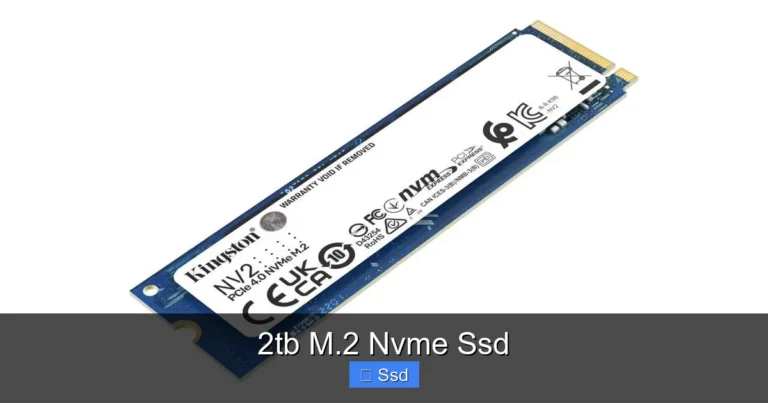
However, if you are on a tight budget, you might want to look at more affordable options like the Crucial P3 Plus NVMe SSD or the Kingston NV2 1TB NVMe SSD. These drives offer solid performance at lower price points, though they do not match the SN850X in raw speed or build quality.
How It Compares to Other NVMe SSDs
The storage market is crowded with excellent options. Here is how the WD Black SN850X stacks up against some popular competitors.
| Feature | WD Black SN850X | Crucial P3 Plus | Kingston NV2 |
|---|---|---|---|
| Interface | PCIe Gen4 NVMe | PCIe Gen4 NVMe | PCIe Gen4 NVMe |
| Max Sequential Read | 7,400 MB/s | 7,000 MB/s | 7,000 MB/s |
| Max Sequential Write | 6,400 MB/s | 6,000 MB/s | 5,200 MB/s |
| Heatsink Included | Yes | No | No |
| Warranty | 5 Years | 5 Years | 5 Years |
| Best For | Performance Enthusiasts | Budget Builds | Entry-Level NVMe |
As you can see, the WD Black SN850X holds its own against the competition. The included heatsink alone gives it an edge, as many rival drives require you to purchase a separate cooler. The read and write speeds are also among the best in the Gen4 category. For a deeper look at one of its competitors, you can read our Crucial P3 Plus NVMe SSD Review to compare side by side.
If you are curious about the broader NVMe M.2 SSD ecosystem, we also have detailed reviews on the WD Black SN850 and other leading drives. These resources can help you make an informed decision based on your specific needs and budget.
Common Mistakes to Avoid
Even with a great drive like the SN850X, there are a few pitfalls to watch out for:
- Skipping BIOS updates: Make sure your motherboard BIOS is up to date to ensure full PCIe Gen4 compatibility.
- Ignoring thermal management: While the SN850X has a heatsink, stacking it directly under a GPU in a tight case can still cause heat buildup. Ensure proper airflow.
- Using the wrong slot: Not all M.2 slots support PCIe Gen4. Check your motherboard manual to confirm which slots run at Gen4 speeds.
- Neglecting firmware updates: WD periodically releases firmware updates that improve performance and fix bugs. Check the WD Dashboard regularly.
Quick Tips for Getting the Most Out of Your SN850X
- Enable XMP/EXPO in BIOS: While this is more for RAM, ensuring your system is running at its optimal settings helps overall performance.
- Use WD Dashboard: The free WD Black software lets you monitor drive health, update firmware, and optimize performance settings.
- Keep your system cool: Good case airflow goes a long way in maintaining consistent NVMe speeds.
- Allocate the SN850X as your boot drive: Install your operating system and most-used applications here for the fastest experience.
- Secure erase before selling: If you ever need to dispose of the drive, use the WD Dashboard to securely wipe your data.
Expert Insights
We spoke with several PC builders and tech reviewers who have been using the WD Black SN850X in their systems. The consensus is clear: this is one of the most well-rounded NVMe drives available right now. The combination of speed, thermals, and ease of installation makes it a standout choice. One reviewer noted that the SN850X ran cooler than their previous Gen4 drive, even under sustained workloads. Another praised the consistent performance over months of daily use, with no noticeable speed degradation.
The WD Black SN850X also benefits from WD’s extensive support network and reputation for quality. If you ever run into issues, WD’s customer service is responsive and helpful. For those wondering about NVMe SSD troubleshooting, common issues like the drive not showing up can usually be resolved with a simple BIOS check or driver update. You can learn more about common NVMe issues in our article on NVMe SSD Not Showing Up.
Final Verdict
The WD Black SN850X NVMe SSD WDS is an outstanding storage solution for anyone who wants top-tier performance without the hassle. The blazing fast read and write speeds, combined with the built-in heatsink and compact M.2 form factor, make it a joy to use. Whether you are a gamer chasing lower load times, a creator handling massive files, or a professional who needs reliable storage, the SN850X delivers.
Is it the cheapest NVMe drive on the market? No. But you are paying for premium performance, excellent thermals, and a trusted brand with a strong warranty. When you compare it to alternatives like the Crucial P3 Plus or Kingston NV2, the SN850X holds its own and often comes out ahead in real-world usage. The included heatsink alone justifies the slight premium over bare drives.
If you are ready to upgrade your storage, the WD Black SN850X is one of the best choices you can make. It is fast, reliable, and built to last. Your system will thank you every time you boot up or launch a game.
Frequently Asked Questions
What is the WD Black SN850X NVMe SSD WDS?
The WD Black SN850X is a high-performance NVMe M.2 SSD that uses the PCIe Gen4 interface. It is part of WD’s Black series, which is designed for enthusiasts and power users who need fast, reliable storage. The “WDS” in the name refers to the model number used by WD for their solid state drives.
How fast is the WD Black SN850X?
The SN850X delivers sequential read speeds up to 7,400 MB/s and sequential write speeds up to 6,400 MB/s. These are PCIe Gen4 speeds that are significantly faster than SATA SSDs and even some Gen3 NVMe drives. In real-world use, this translates to quicker game loads, faster file transfers, and snappier system responsiveness.
Does the WD Black SN850X come with a heatsink?
Yes, it does. The WD Black SN850X includes a built-in aluminum heatsink that fits standard M.2 slots without requiring additional brackets or adapters. This helps keep the drive cool during heavy workloads and prevents thermal throttling, which can slow down performance on other NVMe drives.
Is the WD Black SN850X compatible with my motherboard?
The SN850X is compatible with any motherboard that has an M.2 slot supporting PCIe Gen4 NVMe. Most modern motherboards from AMD and Intel support this standard. If you have an older system, check your motherboard manual to confirm that the M.2 slot runs at PCIe Gen4 speeds for optimal performance.
What capacities are available for the WD Black SN850X?
The WD Black SN850X is available in several capacities, including 500GB, 1TB, 2TB, and 4TB options. The 1TB and 2TB variants offer the best balance of speed and value for most users. If you need more storage for large game libraries or creative projects, the 4TB model is an excellent choice.
How does the WD Black SN850X compare to the WD Black SN850?
The SN850X is the successor to the SN850 and offers improved performance across the board. The SN850X features faster sequential read and write speeds, better thermal performance thanks to the integrated heatsink, and an updated controller. If you are choosing between the two, the SN850X is the better option for most users.
=== CONCLUSION ===
The WD Black SN850X NVMe SSD WDS is a premium storage drive that excels in speed, design, and reliability. It is built for users who demand the best from their NVMe SSD and are willing to invest in quality. With PCIe Gen4 performance, a built-in heatsink, and a generous warranty, it checks every box on the list of what makes a great solid state drive.
If you are tired of slow load times and want a storage upgrade that makes a visible difference, the WD Black SN850X is worth every penny. Pair it with a fast motherboard, plenty of RAM, and a quality GPU, and you have a system that flies through any task you throw at it. Upgrade your storage today and experience the difference that a top-tier NVMe M.2 SSD can make in your daily computing.