4tb M.2 Pcie Nvme Ssd
A 4TB M.2 PCIe NVMe SSD delivers massive storage capacity with incredible read and write speeds, making it a game-changer for gamers, creators, and professionals. Whether you are building a new system or upgrading an existing one, this guide covers everything you need to know about choosing and using the right high-capacity NVMe drive.
Key Takeaways
- Massive Speed Gains: A 4TB M.2 PCIe NVMe SSD offers read speeds up to 7,000 MB/s, far outpacing traditional SATA drives.
- Ideal for Heavy Workloads: With 4 terabytes of storage, you can store entire game libraries, massive video projects, and professional datasets on a single drive.
- Compatibility Matters: Make sure your motherboard supports M.2 PCIe Gen4 or Gen5 before purchasing a high-capacity NVMe drive.
- Thermal Management Is Critical: Large-capacity NVMe drives generate significant heat, so heatsinks and proper airflow are essential.
- Price-Per-GB Is Dropping: The cost of 4TB solid state drives is becoming more affordable, making them accessible for mainstream users.
- NAND Type Affects Longevity: TLC NAND offers the best balance of speed, endurance, and price for most users.
📑 Table of Contents
- Introduction
- What Is a 4TB M.2 PCIe NVMe SSD?
- Key Benefits of a 4TB M.2 PCIe NVMe SSD
- Who Needs a 4TB M.2 PCIe NVMe SSD?
- 4TB M.2 PCIe NVMe SSD vs Other Capacities
- Important Features to Look For
- Top Picks and Compatibility Tips
- Common Mistakes When Buying a 4TB M.2 PCIe NVMe SSD
- Expert Insights
- Conclusion
Introduction
Storage technology has come a long way in the last decade. Today, a 4TB M.2 PCIe NVMe SSD is no longer a futuristic dream — it is a real, affordable option for anyone who needs serious speed and massive capacity in a single, compact drive. Whether you are a gamer tired of long load times, a video editor working with 4K footage, or a professional managing large datasets, this drive can completely transform your workflow.
But what exactly makes a 4TB NVMe M.2 SSD so special? How does it compare to smaller capacity drives? And more importantly, how do you choose the right one for your system? In this guide, we will break down everything you need to know — from how these drives work to the key features you should look for when shopping.
We will also cover compatibility, thermal management, common buying mistakes, and practical tips to help you get the most out of your high-capacity NVMe storage. Let us dive in.
What Is a 4TB M.2 PCIe NVMe SSD?
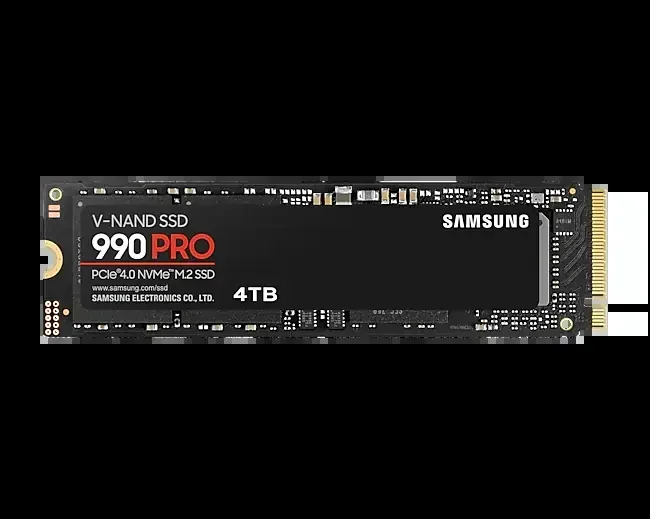
A 4TB M.2 PCIe NVMe SSD is a solid state drive that uses the M.2 form factor and connects through a PCIe (Peripheral Component Interconnect Express) lane. The NVMe (Non-Volatile Memory Express) protocol allows the drive to communicate directly with the CPU, bypassing the older SATA bottleneck. This results in dramatically faster data transfer speeds compared to traditional hard drives or even SATA-based SSDs.
How It Works
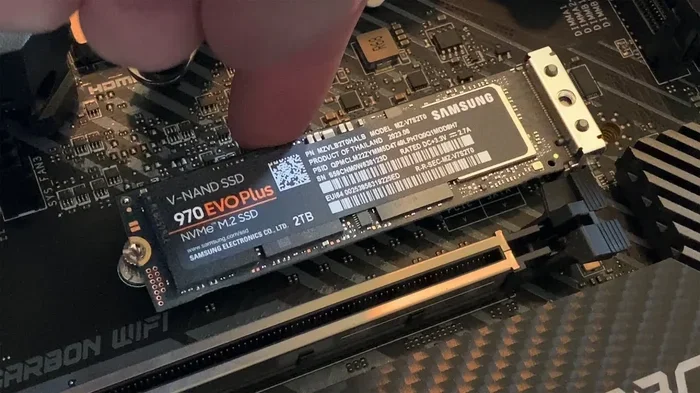
Unlike a traditional hard drive that uses spinning disks and read/write heads, an NVMe SSD stores data on interconnected NAND flash memory chips. The M.2 form factor — a small, stick-like design — allows the drive to slot directly into a dedicated port on your motherboard. This compact shape saves space and eliminates the need for bulky cables.
When you use a 4TB solid state drive over a PCIe Gen4 or Gen5 connection, data moves at incredible rates. A SATA III SSD maxes out around 550 MB/s. A PCIe Gen4 NVMe drive can hit 5,000 to 7,000 MB/s. The newest PCIe Gen5 drives push beyond 10,000 MB/s. That is the difference between waiting minutes and waiting seconds.
Key Benefits of a 4TB M.2 PCIe NVMe SSD
Speed and Performance
The most obvious benefit is raw speed. Loading times drop dramatically. File transfers finish in a fraction of the time. Applications open almost instantly. With a 4TB M.2 PCIe NVMe SSD, your system feels responsive and snappy, even under heavy workloads.
Here is a quick look at typical sequential read speeds across different storage types:
- HDD: 80–160 MB/s
- SATA SSD: 500–560 MB/s
- PCIe Gen3 NVMe: 3,000–3,500 MB/s
- PCIe Gen4 NVMe: 5,000–7,000 MB/s
- PCIe Gen5 NVMe: 10,000–14,000 MB/s
As you can see, upgrading to a high-capacity NVMe drive is like switching from a bicycle to a sports car. The improvement is night and day.
Storage Space for Modern Needs
Modern games, applications, and media files are enormous. A single AAA game can exceed 100 GB. Video projects in 4K or 8K can take up terabytes of space. With a 4TB internal storage solution, you have room to spare. You can install your entire game library, keep your creative projects organized, and still have space left over for backups and archives.
This eliminates the need for multiple drives or constantly juggling external storage. Everything lives in one fast, reliable place.
Who Needs a 4TB M.2 PCIe NVMe SSD?
Gamers
Gamers benefit enormously from a 4TB M.2 PCIe NVMe SSD. Modern open-world games are packed with textures, assets, and streaming data. Loading from an NVMe drive means less time waiting at screens and more time playing. Some next-gen consoles already use similar technology, and PC gamers are following suit.
With 4 terabytes on a single drive, you can store dozens of large titles without worrying about running out of room. Fast load times also reduce in-game stuttering when the game streams assets from the drive.
Content Creators
Video editors, 3D artists, photographers, and music producers all need fast, spacious storage. A 4TB NVMe M.2 SSD lets you edit directly from the drive without lag. Rendering large projects becomes smoother. Importing massive RAW photo libraries happens in seconds, not minutes.
For creators who work with 4K or 8K video, having a high-capacity SSD with fast sequential write speeds is practically a requirement. It keeps your timeline responsive and your workflow uninterrupted.
Professionals and Data Centers
Businesses and professionals who handle large datasets, databases, or virtual machines also benefit. A 4TB M.2 PCIe NVMe SSD provides the IOPS (Input/Output Operations Per Second) needed for demanding workloads. In data center environments, these drives improve server responsiveness and reduce latency for critical applications.
4TB M.2 PCIe NVMe SSD vs Other Capacities
Choosing the right capacity depends on your needs. Here is how a 4TB M.2 PCIe NVMe SSD stacks up against smaller options:
| Feature | 1TB NVMe SSD | 2TB NVMe SSD | 4TB NVMe SSD |
|---|---|---|---|
| Best For | Basic storage, boot drive | Gamers, casual pros | Heavy users, creators, enthusiasts |
| Price Per GB | Higher | Moderate | Best Value |
| Game Library Fit | 5–10 games | 15–25 games | 40–60+ games |
| Video Project Space | Small projects | Medium projects | Large multi-track projects |
| Speed (Gen4) | Up to 7,000 MB/s | Up to 7,000 MB/s | Up to 7,000 MB/s |
As the table shows, the 4TB M.2 NVMe PCIe drive offers the best value per gigabyte for power users. You get more space at a lower per-unit cost, and the speed remains on par with smaller drives in the same product line.
Quick Tip
Consider pairing a smaller NVMe drive (like a 1TB M.2 NVMe SSD) as your boot drive with a 4TB drive as your primary data drive. This gives you the best of both worlds — a fast system drive and plenty of room for everything else.
Important Features to Look For
NAND Flash Type
The type of NAND flash inside your 4TB solid state drive matters a lot. Here are the three main types:
- SLC (Single-Level Cell): Fastest and most durable, but very expensive. Mostly found in enterprise drives.
- MLC (Multi-Level Cell): Good balance of speed and endurance. Less common in consumer drives today.
- TLC (Triple-Level Cell): The sweet spot for most users. Great speed, decent endurance, and affordable pricing.
- QLC (Quad-Level Cell): Offers the most storage per chip at a lower cost, but trades some speed and endurance. Common in high-capacity consumer drives like a 4TB NVMe M.2 SSD.
For a 4TB M.2 PCIe NVMe SSD, you will mostly find TLC or QLC NAND. TLC offers the best all-around performance. QLC is more budget-friendly and still delivers excellent speeds for everyday use.
DRAM Cache
A DRAM cache acts as a buffer between the NAND flash and your system. Drives with a dedicated DRAM chip can map data faster and handle sustained workloads more efficiently. When shopping for a high-capacity NVMe drive, look for models with DRAM cache for the best real-world performance.
Some budget drives skip the DRAM cache and use a portion of the NAND flash instead (called Host Memory Buffer or HMB). These work fine for general use but may struggle under heavy, sustained write workloads.
Thermal Management
This is often overlooked but extremely important. A 4TB M.2 PCIe NVMe SSD generates significant heat, especially during large file transfers or extended gaming sessions. Overheating can cause thermal throttling, which reduces speed to protect the drive.
Here are some tips to keep your drive cool:
- Use a motherboard with a built-in M.2 heatsink.
- Add an aftermarket M.2 heatsink if your board does not have one.
- Ensure good case airflow around the M.2 slot.
- Avoid installing multiple NVMe drives in adjacent slots without heatsinks.
Many premium 4TB NVMe SSDs come with built-in heatsinks or heat spreaders. This is a feature worth paying extra for if your system does not already have one.
Endurance and Warranty
Endurance is measured in TBW (Terabytes Written). It tells you how much data you can write to the drive over its lifetime. A typical 4TB M.2 PCIe NVMe SSD offers between 1,200 and 2,400 TBW depending on the NAND type and manufacturer.
Most reputable brands offer a 5-year limited warranty. Always check both endurance ratings and warranty terms before buying. A strong warranty gives you peace of mind, especially when investing in a high-capacity SSD.
Top Picks and Compatibility Tips
When looking for a 4TB M.2 PCIe NVMe SSD, you will find options from brands like Crucial, Samsung, WD, and others. The Crucial T705 4TB PCIe Gen5 NVMe M.2 SSD is one standout option that delivers top-tier speeds and excellent reliability for demanding users. Samsung and WD also offer competitive models in the high-capacity space.
Check Your Motherboard First
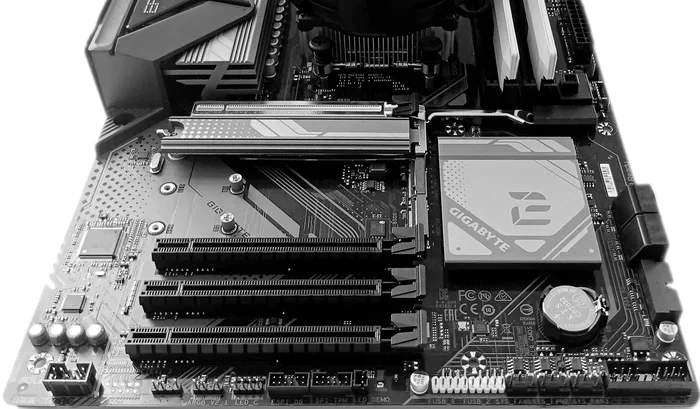
Before buying, confirm that your motherboard has an M.2 slot that supports PCIe Gen4 or Gen5. Not all M.2 slots are the same. Some older boards only support PCIe Gen3, which will still be fast but will not unlock the full speed of a Gen4 or Gen5 drive.
Here is a quick compatibility checklist:
- Does your motherboard have an M.2 slot? (Check your manual.)
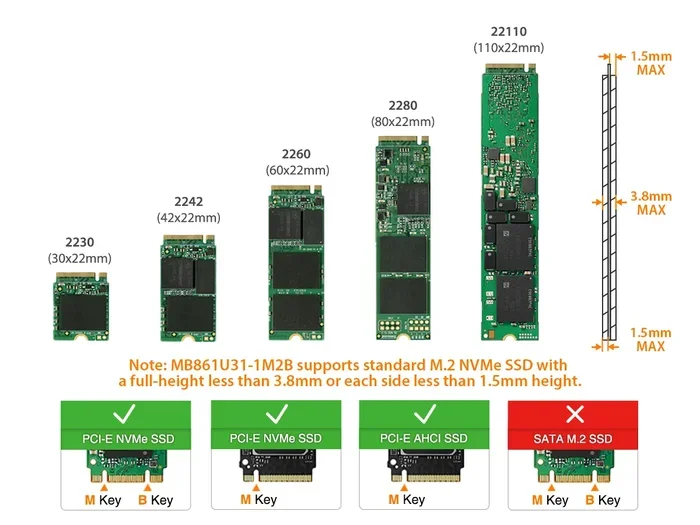
- Does the slot support PCIe Gen4 or Gen5? (Look for the key: M-key for M.2 NVMe.)
- Is there enough physical space for the drive, especially if it includes a heatsink?
- Does your system have adequate cooling around the M.2 area?
If you are building a new system, choosing a modern motherboard with multiple M.2 slots gives you flexibility. You can use a 2TB M.2 NVMe SSD for your boot drive and a 4TB drive for mass storage.
External Enclosures
Not all M.2 slots are available on every system, especially laptops. In that case, an NVMe M.2 enclosure can turn your internal 4TB M.2 PCIe NVMe SSD into a fast external drive. Just make sure the enclosure supports PCIe speeds and not just SATA, or you will be stuck at much slower transfer rates.
Common Mistakes When Buying a 4TB M.2 PCIe NVMe SSD
Buying a 4TB M.2 PCIe NVMe SSD is a significant investment. Avoid these common pitfalls:
- Ignoring compatibility: Not every M.2 slot supports NVMe. Some are SATA-only. Always double-check.
- Skipping the heatsink: Without proper cooling, your drive may throttle and lose speed. A simple heatsink can make a huge difference.
- Chasing speed over real-world use: The fastest drive is not always the best choice. Focus on the features you actually need — capacity, endurance, and reliability matter just as much as peak speeds.
- Ignoring endurance ratings: If you write large amounts of data regularly (like video editing), choose a drive with higher TBW ratings.
- Forgetting firmware updates: After installing your 4TB NVMe M.2 SSD, check the manufacturer website for firmware updates. These can improve performance, fix bugs, and enhance compatibility.
Expert Insights
Industry experts consistently recommend TLC NAND for the best balance of speed, endurance, and price in consumer drives. For a 4TB M.2 PCIe NVMe SSD, QLC is a practical and cost-effective alternative that still delivers excellent performance for most tasks. However, if you need maximum endurance for professional workloads, investing in a TLC-based drive is worth the extra cost.
Experts also stress the importance of thermal management. “Heat is the silent killer of NVMe performance,” says one storage industry analyst. “A drive that thermal throttles under load is essentially a slower drive. Invest in a good heatsink and make sure your case has decent airflow.”
Another tip from professionals: use your 4TB NVMe drive as a primary data or game drive, and keep a separate smaller, faster drive for your operating system. This setup optimizes both boot speed and storage capacity without compromise.
Conclusion
A 4TB M.2 PCIe NVMe SSD is one of the best storage upgrades you can make for your system. It combines massive capacity with blazing speeds, compact design, and modern features like DRAM cache and advanced thermal management. Whether you are a gamer, content creator, or professional, this drive delivers the performance and space you need to stay productive and enjoy your digital content without compromise.
The key is to choose the right drive for your specific needs, ensure compatibility with your system, and take care of thermal management. With the right 4TB M.2 PCIe NVMe SSD installed, your system will feel faster, more spacious, and ready to handle whatever you throw at it. Do your research, avoid common mistakes, and enjoy the incredible speed that modern NVMe technology has to offer.
Frequently Asked Questions
How fast is a 4TB M.2 PCIe NVMe SSD compared to a regular SSD?
A 4TB M.2 PCIe NVMe SSD is typically 5 to 10 times faster than a SATA SSD in sequential read and write speeds. While a SATA SSD tops out around 550 MB/s, a Gen4 NVMe drive reaches 5,000 to 7,000 MB/s, and Gen5 drives exceed 10,000 MB/s. This means file transfers, game loads, and application launches happen dramatically faster.
Will my computer support a 4TB M.2 PCIe NVMe SSD?
Most modern motherboards from 2020 onward support M.2 NVMe drives, but you need to check if your specific M.2 slot supports PCIe Gen4 or Gen5 speeds. Older boards may only support Gen3, which still works but limits maximum speed. Check your motherboard manual or use a system scanning tool to confirm compatibility before purchasing.
Is a 4TB NVMe SSD worth the price?
Yes, if you need large, fast storage. The price per gigabyte for a 4TB solid state drive has dropped significantly in recent years. For gamers who want to store an entire library, content creators working with large files, or professionals handling big datasets, the value is excellent compared to buying multiple smaller drives or relying on slower storage solutions.
Does a 4TB NVMe SSD need a heatsink?
It is highly recommended. Large-capacity NVMe drives generate more heat during sustained workloads. Without a heatsink, the drive may thermal throttle and reduce its speed to protect itself. Most motherboards have built-in M.2 heatsinks, but if yours does not, an aftermarket heatsink is a small investment that preserves performance.
Can I use a 4TB M.2 NVMe SSD as an external drive?
Yes, with a compatible NVMe enclosure. You can place your 4TB M.2 PCIe NVMe SSD inside an external enclosure that connects via USB4 or Thunderbolt 3/4. Make sure the enclosure explicitly supports NVMe protocols and not just SATA, as many cheap enclosures only work with SATA M.2 drives.
What is the difference between TLC and QLC NAND in a 4TB drive?
TLC (Triple-Level Cell) NAND offers faster speeds and better endurance, making it ideal for heavy workloads like video editing and gaming. QLC (Quad-Level Cell) NAND stores more data per chip at a lower cost but trades some speed and durability. For most users, a 4TB NVMe M.2 SSD with QLC NAND is perfectly fine, while TLC is the better choice for demanding professional use.