M 2 Nvme 3.0 2280 Ssd
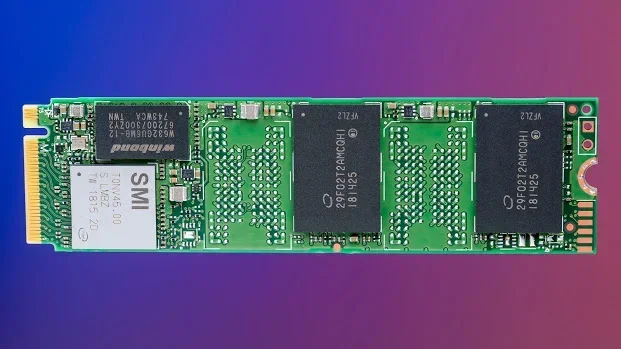
The M 2 NVMe 3.0 2280 SSD is a high-performance storage drive that delivers blazing-fast speeds for modern computers. This compact solid state drive uses the PCIe 3.0 interface and NVMe protocol to outperform traditional hard drives by a wide margin. Whether you are upgrading a laptop or building a new PC, the 2280 form factor fits most motherboards with an M.2 slot. In this guide, we break down everything you need to know about choosing, installing, and getting the most from your M 2 NVMe 3.0 2280 SSD.
If you have been looking to speed up your computer, the M 2 NVMe 3.0 2280 SSD is one of the best upgrades you can make. This type of solid state drive combines a small footprint with serious performance gains. It fits into the M.2 slot on your motherboard and uses the PCIe 3.0 bus to transfer data at incredible rates.
Traditional hard drives are slow by comparison. Even older SATA SSDs cannot match the speed of a PCIe 3.0 NVMe M.2 SSD. With read speeds that can exceed 3,500 MB/s, your operating system, games, and apps load in a fraction of the time. This guide will walk you through what makes these drives so good, how to pick the right one, and how to install it yourself.
Key Takeaways
- Blazing Speeds: PCIe 3.0 NVMe drives offer sequential read speeds up to 3,500 MB/s, far faster than SATA SSDs.
- Compact Design: The 2280 form factor is small enough for laptops and desktops with M.2 slots.
- Easy Installation: No cables needed. Just insert the drive into the M.2 slot and screw it in.
- Great for Gaming: Load times drop significantly when you use a M 2 NVMe 3.0 2280 SSD as your boot drive.
- Affordable Options Available: You can find reliable 512GB and 1TB models at budget-friendly prices.
- Widely Compatible: Most modern motherboards support NVMe M.2 drives with PCIe 3.0.
📑 Table of Contents
- What Is an M 2 NVMe 3.0 2280 SSD?
- How Does PCIe 3.0 Technology Work in M.2 SSDs?
- Benefits of Upgrading to an M 2 NVMe 3.0 2280 SSD
- M.2 NVMe 3.0 vs Other SSD Form Factors
- How to Choose the Right M 2 NVMe 3.0 2280 SSD
- Installation and Setup Tips
- Common Mistakes to Avoid
- Expert Insights: Who Benefits Most from This Drive?
- Conclusion
What Is an M 2 NVMe 3.0 2280 SSD?
The name might look like a jumble of letters and numbers, but each part tells you something important about the drive. Let us break it down piece by piece so it all makes sense.
Understanding the M.2 Form Factor
The M.2 designation refers to the physical shape and size of the drive. It is a small, rectangular module that plugs directly into your motherboard. There is no cable required. The “2280” part of the name tells you the dimensions. It means the drive is 22 millimeters wide and 80 millimeters long. This is the most common size for M.2 SSDs, and it fits the vast majority of laptops and desktops that have an M.2 slot.
What Makes NVMe Different?
NVMe stands for Non-Volatile Memory Express. It is a communication protocol designed specifically for flash storage. Unlike older protocols that were built for spinning disks, NVMe takes full advantage of the speed that modern NAND flash memory can offer. This is why a NVMe M.2 2280 SSD feels so much snappier than a traditional drive.
The Role of PCIe 3.0
PCIe 3.0 is the third generation of the Peripheral Component Interconnect Express interface. It provides a high-bandwidth connection between the SSD and the CPU. Each PCIe 3.0 lane can move about 1 GB per second of data. Most M 2 NVMe 3.0 2280 SSD drives use four lanes, which gives them a theoretical maximum of around 4 GB/s. In real-world use, you will typically see sequential read speeds between 3,000 and 3,500 MB/s.
How Does PCIe 3.0 Technology Work in M.2 SSDs?
To understand why PCIe 3.0 matters, it helps to know a little about how data moves between your storage drive and your processor. The PCIe bus acts like a highway. The wider the highway, the more data can travel at once. PCIe 3.0 offers a much wider highway than older SATA connections.
Here is a simple comparison of the two paths:
- SATA III: Maxes out around 600 MB/s. This is the bottleneck for older SSDs.
- PCIe 3.0 x4: Can deliver up to 4,000 MB/s. That is roughly six times faster.
When your operating system boots up or a game loads a new level, massive amounts of data need to move quickly. The PCIe 3.0 interface handles this with ease. If you have been frustrated by long load screens or slow boot times, switching to a M 2 NVMe 3.0 2280 SSD will make a noticeable difference right away.
The TLC NAND flash memory used in many of these drives also helps with performance and longevity. TLC stands for Triple-Level Cell, which means each memory cell stores three bits of data. This gives a good balance of speed, capacity, and cost. For most users, a TLC-based PCIe 3.0 NVMe M.2 SSD is the sweet spot.
Benefits of Upgrading to an M 2 NVMe 3.0 2280 SSD
Upgrading your storage is one of the most impactful things you can do for your computer. Here is why a M 2 NVMe 3.0 2280 SSD is worth every penny.
Blazing Fast Boot and Load Times
Your PC can go from cold boot to desktop in seconds. Games that used to take minutes to load now start almost instantly. Applications open without any noticeable delay. This upgrade transforms the daily computing experience, especially if you are coming from a mechanical hard drive.
Compact and Cable-Free Design
Since the drive slots directly into the motherboard, there are no SATA cables or power connectors to manage. This keeps your build clean and improves airflow inside your case. For laptop users, the small size means it fits into tight spaces without taking up extra room.
Energy Efficiency
NVMe SSDs are designed to be power efficient. They consume less energy than traditional hard drives, which can add up to better battery life on laptops. Even on desktops, a solid state drive M 2 NVMe keeps your system cooler and quieter.
Great Value for the Price
Prices for M 2 NVMe 3.0 2280 SSD storage have dropped significantly over the past few years. A reliable 1TB model now costs less than it did just a couple of years ago. A 512GB NVMe M.2 2280 SSD is an even more affordable option that still gives you plenty of space for your operating system, favorite apps, and several games.
M.2 NVMe 3.0 vs Other SSD Form Factors
The market is full of different SSD types. It can be confusing to know which one is right for you. Let us compare the most common options.
M.2 NVMe vs SATA SSD
SATA SSDs use the same 2.5-inch form factor as old laptop hard drives. They connect through a SATA III interface, which caps speeds at 600 MB/s. A M 2 NVMe 3.0 2280 SSD is at least five times faster. If your motherboard has an M.2 slot, there is really no reason to choose a SATA SSD for performance.
M.2 NVMe vs PCIe 4.0 NVMe
PCIe 4.0 is the newer generation that offers even higher speeds. A PCIe Gen4 NVMe M.2 SSD can reach read speeds of 7,000 MB/s or more. However, PCIe 4.0 drives cost more and require a compatible motherboard. For most everyday tasks, PCIe 3.0 is more than enough. The speed difference matters most for large file transfers and professional workloads like video editing.
M.2 NVMe vs Add-in Card SSDs
Some high-end SSDs come on add-in cards that plug into a PCIe slot on the motherboard. These offer the same NVMe speeds but take up more space. The M.2 form factor wins on convenience and compactness. For 95% of users, the M 2 NVMe 3.0 2280 SSD is the best choice.
How to Choose the Right M 2 NVMe 3.0 2280 SSD
Not all NVMe drives are created equal. Here are the key factors to consider before you buy.
Capacity Needs
Think about what you will store on the drive. If you only need your operating system and a few apps, a 256GB or 512GB drive works well. For gaming or storing large media files, a 1TB or 2TB model makes more sense. A 1TB NVMe M.2 SSD is the most popular choice because it offers a great balance of space and price.
Read and Write Speeds
Look for sequential read speeds of at least 3,000 MB/s. Write speeds are important too, especially if you work with large files. Most M 2 NVMe 3.0 2280 SSD drives from reputable brands deliver consistent performance in this range.
Brand Reputation and Warranty
Stick with well-known brands that offer at least a three-year warranty. Brands like Samsung, Crucial, Kingston, and WD have established track records in the SSD market. A Kingston 1TB M.2 NVMe SSD or a Crucial P310 1TB PCIe Gen4 NVMe 2280 M.2 SSD are both solid choices that balance performance and reliability.
DRAM Cache
Drives with a DRAM cache handle sustained workloads better. They keep a map of where data is stored, which improves random read and write performance. If you plan to use the drive for heavy multitasking or professional work, look for a model with DRAM support.
Installation and Setup Tips
Installing an M 2 NVMe 3.0 2280 SSD is surprisingly simple. You do not need to be a tech expert. Here is a quick overview of the process.
Step-by-Step Installation
- Turn off your computer and unplug it from the power outlet.
- Open your PC case or locate the M.2 slot on your laptop’s motherboard.
- Insert the SSD into the M.2 slot at a 30-degree angle.
- Press the drive down gently and secure it with the small screw.
- Close up your case and boot into your BIOS or UEFI settings.
- Make sure the M.2 slot is enabled and set to NVMe mode.
- Install your operating system or migrate your existing drive.
Quick Tips for Best Performance
- Always update your motherboard BIOS before installing a new NVMe drive.
- Enable the XMP profile in BIOS if you want to ensure optimal memory performance alongside your new SSD.
- Use the manufacturer’s software to keep your drive’s firmware up to date.
- Avoid filling the drive past 80% capacity for the best sustained speeds.
For more detailed guidance on setting up your new storage, check out our guide on solid state drive PCIe 3.0 TLC NVMe M.2 SSD which covers installation and optimization in greater detail.
Common Mistakes to Avoid
Even though installation is straightforward, there are a few pitfalls to watch out for.
- Buying the wrong length: M.2 drives come in different lengths. The 2280 is 80mm long. Make sure your motherboard supports this size. Some slots only fit shorter drives like 2242 or 2260.
- Forgetting to enable NVMe mode: Some motherboards default to SATA mode for M.2 slots. You need to go into BIOS and switch it to NVMe or PCIe mode to get the full speed.
- Skipping firmware updates: Manufacturers often release firmware that improves performance and fixes bugs. Always check for updates after purchase.
- Not using the right slot: Some motherboards have multiple M.2 slots. One might run at PCIe 3.0 while another runs at PCIe 4.0. Check your motherboard manual to know which slot gives you the best performance for your drive.
If you are unsure about compatibility, our article on SSD NVMe PCIe M.2 covers common motherboard compatibility questions in depth.
Expert Insights: Who Benefits Most from This Drive?
The M 2 NVMe 3.0 2280 SSD is not just for tech enthusiasts. Here are the groups of people who see the biggest improvements.
- Gamers: Faster load times mean less waiting and more playing. Modern games like Cyberpunk 2077 and Hogwarts Legacy benefit enormously from NVMe speeds.
- Content Creators: Video editors and photographers working with large files see a real boost in export and transfer speeds.
- Students: A fast boot drive makes multitasking between apps, browser tabs, and research materials smoother than ever.
- Office Workers: Opening spreadsheets, presentations, and email clients happens in a flash on an NVMe drive.
- Laptop Upgraders: If your laptop came with a slow HDD or a small SATA SSD, swapping in a M 2 NVMe 3.0 2280 SSD can make it feel like a new machine.
For those looking to expand their storage using external enclosures, we also recommend checking out the Ugreen M.2 NVMe SATA SSD enclosure review for a reliable and affordable way to use your NVMe drive externally.
Conclusion
The M 2 NVMe 3.0 2280 SSD is one of the simplest and most effective upgrades you can make to any modern computer. It delivers speeds that blow past traditional hard drives and even older SATA SSDs. The compact 2280 form factor fits into virtually any system with an M.2 slot, and the installation process is quick and painless.
Whether you are a gamer looking to cut load times, a student who wants a responsive laptop, or a professional who needs fast file transfers, this drive delivers where it counts. With prices continuing to drop and capacities climbing, there has never been a better time to make the switch to NVMe M.2 storage.
Pick the right capacity for your needs, choose a reputable brand, and follow our installation tips. Your computer will thank you every single time you turn it on.
Frequently Asked Questions
What does 2280 mean in M 2 NVMe 3.0 2280 SSD?
The “2280” refers to the physical dimensions of the drive. It is 22 millimeters wide and 80 millimeters long. This is the standard size for most M.2 SSDs and fits the majority of motherboards and laptops with an M.2 slot.
Is a PCIe 3.0 NVMe SSD fast enough for gaming?
Absolutely. PCIe 3.0 NVMe drives offer read speeds of around 3,500 MB/s, which is more than enough for modern gaming. You will notice significantly shorter load times compared to a SATA SSD or a traditional hard drive.
Can I install an M 2 NVMe 3.0 2280 SSD in any computer?
Not every computer has an M.2 slot. Check your motherboard or laptop manual to confirm it supports M.2 NVMe drives. Most computers built after 2018 include at least one M.2 slot that supports NVMe SSDs.
How is PCIe 3.0 different from PCIe 4.0 for NVMe SSDs?
PCIe 4.0 offers roughly double the bandwidth of PCIe 3.0. This means PCIe 4.0 NVMe drives can reach speeds above 7,000 MB/s. However, PCIe 3.0 is still fast enough for most users and costs less. The difference matters most for professional workloads like video editing and large data transfers.
Do I need a heatsink for my M 2 NVMe 3.0 2280 SSD?
It depends on your use case. For casual gaming and everyday use, most drives work fine without a heatsink. If you do heavy sustained workloads like rendering or compiling large codebases, a heatsink can help maintain peak performance by keeping temperatures in check.
What is the average lifespan of an M 2 NVMe 3.0 2280 SSD?
Most modern NVMe SSDs are rated for several hundred terabytes written (TBW). A typical 1TB TLC NVMe drive can last many years under normal use. Keeping your drive below 80% capacity and updating firmware regularly helps maximize its lifespan.
=== CONCLUSION ===
The M 2 NVMe 3.0 2280 SSD is a fast, compact, and affordable upgrade that can breathe new life into any computer. From boot times to game loading, the performance gains are immediate and noticeable. Follow the tips in this guide to choose the right drive, install it correctly, and enjoy the speed benefits for years to come.