Pcie Gen4 Nvme M 2 Ssd
A Pcie Gen4 Nvme M 2 Ssd is the latest generation of high-speed storage that uses the PCIe Gen4 interface and NVMe protocol in a compact M.2 form factor. It offers double the bandwidth of Gen3 drives, delivering read speeds up to 7000 MB/s and write speeds around 5000 MB/s. This guide covers everything you need to know about choosing, installing, and getting the most from a Gen4 NVMe M.2 SSD.
If you are building or upgrading a PC right now, you have probably seen the term Pcie Gen4 Nvme M 2 Ssd everywhere. It sounds like a lot of tech jargon packed into one phrase, but the idea behind it is simple. These drives are super fast storage devices that plug directly into your motherboard and load everything almost instantly.
Whether you are a gamer who wants near instant game launches, a content creator working with large video files, or just someone tired of waiting on a slow hard drive, a Gen4 NVMe M.2 SSD can be a real game changer. In this guide, we will break down exactly what these drives are, how they compare to older options, and what you should look for when buying one.
The world of solid state drives has moved fast over the last few years. SATA SSDs were the big upgrade from mechanical hard drives, but now PCIe NVMe drives have taken speed to a whole new level. And with Gen4 pushing the limits even further, the M.2 NVMe SSD has become the go to choice for anyone who wants top tier performance.
Key Takeaways
- Massive Speed Boost: PCIe Gen4 NVMe M.2 SSDs offer up to 7000 MB/s read speeds, far outpacing older SATA and Gen3 drives.
- Compact and Versatile: The M.2 2280 form factor fits most modern desktops and laptops with an M.2 slot.
- Real World Benefits: Faster game loads, quicker file transfers, and snappier system boot times are the main perks.
- Backward Compatible: A Gen4 drive works in Gen3 and Gen2 slots, but you will only get Gen3 speeds in those slots.
- Price Has Dropped: Gen4 NVMe SSDs are now affordable, with 1TB models offering excellent value for the speed gains.
- Check Your Motherboard: Make sure your board supports PCIe Gen4 before buying a Gen4 drive for full performance.
📑 Table of Contents
- What Is a Pcie Gen4 Nvme M 2 Ssd?
- Benefits of Upgrading to a Gen4 NVMe M.2 SSD
- Pcie Gen4 Nvme M 2 Ssd vs Other SSD Types
- How to Choose the Right Pcie Gen4 Nvme M 2 Ssd
- Common Mistakes to Avoid When Buying a Gen4 NVMe M.2 SSD
- Installation Tips for Your Pcie Gen4 Nvme M 2 Ssd
- Expert Insights on Gen4 NVMe M.2 SSDs
- Final Thoughts
What Is a Pcie Gen4 Nvme M 2 Ssd?
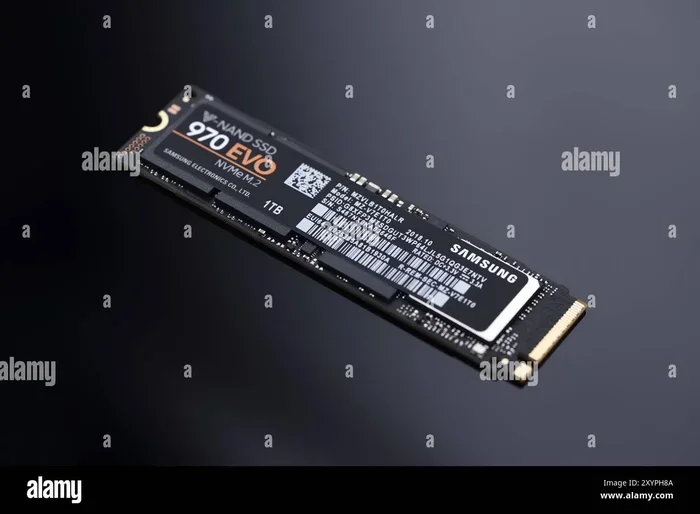
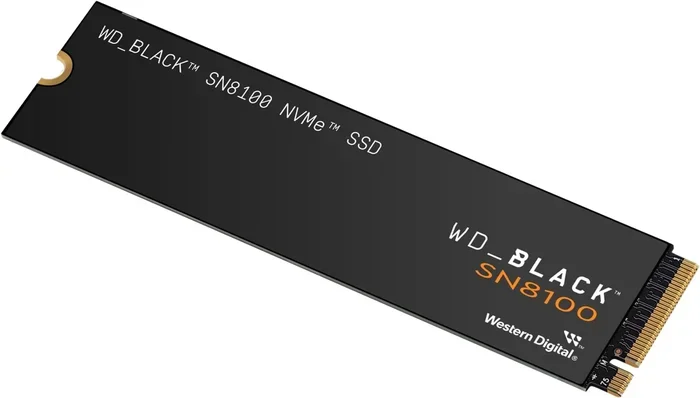
Let us start with the basics. A Pcie Gen4 Nvme M 2 Ssd is a type of solid state drive that uses the PCIe Gen4 interface. The letters NVMe stand for Non Volatile Memory Express, which is a protocol designed specifically for flash storage. The M.2 part refers to the physical shape and size of the drive, which is a small rectangular module that slides right into your motherboard.
Here is why this matters. Older SATA SSDs max out around 550 MB/s. A standard NVMe M.2 SSD using PCIe Gen3 can hit about 3500 MB/s. But a PCIe Gen4 NVMe drive doubles that, reaching speeds up to 7000 MB/s for reads and around 5000 MB/s for writes.
Think of it like a highway. SATA is a single lane road. Gen3 NVMe is a four lane highway. Gen4 NVMe is an eight lane superhighway. More lanes mean more data can flow at the same time, which means faster load times and smoother performance.
How the PCIe Gen4 Interface Works
The PCIe (Peripheral Component Interconnect Express) interface connects your SSD directly to the CPU. This is different from SATA drives, which route through the motherboard chipset first. With PCIe Gen4, each lane can move 2 GB per second of data. A typical Gen4 NVMe M.2 SSD uses four lanes, giving it a total bandwidth of about 8 GB per second.
This direct connection is one of the main reasons NVMe M.2 SSDs are so much faster than SATA drives. The data has a shorter, more direct path to the processor, which cuts down on delays and bottlenecks.
The M.2 Form Factor Explained
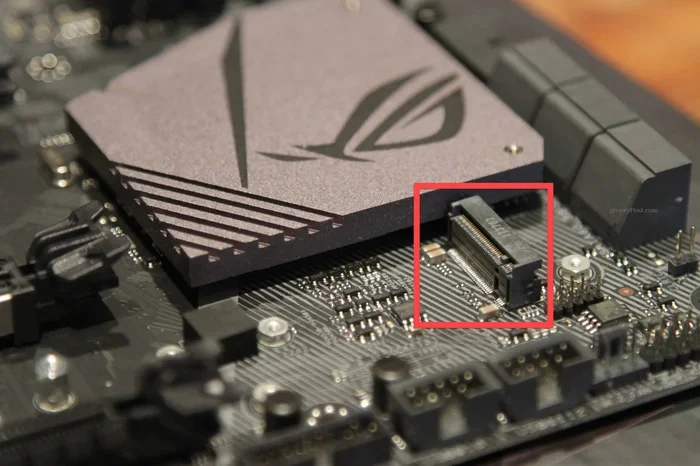
The M.2 standard defines the physical size and connector type. The most common size for NVMe M.2 SSDs is the 2280 format, which means 22 millimeters wide and 80 millimeters long. This size fits into the M.2 slots found on most modern motherboards and laptops.
One thing to keep in mind is that not all M.2 slots support NVMe. Some M.2 slots only support SATA. Before you buy a Gen4 NVMe M.2 SSD, check your motherboard manual to make sure your slot supports PCIe NVMe drives.
Benefits of Upgrading to a Gen4 NVMe M.2 SSD
Upgrading to a Pcie Gen4 Nvme M 2 Ssd brings several real world advantages. Let us look at the biggest benefits that most users will notice right away.
Blazing Fast Load Times
Games load faster. Applications open almost instantly. Large files copy in a fraction of the time. With read speeds hitting 7000 MB/s, a Gen4 NVMe SSD makes everything on your PC feel snappier. If you have ever waited minutes for a game to load or a video to export, the difference is night and day.
Better Performance for Creative Work
Video editors, 3D modelers, and photographers deal with huge files every day. A PCIe Gen4 NVMe M.2 SSD can handle these large workloads with ease. You will spend less time waiting for files to save or render and more time being productive.
Low Power and Compact Design
Despite their incredible speed, NVMe M.2 drives use very little power. They generate less heat than older drives and take up almost no space inside your case. This makes them perfect for both desktops and laptops where space and energy efficiency matter.
Future Proof Your System
As games and software keep growing in size and complexity, they demand faster storage. A Gen4 NVMe M.2 SSD gives your system a solid foundation for years to come. It handles current workloads with ease and is ready for the demands of tomorrow.
Pcie Gen4 Nvme M 2 Ssd vs Other SSD Types
Not all SSDs are created equal. Here is how a Pcie Gen4 Nvme M 2 Ssd stacks up against the most common alternatives.
Gen4 NVMe vs SATA SSD
A SATA SSD is still much faster than a mechanical hard drive, but it simply cannot compete with Gen4 NVMe speeds. SATA is limited to about 550 MB/s because of the older interface it uses. A Gen4 NVMe drive is over 12 times faster in read speeds. The gap is huge, and once you make the switch, going back to SATA feels painfully slow.
Gen4 NVMe vs Gen3 NVMe
This is where things get interesting. A PCIe Gen3 NVMe M.2 SSD already offers great speeds around 3500 MB/s read. A Gen4 drive pushes that to around 7000 MB/s. That is double the bandwidth. In real world use, you will notice faster file transfers and quicker game loads with Gen4, but the difference is less dramatic than the jump from SATA to NVMe.
For most users, a Gen3 NVMe SSD is still perfectly fine for everyday tasks. But if you want the absolute best performance, Gen4 is the way to go. You can also check out the Crucial P310 1TB PCIe Gen4 NVMe M.2 SSD for a great example of a reliable Gen4 option.
Gen4 NVMe vs Gen5 NVMe
The newest standard is PCIe Gen5, which promises speeds up to 14000 MB/s. Drives like the Crucial T705 PCIe Gen5 NVMe M.2 SSD are already on the market. Gen5 is fast, but it comes at a premium price. For most users, a Gen4 NVMe M.2 SSD offers the best balance of speed and value right now.
| Feature | SATA SSD | Gen3 NVMe M.2 | Gen4 NVMe M.2 | Gen5 NVMe M.2 |
|---|---|---|---|---|
| Max Read Speed | ~550 MB/s | ~3500 MB/s | ~7000 MB/s | ~14000 MB/s |
| Max Write Speed | ~520 MB/s | ~3000 MB/s | ~5000 MB/s | ~10000 MB/s |
| Interface | SATA III | PCIe 3.0 x4 | PCIe 4.0 x4 | PCIe 5.0 x4 |
| Form Factor | 2.5 inch | M.2 2280 | M.2 2280 | M.2 2280 |
| Typical Price (1TB) | $40-$55 | $50-$70 | $60-$85 | $100-$140 |
How to Choose the Right Pcie Gen4 Nvme M 2 Ssd
Shopping for a Gen4 NVMe M.2 SSD can feel overwhelming with so many options out there. Here are the key things to consider before you buy.
Check Your Motherboard Compatibility
Not every motherboard supports PCIe Gen4. Older boards may only have Gen3 or even Gen2 M.2 slots. A Gen4 drive will still work in a Gen3 slot, but it will run at Gen3 speeds. Look up your motherboard model online or check the manual to confirm it has PCIe Gen4 M.2 slots.
Consider the Capacity You Need
Gen4 NVMe SSDs come in several sizes, from 500GB all the way up to 4TB. For most users, a 1TB drive hits the sweet spot between price and storage space. If you store lots of games or work with huge media files, consider a 2TB or 4TB Gen4 NVMe M.2 SSD to give yourself room to grow.
Look at Endurance and Warranty
Every SSD has a rated lifespan measured in TBW (Terabytes Written). This tells you how much data you can write to the drive before it is expected to wear out. Higher quality NVMe M.2 SSDs come with longer warranties and higher TBW ratings. Look for at least a 5-year warranty when shopping for a PCIe Gen4 NVMe drive.
Brand Reputation and Support
Sticking with well known brands like Crucial, Samsung, WD, and Kingston is a smart move. These companies offer proven reliability, solid firmware support, and responsive customer service. When you invest in a Gen4 NVMe M.2 SSD, you want to know the brand will stand behind their product.
Thermal Performance
Fast drives generate heat, and Gen4 NVMe drives are no exception. Many models come with a heatsink or a built in thermal solution. If your motherboard M.2 slot does not have a heatsink, consider buying a drive with one included or picking up an M.2 NVMe SSD enclosure with passive cooling for extra protection.
Common Mistakes to Avoid When Buying a Gen4 NVMe M.2 SSD
Even experienced PC builders sometimes make mistakes when picking out a Pcie Gen4 Nvme M 2 Ssd. Here are the most common pitfalls to watch out for.
- Buying a Gen4 drive for a Gen2 or Gen3 motherboard: You will not get Gen4 speeds. Always match your drive to your board’s capabilities.
- Ignoring the M.2 key type: M.2 slots use different key notches (B key, M key, B+M key). Make sure your drive fits the slot on your motherboard.
- Overlooking cooling needs: A hot SSD will throttle its speeds. A good heatsink or thermal pad keeps your Gen4 NVMe M.2 SSD running at full speed.
- Choosing the cheapest option without checking reviews: Budget drives can be tempting, but they may have slower sustained write speeds or weaker endurance ratings.
- Not checking if your system has enough PCIe lanes: Some CPUs and motherboards share PCIe lanes between the GPU, M.2 slots, and other devices. Make sure you have enough lanes for full Gen4 performance.
Installation Tips for Your Pcie Gen4 Nvme M 2 Ssd
Installing a Gen4 NVMe M.2 SSD is one of the easiest upgrades you can do. Most modern motherboards have an M.2 slot right on the board, and the whole process takes just a few minutes.
- Locate the M.2 slot on your motherboard. It is usually labeled and sits near the CPU socket.
- Remove the small mounting screw from the slot.
- Align the notches on your NVMe M.2 SSD with the slot keys and gently press the drive down at an angle.
- Press the drive flat and secure it with the mounting screw.
- Close up your case and power on your PC.
- Go into your BIOS or UEFI to make sure the drive is detected.
- Initialize and format the drive in your operating system.
That is it. No cables, no extra power connectors, no mounting brackets. The M.2 NVMe SSD slots right in and you are good to go. For more details on setup and troubleshooting, you can also check out our guide on SSD PCIe M.2 NVMe installation tips.
Expert Insights on Gen4 NVMe M.2 SSDs
Industry experts agree that PCIe Gen4 NVMe M.2 SSDs represent the current sweet spot for storage performance and price. The technology has matured, prices have dropped, and most modern systems are ready to take full advantage of the extra bandwidth.
One thing to keep in mind is that while Gen4 speeds are impressive on paper, real world gains depend on what you are doing. For gaming, the difference between Gen3 and Gen4 is noticeable but not dramatic. For large file transfers, video editing, and working with databases, the speed boost is much more obvious.
As the industry continues to evolve, Gen5 NVMe M.2 SSDs are starting to appear, but Gen4 remains the most practical choice for most users today. The performance leap from Gen3 to Gen4 is significant enough to justify the upgrade, especially now that prices have become very competitive.
If you are still on a SATA drive or an older NVMe drive, upgrading to a Pcie Gen4 Nvme M 2 Ssd is one of the single best improvements you can make to your system. The responsiveness gains are immediate and you will wonder how you ever lived with slower storage.
Final Thoughts
A Pcie Gen4 Nvme M 2 Ssd delivers serious speed in a tiny package. It is fast, reliable, compact, and more affordable than ever before. Whether you are upgrading an existing system or building a new one from scratch, a Gen4 NVMe M.2 drive is a smart investment that pays off every single day.
The jump from SATA to Gen4 NVMe is transformative. You get near instant load times, lightning fast file transfers, and a system that simply feels more responsive. With prices continuing to fall and capacities increasing, there has never been a better time to make the switch.
Do your homework, check your motherboard compatibility, pick a drive from a trusted brand, and enjoy the speed of next generation storage. Your Gen4 NVMe M.2 SSD will thank you with performance that makes everything you do on your PC faster and more enjoyable.
Frequently Asked Questions
What does PCIe Gen4 NVMe M.2 SSD stand for?
PCIe Gen4 stands for Peripheral Component Interconnect Express Generation 4, which is the fourth generation of the high speed interface standard. NVMe stands for Non Volatile Memory Express, the protocol optimized for flash storage. M.2 is the physical form factor, a small rectangular module that installs directly into the motherboard.
Is a Gen4 NVMe M.2 SSD worth the upgrade?
Absolutely. If you are currently using a SATA SSD or an older hard drive, a Gen4 NVMe M.2 SSD will feel like a completely different system. Games load faster, files transfer quicker, and your overall system responsiveness improves significantly. The price gap between Gen3 and Gen4 has also narrowed, making it a smart value proposition.
Can I use a Gen4 NVMe SSD in a Gen3 motherboard slot?
Yes, a Gen4 NVMe M.2 SSD is backward compatible with Gen3 and Gen2 slots. However, the drive will automatically downgrade to the speed of the slot it is installed in. You will get Gen3 speeds (around 3500 MB/s read) instead of full Gen4 speeds in a Gen3 slot.
How much faster is Gen4 NVMe compared to SATA?
A Gen4 NVMe M.2 SSD is roughly 12 to 15 times faster than a SATA SSD in sequential read speeds. SATA tops out around 550 MB/s while Gen4 NVMe can reach up to 7000 MB/s. The real world difference is most noticeable in large file transfers, game loading times, and system boot speeds.
Do I need a heatsink for a Gen4 NVMe M.2 SSD?
It depends on your setup. Many Gen4 drives come with a built in heatsink, and most motherboards include a small M.2 heatsink on the slot itself. If you are running demanding workloads for extended periods or your case has poor airflow, adding a heatsink helps prevent thermal throttling and keeps your Gen4 NVMe M.2 SSD running at peak speeds.
What capacity should I choose for a Gen4 NVMe M.2 SSD?
For most users, a 1TB drive offers the best balance of speed and storage space. If you have a large game library or work with big media files, a 2TB or 4TB model gives you plenty of room. Keep in mind that NVMe M.2 SSDs at higher capacities tend to offer even better sustained write speeds due to more NAND flash chips on the drive.
=== CONCLUSION ===
Upgrading to a Pcie Gen4 Nvme M 2 Ssd is one of the easiest and most impactful changes you can make to any modern PC. The speed gains are real, the prices are competitive, and the installation process is simple. Whether you are a gamer, a creator, or just someone who wants a faster computer, a Gen4 NVMe M.2 drive delivers results you will notice every single day.
Take the time to check your motherboard compatibility, pick a trusted brand, and enjoy the benefits of next generation storage technology. Your system is ready for it, and the performance difference is well worth the upgrade.