Pcie Gen 5 Nvme Ssd
The PCIe Gen 5 NVMe SSD delivers unprecedented speeds with double the bandwidth of Gen 4, reaching up to 14 GB/s read speeds. This next-generation storage solution is built for professionals, gamers, and creators who demand lightning-fast data transfer and ultra-low latency. Whether you are building a high-performance workstation or upgrading your rig, a PCIe Gen 5 NVMe SSD is the future of fast, reliable storage.
Key Takeaways
- PCIe Gen 5 delivers up to 14GB/s speeds, doubling Gen 4 performance.
- 32GT/s per lane provides massive bandwidth for demanding workloads.
- Backward compatible with PCIe Gen 4 and Gen 3 motherboards.
- Best suited for video editing, AI training, and gaming needing extreme throughput.
- You need a compatible CPU and motherboard to unlock Gen 5 speeds.
- Prices remain higher than Gen 4, so weigh gains against your budget.
- Early Gen 5 drives show improved power efficiency over previous generations.
📑 Table of Contents
What Is a PCIe Gen 5 NVMe SSD?
If you have been following the latest developments in computer storage, you have probably heard about the pcie gen 5 nvme ssd. This is the newest generation of high-speed storage that is changing how we think about data transfer, gaming, and content creation. But what exactly does it mean, and why should you care?
Let us break it down simply. A pcie gen 5 nvme ssd is a solid state drive that connects to your motherboard through the fifth generation of the Peripheral Component Interconnect Express (PCIe) interface. It uses the NVMe (Non-Volatile Memory Express) protocol, which is designed specifically for flash storage. Together, these technologies deliver blazing fast speeds that make older drives look painfully slow.
Think of it like upgrading from a two lane road to a superhighway. More data can flow at the same time, and everything feels instant. Whether you are a gamer, a video editor, or just someone who wants their computer to feel snappy, this drive is a big deal.
Why the Hype Around Gen 5?
The excitement around the pcie gen 5 nvme ssd comes down to raw numbers. Gen 4 NVMe drives already felt fast, but Gen 5 doubles the available bandwidth. We are talking about transfer speeds that can exceed 12 GB/s in sequential reads. That is enough to load massive game worlds in seconds or edit 8K video without stuttering.
Companies like Crucial have already jumped into the space with Gen 5 offerings, showing that this technology is not just theoretical. It is here, and it is ready to be used.
How PCIe Gen 5 NVMe SSDs Work
Understanding how a pcie gen 5 nvme ssd works does not require an engineering degree. Let us keep it simple and look at the key parts that make this drive so powerful.
The PCIe Interface
The PCIe interface is the physical connection between your drive and your computer’s CPU. Each generation of PCIe increases the data rate per lane. Gen 4 offers about 16 GT/s (gigatransfers per second) per lane, while Gen 5 pushes that to 32 GT/s per lane. With a typical x4 configuration, Gen 5 delivers roughly 64 GB/s of total bandwidth. That is a massive leap over Gen 4’s 32 GB/s.
You can learn more about how these connections work in our detailed guide on SSD NVMe PCIe M.2 technology.
The NVMe Protocol
While PCIe handles the physical connection, the NVMe protocol handles how data is sent and received. NVMe was built from the ground up for flash storage. Unlike older protocols like AHCI (used with SATA drives), NVMe reduces latency and allows for thousands of parallel data queues. This means the drive can handle many requests at the same time without bottlenecks.
Controller and NAND Flash
Inside every gen 5 nvme ssd, you will find a controller chip and NAND flash memory. The controller manages data flow, error correction, and wear leveling. The NAND flash stores your actual data. In Gen 5 drives, controllers are more powerful than ever, handling the increased throughput with efficiency and smart thermal management.
M.2 Form Factor
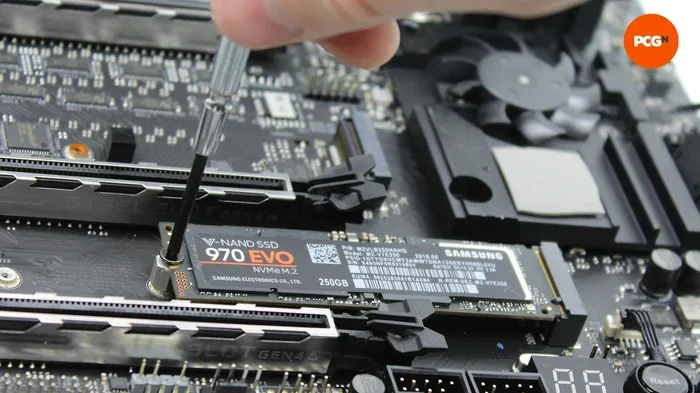
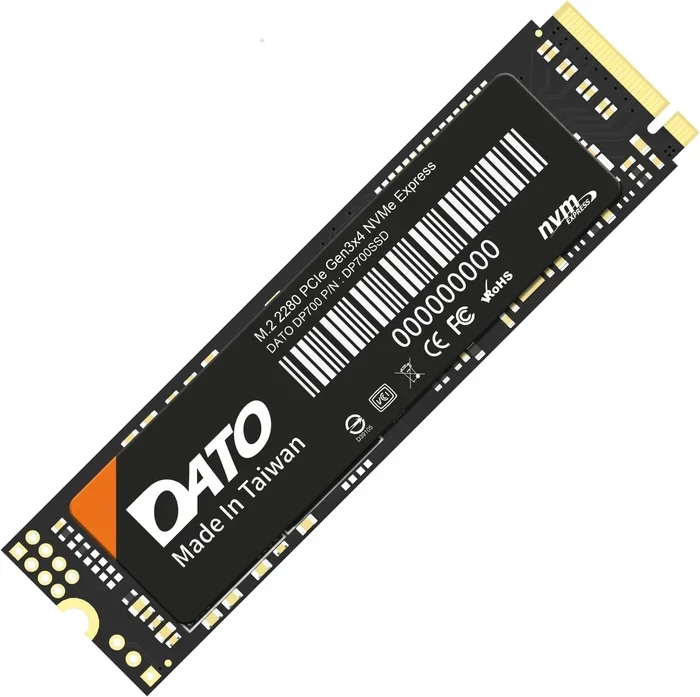
Most pcie gen 5 nvme ssd drives use the M.2 form factor. This is a small, stick like shape that slots directly into your motherboard. It keeps things compact and tidy, which is perfect for modern desktops and laptops. You can read more about M.2 PCIe NVMe drives in our article on M.2 PCIe NVMe SSD.
Gen 5 NVMe SSD Performance Benchmarks
Numbers are fun, but what do they actually mean for your daily use? Let us look at how the pcie gen 5 nvme ssd performs in real world scenarios.
Sequential Read and Write Speeds
Sequential speeds measure how fast the drive can read or write large files in a row. Gen 5 NVMe drives typically hit these marks:
- Sequential Read: Up to 12,000 14,000 MB/s
- Sequential Write: Up to 10,000 13,000 MB/s
For comparison, a good Gen 4 drive usually maxes out around 7,000 MB/s for reads. That means Gen 5 is roughly 70 100% faster in sequential tasks.
Random Read and Write (IOPS)
Random operations matter more for everyday tasks like opening apps or loading game levels. Gen 5 drives can handle up to 1.5 million random read IOPS and over 1 million random write IOPS. This translates to near instant application launches and seamless multitasking.
Real World Gaming Performance
Gamers will notice shorter load times and smoother texture streaming. In open world games with huge environments, the gen 5 nvme ssd reduces pop in and stuttering. Some next generation game engines are already designed to take advantage of faster storage.
Content Creation
If you edit video, render 3D models, or work with large datasets, Gen 5 storage is a game changer. Importing 100GB video files takes a fraction of the time. Adobe Premiere Pro, DaVinci Resolve, and similar tools benefit greatly from faster storage.
Comparison Table: Gen 4 vs Gen 5
| Feature | Gen 4 NVMe SSD | Gen 5 NVMe SSD |
|---|---|---|
| Bandwidth (x4) | ~32 GB/s | ~64 GB/s |
| Sequential Read | ~7,000 MB/s | ~14,000 MB/s |
| Sequential Write | ~6,500 MB/s | ~13,000 MB/s |
| Random Read IOPS | ~1,000,000 | ~1,500,000 |
| Latency | ~20 30 microseconds | ~15 20 microseconds |
| Best For | General use, gaming | Heavy workloads, pro tasks |
For those wondering if the jump is worth it, check out our comparison on Is NVMe Faster Than SSD to understand the generational leaps in storage technology.
Gen 4 vs Gen 5 SSD: What’s the Real Difference?
You might be thinking, “Gen 4 already feels fast. Do I really need Gen 5?” That is a fair question. Let us break down the real differences honestly.
Speed
The most obvious difference is speed. Gen 5 doubles the bandwidth. If you regularly move huge files, edit high resolution media, or work with massive databases, you will feel the difference immediately. For casual users, Gen 4 is still plenty fast.
Power Consumption
Early Gen 5 drives drew more power than their Gen 4 predecessors. Manufacturers have made strides in improving efficiency, but heat and power remain important considerations. Newer drives like the Crucial T705 have addressed some of these concerns with smart thermal designs.
Price
Gen 5 drives are still more expensive than Gen 4. As production scales up and competition increases, prices are dropping. But if you are on a budget, a solid Gen 4 drive still delivers excellent value.
Compatibility
To use a pcie gen 5 nvme ssd, you need a motherboard that supports Gen 5. Many newer Intel and AMD boards now include Gen 5 M.2 slots. If your current board only supports Gen 4, the drive will still work but at Gen 4 speeds. You can learn more about compatibility in our guide on SSD NVMe PCIe M.2.
Quick Tips: Should You Upgrade?
- Yes if you work with large files, edit video, or want the fastest possible storage.
- Maybe if you are a casual gamer or general user. A Gen 4 drive still serves you well.
- Wait if your current setup is less than two years old and you are not experiencing storage bottlenecks.
Best Use Cases for PCIe Gen 5 NVMe SSDs
Not everyone needs a pcie gen 5 nvme ssd. But for certain users, this drive is absolutely transformative. Here are the scenarios where it shines the brightest.
Professional Video Editing
Editing 4K or 8K video requires reading and writing massive files simultaneously. Gen 5 NVMe drives handle this with ease. You can scrub through timelines smoothly, render faster, and export projects in a fraction of the time.
3D Rendering and Animation
3D artists working with complex scenes benefit from faster asset loading. Large texture files and geometry data load almost instantly on a gen 5 nvme ssd, keeping creative workflows flowing without interruption.
Data Science and Machine Learning
Training datasets can be enormous. Data scientists and ML engineers who work with terabytes of training data will appreciate the speed boost. Faster data access means shorter training cycles and more productive experimentation.
High End Gaming
Next generation games are starting to leverage faster storage for features like instant asset streaming. While any NVMe SSD improves gaming over a traditional HDD, Gen 5 takes it to another level. Future games will likely be designed with Gen 5 speeds in mind.
Server and Workstation Use
For professionals running servers or workstations that handle multiple users or heavy workloads, Gen 5 storage provides the throughput needed for demanding environments. It is an investment that pays off in productivity.
Key Takeaway
The pcie gen 5 nvme ssd is best suited for power users and professionals. If your work involves heavy data processing or you simply want the absolute fastest storage available, Gen 5 is the way to go.
Things to Consider Before Buying a Gen 5 NVMe SSD
Ready to buy a pcie gen 5 nvme ssd? Hold on for a moment. There are a few important things you should think about before making the purchase.
Check Your Motherboard Compatibility
Not all motherboards have Gen 5 M.2 slots. You need to confirm that your board supports PCIe 5.0. Check the manufacturer’s specifications or manual. Some boards have one Gen 5 slot and others are shared with other components, so be careful about slot selection.
Cooling Is Important
Gen 5 drives generate more heat than Gen 4. Many come with a heatsink included or attached. If your drive does not have one, consider buying a separate M.2 heatsink. Overheating can cause thermal throttling, which reduces performance exactly when you need it most.
Storage Capacity
Gen 5 NVMe drives are available in various capacities. Common sizes include 500GB, 1TB, and 2TB. Think about what you need. If you plan to install your operating system and a few games on it, 1TB is a solid starting point. For creative professionals, 2TB or more might be necessary.
Endurance and Warranty
Check the TBW (Terabytes Written) rating. This tells you how much data you can write to the drive over its lifetime. Higher TBW means more durability. Also look at the manufacturer’s warranty. Most reputable brands offer 5 year warranties on their NVMe drives.
Price to Performance Ratio
Gen 5 drives are still premium priced. Make sure the speed gains are worth the extra cost for your specific needs. Sometimes a fast Gen 4 drive gives you 90% of the benefit at half the price.
Expert Insight
Industry experts suggest that early adopters should focus on drives with proven firmware and good thermal designs. The gen 5 nvme ssd market is still maturing, and small issues can pop up with first generation products. Wait for reviews and user feedback if you are on the fence.
The Future of PCIe Gen 5 NVMe Storage
The storage landscape is evolving fast. PCIe Gen 5 is just the beginning. Here is a look at what is coming next and how Gen 5 fits into the bigger picture.
PCIe Gen 6 on the Horizon
PCIe 6.0 has already been finalized, promising speeds of up to 128 GB/s in x4 configurations. However, widespread adoption will take a few more years. For now, Gen 5 is the sweet spot for high performance storage.
Growing SSD Capacity
As NAND flash technology improves, we are seeing higher capacity drives at more affordable prices. Companies are pushing 4TB and even 8TB NVMe drives. This means a pcie gen 5 nvme ssd can serve as your primary drive for almost everything.
Integration with AI and Machine Learning
AI workloads demand extreme data throughput. Gen 5 storage plays a key role in supporting AI accelerators and GPUs by feeding data quickly enough to keep them busy. This trend will only grow as AI becomes more mainstream.
Wider Adoption in Consumer Products
What was once limited to enterprise servers is now finding its way into consumer desktops and laptops. More motherboard manufacturers are including Gen 5 slots by default. As prices drop, the gen 5 nvme ssd will become a standard component in high performance PCs.
Key Takeaway
The pcie gen 5 nvme ssd represents a major step forward in storage technology. It delivers incredible speeds, handles demanding workloads with ease, and sets the stage for even faster future generations. Whether you are a professional who needs the best tools or an enthusiast who wants cutting edge performance, this drive delivers on all fronts.
Investing in a Gen 5 NVMe drive today means you are future proofing your system. Storage technology moves fast, and staying ahead of the curve ensures your computer remains powerful and responsive for years to come. Do your research, check compatibility, pick the right capacity, and enjoy the speed.
Frequently Asked Questions
What Is a PCIe Gen 5 NVMe SSD?
A PCIe Gen 5 NVMe SSD is the latest generation of solid-state drives that uses the fifth generation of the PCIe interface to deliver ultra-fast data transfer speeds. It uses the NVMe protocol over the PCIe bus, which allows it to achieve significantly higher read and write speeds compared to older SSDs.
How Fast Is a PCIe Gen 5 NVMe SSD Compared to Gen 4?
A PCIe Gen 5 NVMe SSD offers roughly double the bandwidth of Gen 4, with speeds reaching up to 14,000 MB/s on the latest models. While real-world improvements may vary, Gen 5 drives provide a noticeable boost in large file transfers and heavy workloads.
Do I Need a Specific Motherboard for a PCIe Gen 5 NVMe SSD?
Yes, you need a motherboard with PCIe Gen 5 M.2 slots to fully take advantage of a PCIe Gen 5 NVMe SSD. However, you can still use a Gen 5 drive in a Gen 4 slot, but it will operate at Gen 4 speeds. Always check your motherboard specifications before purchasing.
Is a PCIe Gen 5 NVMe SSD Worth It for Gaming?
A PCIe Gen 5 NVMe SSD can significantly reduce game load times and improve asset streaming in demanding titles. While Gen 4 SSDs are already fast enough for most gaming needs, Gen 5 offers future-proofing and benefits for content creation and heavy multitasking.
Can I Use a PCIe Gen 5 NVMe SSD in a PCIe Gen 4 Slot?
Yes, a PCIe Gen 5 NVMe SSD is backward compatible with Gen 4 slots, so it will work without any issues. The drive will simply operate at Gen 4 speeds, which are still extremely fast for most users. You will not damage your hardware by doing this.
What Are the Best PCIe Gen 5 NVMe SSDs Available?
Top picks for a PCIe Gen 5 NVMe SSD include the Samsung 990 Pro, WD Black SN850X, and Crucial T705. These drives offer excellent speeds, reliability, and value for different budgets. Always consider your specific needs like capacity, endurance, and price when choosing.