Is Wireless Usb Faster Than Bluetooth
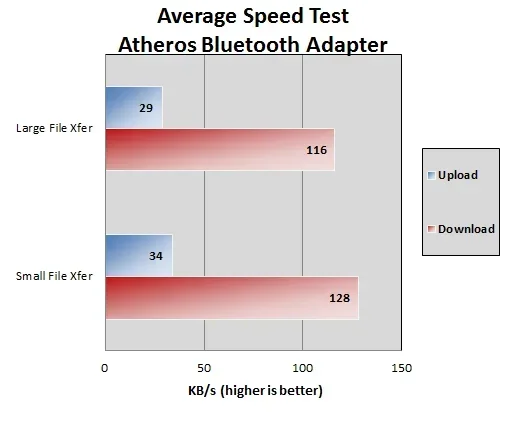
Is wireless USB faster than Bluetooth? In most cases, yes. Wireless USB connections deliver significantly higher data transfer speeds and lower latency compared to Bluetooth. Whether you are connecting peripherals, transferring files, or streaming data, understanding the difference between these two technologies helps you make smarter choices for your setup.
When you are setting up a wireless connection between your devices, speed is usually the first thing you think about. Is wireless USB faster than Bluetooth? This is a question many people ask, especially when they want to transfer files quickly or connect peripherals without lag. The short answer is yes, wireless USB is generally faster. But the full picture is more interesting than that.
Both wireless USB and Bluetooth serve the same basic purpose. They let your devices talk to each other without cables. But they do it in very different ways. Wireless USB uses a dedicated protocol built for high-speed data. Bluetooth was designed for low-power, short-range communication. Understanding these differences helps you pick the right connection every time.
In this guide, we will break down everything you need to know. We will compare speeds, look at real-world use cases, and help you decide which technology fits your needs. Whether you are a gamer, a content creator, or just someone who wants a cleaner desk setup, this article has you covered.
Key Takeaways
- Wireless USB is generally much faster: It offers higher bandwidth and quicker data transfer than Bluetooth in nearly all scenarios.
- Bluetooth excels in simplicity: It is easy to set up and works well for low-bandwidth tasks like audio streaming and input devices.
- Latency matters: Wireless USB provides lower response times, making it better for gaming and real-time applications.
- Range differs: Bluetooth typically has a longer range, while wireless USB works best at closer distances.
- Use the right tool: Choose wireless USB for speed-heavy tasks and Bluetooth for convenience and lightweight connections.
- Check your hardware: Not all devices support wireless USB, so compatibility matters before you switch.
📑 Table of Contents
What Is Wireless USB?
Wireless USB is a technology that lets you connect USB devices without a cable. It uses radio frequency signals to transmit data between a host device and a peripheral. Think of it like a regular USB connection, but the cable is replaced by a wireless link.
The technology was developed to keep the speed of wired USB while removing the cord. It operates on the WiGig standard, which uses the 60 GHz frequency band. This high frequency allows for very fast data transfer. In theory, wireless USB can reach speeds up to 480 Mbps, which is close to USB 2.0 wired speeds.
How Does Wireless USB Work?
Wireless USB uses a small adapter or dongle. One end plugs into your computer’s USB port. The other end connects to your peripheral device. The adapter sends and receives data using directional radio waves. Because the signal is focused, it maintains high speed even at a distance of up to 10 meters.
The protocol was designed specifically for high bandwidth. It handles large file transfers, video streams, and real-time data with ease. This is why many people ask, is wireless USB faster than Bluetooth, and the answer lies in how the technology was built from the ground up for speed.
What Is Bluetooth?
Bluetooth is one of the most widely used wireless technologies in the world. It connects devices over short distances using low-power radio waves. You use Bluetooth every day when you connect wireless headphones, keyboards, or your phone to a car speaker.
Bluetooth has evolved a lot over the years. Bluetooth 5.0 and newer versions offer much better speeds than older versions. Bluetooth 5.0 can reach speeds up to 2 Mbps, and Bluetooth 5.3 pushes that even further. But even with these improvements, Bluetooth is still much slower than wireless USB.
Why Is Bluetooth So Popular?
Bluetooth is popular because it is simple. You do not need any extra hardware in most cases. Almost every modern laptop, phone, and tablet has Bluetooth built in. You just pair your device and go. It uses very little power, which makes it perfect for battery-operated accessories like mice and earbuds.
Bluetooth also has a decent range. Bluetooth 5.0 can reach up to 240 meters in open space, though real-world conditions usually reduce that to around 10 to 30 meters. For everyday tasks like audio streaming or using a wireless mouse, this range is more than enough.
Speed Comparison: Wireless USB vs Bluetooth
This is the heart of the question. Is wireless USB faster than Bluetooth? Let us look at the numbers side by side. The difference is clear, and it matters depending on what you are doing.
Data Transfer Speeds
Wireless USB can transfer data at speeds up to 480 Mbps. Bluetooth 5.0 tops out around 2 Mbps. That means wireless USB is roughly 240 times faster than Bluetooth in terms of raw bandwidth. Even the latest Bluetooth versions cannot come close to matching wireless USB speeds.
For file transfers, this difference is huge. Moving a 1 GB folder over wireless USB takes seconds. The same transfer over Bluetooth could take several minutes. If you work with large files regularly, this speed gap is a game changer.
Latency and Response Time
Latency is the delay between sending a signal and receiving a response. Wireless USB has very low latency, often under 1 millisecond. Bluetooth latency is higher, typically ranging from 5 to 50 milliseconds depending on the version and device.
For most everyday tasks, Bluetooth latency is not noticeable. But if you are gaming or doing real-time audio work, that extra delay can be frustrating. Wireless USB gives you a much more responsive experience. Is wireless USB faster than Bluetooth when it comes to responsiveness? Absolutely, yes.
Bandwidth for Multiple Devices
Wireless USB handles multiple connections better because of its higher bandwidth. You can run several high-speed devices at the same time without slowdowns. Bluetooth struggles when too many devices share the same connection. The bandwidth gets divided, and speeds drop.
For example, if you connect a wireless hard drive, a keyboard, and a mouse through Bluetooth, you may notice delays. The same setup over wireless USB runs smoothly because there is plenty of bandwidth to go around.
Real-World Use Cases
Understanding the theory is helpful, but seeing how these technologies perform in real life is even better. Let us look at common scenarios where you might choose one over the other.
File Transfers
If you need to move files between devices quickly, wireless USB is the clear winner. It is especially useful for professionals who work with large media files. Photographers, video editors, and designers benefit greatly from the high transfer rates.
Bluetooth file transfers work fine for small files like documents or photos. But for anything larger, the wait time becomes frustrating. Think about it this way, would you rather wait 30 seconds or 3 minutes to transfer a file? Most people would choose the faster option every time.
Gaming Peripherals
Gamers know that every millisecond counts. A wireless mouse or keyboard connected via wireless USB gives you a noticeable edge over Bluetooth. The lower latency means your inputs register faster. This can make a real difference in competitive games where split-second reactions matter.
Many gaming peripherals now offer dual connectivity. They support both Bluetooth and a USB wireless adapter. If you want the best performance, always choose the USB wireless dongle. It gives you the speed and responsiveness that Bluetooth simply cannot match.
Audio Streaming
For audio, Bluetooth is perfectly fine. Music does not require a lot of bandwidth. Bluetooth codecs like aptX and LDAC deliver high-quality sound with minimal compression. Most people cannot tell the difference between Bluetooth audio and wired audio in blind tests.
However, if you are doing professional audio editing or live streaming, wireless USB provides a more stable and lower-latency connection. For casual listening, Bluetooth works great. For professional work, wireless USB is the better choice.
Peripheral Connectivity
Connecting peripherals like printers, external drives, and scanners is where wireless USB really shines. These devices often need to move large amounts of data quickly. Bluetooth would create a bottleneck in these situations.
For lighter peripherals like mice and keyboards, Bluetooth is more than enough. These devices send small packets of data and do not need high bandwidth. The choice between wireless USB and Bluetooth for peripherals comes down to the specific device and what it needs to do.
Range and Compatibility
Range and compatibility are two factors that often get overlooked when comparing these technologies. They matter just as much as speed in real-world use.
Wireless Range
Bluetooth has a longer range than wireless USB. Bluetooth 5.0 can reach up to 240 meters in ideal conditions. Wireless USB typically works best within 10 meters. The directional nature of wireless USB signals means obstacles like walls can reduce the effective range significantly.
If you need to connect a device across a room or through walls, Bluetooth has the advantage. If you want a fast, stable connection at close range, wireless USB is the better option.
Device Compatibility
Bluetooth is everywhere. Almost every modern device supports it out of the box. Wireless USB requires specific hardware. You need a wireless USB adapter on both the host and the peripheral device. This limits compatibility compared to Bluetooth.
Before you invest in wireless USB, check that your devices support it. Many newer laptops and desktops have the necessary hardware, but older systems may not. Bluetooth, on the other hand, works with almost anything made in the last decade.
Which Technology Should You Choose?
The answer depends on what you need. Here is a simple guide to help you decide.
Choose wireless USB if:
- You need fast data transfers
- You are a gamer who wants low latency
- You work with large files regularly
- You connect multiple high-bandwidth devices
Choose Bluetooth if:
- You want simple, cable-free connectivity
- You are connecting audio devices like headphones or speakers
- You need longer range between devices
- Your devices do not support wireless USB
For most everyday users, Bluetooth covers all the basics. It is simple, reliable, and works with almost everything. But if speed is your priority, wireless USB is the clear winner. Is wireless USB faster than Bluetooth? Without a doubt, yes. The question is whether you need that extra speed for your specific use case.
Common Mistakes to Avoid
When choosing between wireless USB and Bluetooth, people often make a few common mistakes. Avoiding these pitfalls saves you time and frustration.
- Assuming Bluetooth is fast enough for everything. Bluetooth works well for audio and input devices. But it struggles with large file transfers and high-bandwidth tasks.
- Ignoring latency. Speed is not just about transfer rates. Latency affects how responsive your devices feel, especially in gaming and real-time applications.
- Overlooking compatibility. Buying a wireless USB adapter only to find out your device does not support it is a waste of money. Always check compatibility first.
- Confusing wireless USB with Wi-Fi Direct. These are different technologies. Wi-Fi Direct is even faster than wireless USB in some cases, but it operates differently and requires different hardware.
Expert Insights
Technology experts consistently point out that the speed gap between wireless USB and Bluetooth is significant. According to industry benchmarks, wireless USB delivers data rates that are orders of magnitude faster than even the latest Bluetooth standards. For users who prioritize performance, this gap is hard to ignore.
Experts also note that the future of wireless connectivity is moving toward faster, more versatile standards. Technologies like Wi-Fi 6E and Wi-Fi Direct are blurring the lines between traditional wireless USB and Bluetooth. These newer standards offer high speeds and wide compatibility in a single package.
However, for now, if you want the fastest wireless connection for USB devices, wireless USB remains the best option. It was built specifically to match the speed of wired USB while giving you the freedom of wireless connectivity.
Final Thoughts
So, is wireless USB faster than Bluetooth? The answer is a resounding yes. Wireless USB delivers dramatically higher speeds, lower latency, and better performance for bandwidth-heavy tasks. Bluetooth wins on convenience, compatibility, and range.
The right choice depends on your needs. If you want speed and responsiveness, go with wireless USB. If you want simplicity and broad compatibility, Bluetooth is the way to go. Most people will find that Bluetooth handles their daily needs just fine. But for power users and professionals, wireless USB makes a noticeable difference.
Understanding the strengths and weaknesses of each technology empowers you to make better decisions. You will set up your devices with confidence and get the best performance possible. Whether you are transferring files, gaming, or streaming audio, choosing the right wireless connection makes everything smoother.
Take a moment to evaluate your setup. Do you need the raw speed of wireless USB, or does the convenience of Bluetooth meet your needs? Either way, you now have the knowledge to choose wisely. Is wireless USB faster than Bluetooth? Now you know the answer and the reasons behind it.
Frequently Asked Questions
Can I use both wireless USB and Bluetooth at the same time?
Yes, you can use both technologies simultaneously. They operate on different frequencies and do not interfere with each other. Many users run Bluetooth for audio and wireless USB for file transfers without any issues.
Is wireless USB better than Bluetooth for gaming?
Absolutely. Wireless USB offers much lower latency than Bluetooth, which gives you a faster response time. For competitive gaming, this difference can be significant. Most pro gamers prefer wireless USB or proprietary low-latency wireless connections over Bluetooth.
Does wireless USB require special hardware?
Yes, wireless USB requires a compatible adapter on both the host device and the peripheral. Not all devices support wireless USB out of the box. Check your device specifications before purchasing wireless USB accessories.
How far can wireless USB work compared to Bluetooth?
Wireless USB typically works within 10 meters, while Bluetooth 5.0 can reach up to 240 meters in open space. Bluetooth has a much longer range, but wireless USB delivers faster speeds at close distances.
Is Bluetooth 5.3 faster than wireless USB?
No, even Bluetooth 5.3 cannot match wireless USB speeds. Bluetooth 5.3 offers improved efficiency and range, but its maximum data rate is still far below what wireless USB can deliver. For pure speed, wireless USB remains the superior choice.
Which is more power efficient, wireless USB or Bluetooth?
Bluetooth is more power efficient than wireless USB. It was designed for low-power devices like earbuds and fitness trackers. Wireless USB uses more energy because it operates at higher frequencies and transfers data at faster rates.