Which Is Better Usb Tethering or Hotspot
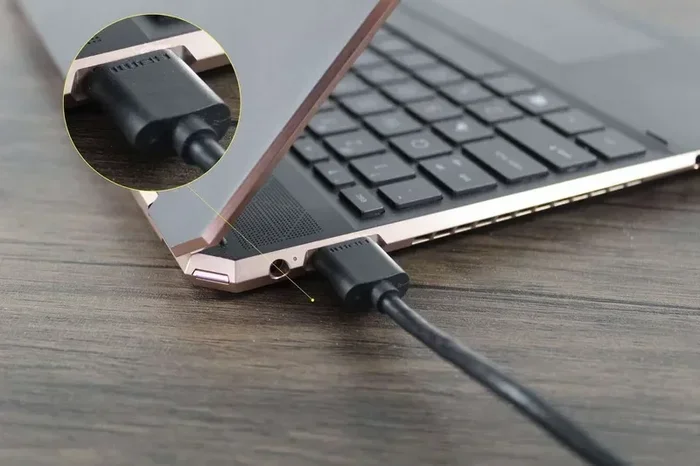
USB tethering and mobile hotspot are two popular ways to share your phone’s internet with other devices. USB tethering uses a cable to connect your phone to a laptop or PC, offering faster speeds and less battery drain. A mobile hotspot creates a Wi-Fi network that lets multiple devices connect wirelessly. Each method has its strengths depending on your needs, location, and how long you need internet access.
Have you ever been away from home and needed internet on your laptop? Maybe you are at a coffee shop, in a hotel room, or visiting a friend. Your phone has data, but your laptop does not. This is where USB tethering and mobile hotspot come in handy. Both let you share your phone’s internet connection with other devices. But which one is actually better?
The answer depends on what you need. Do you want the fastest speeds? Do you need to connect multiple devices? Are you worried about battery life? In this guide, we will break down everything you need to know about USB tethering vs hotspot. By the end, you will know exactly which method works best for you.
Let us start by understanding what each option does and how it works.
Key Takeaways
- USB Tethering is faster and more stable: A wired connection delivers better speeds and lower latency than Wi-Fi.
- Hotspot is more convenient: No cables needed, and multiple devices can connect at once.
- Battery drain differs greatly: Tethering uses less battery because the cable charges your phone while transferring data.
- Data usage is the same: Both methods consume the same amount of mobile data from your plan.
- Security favors tethering: A USB connection is harder to hack than a Wi-Fi hotspot.
- Setup is different for each: Tethering requires a cable; hotspot requires Wi-Fi password sharing.
- Your use case decides the winner: Choose based on speed needs, device count, and portability.
📑 Table of Contents
What Is USB Tethering?
USB tethering is a method of sharing your phone’s internet connection through a USB cable. You plug your phone into your laptop or tablet using a cable. Your phone then acts as a modem. The other device gets online through your phone’s mobile data.
Here is how it works in simple steps:
- Take your phone and a USB cable.
- Plug the cable into your phone and your laptop.
- On your phone, go to Settings and turn on USB tethering.
- Your laptop should detect the connection automatically.
- You are now online using your phone’s data.
USB tethering creates a direct wired link between your phone and your computer. This means the connection is very stable. There is no Wi-Fi signal to weaken or interfere with. The data travels through the cable, which gives you a reliable path for your internet.
One big advantage of tethering is speed. Because it uses a physical cable, you get a stronger and more consistent connection. You also do not have to worry about someone else stealing your Wi-Fi signal. A USB connection is private and secure. If you want to learn more about how USB devices interact with laptops, check out why your USB mouse might stop working on your laptop, which covers USB connectivity issues in detail.
Pros of USB Tethering
- Faster speeds: Wired connections are generally faster than Wi-Fi.
- Lower latency: Games and video calls run smoother.
- Less battery drain: Your phone gets charged through the cable.
- More secure: Harder for others to intercept your data.
- Stable connection: No signal drops or interference.
Cons of USB Tethering
- Requires a cable: You must carry a compatible USB cable.
- Limited to one device: Only the connected laptop or PC gets online.
- Less portable: You need to stay near your phone while tethered.
What Is a Mobile Hotspot?
A mobile hotspot turns your phone into a Wi-Fi router. It broadcasts a wireless signal that other devices can connect to. Your phone shares its mobile data over this Wi-Fi network. Any device within range can join and get online.
Setting up a hotspot is straightforward:
- Go to Settings on your phone.
- Find the Hotspot or Mobile Hotspot option.
- Turn it on and set a password.
- On your other device, find the Wi-Fi network and connect.
- Enter the password and you are online.
Hotspots are incredibly convenient. You do not need any cables. You can connect your laptop, tablet, smart TV, or even a gaming console. As long as the device has Wi-Fi, it can join your hotspot. This makes hotspot the go-to choice for many people who need to connect multiple devices at once.
However, there are trade-offs. Wi-Fi signals can weaken over distance. Walls and other obstacles can reduce your speed. And because the connection is wireless, it is more exposed to potential security risks. Anyone nearby who knows your password can hop on your network.
If you are looking to boost your laptop’s overall connectivity setup, having enough 8GB of RAM in your laptop ensures smooth performance when running multiple tasks over a shared connection.
Pros of Mobile Hotspot
- Connects multiple devices: Share internet with phones, laptops, and tablets.
- No cables needed: Fully wireless and portable.
- Easy to set up: Takes less than a minute.
- Works anywhere: As long as your phone has signal, you have internet.
Cons of Mobile Hotspot
- Slower speeds: Wi-Fi is generally slower than a USB connection.
- Battery drain: Your phone battery drops quickly when broadcasting a hotspot.
- Security risks: Wireless signals can be intercepted.
- Signal interference: Walls and distance weaken the connection.
USB Tethering vs Hotspot: Head-to-Head Comparison
Now let us compare both methods side by side. This will help you decide which one fits your situation best.
Speed and Performance
USB tethering wins on speed. A wired connection delivers faster data transfer rates. Your internet feels snappier, and downloads complete quicker. Hotspot speeds depend on your Wi-Fi signal strength. If you are close to your phone, the speeds are decent. But move farther away, and the connection slows down.
If you are into gaming or need a stable connection for video calls, tethering is the clear winner. The connection stability of a USB cable means fewer dropped packets and less lag.
Battery Life
This is where tethering really shines. When you use USB tethering, your phone charges while it shares data. Your battery level stays the same or even goes up. With a hotspot, your phone works hard to broadcast a Wi-Fi signal. This drains your battery fast.
Here is a quick comparison:
- USB Tethering: Battery stays stable or charges slightly.
- Mobile Hotspot: Battery drops 10-20% per hour depending on usage.
Number of Devices
Hotspot clearly wins here. You can connect 5, 10, or even more devices to a single hotspot. Tethering only supports one device at a time. If you travel with family or coworkers, hotspot makes more sense.
Security
USB tethering is more secure. Data travels through a physical cable. It is very hard for someone to intercept that signal. A hotspot sends data over the air. Even with a strong password, wireless signals can be vulnerable to skilled attackers.
Portability and Convenience
Hotspot is more convenient. You just turn it on and connect. No cables, no setup fuss. Tethering requires you to carry a cable and plug it in. If you are moving around a lot, hotspot is easier to use.
Data Usage
Both methods use the same amount of data from your plan. Whether you tether via USB or share over Wi-Fi, your phone’s data is consumed at the same rate. If you stream a 1GB video, it uses 1GB of data either way. Keep an eye on your data plan to avoid extra charges.
When Should You Use USB Tethering?
USB tethering is the better choice in several situations:
- You need fast, stable internet: For work tasks, video calls, or large downloads, tethering gives you the reliability you need.
- You are on the go but staying in one spot: If you are sitting at a desk or a table, tethering works perfectly.
- Battery life matters: You want your phone to last longer, and tethering actually helps by charging your device.
- Security is a priority: You are handling sensitive data and do not want anyone snooping on your connection.
- You only need one device online: Just your laptop or PC.
Many professionals prefer tethering for business travel. It gives them a reliable internet connection without draining their phone battery. If you are working on design files or transferring large projects, having a fast and stable connection matters. Using a fast NVMe SSD in your laptop also helps with quick file saves during these sessions.
When Should You Use a Mobile Hotspot?
Hotspot is the better choice when:
- You need to connect multiple devices: Your laptop, tablet, and friend’s phone all need internet.
- You are moving around: Walking around a campus, airport, or hotel room makes tethering impractical.
- You do not have the right cable: Not everyone carries every type of USB cable.
- You need quick, temporary access: Turn it on, connect, and go.
- You are hosting a small group: Sharing internet with a few people is easy with hotspot.
Hotspot is also great for short-term needs. If you are at a conference and need internet for an hour, hotspot is the fastest way to get online. No cables, no fuss. Just turn it on and connect.
Tips to Improve Your Tethering and Hotspot Experience
Whether you choose tethering or hotspot, these tips will help you get the best results:
For USB Tethering
- Use a high-quality USB cable. Cheap cables can cause slow speeds or disconnections.
- Keep your phone plugged into a power source if you plan to tether for a long time.
- Turn off unnecessary apps on your phone. This frees up data and processing power.
- Update your phone’s drivers on your laptop to avoid connection issues.
- Use a USB 3.0 port on your laptop for faster data transfer.
For Mobile Hotspot
- Set a strong password to keep unauthorized users out.
- Place your phone in a central location for the best Wi-Fi signal.
- Limit the number of connected devices to maintain speed.
- Turn off the hotspot when you are not using it to save battery.
- Use the 5GHz band if your phone supports it for faster speeds.
Common Mistakes People Make
Avoid these common pitfalls when using tethering or hotspot:
- Forgetting to turn off tethering or hotspot: This drains your battery and wastes data.
- Using a weak password on hotspot: This invites strangers to use your data.
- Ignoring data limits: Tethering and hotspot both eat through your data plan quickly.
- Using a damaged USB cable: This causes slow speeds and frustrating disconnections.
- Placing your phone far from devices on hotspot: Distance kills Wi-Fi signal strength.
Final Verdict: Which Is Better?
So, which is better USB tethering or hotspot? The honest answer is: it depends on your situation.
If you want the fastest, most stable, and most secure connection, USB tethering is the winner. It is perfect for solo work sessions, long travel days, and situations where battery life matters.
If you need convenience, flexibility, and the ability to connect multiple devices, mobile hotspot is the better choice. It is ideal for quick setups, group situations, and on-the-go use.
Many people actually use both. They tether when they need speed and security. They switch to hotspot when they need to connect multiple devices or move around freely. Having both options in your toolkit gives you maximum flexibility.
Think about your daily routine. How often do you need to share your internet? How many devices do you connect? How important is speed and battery life? Answer these questions, and you will know which method works best for you.
Both USB tethering and mobile hotspot are valuable tools. They solve the same problem in different ways. The best choice is the one that fits your needs at that moment. Keep this guide handy, and you will always make the right call.
Frequently Asked Questions
Is USB tethering faster than a mobile hotspot?
Yes, USB tethering is generally faster than a mobile hotspot. A wired connection provides a more stable and faster data transfer compared to Wi-Fi. You will notice the difference especially during downloads, video calls, and online gaming.
Does USB tethering use more data than hotspot?
No, both methods use the same amount of data. Whether you share your connection through a USB cable or Wi-Fi, your phone’s data consumption remains the same. A 1GB download uses 1GB of data either way.
Can I charge my phone while using USB tethering?
Yes, that is one of the biggest advantages of USB tethering. Your phone charges through the same cable you use for the connection. This means you can tether for hours without worrying about your battery dying.
How many devices can connect to a mobile hotspot?
Most phones allow 5 to 10 devices to connect to a hotspot at the same time. The exact number depends on your phone model and carrier. Keep in mind that more connected devices mean slower speeds for each one.
Is it safe to use a mobile hotspot in public?
It is relatively safe if you use a strong password. However, wireless signals can be intercepted by others nearby. For sensitive tasks like banking or accessing private work files, USB tethering is the safer option.
Will tethering or hotspot drain my phone battery quickly?
Hotspot drains battery faster because your phone works hard to broadcast a Wi-Fi signal. USB tethering actually charges your phone while sharing data. If battery life is a concern, tethering is the clear winner.
=== CONCLUSION ===
USB tethering and mobile hotspot each have their place. Tethering gives you speed, stability, security, and better battery performance. Hotspot gives you convenience, flexibility, and multi-device support. The best choice depends on what you need right now.
Keep both options in mind the next time you need to share your internet. With the right approach, you will stay connected no matter where you are. Make smart choices, protect your data, and enjoy seamless internet access wherever life takes you.