Which Charges Faster Usb a or C
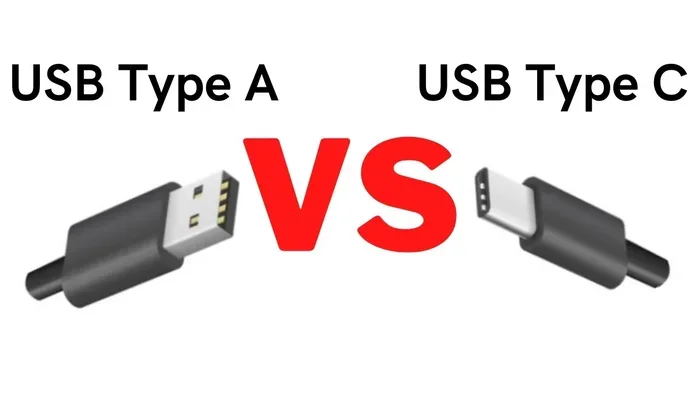
USB-C charges significantly faster than USB-A thanks to higher wattage support, Power Delivery technology, and better efficiency. If you want quicker charging for phones, laptops, or tablets, switching to a USB-C cable and charger is the smartest move. This guide breaks down the real differences in speed, power output, and compatibility so you can stop guessing and start charging smarter.
Let us be honest. We all hate waiting for our devices to charge. Whether it is your phone, tablet, or laptop, nobody wants to sit around watching a battery icon crawl from empty to full. The type of cable and port you use makes a huge difference in how fast your device gets powered up.
So, which charges faster USB A or USB C? The short answer is USB-C. But the full answer is more interesting than you might think. There is more to charging speed than just plugging in a cable. The port type, the charger wattage, the cable quality, and even the device itself all play a role. In this guide, we will walk through everything you need to know about USB-A vs USB-C charging speeds, so you can make the best choice for your gear.
If you have been wondering whether it is worth switching to USB-C or if your old USB-A charger is still good enough, you are in the right place. We will break it all down in simple terms, with real numbers and practical tips. No tech jargon overload, just clear answers you can use today.
Key Takeaways
- USB-C delivers faster charging: It supports higher wattages and USB Power Delivery, making it much quicker than USB-A.
- USB-A has lower power limits: Standard USB-A ports typically max out at 5 watts, which is far slower for modern devices.
- USB-C is the future: Most new laptops, phones, and tablets now use USB-C, and the trend is only growing.
- Cable quality matters: A cheap USB-C cable can slow down your charging speed even if your charger is powerful.
- Check your device requirements: Not every USB-C cable supports fast charging, so always verify wattage and protocol compatibility.
- Adapters exist but add friction: You can use USB-A to USB-C adapters, but they may limit the charging speed you get.
- USB-C does more than charge: It also handles faster data transfer and video output, making it a versatile all-in-one port.
📑 Table of Contents
Understanding USB-A and USB-C: The Basics
Before we dive into speed comparisons, let us quickly cover what these two connector types actually are. Understanding the basics helps you make smarter decisions about your charging setup.
What Is USB-A?
USB-A is the classic rectangular port that has been around for decades. You have probably seen it on computers, wall chargers, and power banks. It is the standard port that most people associate with USB charging. USB-A ports come in different versions like USB 2.0 and USB 3.0, but the connector shape has stayed the same.
The problem with USB-A for charging is that it was designed in a different era. When USB-A became popular, devices did not need a lot of power. Phones had small batteries, and laptops were always plugged into wall outlets. USB-A was never built with fast charging in mind.
Standard USB-A ports typically deliver about 5 watts of power at 5 volts and 1 amp. That is enough to slowly charge a phone overnight, but it is not going to get you through a quick morning top-up. Some USB-A ports can push up to 2.4 amps, which gives you around 12 watts. That is better, but still slow compared to modern standards.
What Is USB-C?
USB-C is the newer, smaller, oval-shaped connector that has taken the tech world by storm. It is reversible, meaning you can plug it in either way, which is a small but wonderful convenience. USB-C supports much higher power delivery and faster data transfer speeds than USB-A ever could.
USB-C ports can support USB Power Delivery, commonly known as USB PD. This protocol allows devices to negotiate the right amount of power between the charger and the device. In practice, this means a USB-C charger can deliver anywhere from 18 watts to over 100 watts depending on the charger and cable you use.
Most modern smartphones, laptops, and tablets now use USB-C as their primary charging port. Even some accessories like the best USB Type C headphones now rely on USB-C for both power and audio. The shift to USB-C is not just a trend, it is the new standard.
Charging Speed Comparison: USB-A vs USB-C
Now let us get to the heart of the matter. How much faster does USB-C charge compared to USB-A? The answer depends on several factors, but the difference is usually significant.
Power Delivery and Wattage
Charging speed is measured in watts. The higher the wattage, the faster your device charges. Here is a simple breakdown of what each port type can typically handle:
- USB-A (standard): 5 to 12 watts
- USB-A (with QC or fast charge): Up to 18 watts
- USB-C (basic): 18 to 20 watts
- USB-C with USB PD: 20 to 100 watts
- USB-C with proprietary fast charging: Up to 120 watts or more
As you can see, USB-C has a massive advantage in power delivery. Even a basic USB-C charger will outpace most USB-A chargers. And when you get into USB PD territory, the gap becomes enormous.
Real-World Charging Times
Let us look at some practical examples. If you charge a typical smartphone with a USB-A charger delivering 10 watts, it might take about 2.5 to 3 hours to go from empty to full. The same phone charged with a USB-C charger delivering 20 watts could be fully charged in about 1.5 hours or less.
For laptops, the difference is even more dramatic. A laptop that takes 2 hours to charge via USB-C at 65 watts might take 4 to 5 hours or more if you are stuck using a USB-A charger with a lower wattage output. This is why most modern laptops have moved entirely to USB-C charging.
If you are curious about how much power your own laptop draws while charging, check out our guide on how much power a laptop uses when plugged in. It gives you a clearer picture of wattage requirements and helps you choose the right charger.
Why USB-C Charges Faster
There are a few reasons why USB-C is inherently faster for charging than USB-A:
- Higher voltage support: USB-C can handle higher voltage levels, which directly translates to more power and faster charging.
- USB Power Delivery protocol: This smart protocol lets your device pull only the power it needs, and it adjusts dynamically for optimal speed.
- Better cable design: USB-C cables have more pins and better wiring, which allows them to carry more current safely.
- Direction-agnostic design: Because USB-C is reversible, the connector is built to handle higher current without wear and tear from repeated plugging.
Factors That Affect Charging Speed
It is not just about the port type. Several other factors play a big role in how fast your device actually charges. Understanding these will help you get the most out of your USB-C setup.
Charger Quality and Wattage
The charger itself matters a lot. A cheap no-name charger might claim fast charging but deliver inconsistent power. A reputable charger from a trusted brand will provide stable and reliable power output. Always look for chargers that clearly state their wattage and support recognized fast-charging standards.
Cable Quality and Length
This is a factor that many people overlook. A poor-quality USB-C cable can severely limit your charging speed, even if you have a powerful charger. Thin cables, overly long cables, or cables that do not support the required wattage will all slow things down.
For the best results, use a short, thick, certified USB-C cable. If you need a longer cable, make sure it is rated for the wattage you need. A quality cable is one of the easiest ways to ensure you are getting the fastest possible charge.
Device Compatibility
Your device also has a say in how fast it charges. Some phones and laptops have built-in charging limits that cap the maximum wattage they will accept. Even if you plug into a 100-watt USB-C charger, a device that only supports 20 watts will charge at 20 watts. Always check your device specifications to understand its charging capabilities.
Temperature and Environment
Heat affects charging speed. When a device gets too warm during charging, it will often slow down the charging rate to protect the battery. Charging in a cool, well-ventilated area helps maintain optimal speed. Avoid charging your device under a pillow or in direct sunlight.
When USB-A Still Makes Sense
Even though USB-C is clearly faster, there are still situations where USB-A has a place. Let us look at when USB-A might be the right choice for you.
Legacy Devices
Many older devices still use USB-A for charging. If you have an older tablet, e-reader, Bluetooth speaker, or fitness tracker, it might only support USB-A charging. In these cases, USB-A is not a limitation, it is simply what the device requires.
Emergency and Backup Charging
USB-A chargers and cables are everywhere. Airport lounges, hotel rooms, and office desks almost always have USB-A ports available. If you need a quick emergency charge and do not have your USB-C charger handy, a USB-A port can still get the job done, even if it is slower.
Low-Power Devices
For devices that do not need much power, like wireless mice, keyboards, or USB flash drives, USB-A is perfectly fine. These devices draw very little power, so the slower charging speed of USB-A does not matter at all.
If you use USB-C accessories like external storage drives, an M.2 NVMe to USB C SSD enclosure is a great example of how USB-C goes beyond just charging and handles high-speed data transfer too.
Should You Switch to USB-C for Charging?
The short answer is yes, absolutely. If you are still relying on USB-A chargers and cables for your daily devices, switching to USB-C will noticeably improve your charging speed and convenience.
Here are some practical steps to make the switch smoothly:
- Audit your current devices: Check which of your gadgets already use USB-C and which still rely on USB-A.
- Invest in quality USB-C chargers: Look for chargers that support USB Power Delivery and match your device’s wattage needs.
- Buy certified USB-C cables: Choose cables that are rated for the wattage you need and from reputable brands.
- Keep a USB-A to USB-C adapter handy: This lets you use USB-A power sources when needed, though it may limit your charging speed.
- Upgrade gradually: You do not need to replace everything at once. Start with the devices you charge most frequently.
If you are also wondering about upgrading other parts of your laptop or setup to improve overall performance, our article on how to upgrade the RAM of a laptop can help you squeeze more speed out of your existing machine.
Common Mistakes People Make With USB Charging
Avoid these common pitfalls to get the best charging speeds from your USB-C setup:
- Using cheap, uncertified cables: These cables often cannot handle the full wattage and will throttle your charging speed. They can also be a safety risk.
- Assuming all USB-C cables are the same: Not all USB-C cables support the same power levels. Some are only rated for basic 5-watt charging.
- Ignoring charger compatibility: A USB-C charger does not automatically mean fast charging. Make sure both the charger and your device support the same fast-charging protocol.
- Charging while using intensive apps: Running demanding apps while charging generates heat, which slows down the charging process.
- Using the wrong port on a multi-port charger: Some chargers have both USB-A and USB-C ports. The USB-A ports usually deliver less power, so always plug into the USB-C port when possible.
Expert Insights: The Future of Charging
The tech industry is moving strongly toward USB-C as the universal charging standard. The European Union has already mandated USB-C for many electronic devices, and other regions are likely to follow. This means more devices, more chargers, and more cables will use USB-C in the coming years.
USB Power Delivery continues to evolve, with newer versions supporting even higher wattages and smarter power management. GaN (Gallium Nitride) chargers are becoming more popular because they are smaller, cooler, and more efficient than traditional chargers. These chargers pair perfectly with USB-C to deliver incredibly fast charging in a compact form factor.
If you want to stay ahead of the curve, investing in a good USB-C charger and a few quality USB-C cables is one of the best decisions you can make for your tech setup. It is not just about charging faster today, it is about future-proofing your devices for years to come.
Conclusion
So, which charges faster USB A or USB C? The answer is clear. USB-C is faster, more versatile, and represents the future of device charging. With support for higher wattages, smarter power delivery protocols, and better cable technology, USB-C leaves USB-A in the dust when it comes to charging speed.
That said, USB-A still has a place for older devices and emergency situations. The best approach is to transition gradually to USB-C while keeping a few USB-A options for compatibility. Focus on getting quality USB-C chargers and cables, and you will notice a real difference in how quickly your devices power up.
Stop waiting around for your devices to charge. Make the switch to USB-C, and enjoy faster, more convenient charging every single day. Your future self will thank you.
Frequently Asked Questions
Can I use a USB-A charger to charge a USB-C device?
Yes, you can use a USB-A charger with a USB-C device by using a USB-A to USB-C cable or adapter. However, the charging speed will likely be slower because USB-A ports have lower power limits. You will get basic charging, but not the fast-charging speeds that USB-C is capable of.
Why is my USB-C cable charging so slowly?
Several factors can cause slow USB-C charging. The cable might not be rated for high wattage, the charger might not support USB Power Delivery, or the device itself might have charging limits. Always use certified USB-C cables and compatible chargers to get the fastest speeds.
Is USB-C always faster than USB-A for charging?
In almost all cases, yes. USB-C supports higher wattages and the USB Power Delivery protocol, which allows for much faster charging. The only exception is if you are using a low-quality USB-C cable or a charger that does not support fast charging protocols.
Can I fast charge my phone with a USB-A charger?
Some phones support quick charge over USB-A, but the speeds are still much slower than USB-C fast charging. USB-A ports typically max out at around 12 to 18 watts, while USB-C with USB PD can deliver 20 watts or more, depending on the charger and cable.
Do I need a special charger for USB-C fast charging?
Yes, you need a charger that supports USB Power Delivery or your device’s proprietary fast-charging standard. Not all USB-C chargers are created equal. Look for chargers that clearly state their wattage and USB PD support to ensure you get the fastest possible charging speed.
Will USB-C replace USB-A completely?
The industry is moving strongly in that direction. Many new laptops, phones, and tablets now only come with USB-C ports. Regulations in some regions are also pushing for USB-C as a universal standard. While USB-A will likely remain around for legacy devices for a while, USB-C is becoming the dominant connector type.