Why Cant Usb C Replace Hdmi
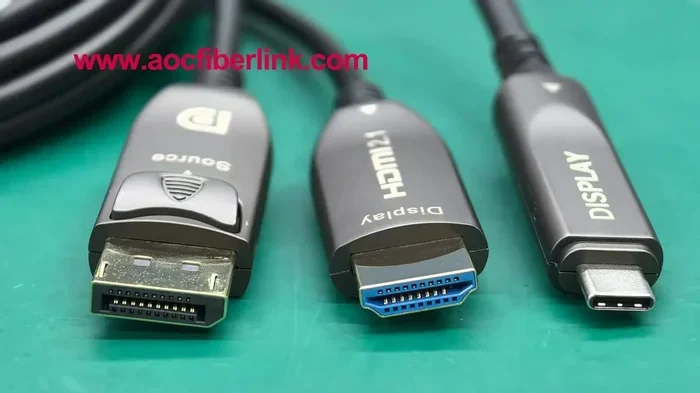
USB-C cannot fully replace HDMI because they use different protocols, bandwidth levels, and display standards. While USB-C is versatile and supports video output through Alt Mode, it still lacks the raw power and universal TV compatibility that HDMI provides. HDMI remains the go-to standard for TVs, monitors, and home theater systems.
USB-C has taken the tech world by storm. You can find it on laptops, phones, tablets, and even some monitors. It is small, reversible, and incredibly versatile. But here is the big question many people still ask. Why cant USB C replace HDMI when it seems so capable? The answer is not as simple as you might think.
Both connectors look modern and serve similar roles in the world of digital connections. However, they were built with different goals in mind. HDMI was designed specifically for audio and video. USB-C was designed as a universal data and power connector. Understanding this difference is the first step to seeing why USB-C has not fully taken over from HDMI yet.
In this article, we will explore the real reasons behind this gap. We will look at how each connector works, where USB-C falls short, and when you should still reach for an HDMI cable. By the end, you will have a clear picture of why both connectors still matter in today’s tech landscape.
Key Takeaways
- Different Protocols: USB-C and HDMI use entirely different signaling protocols, which limits direct replacement.
- Bandwidth Gaps: HDMI 2.1 offers much higher bandwidth than most USB-C implementations for 4K and 8K video.
- Consumer Device Support: Most TVs and projectors still rely on HDMI ports, not USB-C.
- USB-C Alt Mode: USB-C can carry video signals, but it requires specific support and adapters.
- Power and Data: USB-C handles power delivery and data, which adds complexity compared to HDMI’s single-purpose design.
- Adapters Help: You can use a USB-C to HDMI adapter to bridge the gap in many situations.
📑 Table of Contents
Understanding USB-C and HDMI
Before we dive into the reasons, let us take a quick look at what each connector actually is. This will help you understand why they are not interchangeable, even though they both carry digital signals.
What Is USB-C?
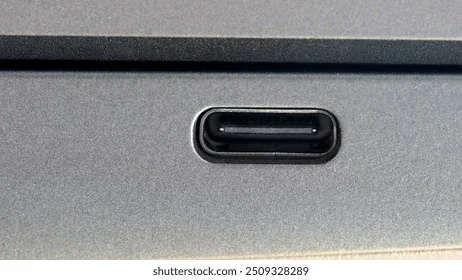
USB-C is a connector standard developed by the USB Implementers Forum. It is a small, oval-shaped port that supports data transfer, power delivery, and video output. Many people love it because it is reversible. You never have to flip it to plug it in.
USB-C is not a single protocol. It is a physical connector that can carry multiple types of signals. This includes USB 3.0, USB 3.1, USB 3.2, and even Thunderbolt 3 and Thunderbolt 4. The same port can connect to external storage, charge your device, and output video all at once.
However, this versatility comes with trade-offs. Not every USB-C port supports the same features. Some only handle data and power. Others support video output through DisplayPort Alt Mode. This inconsistency is one reason why USB-C has not replaced HDMI across all devices.
What Is HDMI?
HDMI stands for High-Definition Multimedia Interface. It was created specifically for carrying uncompressed audio and video signals. Unlike USB-C, HDMI was built from the ground up for one purpose: connecting source devices to displays.
You will find HDMI ports on almost every TV, monitor, projector, and gaming console. It has been the standard for home entertainment for over two decades. The HDMI standard has evolved through several versions, including HDMI 2.0 and HDMI 2.1, each offering higher bandwidth and better support for features like 4K at 120Hz and 8K resolution.
HDMI also supports Consumer Electronics Control, or CEC. This lets you control multiple devices with one remote. This kind of deep integration is hard to replicate with a general-purpose connector like USB-C.
Why USB-C Cannot Fully Replace HDMI
Now that we understand the basics, let us look at the core reasons why USB-C still cannot fully replace HDMI. These are the technical and practical limitations that keep both connectors relevant.
Different Protocols and Standards
The biggest reason USB-C cannot replace HDMI is that they use completely different protocols. USB-C uses the USB protocol for data and the DisplayPort protocol for video through Alt Mode. HDMI uses its own dedicated HDMI protocol designed specifically for audio and video.
This means that when you send video through USB-C, the signal must be converted. First, the device encodes video as a DisplayPort signal. Then, if you are connecting to an HDMI display, an adapter or cable must convert that signal back to HDMI. Each conversion step adds potential for signal loss and compatibility issues.
In contrast, HDMI sends a native signal directly to the display. There is no conversion needed. This direct path means better reliability, lower latency, and fewer chances for something to go wrong.
Bandwidth and Resolution Limits
HDMI 2.1 offers a massive bandwidth of up to 48 Gbps. This allows for 4K at 120Hz, 8K at 60Hz, and features like Variable Refresh Rate, or VRR, and Auto Low Latency Mode, or ALLM. These are critical for gaming and high-end home theater setups.
Most USB-C implementations rely on USB 3.1 or USB 3.2 protocols, which max out at 10 Gbps or 20 Gbps. Even with Thunderbolt 4, which offers 40 Gbps, the real-world video bandwidth is still lower than what HDMI 2.1 provides natively.
So while USB-C can handle 4K at 60Hz in many cases, it struggles with the higher refresh rates and resolutions that HDMI 2.1 delivers easily. For gamers and professionals who need the best display performance, HDMI still has a clear edge.
Where USB-C Falls Short for Video
USB-C is an amazing connector, but it has specific weaknesses when it comes to video output. Understanding these gaps helps explain why HDMI is still necessary.
DisplayPort Alt Mode Limitations
USB-C relies on DisplayPort Alt Mode to output video. This is not a built-in feature of every USB-C port. Device manufacturers must choose to support it. Some budget laptops and phones skip this feature entirely to save cost.
Even when Alt Mode is supported, the video capabilities depend on the underlying USB protocol version. A USB-C port running on USB 2.0 will have very limited video bandwidth. A port running on USB 3.1 Gen 2 or Thunderbolt 3 will perform much better.
This inconsistency creates confusion for consumers. You cannot always guarantee that a USB-C port will work with your external display. This is a problem that HDMI simply does not have. Every HDMI port is designed for video output by default.
Consumer Device Compatibility
Think about the devices in your home. Your television almost certainly has HDMI ports. Your soundbar likely has HDMI inputs. Your gaming console, Blu-ray player, and streaming box all use HDMI. The HDMI ecosystem is deeply embedded in consumer electronics.
Now think about USB-C. Very few TVs have USB-C ports. Very few soundbars accept USB-C audio. The reality is that USB-C has not penetrated the display and home entertainment market the way HDMI has.
This is not just about current devices. It is about ecosystem inertia. Manufacturers invest billions in HDMI infrastructure. Switching to USB-C as the primary video standard would require a massive industry overhaul. That takes time and money.
When You Still Need HDMI
There are specific situations where HDMI remains the best or only practical choice. Knowing when to use HDMI instead of USB-C will save you from frustration.
Gaming and Home Theater Setups
If you are a serious gamer, HDMI 2.1 is essential. Modern consoles like the PlayStation 5 and Xbox Series X support 4K at 120Hz through HDMI 2.1. You need that bandwidth for smooth gameplay with VRR and ALLM features.
Similarly, if you are building a home theater, HDMI is the standard for connecting your source devices to your TV or projector. HDMI eARC support gives you high-quality audio return to your sound system. USB-C simply cannot match this level of integration in a home entertainment setup.
Some people use a USB-C to HDMI adapter for gaming, but this adds an extra step and potential compatibility issues. A direct HDMI connection is always more reliable for gaming.
Professional Display Work
For professionals who work with video editing, graphic design, or 3D rendering, HDMI offers stable, high-bandwidth connections to professional monitors. Color accuracy and refresh rate consistency are critical in these workflows.
USB-C can work for professional displays, especially with Thunderbolt 4 docks and monitors. But the extra adapter or conversion step can introduce color depth issues or latency. When every pixel matters, a direct HDMI connection provides peace of mind.
The Best of Both Worlds
The good news is that you do not have to choose one over the other forever. The industry is moving toward a future where USB-C and HDMI work together seamlessly. Many modern laptops now include both a USB-C port and an HDMI port. This gives users the flexibility to connect to any display or device.
Adapters and docking stations have also improved dramatically. You can now find high-quality USB-C to HDMI adapters that support 4K at 60Hz or even 4K at 120Hz in some cases. These adapters bridge the gap between the two standards and let you use your USB-C laptop with any HDMI display.
It is also worth noting that USB-C has made incredible strides in other areas. For example, you can connect high-speed external SSDs through a USB-C port for fast backups and file transfers. Devices like the M.2 NVMe SSD to USB 3.1 adapter showcase how USB-C excels at data connectivity, even if it cannot fully replace HDMI for video. Similarly, the versatility of USB-C extends to audio, where you can enjoy premium sound with the best USB Type C headphones without needing a separate audio jack.
The future may eventually see USB-C become the single port for everything. But for now, HDMI remains the reliable standard for displays and home entertainment. Both connectors have their place, and understanding their strengths will help you make better connection choices every day.
Common Mistakes People Make
Many users run into issues because they assume USB-C and HDMI are fully interchangeable. Here are some mistakes to avoid.
- Assuming all USB-C ports support video output. Some ports only handle data and charging. Always check your device specifications.
- Using cheap adapters. A low-quality USB-C to HDMI adapter can cause signal drops, resolution limits, or audio problems.
- Expecting USB-C to match HDMI 2.1 performance. Most USB-C setups cannot deliver the full 48 Gbps bandwidth of HDMI 2.1.
- Ignoring cable quality. The same way a USB-C to HDMI cable matters, the quality of your USB-C data cable affects overall performance too.
Expert Insights
Industry experts agree that USB-C and HDMI will coexist for the foreseeable future. The USB-C standard continues to evolve, with newer versions offering higher bandwidth and better video support. But HDMI also keeps advancing, with each new version pushing the boundaries of what is possible in home entertainment.
When choosing between the two, consider your specific use case. If you are connecting a laptop to a presentation screen at the office, USB-C with an adapter works great. If you are setting up a gaming console in your living room, stick with HDMI. Both connectors are valuable tools in your tech toolkit.
Conclusion
The answer to why cant USB C replace HDMI comes down to purpose, protocol, and ecosystem. USB-C is a fantastic universal connector that handles data, power, and video with impressive versatility. But HDMI was purpose-built for audio and video delivery, and it still does that job better in many real-world scenarios.
Rather than viewing these connectors as competitors, think of them as complementary tools. Use USB-C for your laptop, external drives, and mobile devices. Use HDMI for your TV, gaming console, and home theater setup. Understanding their strengths will help you get the best experience from every device you own.
Technology is always moving forward. Maybe one day USB-C will become the single standard for all connections. But until that day arrives, both USB-C and HDMI will continue to play important roles in how we connect our devices and enjoy our content.
Frequently Asked Questions
Can USB-C carry the same video quality as HDMI?
In many cases, yes. USB-C with DisplayPort Alt Mode can deliver 4K at 60Hz. However, it cannot match the full capabilities of HDMI 2.1, which supports 4K at 120Hz and 8K at 60Hz. The video quality depends on the specific USB-C implementation and the adapter or cable you use.
Do I need a special adapter to connect USB-C to an HDMI display?
Yes, you need a USB-C to HDMI adapter or a cable with USB-C on one end and HDMI on the other. Make sure the adapter supports the resolution and refresh rate you need. Cheap adapters may not support higher resolutions or may cause audio issues.
Why do most TVs not have USB-C ports?
TVs are designed primarily as display devices, and HDMI has been the standard input for decades. Manufacturers have invested heavily in HDMI infrastructure, and consumers expect HDMI ports on their TVs. Switching to USB-C would require changes across the entire entertainment ecosystem.
Is Thunderbolt 4 USB-C better than HDMI for video?
Thunderbolt 4 over USB-C offers excellent video support and 40 Gbps bandwidth. It can drive multiple high-resolution displays. However, it still requires conversion when connecting to HDMI displays, and it does not match the native 48 Gbps bandwidth of HDMI 2.1 for single-display setups.
Can I use USB-C for gaming on my TV?
You can use USB-C with an adapter to connect a laptop to a TV for gaming. However, for consoles like the PlayStation 5 and Xbox Series X, HDMI is the required connection. USB-C gaming on a TV works best with laptops that support Thunderbolt 4 and USB-C Alt Mode.
Will USB-C eventually replace HDMI completely?
It is possible in the long term, but not in the near future. USB-C is becoming more common on laptops and monitors, but the HDMI ecosystem in TVs, projectors, and home theater equipment is deeply established. Both standards will likely coexist for many years to come.