Is Iphone Being Forced to Use Usb C
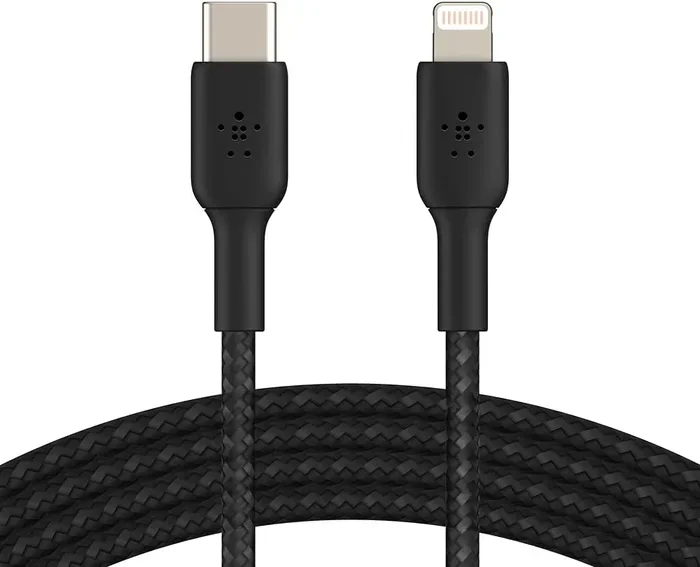
Apple is transitioning iPhones to USB-C, driven by EU regulations and industry standards. The iPhone 15 lineup marks the official shift away from the Lightning connector, replacing it with a universal USB-C port. This change affects charging, accessories, and how you connect your phone to other devices.
There is a big question on every iPhone user’s mind right now. Is iPhone being forced to use USB-C? The short answer is yes. Apple made the official switch starting with the iPhone 15 series. But the story behind this change is much more interesting than you might think. It involves regulations, technology upgrades, and a lot of consumer frustration over the years.
If you have been using an iPhone for a while, you know the Lightning connector well. It has been Apple’s go-to charging port for nearly a decade. But now, that era is ending. The move to USB-C brings faster speeds, better compatibility, and a universal standard that works across many devices. Whether you are a casual user or a tech enthusiast, this shift matters to you.
Let us break down everything you need to know. We will cover why Apple made this change, what the EU has to do with it, and how this affects your daily routine. You will also learn about USB-C accessories and what to look for when shopping for new cables and adapters.
Key Takeaways
- EU Regulation: The European Union mandated USB-C for all mobile devices, pushing Apple to make the switch.
- iPhone 15 Lineup: All iPhone 15 models now feature a USB-C port instead of Lightning.
- Faster Charging: USB-C enables faster data transfer and quicker charging speeds compared to Lightning.
- Accessory Compatibility: You may need new cables and adapters for your existing USB-C devices.
- Future-Proofing: The switch aligns iPhone with industry standards, making it easier to share chargers across devices.
📑 Table of Contents
Why Is Apple Switching to USB-C?
Apple has been slow to adopt USB-C. For years, the company stuck with its proprietary Lightning connector. But pressure from regulators and the tech industry finally pushed them to change. The iPhone 15 and iPhone 15 Pro models now ship with USB-C ports. This is not just a random decision. There are very real reasons behind it.
The European Union Regulation
The biggest driving force is the European Union. The EU passed a law requiring all mobile phones, tablets, and cameras to use USB-C as a universal charging standard. This regulation took effect in late 2024. Apple could not ignore it. The company had no choice but to comply if it wanted to keep selling iPhones in Europe.
This law was not just about convenience. It was about reducing electronic waste. The idea is simple. When everyone uses the same charger, people need fewer duplicate cables. That means less clutter and less trash in landfills. Apple actually supported the concept in the long run, even though it fought the regulation at first.
Industry Standardization
Beyond the EU law, there is a bigger picture. The tech world is moving toward USB-C as the universal connector. Laptops, tablets, monitors, and even gaming consoles now use USB-C. By switching, Apple aligns its products with the rest of the industry. This makes life easier for people who own multiple devices from different brands.
Think about it. You no longer need a drawer full of different cables. One USB-C cable can charge your phone, your tablet, your laptop, and even your headphones. That is the real beauty of this transition.
How Does USB-C Compare to Lightning?
This is a question many iPhone users ask. The Lightning connector served Apple well for years. But USB-C brings several real advantages that are hard to ignore.
Charging Speed
USB-C supports much faster charging than Lightning. With the right USB-C power adapter, you can charge your iPhone significantly quicker. The iPhone 15 Pro models can charge up to 50 percent in about 30 minutes. That is a huge improvement over what Lightning could deliver.
Data Transfer Speeds
Data transfer is another major win. USB-C on the iPhone 15 Pro supports USB 3 speeds, which means you can move large files like videos and photos much faster. If you regularly transfer files between your phone and a computer, this change will feel great. You will spend less time waiting and more time working.
Compatibility
Lightning cables only work with Apple devices. USB-C cables work with almost everything. Your phone, your laptop, your portable SSD drive, your camera, and even some car chargers all use USB-C now. This universal compatibility is a game changer. You can share a single cable with friends and family without worrying about compatibility issues.
Durability
USB-C connectors are also more durable than Lightning ports. They are designed to handle more plug-in cycles. This means your port is less likely to wear out quickly. For people who charge their phones multiple times a day, this added longevity really matters.
| Feature | Lightning | USB-C |
|---|---|---|
| Charging Speed | Standard | Fast (up to 27W) |
| Data Transfer | Up to 480 Mbps | Up to 10 Gbps (USB 3) |
| Compatibility | Apple devices only | Universal |
| Durability | Moderate | High |
| Adoption | Legacy | Industry standard |
What Does This Mean for iPhone Users?
The switch to USB-C changes some things for iPhone owners. Most of the changes are positive, but there are a few adjustments you will need to make.
New Cables and Adapters
If you have a collection of Lightning cables, they will not work with your new iPhone. You will need to buy USB-C cables and possibly adapters. This can feel like an extra expense, especially if you have multiple devices. However, many people already own USB-C cables from other gadgets. So the cost may not be as high as you think.
When shopping for cables, look for ones that are MFi certified. This means Apple has approved the cable for safe use with iPhones. Cheap, uncertified cables can damage your device or charge it slowly. Spending a little extra on quality cables saves you headaches later.
Accessory Ecosystem
Your existing accessories may need an upgrade. Car mounts, battery packs, and docking stations that relied on Lightning will need USB-C versions. The good news is that the market is already full of USB-C accessories. From car chargers to desktop docks, you have plenty of options to choose from.
For example, if you use an external drive to back up your phone, you can now plug it directly into your iPhone using a USB-C to USB-C cable. This direct connection makes file transfers much simpler. No adapter dongle needed in most cases.
Dongles and Adapters
Some users will need dongles to connect older equipment. If you have a monitor or projector that only accepts USB-A or HDMI, a simple adapter solves the problem. Apple sells its own dongles, but third-party options work just as well and cost less. Just make sure whatever you buy supports the data and power speeds you need.
Is the Transition Really Forced?
The word “forced” is in the title for a reason. Many people feel Apple did not make this choice freely. The EU regulation left the company with little room to negotiate. Apple could have continued using Lightning, but that would have meant losing access to a huge market in Europe.
That said, Apple has actually been moving in this direction for a while. The iPad Air, iPad Pro, and MacBook lines already used USB-C before the iPhone did. So the iPhone was really the last holdout. The transition was inevitable, even if the timing felt sudden to some users.
Some people argue that Apple benefits from proprietary connectors. Selling Lightning cables and adapters at premium prices has been a revenue stream. But the shift to USB-C ends that advantage. Apple now has to compete on quality and price like every other accessory maker.
What to Look for in USB-C Accessories
Not all USB-C cables and adapters are created equal. Here is what you should keep in mind when buying accessories for your new iPhone.
Cable Quality
Look for cables that support USB 3 or higher if you want fast data transfer. For charging alone, a basic USB-C cable works fine. But if you want to connect your iPhone to a computer for backups or file transfers, go for a higher-quality cable. Brands like Anker, Belkin, and Cable Matters offer reliable options.
Also check the wattage rating. A cable rated for 20W or higher will charge your iPhone quickly and safely. Avoid ultra-cheap cables from unknown brands. They may not handle the power properly and could pose a safety risk.
Adapter Compatibility
If you need adapters, make sure they support the features you use. A simple USB-C to Lightning adapter works for charging, but it will not give you fast data transfer. For that, you need a full-featured adapter that supports USB 3 speeds. Always check the product specifications before buying.
Portable Storage Options
One of the best uses of USB-C on the iPhone is connecting external storage. You can plug in a portable SSD or hard drive to back up photos and videos directly. Devices like the SanDisk Extreme Portable 2TB External USB-C NVMe SSD work great with the iPhone 15 lineup. These drives are fast, compact, and perfect for on-the-go storage.
Similarly, if you want to connect your iPhone to a computer for bulk transfers, a NVMe SSD to USB adapter gives you an affordable and fast solution. You can move hundreds of gigabytes of files in minutes instead of hours.
Quick Tips for the USB-C Transition
- Keep your old Lightning cables. They still work with older iPhones, iPads, and accessories you may still use.
- Buy MFi-certified cables. They ensure safe and reliable performance with your iPhone.
- Invest in a good USB-C power bank. A high-quality power bank with USB-C input and output keeps your phone charged on the go.
- Label your cables. With multiple USB-C devices at home, labeling helps you avoid confusion.
- Check your car charger. Make sure your car mount or charger supports USB-C before you need it.
Common Mistakes People Make During the Transition
Many iPhone users run into avoidable problems when switching to USB-C. Here are a few common mistakes to watch out for.
Buying cheap cables. This is the number one mistake. Low-quality USB-C cables can cause slow charging, data errors, or even damage your phone. Always stick with reputable brands or certified cables.
Assuming all USB-C cables are the same. Not all USB-C cables support the same speeds or power levels. A basic cable might only charge at 5W, while a premium one charges at 27W or more. Check the specs before you buy.
Ignoring adapter quality. Cheap adapters can introduce connection issues or fail to support fast charging. A good adapter costs a little more but saves you from frustrating connectivity problems.
Throwing away Lightning gear too soon. Your Lightning cables and adapters still work perfectly with older Apple devices. Keep them until you have fully upgraded your entire ecosystem.
Expert Insights
Tech experts agree that the USB-C transition is a positive move for consumers. It simplifies the charging experience and improves compatibility across devices. According to industry analysts, the EU regulation was the final push Apple needed, but the technology benefits speak for themselves.
From a technical standpoint, USB-C offers a more robust and versatile connection. It supports video output, high-speed data transfer, and rapid charging through a single port. This level of versatility was not possible with Lightning. Users who work across multiple platforms will especially appreciate the universal compatibility.
Apple’s decision also opens the door for more innovation in accessories. Third-party manufacturers can now create USB-C products that work seamlessly with iPhones. This competition should drive prices down and quality up over time. The best USB Type C headphones market, for example, is already thriving and growing.
Final Thoughts
The question is iPhone being forced to use USB-C has a clear answer. Yes, regulations and industry trends pushed Apple to make the switch. But the result is something most users will appreciate. Faster charging, universal compatibility, and a cleaner setup with fewer cables are all wins.
Yes, you will need to replace some accessories. Yes, there is a learning curve with adapters and new cables. But the long-term benefits far outweigh the short-term inconvenience. Once you make the switch, you will wonder how you ever lived with multiple cables for different devices.
The future of charging is USB-C. Every major device maker has already made this shift. Apple joining the crowd feels less like a loss and more like a step forward. Embrace the change, invest in good accessories, and enjoy a simpler, faster charging experience with your iPhone.
Whether you are buying a new M.2 NVMe to USB-C SSD enclosure for your computer or picking up a new cable for your phone, the USB-C ecosystem is here to stay. Make the switch with confidence and enjoy all the benefits that come with it.
Frequently Asked Questions
Why did Apple switch from Lightning to USB-C?
The European Union mandated USB-C as a universal charging standard for all mobile devices. Apple had to comply to continue selling iPhones in Europe. Additionally, USB-C offers faster charging, better data transfer speeds, and universal compatibility across devices.
Do I need to buy new cables for my iPhone 15?
Yes, if you currently use Lightning cables, you will need USB-C cables for your new iPhone 15. Make sure to buy MFi-certified cables for safe and reliable performance. Many people already have USB-C cables from other devices, so the cost may be minimal.
Can I still use my old Lightning accessories with the new iPhone?
No, Lightning accessories will not work with iPhone 15 models. You will need USB-C versions of your cables, chargers, and adapters. However, your Lightning accessories will still work with older Apple devices you may still own.
Is USB-C faster than Lightning for charging?
Yes, USB-C supports significantly faster charging than Lightning. The iPhone 15 Pro can charge up to 50 percent in about 30 minutes with a compatible USB-C power adapter. Standard Lightning cables charge at much slower speeds.
Will this change affect the price of iPhone accessories?
Initially, you may need to spend money on new USB-C cables and adapters. However, USB-C accessories are widely available and competitively priced. Over time, the market will offer more affordable options as adoption increases.
Can I connect external storage to my iPhone with USB-C?
Yes, the USB-C port on iPhone 15 models supports direct connection to external drives. You can plug in portable SSDs and hard drives to transfer files, back up photos, and free up storage space. Look for drives that are compatible with iOS for the best experience.