Is Apple Usb C the Same as Usb C

Apple USB-C looks identical to standard USB-C, but subtle differences in power delivery, data speeds, and accessory compatibility matter. Apple devices use USB-C for charging and data, yet not all USB-C cables or chargers work the same way. Understanding these differences helps you avoid slow charging, data transfer issues, and wasted money on the wrong cables or adapters.
You plug a USB-C cable into your iPhone or MacBook, and it works. So what is the big deal? Well, here is the thing. Not every USB-C cable, charger, or accessory is created equal. Apple devices use USB-C, but the experience you get depends heavily on the cable and charger you choose. Some cables charge fast. Some transfer data at lightning speed. Others barely get the job done. This guide breaks down everything you need to know about Apple USB-C vs standard USB-C. By the end, you will never buy the wrong cable again.
The confusion around USB-C is real. You walk into a store or browse online, and you see dozens of USB-C cables. They all look the same. They all fit the same port. But they perform very differently. Apple has its own approach to USB-C, and it does not always align with generic USB-C standards. Let us dive into the details and clear this up once and for all.
Key Takeaways
- Same Shape, Different Specs: Apple USB-C uses the same connector shape as standard USB-C, but the power and data capabilities can vary.
- Thunderbolt Compatibility: Many Apple devices support Thunderbolt over USB-C, which offers faster speeds than basic USB-C.
- Not All Cables Are Equal: A standard USB-C cable may not deliver the full power or speed your Apple device needs.
- Check Before You Buy: Always verify cable and charger specs to ensure they match your Apple device requirements.
- Adapters Solve Problems: USB-C adapters and enclosures can expand your connectivity options with Apple devices.
📑 Table of Contents
- What Is USB-C Anyway?
- How Apple USB-C Differs From Standard USB-C
- The USB-C Ecosystem: Cables, Chargers, and Hubs
- Common Problems With Apple USB-C and How to Fix Them
- Quick Tips for Choosing the Right USB-C Accessories
- Expert Insight: Why Apple Took Its Own Approach to USB-C
- Common Mistakes People Make With Apple USB-C
- Conclusion
What Is USB-C Anyway?
USB-C is a connector standard. It is a small, oval-shaped plug that fits into a port on your device. Unlike older USB types, USB-C is reversible. You can flip it either way, and it will work. This design change alone made millions of people happy. No more flipping the cable three times to get it right.
USB-C supports several protocols. It can carry data, power, and video signals. The speed and power depend on the cable and the device. A basic USB-C cable might charge your phone slowly. A premium USB-C cable can fast-charge a laptop and transfer huge files in seconds. The connector is the same, but what happens inside the wire makes all the difference.
Apple adopted USB-C across its product line. The iPhone 15 and newer models use USB-C. MacBooks have used USB-C (and Thunderbolt) for years. iPads Pro and iPad Air also rely on USB-C. So understanding USB-C is essential if you own any Apple device.
How Apple USB-C Differs From Standard USB-C
Here is where things get interesting. Apple USB-C and standard USB-C share the same physical connector. You can plug an Apple USB-C cable into a non-Apple device, and vice versa. But under the hood, there are important differences that affect performance.
Power Delivery Differences
Apple devices often demand more power than a basic USB-C cable can provide. The USB-C Power Delivery standard supports up to 240 watts. However, not every cable handles that level. Apple includes cables that are tuned for its devices. These cables negotiate the right amount of power with the charger. A cheap generic cable might limit charging speed or, worse, overheat.
For example, an iPhone 15 Pro charges faster with an Apple USB-C cable and a compatible charger. The same cable on a different brand might not deliver the same speed. This is because Apple cables are built to specific tolerances that ensure safe and fast power transfer.
Data Transfer Speeds
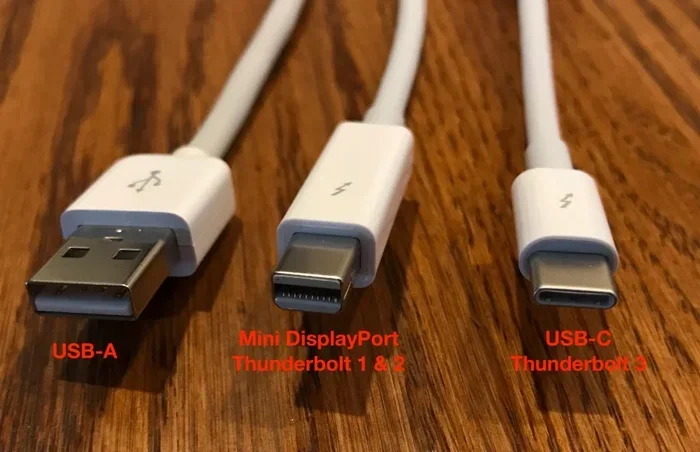
Data transfer speed is another area where Apple USB-C stands apart. Apple devices like the MacBook Pro support Thunderbolt over USB-C. Thunderbolt 3 and Thunderbolt 4 use the USB-C connector but offer much faster speeds than standard USB-C 3.0 or USB-C 3.1. Thunderbolt 3 delivers up to 40 Gbps. Standard USB-C 3.1 maxes out at 10 Gbps. That is a huge gap.
If you connect a regular USB-C external drive to a MacBook, it will work. But if you want the fastest speeds, you need a Thunderbolt-compatible cable and drive. This distinction matters for professionals who move large video files or run external drives daily.
Accessory Compatibility
One of the trickiest parts of Apple USB-C is accessory compatibility. Apple devices work with many USB-C accessories, but not all of them perform equally. For instance, a USB-C enclosure for an external SSD might work fine with a Windows laptop but behave differently with a Mac. Some enclosures support USB 3.0 speeds but not Thunderbolt speeds. This means you could leave performance on the table.
Similarly, if you use a USB-C SSD enclosure to connect an external drive to your Apple device, check whether it supports the data protocol your Mac uses. A standard USB-C SSD enclosure works for basic storage. But for the best speeds, look for enclosures that support USB 3.1 or Thunderbolt.
The USB-C Ecosystem: Cables, Chargers, and Hubs
The USB-C ecosystem has grown fast. You can now find USB-C cables for almost every purpose. Charging cables. Data transfer cables. Video output cables. But the variety can be confusing. Let us break down the most common types you will encounter with Apple devices.
Charging Cables
Charging cables are the most common USB-C cables. They carry power from a charger to your device. Apple includes a basic USB-C charging cable with most of its devices. For faster charging, you need a USB-C cable that supports higher wattage and a compatible charger.
Quick tip: Look for cables rated for at least 20 watts for iPhones and 60 watts or more for MacBooks. A cable that only supports 5 watts will charge your MacBook very slowly.
Data Transfer Cables
Data transfer cables matter if you move files between devices or connect external storage. Not all USB-C cables handle data. Some cables are power-only cables. They can charge your device but cannot transfer files. Always check the specifications before buying a cable for data purposes.
For Apple users, a Thunderbolt-certified cable is the gold standard for data transfer. It supports the fastest speeds and works with Thunderbolt docks, external GPUs, and high-speed storage devices.
USB-C Hubs and Adapters
A USB-C hub expands your connectivity options. It adds ports like HDMI, USB-A, SD card slots, and Ethernet to your device. Apple devices benefit greatly from USB-C hubs, especially the MacBook Air and MacBook Pro, which have limited ports.
When choosing a USB-C hub, make sure it supports the data speeds you need. A basic hub might limit your external display to 4K at 30Hz. A better hub supports 4K at 60Hz or even dual displays. For storage, a hub with a built-in USB-C port lets you connect external drives at full speed.
USB-C Audio Accessories
Apple dropped the 3.5mm headphone jack on several devices. USB-C headphones have become a popular alternative. You can find best USB Type C headphones that deliver great sound quality without needing a dongle. These headphones connect directly to the USB-C port on your iPhone or iPad. They often include a built-in digital-to-analog converter for clean audio output.
Not all USB-C headphones sound the same. Some are designed for casual listening. Others are built for audiophiles who want high-resolution audio. Check reviews and specs before buying to make sure you get the sound quality you expect.
Common Problems With Apple USB-C and How to Fix Them
Even though USB-C is a universal standard, Apple users sometimes run into specific issues. Here are the most common problems and how to solve them.
Slow Charging
If your iPhone or MacBook charges slowly on a USB-C cable, the cable might be the culprit. Cheap cables often have thinner wires that cannot carry high current. Use an Apple-certified USB-C cable for the best charging speed. Also, make sure your charger supports the right wattage for your device.
Data Transfer Fails
Sometimes a USB-C cable connects but does not transfer data. This usually happens when you use a power-only cable. Check the cable specifications to confirm it supports data transfer. If you are using an external drive, try a different cable or a different port on your Mac.
Accessory Not Recognized
Some USB-C accessories do not work with Apple devices even though they fit. This can happen with USB-C hubs, adapters, and enclosures that do not fully comply with the USB-C standard. Look for accessories that are certified for Apple devices or that clearly state Thunderbolt or USB 3.1 compatibility.
Quick Tips for Choosing the Right USB-C Accessories
- Look for Apple MFi Certification: This ensures the cable meets Apple safety and performance standards.
- Check the Data Protocol: USB 3.0, USB 3.1, and Thunderbolt are not the same. Choose the one that matches your needs.
- Buy from Reputable Brands: Cheap cables from unknown brands can damage your device or underperform.
- Match the Wattage: Your charger and cable should both support the wattage your device requires.
- Read Reviews: Real user experiences help you spot problems before you buy.
Expert Insight: Why Apple Took Its Own Approach to USB-C
Apple has always liked to control its ecosystem. When the company adopted USB-C, it did so on its own terms. Apple designs its USB-C cables and chargers to meet strict quality standards. This approach ensures reliability but also means Apple accessories can cost more than generic alternatives.
From a technical standpoint, Apple USB-C is fully compliant with the USB-C standard. The connector works with any USB-C port. But Apple adds its own optimizations for power delivery and data transfer. These optimizations are why Apple cables often feel sturdier and perform better than budget alternatives.
The key takeaway is this. Apple USB-C and standard USB-C are compatible at the connector level. But the performance you get depends on the specific cable, charger, and accessory you use. Investing in quality USB-C accessories pays off in speed, reliability, and safety.
Common Mistakes People Make With Apple USB-C
- Assuming All USB-C Cables Are the Same: They are not. Power delivery and data speeds vary widely.
- Using Power-Only Cables for Data: This is a common mistake. Always verify that the cable supports data transfer.
- Ignoring Thunderbolt Compatibility: If your Mac supports Thunderbolt, using a non-Thunderbolt cable limits your speeds.
- Buying the Cheapest Cable: A $3 cable might seem like a deal, but it could underperform or even damage your device.
- Not Checking Adapter Specs: USB-C adapters vary in quality and capability. Check the supported protocols before buying.
Conclusion
So, is Apple USB-C the same as standard USB-C? The short answer is yes and no. The connector is the same. The port is the same. But the performance, power delivery, and compatibility depend on the specific cable and accessory you use. Apple USB-C devices benefit from high-quality cables and Thunderbolt support that generic USB-C accessories may not fully match.
Understanding these differences empowers you to make better buying decisions. You will know which cables to trust, which adapters to avoid, and how to get the most out of your Apple devices. Next time you reach for a USB-C cable, you will know exactly what to look for. Choose wisely, and your Apple devices will reward you with fast charging, quick data transfers, and reliable connectivity every single day.
Frequently Asked Questions
Can I use any USB-C cable with my iPhone 15?
Yes, any USB-C cable will physically fit your iPhone 15. However, for the best charging speed, use a cable that supports USB-C Power Delivery. Apple-certified cables are the safest and most reliable choice for fast charging.
Is Thunderbolt the same as USB-C?
Thunderbolt uses the USB-C connector, but it is not the same as standard USB-C. Thunderbolt offers faster data speeds and more features. Not all USB-C cables support Thunderbolt, so check the specifications before buying.
Why does my USB-C cable charge slowly on my MacBook?
Slow charging usually means the cable or charger does not support enough wattage. Use a cable rated for at least 60 watts and a charger that matches your MacBook’s power requirements. Cheap or damaged cables can also limit charging speed.
Can I connect a USB-C external SSD to my Mac?
Absolutely. You can connect a USB-C external SSD to your Mac using a USB-C cable or a USB-C SSD enclosure. For the fastest speeds, make sure your SSD and cable support USB 3.1 or Thunderbolt protocols.
Are Apple USB-C cables worth the extra cost?
Apple USB-C cables are built to high standards and offer reliable performance. They are worth it if you want consistent quality and safety. However, several third-party brands also offer excellent USB-C cables at lower prices. Look for certified options from reputable manufacturers.
Do all USB-C hubs work with MacBooks?
Most USB-C hubs work with MacBooks, but performance varies. Some hubs support only USB 3.0 speeds, while others support Thunderbolt. Check the hub specifications to ensure it delivers the data speeds and display support your MacBook needs.