Does Aux to Usb Carry Audio
Yes, aux to USB adapters can carry audio, but the quality and functionality depend on the adapter type and your device. Whether you are trying to connect headphones, speakers, or microphones, understanding how analog and digital signals work makes a big difference. This guide breaks down everything you need to know about aux to USB audio conversion.
If you have ever plugged an aux cable into a USB port and wondered whether it would actually work, you are not alone. The short answer is yes, aux to USB can carry audio, but the full story is a bit more nuanced. Not all adapters deliver the same experience, and understanding how the connection works helps you avoid frustration and wasted money.
Whether you want to plug your favorite headphones into a laptop, record audio from a mixer, or connect older speakers to a modern computer, the aux to USB adapter market has plenty of options. But before you buy anything, it helps to understand what these adapters do, how they convert signals, and what limitations they might have. This guide covers everything from basic compatibility to advanced audio quality tips.
Key Takeaways
- Aux to USB adapters convert analog signals to digital: This means they can carry audio, but the conversion process matters for quality.
- Not all adapters are created equal: Cheap adapters may introduce noise, latency, or poor sound quality compared to dedicated audio interfaces.
- USB audio works both ways: You can use aux to USB for output (listening) and input (recording) depending on the adapter design.
- Driver support is essential: Many USB audio devices need proper drivers installed on your computer to work correctly.
- USB C and USB A adapters behave differently: Make sure you choose the right connector for your device.
- External DACs offer better results: For serious audio work, a dedicated digital-to-analog converter outperforms basic aux to USB cables.
📑 Table of Contents
What Is an Aux to USB Adapter?
An aux to USB adapter is a small device that bridges the gap between analog and digital audio connections. The aux side typically uses a standard 3.5mm jack, which you find on almost every pair of headphones, speakers, and musical instruments. The USB side connects to your computer, phone, or tablet to transfer audio data.
Think of it like a translator between two languages. The aux cable carries an analog audio signal, which is a continuous electrical wave that represents sound. The USB connection carries a digital audio signal, which is a series of ones and zeros. The adapter converts one format into the other so your devices can understand each other.
Types of Aux to USB Adapters
Not all adapters look the same, and they do not all work the same way either. Here are the most common types you will encounter:
- Simple aux to USB cables: These are basic cables with a 3.5mm jack on one end and a USB plug on the other. They are cheap and convenient but often lack built-in processing.
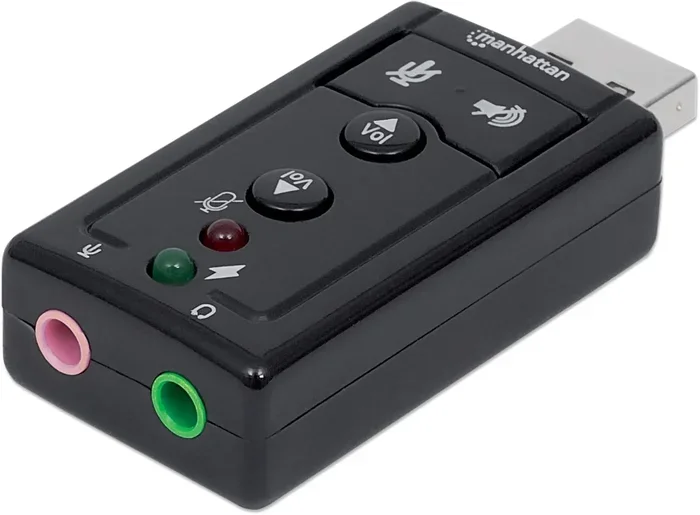
- USB audio adapters: These are small dongles that plug into a USB port and provide a 3.5mm aux output or input. They usually include a basic sound card chip.
- External DAC adapters: These are higher-quality devices that include a dedicated digital-to-analog converter. They deliver significantly better audio than basic cables or adapters.
- USB C to aux adapters: Designed for newer phones and laptops with USB C ports. These handle the conversion specifically for the USB C standard.
Each type serves a different purpose. A simple cable works fine for casual listening, but if you care about audio quality, you will want to invest in a better adapter or a dedicated USB audio device.
How Does Aux to USB Audio Conversion Work?
Understanding how audio conversion works helps you appreciate why some adapters sound better than others. The process involves two key components: the DAC (digital-to-analog converter) and the ADC (analog-to-digital converter).
The Role of the DAC
When you play music from your computer through an aux to USB adapter, the digital audio file needs to be converted into an analog signal your headphones or speakers can use. The DAC handles this job. Better adapters and external DACs use higher-quality conversion chips, which results in cleaner sound with less distortion.
The Role of the ADC
If you are using the adapter for recording, such as plugging a microphone into a computer, the ADC does the opposite. It takes the analog signal from your mic and converts it into digital data your computer can process. The quality of the ADC affects how accurately your recordings capture the original sound.
Why Conversion Quality Matters
Cheap adapters often use low-cost conversion chips that introduce noise, static, or a hollow sound. Better adapters use quality components that preserve the original audio fidelity. If you have ever noticed a buzzing or crackling sound when using a USB audio adapter, that is usually a sign of poor conversion quality.
Some adapters also include amplifier circuits that boost the audio signal. This can be helpful if you are connecting headphones that need more power than your computer can provide through a standard USB port.
Can Aux to USB Carry Audio?
This is the big question, and the answer is a definite yes. Aux to USB adapters do carry audio, both for playback and recording. However, the quality, reliability, and functionality depend on several factors.
Audio Playback Through Aux to USB
When you use an adapter to play audio from your computer through speakers or headphones, the digital audio signal from your computer gets converted to analog by the adapter. Your ears hear the result through the connected speakers or headphones. This works well for everyday listening, gaming, and video watching.
Most modern operating systems, including Windows and macOS, recognize USB audio adapters as external sound cards. Once you install the correct drivers, your computer routes audio through the USB connection instead of the built-in audio hardware. This can actually improve sound quality in some cases.
Audio Recording Through Aux to USB
Recording audio works in the opposite direction. You plug a microphone or instrument into the aux input of the adapter, and the ADC converts the analog signal to digital data that your computer records. This setup is popular with podcasters, musicians, and content creators who need a simple and affordable recording solution.
For basic voice recording or podcasting, a standard aux to USB adapter works well. For professional music production, you will want a dedicated audio interface with better preamps and conversion quality.
Does Aux to USB Carry High-Resolution Audio?
The short answer is: it depends on the adapter. Basic aux to USB cables and cheap adapters typically support standard audio resolutions, usually up to 16-bit/48kHz. Higher-quality adapters and external DACs can support 24-bit/96kHz or even higher resolutions.
If you are an audiophile who wants to hear every detail in your music, a basic adapter will not cut it. Look for adapters that explicitly support high-resolution audio and come with quality DAC chips. Some premium USB audio devices support resolutions up to 32-bit/384kHz.
Common Uses for Aux to USB Adapters
Aux to USB adapters serve a wide range of practical purposes. Here are some of the most common ways people use them in everyday life:
Connecting Headphones to Laptops Without a Headphone Jack
Many modern laptops and tablets have dropped the 3.5mm headphone jack entirely. If you have a favorite pair of wired headphones, a USB C to aux adapter lets you keep using them without buying new wireless headphones. This is one of the simplest and most popular use cases.
Upgrading Computer Audio Quality
Built-in computer audio chips are often mediocre at best. By using a USB audio adapter, you bypass the low-quality onboard audio and get cleaner sound with less interference from other computer components. This is especially noticeable with sensitive headphones and studio monitors.
Connecting Car Stereos to USB Ports
Some car stereos have USB ports but no aux input. An aux to USB adapter can fill this gap, allowing you to play music from your phone through your car speakers. Just make sure your car stereo supports USB audio input and not just charging.
Podcasting and Voice Recording
Content creators often use aux to USB adapters to connect microphones to their computers. The adapter converts the analog microphone signal to digital, which the computer records as an audio file. This is a budget-friendly alternative to expensive audio interfaces.
Using External Speakers with USB-Only Devices
Desktop computers, smart TVs, and gaming consoles sometimes have USB ports but no aux output. An adapter lets you connect powered speakers through the USB port, giving you more flexibility in how you set up your audio system.
Things to Watch Out For
While aux to USB adapters are convenient, they come with a few potential pitfalls. Being aware of these issues helps you make a smarter purchase and avoid disappointment.
Compatibility Issues
Not every adapter works with every device. Some adapters are designed specifically for Windows, while others work best with macOS or ChromeOS. Before buying, check that the adapter is compatible with your operating system and device type.
Also, some devices, especially smartphones, require adapters with specific chipsets to function properly. A random cheap adapter might not work with your phone even if the connector fits.
Driver and Software Requirements
Many USB audio adapters need drivers to work correctly. On Windows, you may need to download and install drivers from the manufacturer’s website. On macOS, most adapters work plug-and-play, but some still require additional software.
Linux users may face more challenges, as driver support for USB audio adapters varies widely. Always check compatibility before purchasing if you use a non-mainstream operating system.
Audio Latency
Latency is the delay between when audio is produced and when you hear it. Cheap aux to USB adapters often have higher latency, which can be noticeable during gaming, video editing, or live music performance. If you need low latency, look for adapters with dedicated audio processing chips or consider a professional audio interface instead.
Build Quality and Durability
Some adapters feel cheap and flimsy, with loose connections that cause audio dropouts. Look for adapters with solid construction, well-fitting connectors, and positive reviews from other users. A slightly higher price usually buys you better build quality and more reliable performance.
Tips for Getting the Best Audio Quality From Your Aux to USB Setup
If you want to get the most out of your aux to USB connection, follow these practical tips:
- Use a high-quality adapter: Invest in an adapter from a reputable brand. Look for models with dedicated DAC chips and positive user reviews.
- Keep cables short: Longer cables pick up more interference, which can degrade audio quality. Use the shortest cable that works for your setup.
- Update your audio drivers: Outdated drivers can cause audio glitches, crackling, or poor performance. Keep your USB audio drivers up to date.
- Avoid USB hubs: Plugging your adapter directly into your computer’s USB port provides more stable power and better audio performance than using a hub.
- Test different sample rates: In your computer’s audio settings, try different sample rates (44.1kHz, 48kHz, 96kHz) to find the best balance of quality and performance for your setup.
- Consider an external DAC: If audio quality is your top priority, a dedicated external DAC will outperform any basic aux to USB adapter by a wide margin.
For users who also work with storage devices and adapters, you might find it helpful to compare how different USB adapters handle data and power delivery. Many of the same principles that apply to audio adapters also apply to data adapters like the M.2 NVMe SSD to USB 3.1 adapter and NVMe SSD to USB adapter options available for connecting storage devices.
Similarly, if you are exploring USB enclosure options for storage, the M2 NVMe SSD in USB enclosures guide covers how USB connectivity works across different device types. Understanding how USB handles both data and audio signals gives you a stronger foundation for choosing the right accessories.
Conclusion
Aux to USB adapters do carry audio, and they are a handy tool for connecting older devices to modern computers and phones. Whether you want to listen to music, record voice, or upgrade your computer’s sound output, the right adapter makes it possible. Just remember that quality varies widely, and investing in a better adapter or a dedicated USB audio device pays off in cleaner sound and fewer headaches.
Before you buy, think about what you need the adapter for. Casual listening requires a basic model, while recording and audiophile listening call for something with better conversion quality. Check compatibility with your device, install the right drivers, and follow the tips in this guide for the best experience.
The world of audio connectivity keeps evolving, and USB adapters remain one of the most versatile tools in your accessory lineup. With the right setup, you can enjoy great sound from almost any device, anywhere.
Frequently Asked Questions
Can you use an aux to USB adapter for headphones?
Yes, you can. Most aux to USB adapters work with standard headphones that have a 3.5mm jack. The adapter converts the digital audio from your computer into an analog signal your headphones can use. For the best results, choose an adapter with a built-in amplifier if your headphones need extra power.
Why does my aux to USB adapter produce static or noise?
Static or noise usually comes from a low-quality adapter with poor conversion chips. Other causes include loose connections, electromagnetic interference from nearby devices, or outdated audio drivers. Try a different adapter, shorten your cable length, or update your drivers to reduce noise.
Does aux to USB carry audio for recording?
Yes, aux to USB adapters can carry audio for recording. You plug a microphone or instrument into the aux input, and the adapter converts the analog signal to digital for your computer to record. For professional-quality recordings, consider a dedicated audio interface instead of a basic adapter.
Do I need drivers for an aux to USB adapter?
It depends on your operating system and the adapter model. Many adapters work plug-and-play on macOS and modern versions of Windows. However, some adapters require specific drivers for full functionality. Always check the manufacturer’s website for driver support before purchasing.
Can I use a USB C to aux adapter with my phone?
Most modern smartphones with USB C ports support USB audio adapters. However, some phones require specific adapter models or DAC chips to work properly. Check your phone’s specifications and user reviews to confirm compatibility before buying a USB C to aux adapter.
Is an external DAC better than a basic aux to USB adapter?
Yes, an external DAC is almost always better than a basic aux to USB adapter for audio quality. External DACs use premium conversion chips and amplifier circuits that deliver cleaner, more detailed sound. If you care about audio fidelity, investing in a dedicated DAC is worth the extra cost.
=== CONCLUSION ===
Aux to USB adapters are a simple yet effective way to carry audio between devices with different connection types. They work for playback and recording, and they come in a wide range of prices and quality levels. By understanding how they work and what to look for, you can choose the right adapter for your needs and enjoy great sound every time.