Are All Usb Charging Cables the Same
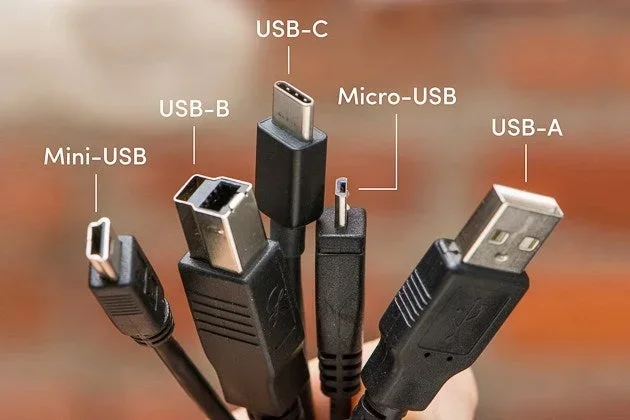
No, not all USB charging cables are the same. Different USB types, cable qualities, and power delivery standards mean your charging speed and performance can vary a lot. Choosing the right USB charging cable matters for fast charging, data transfer, and device safety.
This is a comprehensive guide about Are All Usb Charging Cables The Same.
Key Takeaways
- USB cables are not universal: Different types like USB-A, USB-C, and Micro-USB serve different purposes and devices.
- Cable quality affects charging speed: Thicker wires and better construction deliver more power safely.
- Fast charging depends on protocol support: Standards like USB Power Delivery and Qualcomm Quick Charge make a big difference.
- Not all cables transfer data: Some charging-only cables lack the extra wires needed for data transfer.
- Cable length matters: Longer cables can reduce charging speed due to resistance.
- Using the wrong cable can damage devices: Cheap or incompatible cables pose real risks to your gadgets.
[FEATURED_IMAGE_PLACEHOLDER]
Are All USB Charging Cables the Same?
Here is a simple truth that many people overlook. Not all USB charging cables are the same. You might think any cable with a USB plug will work just fine. But the reality is quite different. The cable you use can change how fast your device charges. It can also affect data transfer and even the safety of your gadget.
Think about how many USB cables you own right now. You probably have at least a few. Some came with your phone. Others came with a tablet or a Bluetooth speaker. They all look similar on the outside. But inside that plastic shell, very different things are happening. The wire gauge, the USB connector type, and the charging protocol all play a role.
This guide breaks it all down. You will learn about the different types of USB cables. You will understand why some charge faster than others. And you will know exactly what to look for when buying a new USB charging cable. Let us get into it.
Understanding USB Cable Types
Not every USB cable uses the same connector. Each type has a specific purpose. Knowing them helps you pick the right one for your needs.
USB Type-A
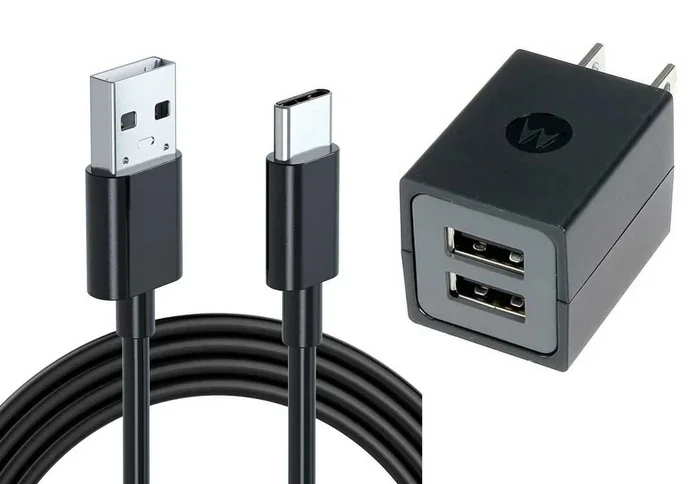
This is the classic rectangular USB plug. You have seen it a thousand times. It is the standard connector for computers, wall chargers, and power banks. USB-A cables are still very common. They are used for charging things like keyboards, mice, and older phones. However, they are not the fastest option for modern devices.
Most USB-A cables support older charging standards. They usually max out at 5 watts of power. That is enough for slow charging. But if you want fast charging, USB-A alone will not cut it. This is why many newer devices have moved to USB-C.
USB Type-C
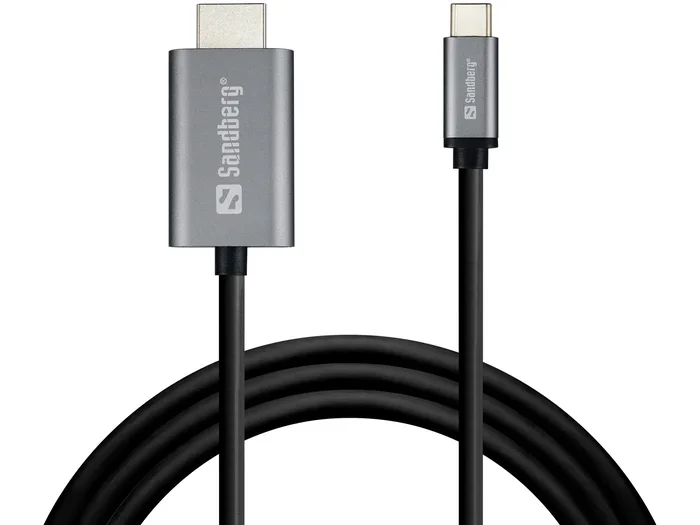
USB-C is the modern standard. It is small, reversible, and powerful. Most new phones, laptops, and tablets use USB-C. The USB-C connector supports much higher power levels. It can deliver up to 100 watts with USB Power Delivery. That means your phone or laptop can charge in a fraction of the time.
USB-C also handles data transfer much better. It supports USB 3.0, USB 3.1, and even USB 4.0 standards. So a single USB-C cable can charge your device and transfer files at the same time. Many people now rely on a USB-C cable as their one cable for everything.
Micro-USB
Micro-USB was the go-to connector for years. You find it on older phones, fitness trackers, and Bluetooth speakers. It is smaller than USB-A but still has a specific up-and-down orientation. Micro-USB is being phased out in favor of USB-C. But you will still see it in many devices around the house.
Micro-USB cables usually support up to 10 watts of charging. That is better than basic USB-A but still slower than modern USB-C fast charging. If you have older devices, keep some Micro-USB cables on hand. But for new purchases, USB-C is the way to go.
Lightning Connector
Apple devices use their own connector called Lightning. It is a proprietary design that only works with Apple products. The Lightning cable charges iPhones and iPads. It also syncs data to computers. Apple has started transitioning some devices to USB-C, but Lightning is still very common.
Lightning cables support fast charging on iPhones. But the speed depends on the charger and cable quality. A basic Lightning cable will charge slowly. A certified Lightning cable with USB Power Delivery support charges much faster. Always look for MFi certification when buying Lightning cables.
Why Cable Quality Matters for Charging Speed
Not all USB cables are built the same way. The quality of the internal wiring makes a huge difference. A cheap cable might charge your phone slowly or not at all. A high-quality cable delivers power efficiently and safely.
Wire Gauge and Thickness
The thickness of the wires inside a cable is called the wire gauge. Thicker wires carry more current. More current means faster charging. A cable with thin wires will resist the flow of electricity. This creates heat and slows down the charging speed.
Look for cables with a 24 AWG wire gauge or lower. The lower the number, the thicker the wire. Premium cables often use thicker copper wiring. They also have better shielding to prevent interference. This is why name-brand cables often outperform cheap knockoffs.
Connector Quality
The connector matters just as much as the wire. A well-built USB connector fits snugly into the port. It does not wobble or fall out. Cheap cables often have loose connectors. Over time, these connectors wear out and stop working properly.
Good cables also have reinforced strain points. These are the areas where the cable bends near the plug. Reinforced connectors last much longer. They prevent fraying and internal wire damage. This is a small detail that makes a big difference in cable durability.
Heat Dissipation
When you charge a device, some energy turns into heat. Quality cables manage this heat better. They use materials that dissipate heat quickly. Cheap cables can get very hot during charging. Excessive heat is bad for your battery and your device.
If your cable feels too hot to touch, stop using it. A good USB charging cable should stay cool or only slightly warm. Look for cables with built-in temperature protection. These cables automatically reduce power if they get too hot.
Fast Charging Standards and Protocols
Fast charging is not just about the cable. It involves a whole system of standards and protocols. Both your device and the cable need to support the same standard for fast charging to work.
USB Power Delivery
USB Power Delivery, or USB PD, is the most widely supported fast charging standard. It works with USB-C cables. USB PD can deliver up to 100 watts of power. That is enough to charge a laptop quickly.
USB PD negotiates the power level automatically. Your device tells the charger how much power it needs. The charger and cable then deliver that amount safely. This makes USB Power Delivery very efficient. It also works across different brands and devices.
Qualcomm Quick Charge
Qualcomm Quick Charge is another popular fast charging standard. It is found in many Android phones. Quick Charge works with specific USB charging cables and compatible chargers. It can deliver up to 100 watts with the latest versions.
Quick Charge is not as universal as USB PD. But it is still very common. If you have a Qualcomm-powered phone, look for cables that support Quick Charge. A compatible cable and charger together make a big difference in charging performance.
Other Fast Charging Protocols
Other companies have their own fast charging standards too. Samsung has Adaptive Fast Charging. OnePlus has Warp Charge. Each one has specific requirements. You need the right cable, charger, and device to get the full benefit.
The good news is that USB Power Delivery is becoming the universal standard. More and more devices now support USB PD. This means one cable can work across many brands. It simplifies things for consumers. But you still need a quality cable to take full advantage.
Data Transfer vs. Charging Only
Here is something many people do not realize. Not all USB cables transfer data. Some cables are designed for charging only. They lack the extra wires that carry data signals.
Charging-only cables have fewer internal wires. They only carry power. They cannot sync files between devices. If you plug a charging-only cable into your computer, your phone will charge. But your computer will not recognize it as a device.
For data transfer, you need a cable with the full set of wires. Most quality USB-C cables support both charging and data. But cheap cables sometimes skip the data wires to save money. Always check the specifications if you need data transfer capability.
The data transfer speed also depends on the USB version. USB 2.0 is slow. USB 3.0 is much faster. USB 4.0 is the fastest standard available today. A good cable supports the latest version for the best data transfer speed. If you are moving large files, this matters a lot.
Some cables are marketed as “charging and data” cables. But they may only support USB 2.0 speeds. Read the product details carefully. Look for cables that support USB 3.0 or higher if you need fast file transfers. This is especially important for professionals who move large files between devices.
Common Myths About USB Charging Cables
There are many myths floating around about USB cables. Let us clear up some of the most common ones.
Myth: All USB-C Cables Are the Same
This is probably the biggest myth. People assume that any USB-C cable will work the same way. But that is not true. USB-C is just a connector shape. The quality and capabilities inside the cable vary widely. Some USB-C cables support only 5 watts. Others support 100 watts with USB PD. Always check the cable specifications before buying.
Myth: Longer Cables Charge Slower
Longer cables do have slightly more resistance. This can reduce charging speed a small amount. But the difference is usually minimal. A 6-foot quality cable will charge almost as fast as a 1-foot cable. The cable quality matters more than the length. A short cheap cable can charge slower than a long quality one.
Myth: Expensive Cables Are Always Better
Price does not always equal quality. Some expensive cables are overpriced. Some affordable cables perform great. Look for certified cables instead of focusing on price. Certifications like USB-IF or MFi ensure the cable meets safety and performance standards. A certified USB cable is your best bet regardless of price.
Myth: You Only Need One Cable for All Devices
While USB-C is becoming universal, you still may need different cables. Your phone might use USB-C. Your smartwatch might use a proprietary connector. Your car charger might work best with USB-A. Having a few different cable types on hand is practical. A multi-cable setup covers all your devices.
How to Choose the Right USB Charging Cable
Now that you know the differences, here is how to pick the right cable for your needs.
First, check your device’s port. Is it USB-C, Micro-USB, or Lightning? Match the connector type to your device. This is the most basic step, but it is easy to overlook.
Second, decide what you need the cable for. Do you want fast charging? Do you need data transfer? Or do you just need a basic charging cable? Your needs determine the cable quality you should buy.
Third, look for certifications. A USB-IF certified cable meets strict standards. MFi certification is essential for Apple Lightning cables. These certifications guarantee safety and performance. They protect your devices from damage.
Fourth, consider cable length. Shorter cables charge slightly faster. But longer cables give you more flexibility. Pick a length that fits your daily use. A 3 to 6 foot cable works well for most people.
Fifth, buy from reputable brands. Well-known brands invest in quality control. They use better materials and testing. This does not mean you must spend a fortune. But avoid unknown brands with no certifications. A reliable USB charging cable from a trusted brand is worth the investment.
Quick Tips for Cable Care
- Do not wrap cables too tightly around your devices.
- Avoid bending cables at sharp angles.
- Store cables loosely in a bag or organizer.
- Clean cable connectors with a dry cloth regularly.
- Replace cables that show visible damage or fraying.
Final Thoughts
Are all USB charging cables the same? The answer is a clear no. The type of connector, the quality of the wiring, and the charging protocol all matter. A quality USB charging cable can charge your devices faster, transfer data better, and keep your gadgets safe. A cheap or wrong cable can cause slow charging, data loss, or even damage.
Take the time to understand your cable needs. Check what your devices support. Look for certifications and quality construction. A good USB cable is a small investment that pays off every day. Your devices will charge faster, last longer, and stay safe. Next time you reach for a cable, you will know exactly what to look for.
Keep a few quality cables on hand. Match them to your devices and your needs. With the right USB charging cable, you will never worry about slow charging or compatibility issues again. Your devices deserve better than a random cable from a junk drawer.
Frequently Asked Questions
Can I use any USB cable for fast charging?
No, not every cable supports fast charging. You need a cable that is rated for higher power output. Look for cables that support USB Power Delivery or your device’s specific fast charging standard. A basic cable may only deliver 5 watts of power.
How do I know if my USB cable is good quality?
Check for certifications like USB-IF or MFi. Feel the cable thickness and connector build quality. Good cables use thicker wires and reinforced connectors. They also stay cool during charging. Avoid cables that feel flimsy or have loose plugs.
Does cable length affect charging speed?
Cable length has a small effect on charging speed. Longer cables have slightly more resistance. But the difference is usually minimal with quality cables. A 6-foot certified cable will charge almost as fast as a 1-foot cable. Cable quality matters more than length.
Can a USB cable damage my device?
Yes, a poor quality cable can damage your device. Cheap cables may deliver unstable power. This can harm your battery or charging port. Always use certified cables from reputable brands. A certified USB cable protects your device from power issues.
What is the difference between USB-A and USB-C cables?
USB-A is the older rectangular connector. It is still common on computers and wall chargers. USB-C is the newer, smaller, reversible connector. USB-C supports faster charging and data transfer. Most modern devices now use USB-C. USB-A is gradually becoming legacy.
Do all USB-C cables support data transfer?
No, not all USB-C cables support data transfer. Some cables are charging-only. They lack the extra wires needed for data signals. If you need to sync files, make sure the cable supports data transfer. Check the product specifications before purchasing.
=== CONCLUSION ===
Not all USB charging cables are the same. The differences in connector types, wire quality, and fast charging standards are significant. A USB-C cable with USB Power Delivery will outperform a basic USB-A cable every time. Your choice of cable affects charging speed, data transfer, and device safety.
Take a moment to evaluate the cables you use every day. Are they the right type? Are they certified? Are they in good condition? Small upgrades to your USB cable setup can make a big difference. Your devices will thank you with faster charging and longer lifespans.
Share this guide with friends who still think all cables are the same. Understanding USB cable differences saves time, money, and protects your gadgets. The right cable is always worth the attention you give it.