Why Is Apple Changing to Usb C
Apple is making a big shift from Lightning to USB-C across its product lineup, starting with the iPhone 15. This change brings faster data transfer, universal compatibility, and a single cable for nearly every device. If you have been wondering why Apple is changing to USB-C, you are in the right place. We will break down the reasons, the benefits, and what it means for you as a user.
Apple has been one of the most stubborn companies when it comes to connectors. For over a decade, the Lightning cable was the go-to charging and data cable for iPhones, iPads, and accessories. But times are changing. Apple has officially started moving to USB-C across its entire product lineup. If you have been asking yourself, why is Apple changing to USB-C, you are not alone. This is one of the biggest shifts in Apple’s hardware history, and it affects nearly every user.
The switch to USB-C is not just a random decision. There are real practical reasons behind it. Faster speeds, universal compatibility, and even government regulations all play a role. In this article, we will walk you through every major reason Apple made this change. We will also cover what it means for your daily use, your accessories, and your workflow. Whether you are a casual user or a creative professional, this change matters to you.
Key Takeaways
- USB-C replaces Lightning: Apple is moving away from the Lightning connector to the universal USB-C standard.
- Faster data transfer: USB-C supports much higher speeds, especially with Thunderbolt technology.
- One cable for everything: You can now use a single USB-C cable for your phone, laptop, and tablet.
- Regulation driven: The EU pushed Apple to adopt USB-C to reduce electronic waste.
- Better external storage support: USB-C opens up faster options like an M.2 NVMe to USB-C SSD enclosure for professionals.
- Charging is faster and more flexible: USB-C PD (Power Delivery) offers more wattage and faster charging.
📑 Table of Contents
What Is USB-C and Why Does It Matter?
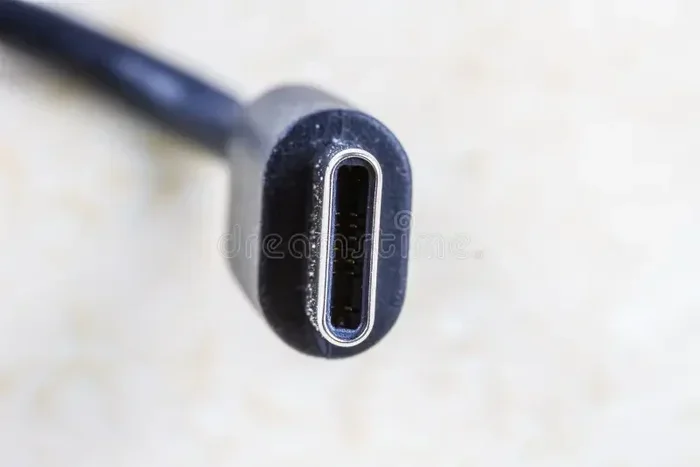
USB-C is a small, reversible connector that has become the standard across the tech world. Unlike the older Lightning port, USB-C can carry power, data, and video signals all through one cable. This makes it incredibly versatile. You can charge your device, transfer files, and connect to a display all with the same port.
The USB-C standard has evolved over the years. You may have heard terms like USB 3.0, USB 3.1, and USB4. Each version brings faster transfer speeds and more power. Thunderbolt technology, which uses the USB-C connector, takes this even further. Thunderbolt 3 and Thunderbolt 4 offer blazing fast speeds of up to 40 Gbps. This is a huge leap from what the Lightning connector could ever deliver.
Why Apple Stuck with Lightning for So Long
Apple introduced the Lightning connector in 2012 with the iPhone 5. At the time, it was a modern and compact connector. It was smaller than USB-C and gave Apple control over the ecosystem. This control meant Apple could manage accessories and revenue through the MFi (Made for iPhone) program. For years, Lightning worked well enough that Apple saw no urgent reason to switch.
But the tech world moved on. Android phones, Windows laptops, and even gaming consoles adopted USB-C. The demand for a universal connector grew stronger every year. Apple eventually realized that holding onto Lightning was creating more problems than it solved. The compatibility issue became impossible to ignore.
The Main Reasons Apple Is Changing to USB-C
So, why is Apple changing to USB-C? There are several key reasons, and each one is important. Let us break them down so you can see the full picture.
1. EU Regulations and Environmental Pressure
The European Union passed a law in 2022 requiring all smartphones sold in the EU to use USB-C. The goal was to reduce electronic waste. Before this law, people often had multiple cables for different devices. A single universal cable would cut down on clutter and unused accessories. Apple was not happy about this rule, but they eventually complied. The iPhone 15 was the first iPhone to drop Lightning in favor of USB-C.
This regulation was a major turning point. It forced Apple to make a change they had resisted for years. Even though Apple may not love regulation, the practical benefits of USB-C made the transition easier to accept.
2. Faster Data Transfer Speeds
One of the biggest advantages of USB-C is speed. The Lightning connector maxes out at USB 2.0 speeds, which is about 480 Mbps. That sounds fine for casual use, but it is painfully slow for professionals. If you shoot 4K video or work with large files, waiting for transfers is frustrating.
USB-C, especially with Thunderbolt, can handle speeds up to 40 Gbps. That is over 80 times faster than Lightning. This means you can move huge files in seconds. For external storage users, this opens up new possibilities. You can connect fast SSDs like the SanDisk Extreme Portable 2TB external USB-C NVMe SSD directly to your Mac or iPad and get incredible speeds.
3. Universal Compatibility
Before USB-C, Apple users often needed separate cables for different devices. Your iPhone used Lightning. Your iPad might use Lightning or USB-C. Your MacBook used USB-C or Thunderbolt. This was confusing and inconvenient.
Now, with USB-C across the board, you need fewer cables. One cable can charge your iPhone, iPad, and MacBook. It can also connect to accessories like monitors, keyboards, and hubs. This universal compatibility is a game-changer for everyday users and professionals alike.
4. Better Charging with USB Power Delivery
USB-C supports USB Power Delivery, or USB PD. This is a smart charging standard that adjusts power output based on what your device needs. A USB-C charger can deliver up to 240 watts of power. That is more than enough for a MacBook Pro or even a iPad Pro.
With Lightning, charging was slower and less efficient. USB-C PD also supports bidirectional charging. This means your iPhone can charge other devices, like your AirPods case, through the USB-C port. The charging cable experience is simply better with USB-C.
5. Future-Proofing the Apple Ecosystem
Apple wants its ecosystem to stay relevant. The Lightning connector was holding the company back. USB-C ensures that Apple devices work seamlessly with the rest of the world. Whether you are connecting to a Windows PC, a car stereo, or a USB-C adapter, the experience is smooth and straightforward.
Apple has also hinted at further innovation with USB-C. The iPad Pro with M4 chip already uses USB-C with Thunderbolt 3 or 4. Future iPhones and iPads will likely build on this foundation. By going all-in on USB-C, Apple is future-proofing its products for years to come.
What Changes for iPhone Users?
If you have been using an iPhone with a Lightning cable, the switch to USB-C brings some noticeable changes. The iPhone 15 and iPhone 16 lines all use USB-C now. Here is what you can expect.
Your old Lightning cables will not work anymore. You will need a new USB-C cable to charge your phone. Most people already have USB-C cables lying around, since they are so common now. If not, a basic USB-C to USB-C cable is inexpensive and easy to find.
Data transfer is much faster. If you move photos and videos from your iPhone to a computer, you will notice a big improvement. USB 3.0 speeds on the iPhone 15 Pro models make this process quick and painless.
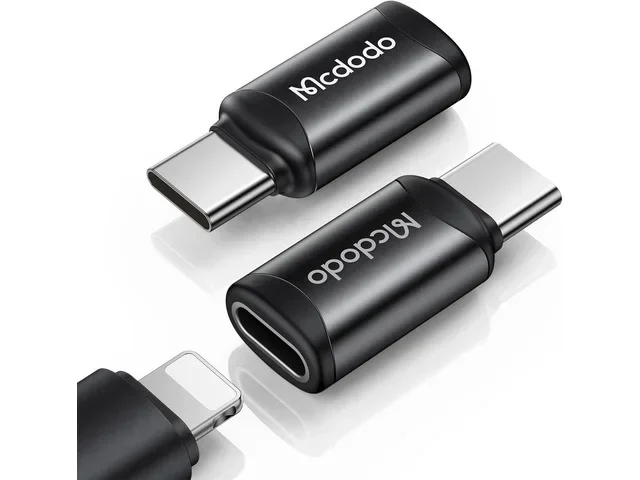
You can connect more accessories. With USB-C, you can plug in external drives, cameras, and even audio gear directly. This is especially useful for content creators. You can also use a USB-C adapter to connect older devices or specialized equipment.
What Changes for iPad and MacBook Users?
For iPad and MacBook users, the switch to USB-C is less dramatic since some models already used it. However, the standardization brings new benefits.
The iPad Pro and iPad Air now use USB-C with Thunderbolt support. This means you can connect high-speed external drives, professional displays, and even M.2 NVMe SSD to USB 3.1 adapters for expanded storage. Creative professionals who work with large video files will appreciate the speed and flexibility.
MacBooks have used USB-C and Thunderbolt for years. Now that iPhones match the same connector, the experience is more unified. You can share cables and chargers across all your Apple devices without any hassle.
Quick Tips for the Transition
- Keep your old Lightning cables for older devices you still use.
- Buy a few quality USB-C cables from trusted brands to avoid connectivity issues.
- Invest in a USB-C hub or dock if you need more ports for your setup.
- Check your accessories before you travel. Make sure you have the right cables and adapters.
- Explore USB-C audio devices like best USB Type C headphones for a wireless-free audio experience.
Common Mistakes People Make After Switching to USB-C
The transition to USB-C is smooth for most people, but some common mistakes can cause frustration. Here is what to watch out for.
Using cheap, uncertified cables. Not all USB-C cables are created equal. Cheap cables may not support the full speed or power delivery your device needs. Always look for cables that are USB-IF certified or from reputable brands. A bad cable can cause slow charging, data transfer failures, or even damage your device.
Assuming all USB-C ports are the same. Not every USB-C port supports Thunderbolt or USB 3.0 speeds. Some ports on older adapters or hubs may only support USB 2.0. Always check the specs before buying an adapter or hub.
Forgetting about adapters for older accessories. If you have Lightning-based accessories like speakers or headphones, you will need a Lightning to USB-C adapter or a new USB-C version. Plan ahead so you are not caught off guard.
Expert Insights on the USB-C Shift
Industry experts see the USB-C transition as a long-overdue change. The Lightning connector served Apple well, but it was holding the ecosystem back. USB-C brings Apple in line with the rest of the tech industry and opens up new possibilities for users and developers.
From a professional standpoint, the speed improvements are enormous. Video editors, photographers, and musicians can now work directly with external drives and audio interfaces without bottlenecks. The compatibility with industry-standard connectors also makes Apple devices more appealing in enterprise and education environments.
Environmental experts also praise the move. A single cable standard means less e-waste and fewer unused cables ending up in landfills. The EU regulation may have been the catalyst, but the long-term benefits are clear for everyone.
Conclusion
The question of why is Apple changing to USB-C has a clear answer. It is about speed, compatibility, and future-proofing. The Lightning connector served its purpose, but USB-C is the present and future of connectivity. Apple made the right call by embracing this universal standard.
For everyday users, this means simpler charging and faster file transfers. For professionals, it means unlocking new levels of performance with external drives and displays. Either way, the shift to USB-C is a win for Apple users and the tech industry as a whole. If you have not made the switch yet, now is the perfect time to embrace USB-C and all the benefits it brings.
Frequently Asked Questions
When did Apple start using USB-C instead of Lightning?
Apple introduced USB-C with the iPhone 15 lineup in September 2023. Since then, all new iPhones have used USB-C instead of the Lightning connector. The iPad Pro and iPad Air already used USB-C before the iPhone made the switch.
Can I still use my old Lightning cables after the switch?
You can still use Lightning cables for older devices that support them. However, newer iPhones no longer have a Lightning port, so you will need a USB-C cable for charging and data transfer. It is a good idea to keep some Lightning cables for older iPads and accessories you still use.
Is USB-C faster than Lightning for data transfer?
Yes, USB-C is significantly faster than Lightning. Lightning is limited to USB 2.0 speeds of about 480 Mbps. USB-C can reach speeds up to 40 Gbps with Thunderbolt 4, which is over 80 times faster. This makes a huge difference when transferring large files like videos or backups.
Do I need a special USB-C cable for fast charging?
Not necessarily, but you do need a USB-C cable that supports USB Power Delivery. Most modern USB-C cables handle fast charging well. For the best results, look for cables rated for at least 60W or 100W power delivery, especially if you charge a MacBook or iPad Pro.
Can I connect external storage to my iPhone with USB-C?
Yes, you can. iPhone 15 Pro models support USB 3.0 speeds, which makes connecting external drives very practical. You can use an external SSD or even an NVMe SSD to USB adapter to expand your storage and move files quickly between devices.
Will all future Apple products use USB-C?
It is very likely. Apple has fully committed to USB-C across its product lineup. The EU regulation pushed this change, and Apple has recognized the benefits of a universal connector. Future iPhones, iPads, and MacBooks will almost certainly continue using USB-C going forward.