Can Laptop Chargers Die
Can Laptop Chargers Die? Absolutely yes. Over time, every laptop charger faces wear and tear, and a dead charger can leave you without power. This guide explains why chargers fail, how to spot the warning signs early, and what you can do to extend your power adapter’s lifespan.
Key Takeaways
- Yes, laptop chargers can die: They wear out from physical damage, heat, and electrical stress over time.
- Warning signs include flickering power, burning smells, and intermittent charging: Catching these early saves your laptop.
- Common causes are frayed cables, power surges, and overheating: Simple habits can prevent most failures.
- Proper care can extend your charger’s lifespan significantly: Store it correctly and use a surge protector.
- Replace your charger with the correct wattage and connector type: Never use a mismatched adapter.
- A dead charger doesn’t mean your laptop is broken: Always check the power supply first.
📑 Table of Contents
Can Laptop Chargers Die?
Can laptop chargers die? Yes, they absolutely can. We rely on our laptop chargers every single day to keep our devices powered and our work flowing. But what happens when that trusty power adapter suddenly stops working? The short answer is that a dead charger is a common reality.
Understanding why chargers fail helps you prevent it from happening too soon. A dead charger isn’t always a mystery. Physical wear, electrical stress, and even poor habits can shorten a charger’s life. In this guide, I’ll walk you through the real reasons chargers die, the warning signs to watch for, and simple steps to keep your power supply alive as long as possible.
Whether you use a traditional AC adapter or a sleek USB-C charger, the principles are the same. I’ll also share when it’s time to replace your charger and how to avoid common mistakes that kill adapters early. Let’s dive in.
How a Laptop Charger Works
A laptop charger converts alternating current (AC) from your wall outlet into direct current (DC) that your laptop needs. The power brick handles the voltage conversion, while the cable delivers the electricity to the charging port. Inside the brick, small circuits regulate the flow of power to protect your laptop battery.
When any part of this system breaks down, the whole chain fails. The charger replacement process becomes necessary. Knowing how the charger works helps you understand why it dies and what you can do to protect it.
Why Do Laptop Chargers Fail?
Several factors contribute to charger failure. Understanding them helps you take preventive action. Here are the main reasons your power adapter might give up.
Physical Damage and Wear
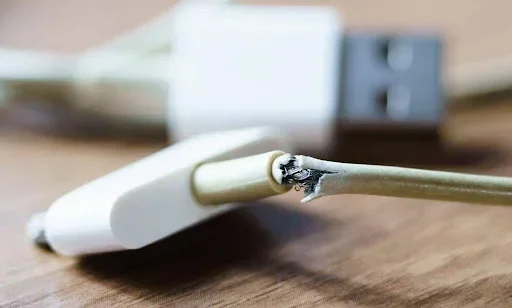
The most common cause is simple wear and tear. Cables get bent, plugged and unplugged hundreds of times. The strain on the connector eventually breaks the internal wires. A frayed cable is a clear sign that the charger is dying. If you see exposed copper or bent prongs, it is time to replace it.
Another form of physical damage comes from dropping or stepping on the charger. Even if the outer jacket looks intact, the internal wiring can be damaged. This hidden damage causes intermittent failures that are hard to diagnose. Over time, the adapter burnout becomes inevitable.
Electrical Stress and Power Surges
Electrical stress wears down the components inside the AC adapter. Power surges from the grid can deliver more voltage than the charger can handle. Over time, this degrades the voltage regulation circuits. A charger that has survived a major surge might continue to work but with reduced efficiency.
Using the charger in a damp or humid environment can also cause electrical issues. Moisture can corrode the internal contacts. This leads to poor connection and eventually complete charger failure. Always plug your charger into a reliable outlet and avoid using it near water.
Overheating Issues
Heat is the enemy of electronics. When a charger gets too hot, its internal components degrade faster. A common cause of overheating is using the charger in a confined space. Placing a power brick on a bed or couch blocks the ventilation vents. The heat builds up and damages the circuitry.
In rare cases, a failing charger can cause your laptop to overheat, and you might even wonder if a laptop can explode from overheating. While that is extremely rare, it highlights the importance of keeping your charger cool. Never block the vents on your power adapter.
Warning Signs Your Charger Is Dying
You do not have to wait for a complete failure. There are clear warning signs that your charger is on its last legs. Recognizing these early can help you avoid being stranded.
| Normal Behavior | Signs of a Dying Charger |
|---|---|
| Steady charging light | Flickering or intermittent charging light |
| Consistent power delivery | Laptop only charges when the cable is in a specific position |
| Cool or warm to the touch | Excessive heat or burning smell |
| No unusual sounds | Clicking or buzzing noises from the adapter |
| Battery percentage increases steadily | Battery percentage drops while plugged in |
If you notice any of these signs, do not ignore them. A failing charger can damage your laptop’s battery or motherboard. Charger replacement early is much cheaper than repairing the damage. Pay attention to how your laptop charger behaves and act quickly when something seems off.
Intermittent Charging
This is the most telling sign. If your laptop only charges when you wiggle the cable, the connector or internal wire is damaged. The charging port on the laptop might also be loose. You need to determine whether the problem is the charger or the port. Wiggle the cable gently at the connector tip. If the light flickers, the charger is failing.
Slow Charging or No Charging
A charger that takes much longer to charge your battery is struggling. The power supply inside the adapter is weakening. Eventually, it will stop charging altogether. If your laptop shows a “plugged in, not charging” message, the charger is likely dying. This often happens when the internal power brick can no longer maintain the correct voltage.
Common Causes of Charger Death
Knowing what kills a charger helps you avoid those habits. Here are the top culprits.
Frayed and Damaged Cables
A cable with a bent or torn outer jacket exposes the inner wires. This can cause short circuits. The charger might still work intermittently, but the damage worsens over time. Keep your cables away from sharp edges and heavy furniture. A simple cable sleeve can prevent adapter burnout.
Using the Wrong Charger
Not all chargers are created equal. Using a charger with the wrong voltage or amperage can stress your laptop’s power system. A charger with too low wattage will overheat trying to meet the demand. Always match the charger specifications to your laptop model. Check the label on your original power adapter for the exact voltage and amperage.
Cheap Third-Party Adapters
Generic chargers often lack proper safety circuits. They may use lower-quality components that burn out quickly. A cheap adapter might work for a few months, but it is a ticking time bomb. Investing in a quality OEM charger or a reputable brand saves money in the long run. Look for certifications like UL or CE on the laptop charger.
Common Mistakes That Kill Your Charger
Many people unknowingly shorten their charger’s life. Here are the mistakes to avoid.
- Wrapping the cable tightly around the charger: This creates stress points that break the internal wires.
- Plugging and unplugging by pulling the cable: Always grip the plug, not the cord.
- Ignoring the heat: If the charger feels too hot to touch, unplug it and let it cool.
- Using an extension cord or power strip: These can cause voltage drops and fluctuations.
- Storing the charger in a hot car: Extreme heat degrades the internal components fast.
How to Extend Your Charger’s Lifespan
A little care goes a long way. Follow these simple habits to keep your laptop charger healthy for years.
Proper Storage
When not in use, store the charger in a cool, dry place. Avoid coiling the cable tightly. Use a cable tie or Velcro strap to keep it loosely organized. This prevents internal wire fatigue. A loose figure-eight coil is much better for the frayed cable problem.
Avoid Overheating
Keep the charger in a well-ventilated area. Do not place it under pillows, blankets, or papers. If you use your laptop on your lap, make sure the charger’s power brick is not covered. Letting air circulate around the adapter prevents overheating and extends the charger lifespan.
Use a Surge Protector
A surge protector absorbs voltage spikes before they reach your charger. This is especially important in areas with unstable power grids. A surge protector is a small investment that can save your power adapter from sudden death. It also protects your laptop from electrical damage.
Quick Tips
- Unplug the charger when not in use for long periods.
- Inspect the cable and connector monthly for any damage.
- Clean the charging port on your laptop with compressed air.
- Avoid charging your laptop in hot environments.
- Buy a charger with a warranty for peace of mind.
- Let the charger cool down before packing it away.
- Avoid bending the cable at sharp angles near the connector.
When to Replace Your Laptop Charger
Sometimes, despite your best efforts, the charger dies. Knowing when to replace it is crucial. Using a damaged charger risks your laptop’s safety. A dead charger can cause laptop power issues and even damage the motherboard.
Check the Specs Before Buying
Match the voltage and amperage of the original charger. The voltage must be identical. The amperage can be equal or higher, but never lower. The connector type and size must also fit your laptop. Check your laptop’s label or manual for the exact specifications. Using the wrong power supply can void your warranty.
Buy the Right Replacement
You have several options: OEM, manufacturer-certified, or reputable third-party. OEM chargers are the safest but often the most expensive. Certified replacements from brands like Anker or Belkin offer a good balance of quality and price. Avoid no-name chargers from unknown sellers. They often lack safety certifications and can cause fires.
If you are wondering whether other components are the problem, remember that a slow laptop might be a RAM issue, not a charger issue. You can learn if you can upgrade the RAM in your laptop, and also check whether laptop RAM can be upgraded to improve overall performance. Sometimes what feels like a power problem is actually a memory bottleneck.
Expert Insights
“A charger is the lifeline of your laptop. Treat it well, and it will serve you for years. Never ignore the warning signs—early replacement prevents costly damage.” — Laptop Repair Specialist
Final Thoughts
So, can laptop chargers die? Yes, they absolutely can. But with the right knowledge, you can spot the warning signs early and take action. A dead charger is not the end of the world. You can replace it safely and keep your laptop running smoothly.
Take care of your power adapter by avoiding common mistakes and following the tips in this guide. Your charger will last longer, and you will save money on repairs. If your charger has died, replace it with the correct specs and a trusted brand. Your laptop will thank you.
Frequently Asked Questions
Why did my laptop charger stop working suddenly?
A sudden stop often points to a power surge, a frayed cable, or a blown internal fuse. Check the cable for visible damage and try a different wall outlet. If the power brick feels burnt or smells like burning, the charger has failed and needs replacement.
Is it safe to use a charger that gets hot?
Warm is normal, but hot to the touch is not. Excessive heat means the power supply is struggling or the ventilation is blocked. Unplug it immediately and let it cool. Continuing to use an overheating charger can cause adapter burnout or even a fire hazard.
Can a dead charger damage my laptop?
Yes, a failing charger can send unstable voltage to your laptop. This can harm the motherboard, charging port, or battery. If your charger shows signs of failure, replace it quickly to avoid costly laptop repair bills.
How long should a laptop charger last?
Most quality chargers last 3 to 5 years with proper care. Heavy daily use, heat exposure, and physical stress shorten that lifespan. If your charger is older than 5 years, consider a charger replacement before it dies unexpectedly.
What should I look for when buying a replacement charger?
Match the voltage exactly, and choose amperage equal to or higher than the original. Ensure the connector type fits your charging port. Look for safety certifications like UL or CE. Buying from the laptop manufacturer or a reputable brand guarantees a safe power adapter.
Can I use a higher wattage charger on my laptop?
Yes, you can use a charger with higher wattage as long as the voltage matches. The laptop will only draw the power it needs. However, never use a lower wattage charger, as it will overheat and likely fail quickly. Check your laptop’s label to confirm the correct power supply specifications.