Is Hdmi Arc the Same as Hdmi

HDMI ARC is not the same as a standard HDMI port. While they share the same physical connector, HDMI ARC (Audio Return Channel) sends audio from your TV back to a soundbar or receiver, eliminating the need for extra cables. Understanding this difference saves time, money, and frustration when setting up your home entertainment system.
Key Takeaways
- HDMI ARC and standard HDMI look identical but serve different purposes for audio and video signal flow.
- HDMI ARC lets your TV send audio back to a soundbar or receiver through a single cable.
- eARC is the newer, improved version that supports advanced audio formats like Dolby Atmos.
- Not all HDMI ports support ARC, so always check your TV and device labels before buying cables.
- You need an HDMI ARC cable to use the ARC feature, even though the port shape is the same.
- HDMI ARC simplifies home theater setups by reducing cable clutter and remote controls.
📑 Table of Contents
Is HDMI ARC the Same as HDMI?
Here is the short answer: no, they are not the same. Even though they use the same plug and port, HDMI ARC does something extra. It sends audio from your TV back to another device like a soundbar or home theater receiver. A regular HDMI cable just sends video and audio in one direction, from a source device to your screen.
Many people buy a TV, plug in a soundbar, and wonder why they need two remote controls and three cables. HDMI ARC fixes that problem. It is a simple technology that makes your life easier once you understand how it works. Let us break it all down in plain language.
The difference comes down to signal direction. Standard HDMI carries a signal from your Blu-ray player, laptop, or game console to your TV. HDMI ARC carries audio in the opposite direction too, from the TV back out to your audio equipment. That one small change makes a huge difference in how you set up your home.
What Is HDMI ARC?
HDMI ARC stands for Audio Return Channel. It is a feature built into certain HDMI ports and cables. It allows your TV to send audio signals back through the same HDMI cable that carries video to the screen. This means you do not need a separate optical or audio cable running from your TV to your sound system.
The ARC feature was introduced with the HDMI 1.4 standard back in 2009. It was a big deal at the time because it cut down on cable mess. Before ARC, you had to plug an optical audio cable from your TV to your soundbar or receiver. Now, one HDMI cable can handle both video and audio in both directions.
Here is how it works in a real-world setup. You plug your cable box into your TV using a standard HDMI cable. Then you connect your TV to your soundbar using an HDMI ARC cable. When you watch a show, the TV receives video from the cable box. When the TV plays audio, it sends that sound back through the ARC connection to your soundbar. One cable, two directions, much less clutter.
What Is a Standard HDMI Port?
A regular HDMI port is the standard connection you find on almost every TV, monitor, and projector today. It carries both high-definition video and audio from a source device to your display. Think of it as a one-way street. The signal flows from your device to your screen, and that is it.
Standard HDMI supports various resolutions, from 1080p to 4K and even 8K on newer versions. It also carries surround sound formats like Dolby Digital and DTS. But it only goes one way. The audio travels from the source device to the TV, not the other way around.
Most people have several standard HDMI ports on the back of their TV. You use them to connect gaming consoles, streaming sticks, and Blu-ray players. These ports work perfectly for inputting content. They just cannot send audio back out to a sound system without a separate cable.
How HDMI ARC Differs from Standard HDMI
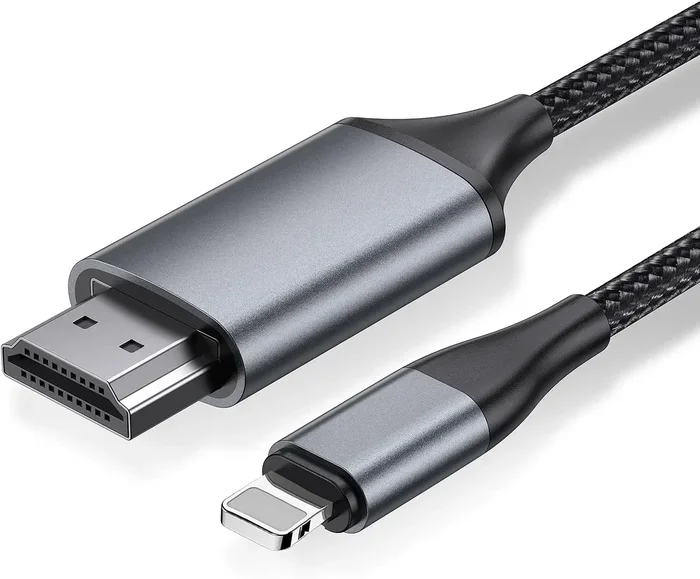
The physical connector looks exactly the same. You cannot tell the difference just by looking at the cable or the port. The difference is in the technology inside. HDMI ARC uses the same HDMI standard but adds a dedicated audio channel that works in reverse.
Here is a simple way to think about it. A standard HDMI cable is like a garden hose that only flows one direction. HDMI ARC is like a hose that can flow both ways. The water (or in this case, the audio signal) can travel back and forth through the same pipe.
Direction of Signal Flow
With standard HDMI, the signal moves from your device to your TV. Your Blu-ray player sends video and audio to the screen. Your TV receives it and displays the picture while playing the sound through its built-in speakers.
With HDMI ARC, the signal goes both ways. Your cable box or streaming device sends video to the TV. But the TV can also send audio back out through the same HDMI port to your external speaker system. This two-way flow is what makes ARC so useful for home theater setups.
Cable Requirements
You do not need a special cable for basic HDMI ARC. Any high-speed HDMI cable works. However, some manufacturers sell cables labeled “HDMI ARC” or “HDMI with Ethernet.” These are not always necessary, but they guarantee compatibility with the ARC feature.
For the best results, look for cables rated as “High Speed HDMI” or “Premium High Speed HDMI.” These support the bandwidth needed for ARC and future features like eARC. A standard cable from a reputable brand will work just fine in most cases.
Device Compatibility
Not every HDMI port on your TV supports ARC. Most modern TVs have at least one port labeled “ARC” or “eARC.” You need to plug your audio device into that specific port for the feature to work. Plugging into a regular HDMI port will not enable ARC.
Check your TV manual or look at the labels on the back of your set. The ARC port is usually clearly marked. If you cannot find it, your TV might not support the feature. This is more common with older or budget models.
What Is eARC and Why Does It Matter?
You have probably seen the term eARC on newer TVs and soundbars. eARC stands for Enhanced Audio Return Channel. It is the next generation of HDMI ARC, and it brings some big improvements. If you care about audio quality, eARC is worth knowing about.
Standard HDMI ARC supports basic audio formats like Dolby Digital and PCM. It cannot pass through advanced formats like Dolby Atmos or DTS:X. eARC fixes this limitation. It supports uncompressed audio and all the latest surround sound formats.
eARC also has a higher bandwidth capacity. This means it can handle more audio channels and higher quality sound. It uses the HDMI 2.1 standard, which is the latest version of HDMI technology. If you are building a modern home theater, eARC is the way to go.
Audio Quality Comparison
With standard HDMI ARC, you get good quality sound for most everyday watching. Movies, TV shows, and music all sound great through Dolby Digital. But if you want the full immersive experience of Dolby Atmos, you need eARC.
Think of it this way. Standard ARC is like a standard highway. It gets you where you need to go. eARC is like an express lane. It handles more traffic and delivers a smoother, higher-quality ride. For casual viewing, standard ARC is fine. For serious movie lovers and audiophiles, eARC makes a real difference.
When to Choose eARC over ARC
You should choose eARC if your TV and soundbar both support it. It is especially important if you watch a lot of content in Dolby Atmos or plan to upgrade your audio setup in the future. eARC also supports lip-sync correction, which helps keep audio and video perfectly in sync.
Another big advantage of eARC is its simpler setup. Standard ARC sometimes requires you to enable CEC (Consumer Electronics Control) settings on multiple devices. eARC handles more of this automatically, making the setup process smoother and less frustrating.
Common HDMI ARC Problems and How to Fix Them
HDMI ARC is not perfect. Sometimes it does not work right out of the box. Here are the most common issues and how to solve them.
No Sound Through Your Soundbar
The most common problem is plugging the HDMI ARC cable into the wrong port. Make sure you are using the port labeled ARC on your TV. Also check that your soundbar is set to the correct input source. Sometimes the soundbar defaults to a different input and ignores the ARC signal.
Another fix is to enable ARC in your TV settings. Go to your TV’s audio settings and look for “HDMI ARC” or “Audio Output.” Make sure it is turned on. Some TVs disable ARC by default to save power or reduce interference.
Audio and Video Are Out of Sync
Lip sync issues happen when the audio arrives at your soundbar a split second after the video. This is annoying but usually easy to fix. Look for a “Lip Sync” or “Audio Delay” setting in your soundbar or TV menu. Adjust it until the sound matches the picture.
eARC handles lip sync better than standard ARC because it has built-in correction features. If you keep having sync problems, upgrading to an eARC-compatible setup might be the best long-term solution.
ARC Keeps Disconnecting
If your HDMI ARC connection drops randomly, try a different HDMI cable. Cheap or damaged cables are a common cause. Also make sure your cable is plugged firmly into both devices. A loose connection will cause intermittent audio dropouts.
Another tip is to turn off and unplug both your TV and soundbar for 30 seconds. Then plug them back in and power them on. This resets the HDMI handshake and often fixes stubborn connection issues.
How to Set Up HDMI ARC in Your Home
Setting up HDMI ARC is easier than most people think. Follow these steps and you will have your audio system running in minutes.
- Check your TV for an ARC port. Look at the back of your TV for a port labeled “ARC” or “eARC.”
- Get a high-speed HDMI cable. Any good quality HDMI cable will work for standard ARC.
- Connect the cable. Plug one end into the ARC port on your TV and the other into your soundbar or receiver.
- Enable ARC in your TV settings. Go to Settings > Sound > HDMI ARC and turn it on.
- Set your soundbar to the right input. Use your soundbar remote to select HDMI or ARC as the input source.
- Test the audio. Play a video and check if the sound comes through your soundbar or speakers.
Once you have everything connected, you can control the volume with your TV remote. This is one of the best perks of HDMI ARC. Your TV remote sends volume commands to your soundbar through the HDMI connection. No extra remote needed.
Why HDMI ARC Matters for Your Home Setup
HDMI ARC is not just a techy feature. It is a practical tool that makes your daily viewing better. Here are the real benefits you get from using ARC in your setup.
Less cable clutter. You only need one cable between your TV and soundbar instead of two or three. Your entertainment area looks cleaner and more organized. This alone is worth it for many people.
Single remote control. You can adjust the volume of your soundbar using your TV remote. This is a small thing that makes a big difference in everyday use. No more switching between remotes just to turn up the volume.
Better audio formats. When you use ARC or eARC, your TV and soundbar can communicate about the best audio format to use. They automatically switch between stereo, surround sound, and other formats based on what you are watching.
Future-proofing. HDMI ARC and eARC are standard features on modern TVs and audio devices. If you are buying new equipment, making sure your setup supports ARC means you are ready for whatever comes next in home entertainment.
Quick Tips for Getting the Most Out of HDMI ARC
- Always check the port labels. Not every HDMI port on your TV supports ARC. Look for the ARC or eARC label.
- Use a high-quality cable. A cheap cable can cause audio dropouts and sync issues. Invest in a reputable brand.
- Update your TV firmware. Sometimes ARC issues are fixed in software updates. Check for updates regularly.
- Disable CEC if it causes problems. Consumer Electronics Control can sometimes interfere with ARC. Try turning it off if you have connection issues.
- Match your devices. Make sure your TV and soundbar both support the same ARC standard. Mixing ARC and eARC devices can cause compatibility issues.
When setting up your audio equipment, keep in mind that the way your speakers connect matters too. For instance, the difference between 2-way and 3-way speakers can affect how your sound system performs alongside your HDMI setup. Similarly, understanding the bullet design on mid-range speakers can help you choose better audio gear for your home theater. If you are comparing speaker setups, the difference between 3-way and 2-way speakers is also worth exploring to get the best sound from your ARC-connected system.
Final Thoughts
HDMI ARC and standard HDMI are not the same thing, even though they share the same connector. HDMI ARC adds a valuable audio return channel that simplifies your home theater setup and improves your viewing experience. It cuts down on cables, lets you use one remote, and supports modern audio formats.
If you are setting up a soundbar or home theater system, make sure your TV has an HDMI ARC port. Use a good quality HDMI cable and enable ARC in your TV settings. The setup takes just a few minutes, and the convenience lasts for years.
For the best audio experience, consider eARC if your devices support it. It offers superior sound quality and handles the latest formats like Dolby Atmos. Whether you choose standard ARC or eARC, you are making your home entertainment setup smarter and simpler.
The bottom line is this. HDMI ARC is a small feature that makes a big impact. Once you use it, you will wonder how you ever managed without it. Take the time to set it up right, and your ears will thank you every time you sit down to watch something.
Frequently Asked Questions
Do I need a special HDMI cable for HDMI ARC?
No, you do not need a special cable for basic HDMI ARC. Any high-speed HDMI cable will work. However, if you want to use eARC or plan to upgrade in the future, a Premium High Speed HDMI cable ensures full compatibility and the best performance.
Can I use HDMI ARC with any soundbar?
Most modern soundbars support HDMI ARC, but not all of them. Check the specs of your soundbar before buying. Look for an HDMI ARC or HDMI eARC port on the back of the soundbar. If it only has optical audio input, you will need an optical cable instead.
What is the difference between HDMI ARC and optical audio?
HDMI ARC carries both audio and video signals through one cable. Optical audio only carries sound and requires a separate HDMI cable for video. HDMI ARC also supports more audio formats and allows you to control volume with your TV remote, which optical cannot do.
Why is my HDMI ARC not working?
The most common reasons are using the wrong HDMI port, not enabling ARC in your TV settings, or using a damaged cable. Try switching to the ARC-labeled port, checking your TV audio settings, and using a different high-quality HDMI cable. A simple power cycle of both devices often fixes the issue too.
Is HDMI ARC the same as HDMI eARC?
No, eARC is an enhanced version of HDMI ARC. eARC supports more advanced audio formats like Dolby Atmos and uncompressed audio. It also has better lip-sync correction and a simpler setup process. If your TV and soundbar both support eARC, it is the better choice for a premium audio experience.
Can HDMI ARC carry surround sound?
Yes, HDMI ARC can carry surround sound formats like Dolby Digital and DTS. However, it cannot pass through the newest formats like Dolby Atmos without eARC. If you want the full immersive surround sound experience, make sure your setup supports eARC.