How to Choose a Gpu for 1440p 144hz Gaming
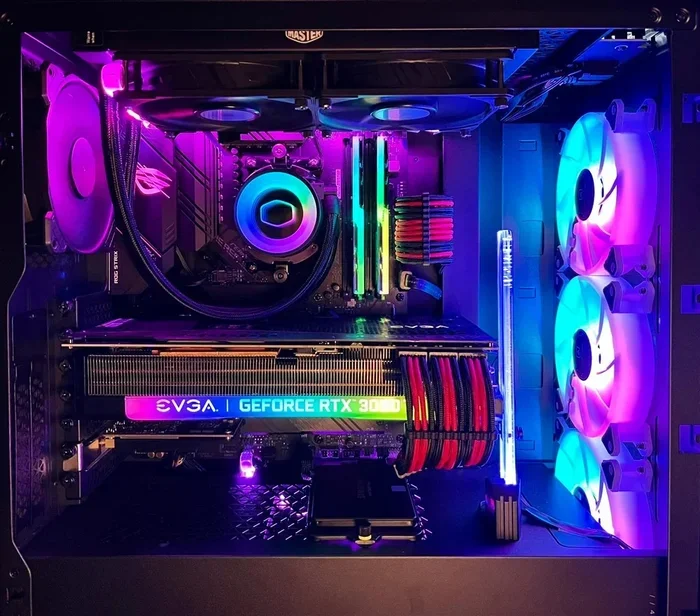
Choosing the right GPU for 1440p 144Hz gaming is the single most important decision you can make for your gaming experience. This guide breaks down everything you need to know, from VRAM requirements and frame rates to brand comparisons and budget considerations. By the end, you will have a clear picture of which graphics card delivers the best 1440p 144Hz performance for your needs.
Building or upgrading a gaming PC is exciting. But when it comes to picking a graphics card for 1440p 144Hz gaming, the choices can feel overwhelming. There are so many models, brands, and specs to consider. How do you know which GPU will actually deliver the smooth, vibrant gameplay you want?
This guide walks you through everything you need to know about choosing the right GPU for your 1440p 144Hz monitor. We will cover VRAM, frame rates, brand comparisons, budget options, and common mistakes to avoid. Whether you are a casual gamer or a competitive player, you will find practical advice here.
The goal is simple: help you make a confident decision. You should walk away knowing exactly what to look for and which graphics card fits your setup. Let us dive in.
Key Takeaways
- VRAM matters a lot: At 1440p, you need at least 8GB of VRAM for smooth gaming at 144Hz.
- Match your GPU to your CPU: Pairing a powerful GPU with a weak bottleneck will hurt your frame rates.
- NVIDIA and AMD both offer great options: The RTX 4070 and RX 7800 XT are top contenders for 1440p 144Hz.
- Consider DLSS and FSR: These technologies boost frame rates without sacrificing visual quality.
- Budget plays a big role: You do not need to spend a fortune to get excellent 1440p 144Hz performance.
- Check your power supply: High-end GPUs demand sufficient wattage and proper connectors.
📑 Table of Contents
Understanding 1440p 144Hz Gaming
Before you pick a GPU, it helps to understand what 1440p 144Hz actually means. The “1440p” part refers to the resolution, which is 2560 by 1440 pixels. This is also called QHD or 2K. It sits right between 1080p and 4K in terms of detail and performance demands.
The “144Hz” part refers to the refresh rate of your monitor. This means the screen refreshes 144 times per second. The result is incredibly smooth motion, which is especially noticeable in fast-paced games like shooters and racing titles.
Why Resolution and Refresh Rate Matter Together
When you combine 1440p resolution with a 144Hz refresh rate, your GPU has to work hard. It needs to push a high number of pixels at a very fast rate. This is where many gamers run into trouble. A GPU that is too weak will drop frames, causing stuttering and lag. A GPU that is too strong may waste its potential if paired with a weaker component.
Think of it like a highway. The resolution is the number of lanes. The refresh rate is the speed limit. Your GPU is the engine. You need enough power to keep traffic flowing smoothly at high speed.
Key Specs to Look For in a GPU
Not all graphics cards are created equal. When shopping for a GPU for 1440p 144Hz gaming, there are a few specs you should understand. These specs directly impact your gaming experience.
VRAM (Video RAM)
VRAM is the memory on your graphics card. It stores textures, frame buffers, and other visual data. For 1440p gaming, 8GB of VRAM is the sweet spot right now. Some modern games can use more, especially at higher texture settings. If you plan to play demanding titles for years, consider 12GB or more.
Here is a quick look at VRAM needs:
- 4GB: Enough for 1080p gaming only. Avoid for 1440p.
- 8GB: The minimum for smooth 1440p 144Hz gaming.
- 12GB or more: Ideal for future-proofing and ultra settings.
Memory Bandwidth
Memory bandwidth determines how fast the GPU can access and move data. Higher bandwidth means better performance at high resolutions. This is one of the specs many people overlook, but it matters a lot at 1440p.
CUDA Cores and Stream Processors
NVIDIA calls them CUDA cores. AMD calls them stream processors. Both do the same thing: they handle the heavy lifting of rendering graphics. More cores generally mean better performance. But the architecture matters just as much as the raw number.
Top GPUs for 1440p 144Hz Gaming
Now let us talk about the best options available. The GPU market changes fast, but some cards stand out for 1440p 144Hz performance. Here are the top picks across different price ranges.
Budget-Friendly Options
If you are watching your spending, the NVIDIA RTX 4060 Ti and the AMD RX 7700 XT are excellent choices. Both deliver solid frame rates at 1440p with medium to high settings. You can expect 80 to 100 frames per second in most modern titles.
These cards are also energy efficient. They do not require massive power supplies, which keeps your overall build costs lower.
Mid-Range Champions
The NVIDIA RTX 4070 and the AMD RX 7800 XT are the sweet spot for 1440p 144Hz gaming. They handle ultra settings smoothly and often hit the 144fps mark in competitive titles. The RTX 4070 also supports DLSS, which uses AI to boost frame rates without a big loss in image quality.
These cards are great for gamers who want high performance without breaking the bank. They also age well, meaning they will stay relevant for several years.
High-End Powerhouses
If you want the absolute best, look at the RTX 4070 Ti Super and the RX 7900 XT. These cards crush 1440p at maximum settings with frame rates well above 144fps. They also handle ray tracing much better than mid-range options.
However, they come at a premium price. If you are not a hardcore enthusiast, a mid-range card might be all you need.
How to Match Your GPU With the Rest of Your System
Picking a GPU is not just about the card itself. You need to think about how it fits into your whole system. A powerful GPU paired with a weak CPU or insufficient RAM will hold you back.
For example, if you want to know more about pairing the right components, check out our guide on how to match a CPU and GPU. It covers the essentials of balanced builds.
CPU Compatibility
Your processor needs to keep up with your graphics card. If your CPU is too slow, it becomes a bottleneck. The GPU sits idle while waiting for the CPU to feed it data. This wastes the GPU’s potential and tanks your frame rates.
For 1440p gaming, a modern mid-range CPU like the AMD Ryzen 5 7600 or the Intel Core i5-14600K works well. These processors provide enough processing power to complement a strong GPU.
RAM Considerations
System RAM also plays a role. For gaming, 16GB is the standard. If you are on a laptop, you might wonder about your options. You can learn more about upgrading memory in our article on how to upgrade the RAM of a laptop. Having enough RAM ensures your system runs smoothly alongside your new GPU.
Power Supply and Cooling
Do not forget your power supply unit (PSU). A high-end GPU needs a reliable PSU with enough wattage. Most mid-range cards require a 650W to 750W PSU. High-end cards may need 850W or more. Always check the manufacturer’s recommendations.
Cooling matters too. A GPU that runs hot will throttle its performance. Make sure your case has good airflow. Consider aftermarket cooling solutions if you plan to push your card hard.
DLSS, FSR, and Upscaling Technologies
If you want to get the most out of your 1440p 144Hz setup, upscaling technologies are your best friend. These tools use smart algorithms to render games at a lower resolution and then upscale the image. The result is higher frame rates with minimal loss in visual quality.
NVIDIA DLSS
DLSS stands for Deep Learning Super Sampling. It is exclusive to NVIDIA GPUs and uses AI tensor cores to upscale images. The newer DLSS 3 and DLSS 3.5 versions offer even better quality and frame generation. If you are considering an NVIDIA card, DLSS support is a big advantage.
AMD FSR
AMD’s FidelityFX Super Resolution works on both AMD and NVIDIA cards. It is not as advanced as DLSS in some areas, but it is a great free option. FSR 3.0 includes frame generation, which can significantly boost your frame rates.
Which One Should You Use?
If you have an NVIDIA GPU, DLSS is the way to go. If you have an AMD card or want a cross-platform solution, FSR is excellent. Both technologies make it easier to hit 144fps at 1440p without sacrificing the visual experience.
For more tips on getting the most out of your gaming setup, also check out our guide on the best gaming PCs for 1440p 144Hz gaming. It covers full system builds that pair well with these GPUs.
Common Mistakes When Choosing a GPU
Even experienced buyers sometimes make mistakes. Here are a few pitfalls to avoid when selecting a GPU for 1440p 144Hz gaming.
Ignoring the Power Supply
Many people buy a great GPU only to realize their PSU cannot handle it. Always check the power requirements before you purchase. Upgrading a PSU later adds extra cost and hassle.
Skipping the Monitor Check
Make sure your monitor actually supports 144Hz at 1440p. Some monitors claim 144Hz but only at 1080p. Check the specs carefully. You also need the right cable, like DisplayPort 1.4 or HDMI 2.1, to carry the signal at that refresh rate.
Overspending on Unnecessary Features
Not everyone needs ray tracing or 12GB of VRAM. If you mostly play competitive multiplayer games, a mid-range card is often enough. Save your money for a better monitor or a faster SSD instead.
Forgetting About Future-Proofing
Games get more demanding every year. Buying a GPU with 8GB of VRAM is fine now, but consider 12GB if you want your card to stay relevant longer. A slightly higher upfront cost can save you from an early upgrade.
Neglecting Brand and Warranty
Not all GPU models are created equal, even from the same manufacturer. Some brands offer better cooling, quieter fans, and longer warranties. Research the specific model, not just the GPU chip. A good warranty can save you a lot of headaches down the road.
Quick Tips for Choosing the Right GPU
Here are some fast tips to keep in mind as you shop:
- Always check benchmarks for the specific games you play.
- Read reviews from multiple sources before buying.
- Compare the GPU’s performance at 1440p, not just 1080p.
- Consider the total cost of your build, not just the GPU alone.
- Look for sales and bundles, especially during holiday seasons.
- Make sure your case has enough space for the card. Some GPUs are very long.
Final Thoughts
Choosing the right GPU for 1440p 144Hz gaming does not have to be stressful. Focus on the specs that matter: VRAM, memory bandwidth, and real-world benchmark performance. Match your GPU with a balanced CPU and sufficient RAM. Take advantage of upscaling technologies like DLSS and FSR to squeeze out every frame.
Whether you go with NVIDIA or AMD, there is a great option for every budget. The key is knowing what you need and avoiding common traps. Use this guide as your roadmap, and you will find the perfect graphics card for an incredible gaming experience at 1440p 144Hz.
Take your time, do your research, and enjoy the journey. The right GPU will transform your gaming sessions and bring your favorite worlds to life with stunning clarity and buttery smooth motion.
Frequently Asked Questions
What GPU is best for 1440p 144Hz gaming?
The NVIDIA RTX 4070 and AMD RX 7800 XT are widely considered the best balance of price and performance for 1440p 144Hz gaming. They deliver smooth frame rates in most modern titles at high settings.
How much VRAM do I need for 1440p 144Hz?
8GB of VRAM is the minimum for 1440p 144Hz gaming today. For future-proofing and ultra settings, 12GB or more is recommended. This ensures your GPU can handle demanding textures and effects.
Can I use DLSS on an AMD GPU?
No, DLSS is exclusive to NVIDIA GPUs. However, AMD offers FSR (FidelityFX Super Resolution), which works on both AMD and NVIDIA cards and provides similar upscaling benefits.
Do I need a special monitor for 1440p 144Hz?
Yes, you need a monitor that supports both 2560 by 1440 resolution and a 144Hz refresh rate. Make sure your monitor has the right inputs, such as DisplayPort 1.4 or HDMI 2.1, to achieve these specs.
Is 16GB of RAM enough for 1440p 144Hz gaming?
Yes, 16GB of system RAM is the standard for 1440p gaming. It provides enough memory for modern games and multitasking. If you run into performance issues, you can explore options to increase your RAM for better overall performance.
How do I know if my power supply is sufficient for a new GPU?
Check the GPU manufacturer’s recommended PSU wattage. Mid-range cards typically need 650W to 750W, while high-end cards may require 850W or more. Always use a quality, certified power supply to protect your components.