What Do You Need to Pick Up Local Tv Channels Only
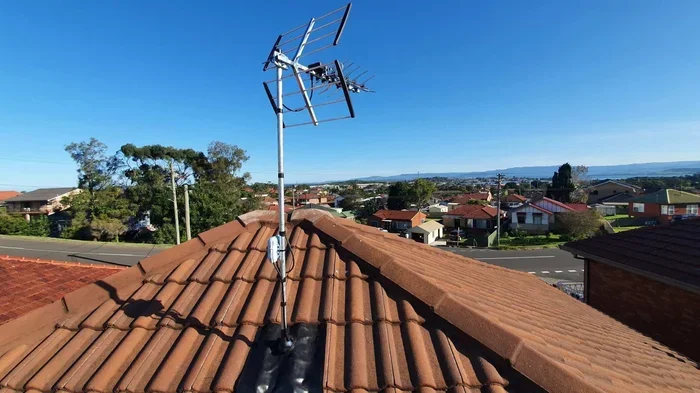
Picking up local TV channels only is simple, affordable, and completely free once you have the right gear. You need a digital antenna, a coaxial cable, and a TV with a built-in tuner to get started. This guide walks you through every step, from choosing the best antenna to optimizing your signal for crystal-clear reception.
Key Takeaways
- Indoor or outdoor antenna: Choose based on your distance from broadcast towers and living situation.
- Built-in digital tuner: Most modern TVs already have one, but older sets may need a converter box.
- Proper placement matters: Position your antenna near a window and point it toward broadcast towers for the best signal.
- Signal amplifiers help selectively: Only use a booster if your antenna already picks up a weak signal.
- Local channels are truly free: No monthly fees, subscriptions, or contracts once you own the equipment.
- Coaxial cables and RCA connections: Quality cables ensure you get the best picture and sound from your setup.
- Regular channel scans: Rescan after moving your antenna to pick up the full channel lineup available in your area.
📑 Table of Contents
- What You Need to Pick Up Local TV Channels Only
- Understanding Local TV Channels and How They Work
- Essential Equipment for Picking Up Local TV Channels
- Setting Up Your Local TV System Step by Step
- Maximizing Reception Quality and Troubleshooting
- Enhancing Your Audio Setup for Local TV
- Common Mistakes to Avoid with Local TV Setups
- Frequently Asked Questions
- Conclusion
What You Need to Pick Up Local TV Channels Only
Cutting the cord on cable TV does not mean giving up your favorite local shows. Picking up local TV channels only is one of the smartest moves you can make as a viewer. You get access to news, weather, sports, and primetime entertainment without paying a single monthly fee. All it takes is the right equipment and a little patience to set things up correctly.
This guide breaks down everything you need to know about building a local TV channels only setup from scratch. We will cover antennas, tuners, cables, placement strategies, and common mistakes to avoid. Whether you live in a high-rise apartment or a house on the edge of town, there is a solution that works for you. Let us walk through it together.
The beauty of over-the-air broadcasting is that it has not gone away. In fact, local stations now broadcast in stunning high definition, and the number of available channels has grown dramatically. Many people are surprised to learn they can access dozens of channels for free with a simple antenna. The key is knowing exactly what to buy and how to set it up. That is exactly what this guide will teach you.
Understanding Local TV Channels and How They Work
Local TV channels are broadcast stations that transmit signals through the air for anyone with an antenna to receive. These include major networks like ABC, NBC, CBS, and Fox, plus independent stations, public broadcasting channels, and local news and weather outlets. Unlike cable or satellite, over-the-air TV delivers these channels at no cost to the viewer.
The transition from analog to digital broadcasting happened over a decade ago, and it changed everything for the better. Digital signals are clearer, more reliable, and carry high-definition video. You no longer need a massive roof-mounted antenna to get decent reception. A compact indoor OTA antenna can pull in dozens of channels in many urban and suburban areas.
How Broadcast Signals Reach Your Home
TV stations transmit signals from towers located throughout your region. These towers send out radio waves in all directions, and your antenna catches those waves and converts them into picture and sound. The strength of the signal depends on several factors, including your distance from the tower, terrain, buildings, and even weather conditions.
Understanding TV signal strength is the first step toward a great setup. If you live within 20 miles of a broadcast tower, you will likely have excellent reception with a basic indoor antenna. If you are 30 to 50 miles away, you may need a stronger outdoor antenna or a signal amplifier. The FCC provides an online tool where you can enter your zip code and see exactly which towers serve your area and how far away they are.
Most local channels use two frequency bands: VHF (Very High Frequency) and UHF (Ultra High Frequency). VHF covers channels 2 through 13, while UHF covers channels 14 and above. Some stations broadcast on both bands, while others use only one. This is why it is important to choose an HD antenna that supports both VHF and UHF reception for the widest possible channel lineup.
Essential Equipment for Picking Up Local TV Channels
Setting up a local TV channels only system requires a few essential pieces of equipment. The good news is that you do not need a lot, and the total cost is often less than one month of cable TV. Here is what you need and why each piece matters.
Choosing the Right Antenna
The antenna is the heart of your local TV channels only setup. It catches the broadcast signals floating through the air and sends them to your TV. There are two main types to consider: indoor antennas and outdoor antennas.
Indoor antennas sit inside your home and are incredibly easy to set up. You simply plug them in, place them near a window, and scan for channels. They work best if you live within 20 miles of broadcast towers. Outdoor antennas mount on your roof or in your yard and offer much stronger reception over longer distances. They are ideal for rural areas or homes more than 30 miles from the nearest tower.
When shopping for an antenna, look for one that supports both UHF and VHF bands. Check the advertised range and compare it to your actual distance from broadcast towers. A digital TV tuner built into your TV makes everything simpler. Most TVs manufactured after 2007 include a digital tuner, so you may already have what you need without buying anything extra.
Cables, Connectors, and Signal Path
Once you have your antenna, you need the right cables to connect it to your TV. A standard coaxial cable is the most common choice for carrying TV signals. It has a single pin in the center surrounded by a circular metal shield. Make sure to use a well-shielded, high-quality coaxial cable to minimize signal loss.
If you also want to connect your TV to an external speaker system for better audio, understanding basic cable connections helps a lot. For example, learning how to hook up RCA to speakers wire gives you a solid foundation in audio cabling. Many modern TVs use HDMI or optical audio outputs instead of RCA, but the underlying principle is the same. A clean, secure connection ensures you get the best picture and sound from your local TV channels only setup.
Signal Amplifiers and When You Need One
A signal amplifier boosts the TV signal as it travels from the antenna to your TV. These devices can be helpful if you live far from broadcast towers or if you have a long cable run between your antenna and TV. However, amplifiers are not always necessary, and using one when you do not need it can actually cause problems.
Before buying a signal booster, think about your audio setup too. If you are adding external speakers to your TV, consider whether you do you need an amplifier for speakers to power them properly. The same logic applies to TV signals. An amplifier only boosts what is already there. If your antenna is not picking up a signal at all, a booster will not help. Start with a basic setup, test your reception, and add an amplifier only if you notice weak or missing channels.
Setting Up Your Local TV System Step by Step
Now that you have your equipment, it is time to put everything together. The setup process is straightforward, but following the right steps ensures you get the best results from day one.
Antenna Placement Strategies
Where you place your antenna has a huge impact on reception quality. For indoor antennas, the best spot is near a window that faces the broadcast towers. Avoid placing the antenna in a closet, behind furniture, or near metal objects. Walls, mirrors, and electronic devices can all weaken the signal before it even reaches your TV.
The higher you place the antenna, the better. Try setting it on a windowsill, a shelf near the top of a room, or even hanging it from a wall near a window. Experiment with different positions and orientations. Sometimes turning the antenna slightly or moving it just a few inches can make the difference between a pixelated picture and a crystal-clear one.
For outdoor antennas, mount the antenna as high as possible on your roof or on a mast in your yard. Always point the antenna directly toward the nearest broadcast tower. You can use online tools like the FCC station finder to determine the exact direction. Use weatherproof cables and connectors for any outdoor runs to protect your setup from the elements.
Running Your First Channel Scan
After connecting your antenna and cables, the next step is to scan for available channels. Go to your TV settings menu and look for the channel scan or auto-tune option. Your TV will search for all available broadcast signals in your area and build a list of channels automatically.
Once the scan finishes, review your channel list. You should see all the local broadcast stations you can receive. If some channels are missing or look weak, try repositioning your antenna and running the scan again. Small adjustments can unlock channels you did not even know were available.
Here are a few tips to get the best results during scanning:
- Scan multiple times. Moving the antenna slightly between scans can reveal additional channels.
- Scan at different times of day. Signal conditions can change based on time and weather.
- Note the signal strength for each channel. Your TV usually displays this during the scan, and it helps you fine-tune placement.
- Rescan after any change. If you move the antenna or add new equipment, always rescan.
Recording Local Channels for Later Viewing
One of the great advantages of over-the-air TV is the ability to record shows and watch them later. Many modern TVs have a built-in recording feature that works with a USB drive or external storage. For the best experience, consider using a fast, reliable storage device to save your recordings.
If you want smooth recording and quick playback of saved broadcasts, setting up a fast internal drive is a great move. Learning how to set up new NVMe SSD in your recording device ensures you have the speed and reliability needed for storing hours of HD video. An NVMe drive handles large video files with ease and gives you instant access to your recorded shows.
Maximizing Reception Quality and Troubleshooting
Even with the best equipment, you may encounter some reception issues. Understanding how to troubleshoot common problems saves time and frustration. Here are the most effective strategies for getting the clearest picture possible.
Understanding TV Frequency Bands
Local channels broadcast on two main frequency bands: VHF and UHF. VHF channels are typically numbered 2 through 13 and were the original broadcast band. UHF channels start at channel 14 and go up to 69 (though the FCC has repacked some of these frequencies in recent years). Each band has different propagation characteristics, and some antennas handle one band better than the other.
To get the best TV reception, find out which frequency bands your local stations use. The FCC website and your TV channel lineup both provide this information. Choose an antenna that supports those specific bands. A dual-band antenna that handles both VHF and UHF is the safest choice for most viewers because it covers all possibilities.
Dealing with Interference and Signal Problems
Interference from nearby electronics is a common cause of poor TV reception. Wi-Fi routers, microwave ovens, Bluetooth devices, and even LED light bulbs can all emit signals that interfere with your TV frequency. Moving your antenna away from these devices often solves the problem immediately.
Weather can also affect your signal temporarily. Heavy rain, thunderstorms, and high winds can weaken or scatter broadcast signals. This is completely normal and usually resolves once the weather clears. If you notice persistent problems, check all your cables and connections. A loose coaxial connection or a damaged cable can cause picture breakup and audio dropouts.
Indoor vs Outdoor Antenna Comparison
Choosing between an indoor and outdoor antenna depends on your living situation and how far you are from broadcast towers. Here is a quick comparison to help you decide.
| Feature | Indoor Antenna | Outdoor Antenna |
|---|---|---|
| Ease of Setup | Very Easy | Moderate |
| Reception Range | Short to Medium | Long Range |
| Cost | $20 to $80 | $50 to $200 |
| Best For | Urban areas, close to towers | Rural areas, far from towers |
| Weather Resistance | No | Yes |
| Installation | Plug and play | Requires mounting hardware |
| Signal Strength | Good for nearby towers | Excellent for all distances |
Indoor antennas work great for most people living within 30 miles of broadcast towers. They are affordable, easy to hide, and require zero installation. Outdoor antennas are better if you live in a rural area, have tall trees nearby, or experience persistent weak signals. Many users start with an indoor antenna and upgrade to outdoor if they are not satisfied with the results.
Enhancing Your Audio Setup for Local TV
Great picture quality means little if the audio is poor. Most TV built-in speakers are small and flat, which means they struggle to deliver rich, immersive sound. Upgrading your audio setup can completely transform how you enjoy local TV channels only.
Theater-quality audio is not just for movie theaters anymore. You can bring that experience home with the right speakers and setup. Consider what what speakers do theaters use as inspiration for your home entertainment system. Many theaters use large, high-powered speakers paired with subwoofers to deliver deep, immersive sound that fills the room. You do not need to replicate that exact setup, but understanding the principles helps you choose better speakers for your TV.
A simple soundbar connected to your TV can make a noticeable difference in audio clarity. For a more full-bodied experience, a pair of bookshelf speakers with a compact amplifier works beautifully. If you want to keep things simple, many modern soundbars offer wireless subwoofers and surround speakers that deliver theater-like sound without the clutter of cables everywhere.
Common Mistakes to Avoid with Local TV Setups
Setting up a local TV channels only system is simple, but a few common mistakes can ruin your experience. Here is what to watch out for so you do not waste time or money.
- Placing the antenna in a closet or behind furniture. Walls and metal objects block signals. Always place your antenna in an open area near a window for the clearest reception.
- Buying an antenna with too much range. More range is not always better. An overpowered antenna in a city can pick up too many signals and cause interference or ghosting on your screen.
- Skipping the channel scan after moving the antenna. Always rescan for channels whenever you reposition your antenna. Even a small move can unlock or lose channels.
- Using cheap, low-quality cables. A bad coaxial cable can degrade your signal significantly. Invest in a well-shielded, high-quality cable to protect your signal integrity.
- Ignoring the VHF band. Some local channels only broadcast on VHF. Make sure your antenna supports both VHF and UHF to avoid missing channels.
- Forgetting to check for obstructions. Trees, buildings, and hills between your antenna and the broadcast tower can weaken your signal. Try to get a clear line of sight whenever possible.
Frequently Asked Questions
Do I need a special TV to watch local channels?
Most TVs made after 2007 have a built-in digital tuner, which means you can watch local channels right away without any extra equipment. If you have an older TV that only has analog inputs, you will need a digital converter box. This small device converts the digital broadcast signal into a format your older TV can display. Check your TV manual or look for a tuner label on the back of your set to confirm what you have.
Can I get local channels with an indoor antenna?
Yes, many people get excellent reception with an indoor antenna. If you live within 20 to 30 miles of broadcast towers, an indoor model will likely work well for you. Place it near a window and point it toward the nearest tower. Experiment with different positions to find the sweet spot for your specific location. Some indoor antennas even come with built-in amplifiers to boost weak signals.
How many local channels can I expect to receive?
The number of channels varies by location. Urban areas typically offer 30 to 60 or more channels, while rural areas may have fewer but still offer all the major networks and local news stations. Use the FCC’s online tool to see exactly what is available in your zip code before you buy any equipment. This helps you set realistic expectations and choose the right antenna for your needs.
Is an amplifier necessary for local TV reception?
Not always. An amplifier helps if you live far from broadcast towers or have a long cable run between your antenna and TV. If your antenna already gets a strong signal, adding an amplifier can actually make things worse by overloading the tuner. Start without one and only add an amplifier if you notice weak or missing channels after a channel scan.
Are local TV channels really free forever?
Yes, local broadcast channels are completely free once you have the equipment. There are no monthly fees, subscriptions, or contracts. The only costs are the one-time purchases of an antenna, cables, and possibly a tuner if your TV does not have one built in. This makes local TV channels only one of the most affordable entertainment options available. You get access to news, sports, and entertainment without ever opening your wallet again after the initial setup.
What is the difference between OTA and cable TV?
OTA stands for over-the-air, which means the signal comes directly from broadcast towers to your antenna. Cable TV delivers channels through underground or overhead cables operated by a paid provider. OTA is free, while cable requires a monthly subscription. OTA also offers the same local channels in high definition, often with better picture quality than cable compressions allow. The only trade-off is that OTA gives you local channels only, while cable offers hundreds of additional channels.
Conclusion
Picking up local TV channels only is a smart, affordable, and surprisingly simple way to enjoy free entertainment at home. With the right antenna, quality cables, and a bit of patience, you can access dozens of channels without paying a single monthly fee. Start with a quality indoor antenna if you are close to broadcast towers, or invest in an outdoor model if you need stronger reception over longer distances.
Take the time to optimize your setup. Test different antenna positions, run channel scans regularly, and upgrade your cables if needed. A little effort goes a long way toward crystal-clear picture quality and reliable local TV channels only viewing. You will wonder why you ever paid for cable when free over-the-air TV delivers such a fantastic experience. Get your setup today and start enjoying your local channels the way they were meant to be watched.