What Is Windows Xp Pro Black Edition
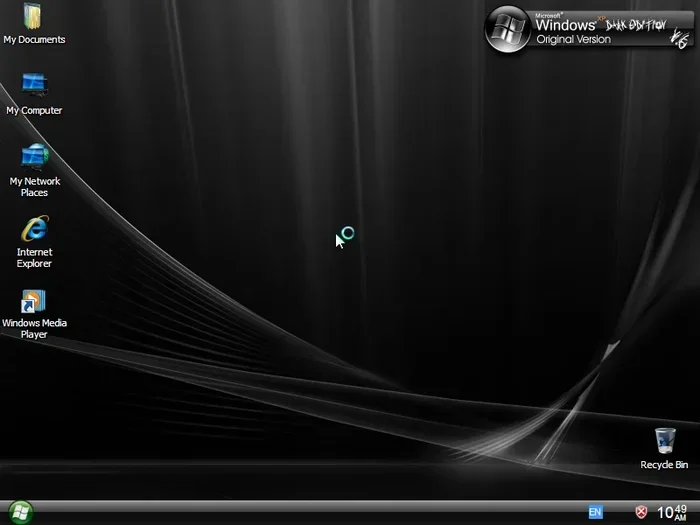
Windows Xp Pro Black Edition is a specialized, unofficial variant of the classic Windows XP Professional operating system. It offers a unique black-themed interface along with the same core features that made Windows XP a beloved system for millions of users. This guide covers everything you need to know about its features, requirements, and current relevance.
If you have been around computers long enough, you have probably heard of Windows Xp Pro Black Edition. It sounds mysterious, almost like a secret version of the classic operating system that only a few people know about. In reality, it is a customized variant of Windows XP Professional that comes with a dark, black-themed interface.
Windows XP was one of the most popular operating systems ever made. Millions of people used it for work, gaming, and everyday tasks. The Windows Xp Pro Black Edition took that familiar platform and gave it a unique visual makeover. Think of it as putting a custom paint job on a classic car. The engine stays the same, but the look is completely different.
So, what makes this edition special? Why do people still talk about it today? In this article, we will break down everything you need to know. From its features and system requirements to its pros and cons, you will get a clear picture of what this operating system offers and whether it is worth your time.
Key Takeaways
- Custom Black Theme: Windows Xp Pro Black Edition features a distinctive dark interface that sets it apart from the standard Windows XP look.
- Built on Windows XP Professional: It retains all the core functionality and performance of the original Windows XP Pro.
- Lightweight and Fast: The OS runs well on older hardware, making it a great option for reviving aging computers.
- Not Officially Supported: Microsoft does not support this edition, so security updates are not available.
- Niche Appeal: It attracts enthusiasts who love retro computing and custom themes.
- Compatibility Matters: You need to check driver and software compatibility before installing it on your machine.
📑 Table of Contents
- What Is Windows Xp Pro Black Edition?
- History and Origins of Windows Xp Pro Black Edition
- System Requirements for Windows Xp Pro Black Edition
- How Windows Xp Pro Black Edition Compares to Standard Windows XP
- Pros and Cons of Windows Xp Pro Black Edition
- Is Windows Xp Pro Black Edition Still Worth Using in 2025?
- How to Install Windows Xp Pro Black Edition
- Final Thoughts on Windows Xp Pro Black Edition
What Is Windows Xp Pro Black Edition?
The Windows Xp Pro Black Edition is a modified version of Windows XP Professional. It is not an official Microsoft product. Instead, it is a custom build created by third-party developers who wanted to offer users a darker, more visually striking desktop experience. The core operating system remains the same as the standard Windows XP Pro.
Windows XP Professional was released in 2001 and quickly became a favorite among home users and businesses alike. It came with features like the NTFS file system, remote desktop support, and advanced networking capabilities. The Black Edition keeps all of these features intact while adding a custom visual layer on top.
Key Features of the Black Edition
- Dark Desktop Theme: The most obvious feature is the black-themed interface. The wallpaper, window borders, and taskbar all use a dark color scheme.
- Original Windows XP Performance: You still get the same fast and responsive performance that Windows XP was known for.
- Full Software Compatibility: Most software that worked on Windows XP Pro will work on the Black Edition as well.
- Custom Boot Screen: The startup screen often features a unique black design that sets the tone right from boot.
- Modified Shell Elements: Icons, start menu styles, and dialog boxes may be altered to match the dark theme.
History and Origins of Windows Xp Pro Black Edition
Windows XP was released by Microsoft in October 2001. It replaced Windows 98 and Windows ME and introduced a completely redesigned user interface called Luna. The Professional edition targeted power users and businesses with advanced features.
Over the years, a community of enthusiasts and developers began creating custom versions of Windows XP. These modified builds added new themes, removed bloatware, and in some cases, improved performance. The Windows Xp Pro Black Edition emerged from this community. It was never sold in stores or distributed through official channels.
The Black Edition gained popularity in the mid-2000s among users who wanted their computers to look different. It was shared through forums and file-sharing communities. Because it was not an official Microsoft product, users had to download it from unofficial sources.
Why Did It Become Popular?
There were several reasons why the Black Edition caught on:
- Unique Appearance: In an era where most computers looked the same, having a black-themed OS stood out.
- Nostalgia: Many users felt a strong connection to Windows XP and wanted to keep using it in a fresh way.
- Lightweight: The OS ran well on older hardware that could not handle newer versions of Windows.
- Customization Culture: The early 2000s saw a huge boom in PC customization. The Black Edition fit right into that trend.
System Requirements for Windows Xp Pro Black Edition
The Windows Xp Pro Black Edition has the same system requirements as the standard Windows XP Professional. Since it is built on the same core, you do not need any special or upgraded hardware to run it.
Minimum Requirements
- Processor: 233 MHz or faster (300 MHz recommended)
- RAM: 64 MB minimum (128 MB recommended)
- Hard Drive Space: 1.5 GB of free space
- Graphics Card: Super VGA (800 x 600) resolution
- CD/DVD Drive: For installation from disc
- Internet Connection: Optional, but recommended for updates and drivers
Because the requirements are so modest, you can run the Windows Xp Pro Black Edition on computers that are well over a decade old. This is one of the main reasons people still install it today. If you have an old laptop or desktop sitting around, this could be a fun project to bring it back to life.
Recommended Hardware for Best Performance
While the minimum requirements are low, you will get a much better experience with slightly better hardware. Here is what we recommend:
- Processor: 1 GHz or faster
- RAM: 256 MB to 512 MB
- Hard Drive: At least 10 GB of free space
- Graphics: Any card that supports 1024 x 768 resolution
If you are planning to install this on an older machine, make sure your what is good ram for laptop or desktop is at least 256 MB. This will ensure smooth performance when running multiple applications at once.
How Windows Xp Pro Black Edition Compares to Standard Windows XP
At its core, the Windows Xp Pro Black Edition is the same operating system as the standard Windows XP Professional. The differences are purely cosmetic and related to the custom theme. Let us take a closer look at how they compare.
| Feature | Standard Windows XP Pro | Windows Xp Pro Black Edition |
|---|---|---|
| Interface Theme | Default Luna (blue) | Custom black theme |
| Core Operating System | Windows XP Professional | Windows XP Professional |
| Software Compatibility | Full | Full |
| System Requirements | Same | Same |
| Security Updates | None (unsupported) | None (unsupported) |
| Official Support | No (discontinued) | No (unofficial) |
| Customization Level | Standard | Enhanced with black theme |
As you can see from the comparison, the two versions are nearly identical. The only real difference is the visual theme. If you have used Windows XP before, you will feel right at home with the Black Edition.
Pros and Cons of Windows Xp Pro Black Edition
Like any operating system, the Windows Xp Pro Black Edition comes with its own set of advantages and disadvantages. Let us break them down so you can decide if it is right for you.
Pros
- Unique and Stylish Look: The black theme gives your desktop a sleek and modern appearance, even though the OS is from 2001.
- Runs on Old Hardware: You can bring an old computer back to life with this lightweight operating system.
- Familiar Interface: If you already know Windows XP, the Black Edition feels the same with just a visual change.
- Full Feature Set: You get all the features of Windows XP Professional, including remote desktop and NTFS support.
- Free to Use: Most versions of the Black Edition are available for free download.
Cons
- No Security Updates: Microsoft stopped supporting Windows XP in 2014. The Black Edition is even less secure since it is unofficial.
- Not Legally Official: Since it is a modified build, it does not come with a legitimate license from Microsoft.
- Driver Issues: Finding drivers for modern hardware on Windows XP can be very difficult.
- No Technical Support: If something goes wrong, you are on your own. There is no official support channel.
- Software Limitations: Many modern applications no longer support Windows XP, including the Windows Xp Pro Black Edition.
Is Windows Xp Pro Black Edition Still Worth Using in 2025?
That is the million-dollar question. The Windows Xp Pro Black Edition is over two decades old at this point. The technology world has moved on significantly. So, is there any reason to use it today?
The answer depends on what you want to do with it. If you are a retro computing enthusiast who loves the Windows XP experience, the Black Edition can be a fun and stylish way to revisit that era. It is also a great option for very old hardware that cannot run anything newer.
However, if you need a computer for everyday tasks like browsing the web, checking email, or doing work, there are much better options available today. Modern operating systems like Windows 10 or Windows 11 offer far better security, performance, and software compatibility.
If you do decide to install the Windows Xp Pro Black Edition, make sure you understand the risks. Do not use it for banking, shopping, or any activity that involves sensitive personal information. The lack of security updates makes it vulnerable to modern threats.
Best Use Cases
- Nostalgia and Retro Computing: Perfect for reliving the Windows XP experience with a unique twist.
- Old Hardware Revival: Great for giving an aging computer a second life for basic tasks.
- Learning and Experimentation: A good way to learn about operating systems and customization.
- Offline Use: Works well for offline applications like word processing or simple games.
How to Install Windows Xp Pro Black Edition
If you are feeling adventurous and want to try the Windows Xp Pro Black Edition on your computer, here is a general overview of the installation process. Keep in mind that the exact steps may vary depending on the specific build you download.
Step-by-Step Installation Guide
- Back Up Your Data: Before you do anything, make sure all your important files are backed up. Installation can sometimes cause data loss.
- Download the ISO: Find a trusted source for the Black Edition ISO file. Be careful and avoid suspicious websites.
- Create a Bootable USB or CD: Use a tool like Rufus or Nero to create a bootable installation media.
- Boot from the Installation Media: Restart your computer and enter the BIOS to set the USB or CD as the first boot device.
- Follow the On-Screen Prompts: The installation process is similar to a standard Windows XP installation. Choose your language, accept the license, and select your partition.
- Install Drivers: After installation, install the necessary drivers for your hardware. This may be the trickiest part since Windows XP is no longer supported.
- Apply the Black Theme: If the theme is not pre-applied, you may need to manually install the custom black theme files.
The installation process is straightforward if you have some basic computer knowledge. If you are completely new to this, consider asking a friend or family member who is more tech-savvy for help.
Tips for a Smooth Installation
- Make sure your what is the ram on a laptop or desktop meets the minimum requirements before starting.
- Have all your device drivers ready on a separate USB drive.
- Disable any antivirus software temporarily during installation to avoid conflicts.
- Have your Windows XP product key handy if the build requires activation.
Final Thoughts on Windows Xp Pro Black Edition
The Windows Xp Pro Black Edition is a fascinating piece of computing history. It takes one of the most beloved operating systems ever made and gives it a dark, stylish makeover. While it is not an official Microsoft product and comes with its limitations, it holds a special place in the hearts of retro computing enthusiasts.
If you are looking for a way to relive the Windows XP era or want to breathe new life into an old computer, the Black Edition is worth exploring. Just remember to use it safely and avoid any activities that could put your personal data at risk.
Technology moves forward, and that is a good thing. But there is something special about the simplicity and charm of Windows XP. The Black Edition captures that spirit and adds its own unique flair. Whether you use it as a daily driver on old hardware or just as a fun experiment, it is a reminder of a simpler time in computing.
Before you dive in, make sure you understand what you are getting into. Check your hardware compatibility, back up your data, and enjoy the ride. The Windows Xp Pro Black Edition may be old, but it still has plenty to offer for those who appreciate it.
Frequently Asked Questions
Is Windows Xp Pro Black Edition legal to use?
The Black Edition is not an official Microsoft product. It is a modified build created by third-party developers. Using it may violate Microsoft’s licensing terms, especially if you do not have a legitimate Windows XP license. Always make sure you have the proper licensing for the underlying operating system.
Can I run Windows Xp Pro Black Edition on modern hardware?
Yes, you can technically install it on modern hardware. However, you may face driver compatibility issues since Windows XP is no longer supported. It is best suited for older computers that originally came with Windows XP or similar hardware from that era.
Is the Black Edition safe from viruses and malware?
No. Since Microsoft stopped supporting Windows XP in 2014, the Black Edition receives no security updates. It is highly vulnerable to modern malware and viruses. Avoid using it for any online activities that involve sensitive information like banking or shopping.
Can I install the Black Edition alongside my current operating system?
Yes, you can set up a dual-boot configuration. This allows you to run the Windows Xp Pro Black Edition alongside your main operating system. However, you will need a separate partition and enough hard drive space for both installations.
What kind of software works on the Black Edition?
Most software designed for Windows XP Professional will work on the Black Edition. This includes older versions of Microsoft Office, media players, and classic games. However, modern applications and web browsers no longer support Windows XP, so your options will be limited for current software.
Where can I download Windows Xp Pro Black Edition?
The Black Edition is not available through official Microsoft channels. You can find it on various retro computing forums and websites. Always be cautious when downloading from unofficial sources and make sure you trust the website before proceeding.