What Type of Coaxial Cable Does Comcast Use
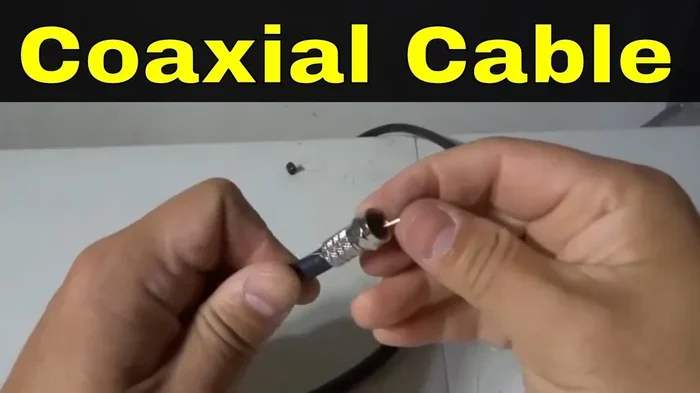
Comcast primarily uses RG6 coaxial cable for its internet and TV services. This cable type delivers strong signal quality over long distances and handles the broadband frequencies Comcast relies on. Understanding the right coaxial cable helps you troubleshoot slow speeds and improve your connection.
Comcast is one of the largest cable providers in the United States. Millions of homes rely on Comcast for internet and TV every single day. But have you ever wondered what kind of cable actually carries that signal into your home? The answer is coaxial cable. What type of coaxial cable does Comcast use? It mostly comes down to two main types: RG6 and RG59. These cables look similar on the outside, but they work very differently on the inside. Knowing which one your setup uses can make a big difference in your connection quality.
Coaxial cables have been around for decades. They carry signals from your cable provider to your TV, modem, or set-top box. The design of these cables helps protect the signal from interference. This is why cable companies like Comcast still depend on them today. Even with the rise of fiber optic internet, coaxial cables remain a backbone of cable-based broadband. In this article, we will walk through everything you need to know about the coaxial cables Comcast uses.
Key Takeaways
- RG6 is the standard: Comcast uses RG6 coaxial cable as its primary cable for internet and TV installations.
- RG59 is older but still found: Some older Comcast setups may still use RG59, though it is less ideal for modern broadband.
- Cable quality matters: Using the wrong type of coaxial cable can cause signal loss and slow internet speeds.
- Connector type is important: Comcast typically uses F-type connectors with its coaxial cables for a secure fit.
- Signal strength drops with distance: Longer cable runs without proper shielding can weaken your Comcast signal.
- Upgrading helps: Replacing old or damaged coaxial cables can improve your internet and TV experience.
📑 Table of Contents
Understanding Coaxial Cables and How They Work
A coaxial cable has a simple but clever design. At its center is a copper conductor. This carries the actual signal. Around the conductor is a layer of insulation. Then comes a braided metal shield. The outermost layer is a protective plastic jacket. This design blocks outside interference and keeps the signal clean.
Coaxial cables are measured by their impedance, which is typically 75 ohms for TV and internet use. The impedance tells you how well the cable carries certain frequencies. Comcast cables are built to handle a wide range of frequencies. This is important because modern broadband uses high-frequency signals to deliver fast speeds.
Why Coaxial Cables Still Matter
You might wonder why coaxial cables are still used in a world full of wireless technology. The truth is simple. Coaxial cables offer reliable, stable connections. They are not affected by walls or distance the way Wi-Fi signals are. For a home internet setup, a wired coaxial connection is often faster and more consistent than a wireless one. This is especially true for streaming, online gaming, and video calls.
Many people also compare coaxial cables to other types of connections. For example, some users wonder about the difference between coaxial and component speakers in audio setups. While that topic deals with audio cables, the underlying principle is similar. Coaxial connections carry a single signal through a central conductor, which keeps the signal path clean and reduces interference.
Types of Coaxial Cables Used by Comcast
Comcast uses a few different types of coaxial cables depending on the service and the installation. Let us break down each type so you know exactly what to look for.
RG6 Cable: The Main Choice
RG6 is the most common coaxial cable used by Comcast. It has a thicker copper conductor than older cable types. This allows it to carry signals over longer distances without losing strength. RG6 cable also has better shielding, which protects the signal from electromagnetic interference.
Here are some key features of RG6 cable:
- Thicker copper center conductor: This improves signal quality and reduces loss.
- Double or quad shielding: This blocks outside interference from power lines and other devices.
- Supports higher frequencies: RG6 can handle the broadband frequencies Comcast uses for fast internet.
- Ideal for long runs: If your cable outlet is far from the main entry point, RG6 handles it well.
Most modern Comcast installations use RG6 cable. Whether you have cable internet, cable TV, or both, RG6 is the standard. It is the go-to choice for delivering strong, reliable signals into your home.
RG59 Cable: The Older Option
RG59 is an older type of coaxial cable. It has a thinner copper conductor and less shielding than RG6. In the past, RG59 was commonly used for short cable TV runs. However, it does not perform as well with modern broadband frequencies.
Here is what you should know about RG59:
- Thinner conductor: This means more signal loss over distance.
- Less shielding: It is more prone to interference from nearby electronics.
- Best for short runs: RG59 works okay for runs under 50 feet, but it struggles with longer distances.
- Older installations: You may still find RG59 in older homes or buildings with legacy Comcast setups.
If your home still uses RG59, you may want to consider upgrading to RG6. The difference in signal quality can be noticeable, especially for high-speed internet and HDTV streaming. Think of it like upgrading from a narrow garden hose to a wider one. More signal gets through, and the quality improves.
How Comcast Chooses the Right Cable
Comcast technicians select the cable type based on several factors. These include the distance from the utility pole or underground feed to your home. They also consider the number of devices you need to connect and the service tier you have subscribed to. For most residential customers, RG6 is the default choice. But in some cases, you may find a mix of both cable types in the same home.
How to Identify the Coaxial Cable in Your Home
Not sure which type of coaxial cable you have? It is actually pretty easy to check. The markings on the outer jacket of the cable will tell you. Look for text printed along the cable. You should see “RG6” or “RG59” written on it. If the text is hard to read, feel the cable. RG6 is noticeably thicker than RG59.
Here is a simple way to check your cable:
- Unplug the cable from the wall outlet or device.
- Look at the outer jacket for printed text or markings.
- Measure the diameter. RG6 is about 7mm thick, while RG59 is closer to 5mm.
- Check the connector. Comcast typically uses F-type connectors on both cable types.
If you find RG59 in your home and you are experiencing slow internet or pixelated TV, that could be the cause. Upgrading to RG6 is a simple fix that can make a real difference. Sometimes the issue is not your internet plan at all. It is just the cable carrying the signal.
Think about it this way. Even the best cable modem cannot deliver fast speeds through a poor-quality cable. The cable is the highway for your data. If the highway is narrow or damaged, the traffic slows down. This is why paying attention to the type of cable matters.
Common Coaxial Cable Problems with Comcast
Even good cables can cause problems over time. Here are the most common issues Comcast customers face with their coaxial connections.
Signal Loss and Attenuation
Signal loss happens when the cable is too long or the quality is poor. As the signal travels through the cable, it weakens. This is called attenuation. Longer runs of cable without a booster can result in slower internet speeds or weak TV signals. If you live in a larger home, the distance from the main cable entry point to your modem matters a lot.
Damaged or Frayed Cables
Physical damage is another common problem. Cables that are pinched, bent sharply, or chewed by pets can lose their shielding. When the shielding is damaged, outside interference gets into the signal. This can cause static on your TV or intermittent internet dropouts. Inspect your cables regularly for any visible damage.
Loose or Corroded Connectors
The connectors at each end of the cable play a big role. A loose F-type connector can cause signal interruptions. Corrosion on the connector pins can also degrade the signal over time. Make sure your connectors are snug and clean. If you see any green or white buildup on the pins, it is time to replace the connector or the entire cable.
Using the Wrong Splitter
Many homes use coaxial splitters to connect multiple devices to one cable line. However, splitters weaken the signal. Using a cheap or low-quality splitter can cause noticeable signal loss. If you need to split your Comcast connection, invest in a high-quality splitter with minimal signal loss. Some Comcast technicians can also install a signal amplifier to compensate for the loss.
Tips for Maximizing Your Comcast Coaxial Connection
Want to get the best performance from your Comcast coaxial setup? Here are some practical tips that really work.
Use High-Quality RG6 Cable
If you are setting up a new connection or replacing an old cable, always choose RG6. It is the standard for a reason. Look for cables with double or quad shielding for the best protection against interference. Branded cables from companies like Belden or Mediabridge are solid choices.
Keep Cable Runs Short
The shorter the cable run, the stronger the signal. Avoid unnecessarily long cables. If you can, route the cable in a straight line rather than coiling it up. Coiled cables can cause signal interference and reduce performance.
Check Your Wall Outlets
The wall outlet itself can be a source of problems. Over time, the connections inside the outlet can loosen or corrode. If you suspect your wall outlet is causing issues, try plugging the cable directly into your modem without the wall adapter. If the connection improves, the outlet may need to be replaced or repaired by a Comcast technician.
Avoid Running Cables Near Power Sources
Electromagnetic interference from power cables can degrade your coaxial signal. Try to keep your Comcast coaxial cables away from power cords and electrical panels. If you must run them near each other, keep them at least a few inches apart.
Replace Old Cables Every Few Years
Coaxial cables do not last forever. The shielding can degrade over time, especially in homes with high humidity or temperature swings. Replacing your cables every few years is a good habit. It keeps your connection performing at its best.
Some people also ask about how different cable setups affect their overall experience. For instance, those setting up a home theater often wonder about speaker configurations and power handling. Understanding what wattage ratings mean on speakers can help you appreciate how signal quality through cables affects the entire audio-visual chain. A clean, strong signal from your coaxial connection ensures the best output from your devices.
When to Call Comcast for Help
Sometimes, coaxial cable issues are beyond a simple DIY fix. If you have tried replacing the cable and the problem persists, it is time to call Comcast. Technicians can check the signal levels at your home and identify issues in the external wiring. They can also replace any damaged infrastructure on their end. Common signs you need professional help include persistent signal drops, very slow internet speeds that do not improve with a new cable, or no signal at all after basic troubleshooting.
Comcast customer service can also schedule a technician visit if needed. Before calling, make sure you have your account information ready and a clear description of the problem. Mention any cables you have already replaced. This helps the technician diagnose the issue faster.
Final Thoughts
The type of coaxial cable Comcast uses has a direct impact on your internet and TV experience. RG6 is the standard for most modern installations, and it delivers excellent performance for broadband and cable TV. Older setups may still use RG59, and upgrading to RG6 can improve your connection quality significantly. By understanding your cable type, checking for common problems, and following the tips in this guide, you can get the most out of your Comcast service.
Take a moment to check the cables in your home today. A simple upgrade or replacement could be the difference between a frustrating connection and a smooth, reliable one. Good cables are the unsung heroes of your home network. They work quietly in the background, making sure your shows stream, your videos load, and your browsing stays fast.
Whether you are a casual streamer or a heavy internet user, the right coaxial cable makes all the difference. Now that you know what type of coaxial cable Comcast uses, you have the knowledge to take control of your connection. Share this guide with friends or family who might be dealing with slow internet. Sometimes the simplest fix is the best one.
For those curious about how coaxial technology extends beyond home internet, the setup in large venues like movie theaters also relies on specialized cabling to deliver high-quality audio and video. The principles of signal integrity and shielding apply across many different applications, from your living room to a packed auditorium.
Frequently Asked Questions
What is the main coaxial cable Comcast uses?
Comcast primarily uses RG6 coaxial cable for both internet and TV services. RG6 has a thicker conductor and better shielding than older cable types, which makes it ideal for delivering fast broadband signals over long distances.
Can I use RG59 cable with Comcast internet?
You can, but it is not recommended for modern internet speeds. RG59 has a thinner conductor and less shielding, which can cause signal loss and slower performance. Upgrading to RG6 is the better choice for reliable speeds.
How do I know if my coaxial cable is damaged?
Look for visible signs like fraying, kinks, or corrosion on the connectors. You may also notice static on your TV, slow internet speeds, or frequent disconnections. Testing the cable with a multimeter or replacing it temporarily can help confirm if it is the problem.
Does the length of the coaxial cable affect signal quality?
Yes, longer cable runs cause more signal loss, which is called attenuation. Keeping your coaxial cable as short as possible helps maintain strong signal quality. If you need a longer run, consider using a higher-quality RG6 cable with extra shielding.
What type of connector does Comcast use on coaxial cables?
Comcast typically uses F-type connectors on its coaxial cables. These connectors screw onto the cable and provide a secure, stable connection. Make sure the connector is tight and clean for the best signal quality.
Should I upgrade my coaxial cable if I have slow internet?
It is worth checking your cable first. An old or damaged coaxial cable can slow down your internet even if your plan is fast. Replacing it with a quality RG6 cable is a simple and inexpensive fix that can improve your speeds noticeably.
=== CONCLUSION ===
What type of coaxial cable does Comcast use? The answer is clear: RG6 for most modern setups and RG59 for older installations. Both cables serve their purpose, but RG6 delivers the best performance for today’s broadband needs. By understanding your cable type and keeping your connections in good shape, you can enjoy a faster, more reliable Comcast experience. Take the time to check your cables, replace any that are worn out, and you will feel the difference in your daily internet and TV use.